Hello! Welcome to the very first lesson in your journey to learning Java. Since you're starting from scratch, our goal is to build a solid foundation, and that begins with understanding not just how to write code, but also what the language is and why it works the way it does.
Today, we will focus on the big picture. We'll explore the purpose of Java, see what kinds of applications it's used to build, and unravel the core technology that makes it so powerful and versatile: the Java Virtual Machine, or JVM. This conceptual groundwork is essential before we dive into writing our first lines of code in the lessons to come.
What Is Java and Why Is It So Popular?
At its heart, Java is a high-level programming language, which means it allows us to write instructions for a computer using a syntax that is much closer to human language than the machine's native binary code. Created in the mid-1990s, it has remained one of the most popular and widely used languages for decades.
But what makes it so enduring? Let's look at some of its applications and defining characteristics.
What is Java? - Java Programming Language Explained - AWS
This article from Amazon Web Services (AWS) provides a great overview of Java's purpose and its widespread use. It will give you a sense of the vast possibilities that learning Java opens up.
Please read the first few sections of the article. Start with the introduction, then move to the section "What is Java programming language used for?" and read about its applications in various fields. Finally, review the section "Why is Java such a popular choice among modern-day software developers?" to understand the reasons for its success, paying close attention to the points on platform independence and security.
As you've just read, Java's reach is extensive, from enterprise-level server applications and Android mobile apps to tools for big data and scientific computing. A key phrase mentioned in the article is "Write Once, Run Anywhere" (WORA). This principle is arguably the most important reason for Java's success, and it's made possible by the Java Virtual Machine (JVM).
The "Write Once, Run Anywhere" Promise
Imagine you write a program on your Windows computer. If you want to share it with a friend who uses a Mac, you can't just send them the program file. In many languages, the program must be re-compiled specifically for the Mac's operating system and hardware. This is time-consuming and inefficient.
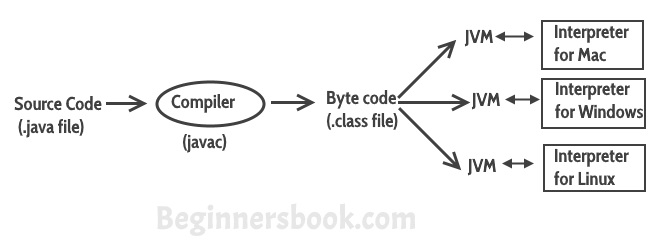
Java solved this problem with a clever, two-step execution process that involves an intermediary called bytecode. Let's break this down.
- Writing: You write your program in a text file with a
.javaextension. This is your source code. - Compiling: You use the Java compiler (a tool named
javac) to transform your human-readable source code. Instead of producing machine code for a specific operating system (like Windows or macOS), it produces a highly optimized set of instructions called Java bytecode. This bytecode is saved in a.classfile. - Running: This bytecode is not tied to any specific platform. To run it, you need a Java Virtual Machine (JVM). The JVM acts as a translator or an interpreter that takes the universal bytecode and converts it into the native machine code that the specific computer it's running on can execute.
So, you can write and compile your Java code on a Windows machine, and the resulting .class file can be run on a Mac, a Linux server, or even a smartphone, as long as that device has a JVM installed.
This entire process is illustrated perfectly in the diagram below.
The Role of the Java Virtual Machine (JVM)
The JVM is more than just a simple translator. It's a sophisticated program that creates a controlled, virtual environment for your Java application to run in.
To get a clearer picture of how the JVM works and what it does behind the scenes, the following article provides an excellent, beginner-friendly explanation.
What Is the Java Virtual Machine (JVM) and How Does It Work?
This article from Codefinity breaks down the function of the JVM in a straightforward way.
Start by reading the introductory section to solidify the definition. Then, focus on the section "How Does JVM Work?", which details the steps from compilation to execution. Finally, read "Why is the JVM necessary?" to understand the key advantages it provides, summarized in the table comparing it to other languages. Pay special attention to memory management and security.
As the article explained, the JVM manages several critical tasks:
- Code Execution: It loads, verifies, and executes the Java bytecode. For performance, it uses a Just-In-Time (JIT) compiler, which identifies parts of the code that are run frequently and compiles them into native machine code on the fly. This gives Java applications performance close to that of languages compiled directly to machine code.
- Memory Management: The JVM automatically manages memory allocation. When parts of your program are no longer in use, a process called garbage collection reclaims that memory, making it available for other uses. This prevents common errors called "memory leaks" and relieves the programmer from having to manage memory manually.
- Security: The JVM acts as a "sandbox," a secure, isolated environment for your code to run. It verifies bytecode to ensure it doesn't contain malicious instructions that could harm the host system.
JDK, JRE, and JVM: Understanding the Toolset
When you start developing in Java, you'll constantly hear three acronyms: JDK, JRE, and JVM. It's vital to understand the difference and how they relate to each other, as you will be installing one of them in our next lesson.
This short video explains the relationship between them clearly and concisely.
JVM, JRE, and JDK - Fully Explained in 5 Minutes
The video "JVM, JRE, and JDK - Fully Explained in 5 Minutes" by Coding with John offers a perfect breakdown of these three key components.
Watch the entire video. It first explains the JRE, which is for running Java programs from this timestamp. It then dives into the JVM, which is part of the JRE in this segment. Finally, it introduces the JDK, the full kit for developing Java programs here, before giving a final recap.
To summarize the relationship:
- JVM (Java Virtual Machine): The "engine" that actually executes the bytecode. It's an abstract concept and a specification; you can't download a "JVM" by itself.
- JRE (Java Runtime Environment): The installation package that provides everything needed to run a Java program. It contains an implementation of the JVM and the Java Class Library (a set of pre-written code for common tasks). If you are a user who just wants to run a Java application, you install the JRE.
- JDK (Java Development Kit): The full development toolkit for Java programmers. It includes everything needed to write, compile, and run Java code. Therefore, the JDK contains the JRE, which in turn contains the JVM. As a developer, you will be installing the JDK.
You can think of it as a set of nested boxes:
JDK (for developers) contains the JRE (for running), which contains the JVM (the engine).
Conclusion
In this lesson, we've laid the crucial first stone of your Java foundation. You've learned that Java is a powerful, general-purpose language whose "Write Once, Run Anywhere" philosophy has made it a cornerstone of the software development world for decades.
Here are the key takeaways:
- Java code is compiled into an intermediate form called bytecode, which is platform-independent.
- The Java Virtual Machine (JVM) is a program that translates this bytecode into machine-specific instructions, allowing the same Java code to run on different operating systems.
- The JVM also provides critical services like automatic memory management (garbage collection) and a secure environment for code execution.
- As a developer, you will use the JDK (Java Development Kit), which includes the JRE (Java Runtime Environment) and the JVM, along with tools like the compiler.
Now that you have a clear picture of what Java is and how it works, we are ready to set up your development environment. In the next lesson, we will walk through the process of installing the JDK, which is the first practical step toward writing and running your own Java programs.