Welcome back! In our last session, we successfully set up your professional development environment by installing and configuring IntelliJ IDEA. Your "workshop" is now ready, and the tools are in place. Before we start building our first program, it's essential to understand the blueprint that every Java application follows.
Today, we'll examine the fundamental anatomy of a basic Java program. We will dissect a simple program to identify its core components: the class and the main method. Understanding this structure is like learning the basic grammar of a new language; it's the foundation upon which all your future Java code will be built. By the end of this lesson, you'll be able to look at a standard Java program and recognize its essential parts and their purpose.
The Basic Blueprint: Class and Method
Every executable Java program, no matter how complex, is built around a core structure. Think of it as a building with a designated main entrance. In Java, the "building" is a class, and the "main entrance" is a special method called main. All the action in your program starts here.
The image below shows the structure of a classic "Hello, World!" program. We will refer back to it as we break down each component.

The Container: The class
The first and most fundamental rule in Java is that all code must reside inside a class. A class is a container for your program's code, bundling related data and behaviors together. For now, you can think of it as the main container or blueprint for your application.
Notice the first line in the diagram: public class HelloWorld.
classis the keyword that declares a new class.HelloWorldis the name we have given to our class.
A crucial rule in Java is that the name of the file must match the name of the public class it contains. So, the code for the HelloWorld class must be saved in a file named HelloWorld.java. This is how the Java compiler and runtime environment find your code.
To reinforce this concept, let's look at a quick overview from W3Schools.
This short reading provides a clear, beginner-friendly introduction to Java syntax.
Please read the section titled Java Syntax. Focus on the explanation of the class and the rule that the file name must match the class name. Don't worry about the main method details just yet; we'll cover that next.
The Starting Point: The main Method
Now that we have our container (the class), we need to tell Java where to start executing the code. A program can't just run the whole class at once; it needs a specific entry point. In Java, this entry point is always the main method.
Look at the diagram "Anatomy of a Java Method" again. The main method is the block of code inside the class: public static void main(String[] args) { ... }. The Java Virtual Machine (JVM) is specifically instructed to look for a method with this exact signature to begin program execution.
This line of code can look intimidating at first, as it's packed with keywords. Let's break it down piece by piece.
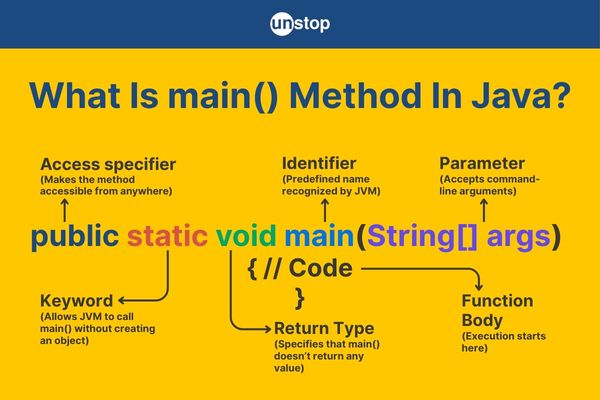
Dissecting public static void main(String[] args)
Each word in this signature has a specific and important meaning. Understanding them now will save you a lot of confusion later. We'll consult a helpful article that explains this in detail.
Beginner’s Guide to ‘public class Main’ in Java
This article does an excellent job of demystifying the main method for beginners.
Please read the section titled Anatomy of the main Method. It provides a list that breaks down each keyword: public, static, void, main, and String[] args. Pay close attention to the reason behind each one.
To complement that reading, the following video offers a more conversational and dynamic explanation of the same concepts. Hearing it explained in a different way can often help solidify your understanding.
Java Main Method Explained - What Does All That Stuff Mean?
The presenter in this video from the "Coding with John" channel provides clear, practical analogies for each part of the main method signature.
Watch the entire video. The key explanations are: Why it's public Why it's static What void means Why it's named main What String[] args is for The explanation of String[] args involving command-line arguments is something you won't use right away, but it's valuable to understand its purpose.
Let's summarize the key roles of each part:
public: This is an "access modifier." It means the method is accessible from anywhere, specifically by the JVM, which exists outside of your code.static: This keyword allows themainmethod to be run without creating an "object" of the class first. Since themainmethod is the very start of the program, this is necessary. The JVM can runClassName.main()directly.void: This is the "return type."voidmeans that themainmethod does not return any value after it finishes executing. It simply runs the code inside it and then terminates.main: This is the actual name of the method. The JVM is hard-wired to look for a method named exactlymain.String[] args: This is a "parameter." It's a placeholder for arguments that can be passed to the program from the command line when it's launched. For our initial programs, this will be empty, but it must be included in the signature.{ }: The curly braces define the "method body." All the code that you want to be executed when the program starts goes between these braces.
Putting It All Together
So, the execution flow of a simple Java application is as follows:
- The JVM starts.
- It loads the specified class (e.g.,
HelloWorld). - It searches for the
public static void main(String[] args)method inside that class. - It executes the code found within that method's curly braces
{}from top to bottom. - When the end of the
mainmethod is reached, the program terminates.
The following short video provides a final, quick recap of this entire structure.
This video from w3schools.com succinctly summarizes the syntax of a "Hello, World!" program.
Watch the entire video from start to finish. It quickly reviews the concepts of the class, the main method, and the file naming convention we've discussed.
Conclusion
In this lesson, you've taken your first look under the hood of a Java program. While it might seem like a lot of specific rules just to get started, this strict structure is one of Java's strengths, promoting organized and predictable code.
Here are the key takeaways:
- All runnable Java code must live inside a
class. - The name of the
.javafile must exactly match the name of the publicclassinside it. - The execution of a Java program begins in the
mainmethod. - The
mainmethod has a required signature:public static void main(String[] args). Each keyword in this signature serves a specific purpose, allowing the JVM to find and run your code correctly.
You now have both a working development environment and the foundational knowledge of a Java program's structure. In our next lesson, we will combine these two things and finally write, compile, and run your first program: the classic "Hello, World!".