Hello! Welcome to a new module on Advanced Analysis with Window Functions.
In our last module, we delved into the low-level workings of the query optimizer, understanding how it translates your declarative SQL into a procedural execution plan. A key insight from that was the concept of a logical order of operations—the sequence in which the database conceptually processes clauses like FROM, WHERE, and GROUP BY.
Today, we'll build on that foundation by introducing a powerful feature that has a specific, and very important, place in that logical order: Window Functions.
Your learning outcome for this lesson is to use the OVER() clause with aggregate functions to perform calculations across a set of rows. You'll learn how to use familiar functions like SUM() and COUNT() in a completely new way that allows you to calculate summaries without losing the detail of your original rows. This is a fundamental skill for writing efficient and elegant analytical queries.
The Problem: Getting Summaries Without Losing Detail
You are already very familiar with using aggregate functions like COUNT() and SUM() with a GROUP BY clause. This is great for creating summary reports, but it has one major limitation: it collapses your detailed rows into a single summary row per group.
What if you want to see both the detail and the summary at the same time? For instance, what if you want to see every single order, and right next to it, see the total sales for the customer who placed that order?
This is the problem window functions solve. Let's see a visual explanation of this core difference.
SQL Window Functions Basics (Visually Explained) | PARTITION BY, ORDER BY, FRAME | #SQL Course 22
This video from the 'Data with Baraa' channel provides a clear, visual comparison between the GROUP BY approach and the window function approach.
Please watch from the beginning to 04:03. Focus on the visual representation of how GROUP BY 'smashes' the rows together, while the window function preserves each row and adds the calculation alongside it.
As the video illustrates, the key takeaway is:
GROUP BY+ Aggregates: Changes the granularity of your data. You get one row per group.- Window Functions: Preserve the granularity. You get a result for every single row.
The OVER() Clause: A Gateway to New Power
The magic that transforms a standard aggregate function into a window function is the OVER() clause. Whenever the SQL parser sees an aggregate function followed by OVER(), it knows not to collapse the rows.

Let's start with the simplest possible form: an empty OVER() clause. This tells the function to create a "window" that includes the entire result set.
SESSION: Building Your T-SQL Tool Kit: Window Function Fundamentals
The speaker in this 'PASS Data Community Summit' video provides an excellent walkthrough of the core concepts. We'll start with the simplest form of the OVER clause.
Watch from 08:47 to 10:06. The speaker demonstrates what COUNT(*) OVER() does. Notice how it calculates the total count of all rows and simply appends that same value to every single row.
A query like SELECT sales, COUNT(*) OVER() FROM orders would show each individual sale amount, and in a second column, the total number of orders in the entire table, repeated on every row. While this is a good starting point, the real power comes from defining more specific windows.
Defining Windows with PARTITION BY
An empty OVER() clause treats the whole table as one big window. To perform calculations on specific subsets of data—like calculating total sales per customer or per region—we need to divide the data into logical groups, or partitions. This is done with the PARTITION BY sub-clause.
PARTITION BY is the window function equivalent of GROUP BY. It splits the data into partitions, and the window function then computes its value separately for each partition, resetting when it moves to a new one.
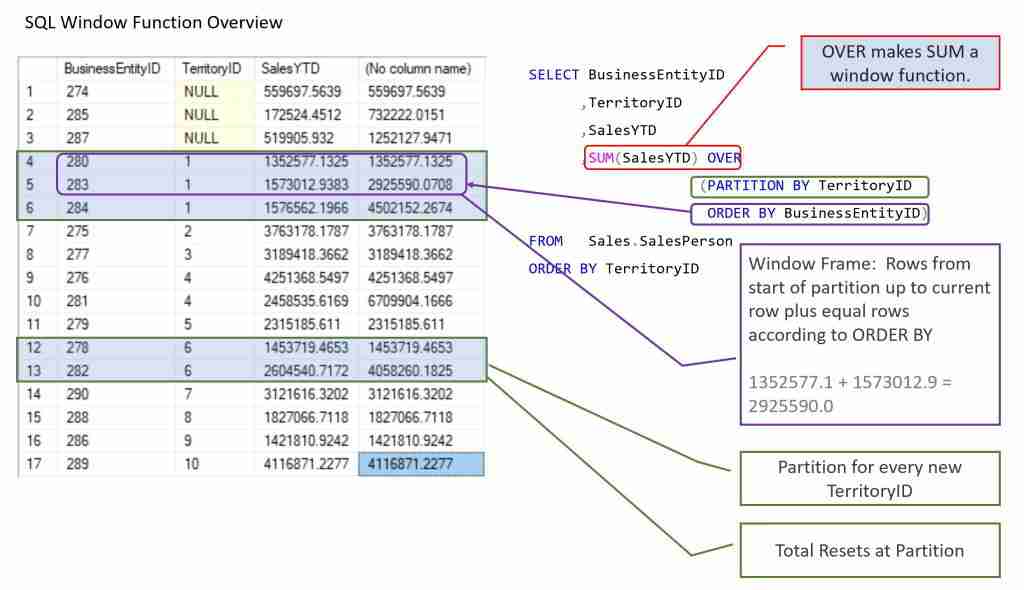
Let's watch two short clips to solidify this concept. The first provides a concise example, and the second offers a deeper conceptual explanation.
SQL Window Functions Basics (Visually Explained) | PARTITION BY, ORDER BY, FRAME | #SQL Course 22
First, let's go back to 'Data with Baraa' for a practical demonstration of adding PARTITION BY.
Watch from 10:31 to 11:40. See how adding PARTITION BY product_id changes the result from a single grand total to a total calculated for each product group.
SESSION: Building Your T-SQL Tool Kit: Window Function Fundamentals
Now, let's see the 'PASS Summit' speaker's take on partitioning. The hostess log analogy used here is a very effective way to think about how these partitions work.
Watch from 10:06 to 13:20. Focus on how partitioning by PartyName breaks the single window into multiple, smaller windows, with calculations performed independently inside each.
By combining PARTITION BY with an aggregate function, we can now solve our original problem. To get each order's details along with the customer's total sales, you could write:
SELECT
  OrderID,
  CustomerID,
  OrderDate,
  SaleAmount,
  SUM(SaleAmount) OVER (PARTITION BY CustomerID) AS CustomerTotalSales
FROM Orders;
For each row in the Orders table, this query would calculate the sum of SaleAmount for all orders placed by that specific CustomerID and display it in the CustomerTotalSales column.
Test your understanding!
You have a products table with columns product_id, product_name, category, and price.
Write a SQL query that retrieves all columns for every product, but also adds a new column named average_price_in_category that shows the average price of all products within that product's category.
Show answer
SELECT
  product_id,
  product_name,
  category,
  price,
  AVG(price) OVER (PARTITION BY category) AS average_price_in_category
FROM products;
This query partitions the data by category. For each row (product), the AVG(price) is calculated over all other rows that share the same category value.
The "Why": Logical Order of Operations
To truly understand window functions and use them correctly, it helps to know where they fit into the SQL logical processing order we've discussed. This knowledge explains their behavior and limitations.
A Beginner's Guide to the True Order of SQL Operations
The jOOQ blog post 'A Beginner's Guide to the True Order of SQL Operations' provides a definitive guide to this topic. It clearly lays out the step-by-step logical pipeline.
Please read the sections detailing the logical order from FROM through WINDOW. Pay close attention to the WINDOW step. The key insight is that it comes after FROM, WHERE, GROUP BY, and aggregations.
The article reveals the crucial sequence:
FROM/JOINWHEREGROUP BY- Aggregate Functions
HAVINGWINDOWFunctionsSELECTORDER BY
This specific ordering explains several key behaviors:
- Why can't you use a window function in a
WHEREclause? BecauseWHEREis processed before the window function is even calculated. The result of the window function doesn't exist yet. - Why don't window functions affect the number of rows? Because they are processed after
GROUP BY. By the time window functions run, the result set has already been filtered and potentially grouped. The window function's job is simply to compute a value over that established set of rows. - A powerful side-effect: Since window functions are calculated after standard aggregations, you can even nest an aggregate function inside a window function, like
SUM(COUNT(*)) OVER (...). This is an advanced technique, but it's a direct consequence of this logical ordering.
Conclusion
In this lesson, you've learned how to harness the power of the OVER() clause to use aggregate functions in a new and flexible way. This is a significant step up in your analytical SQL capabilities.
Key Takeaways:
- Window functions perform calculations across a set of rows but, unlike
GROUP BY, they do not collapse the rows. They return a value for every single row. - The
OVER()clause is what turns a standard aggregate function (likeSUM,AVG,COUNT) into a window function. - The
PARTITION BYclause is used withinOVER()to define the "window" or group of rows over which the function should be calculated. It is the conceptual equivalent ofGROUP BYfor window functions. - Logically, window functions are calculated late in the query processing pipeline, after
WHEREandGROUP BY, which explains their behavior and rules.
Preview of the Next Lesson:
We've just scratched the surface. So far, our windows have been unordered sets. In the next lesson, "Define a data window using PARTITION BY to perform calculations on specific groups", we will refine our control over these windows. We'll explore PARTITION BY in more complex scenarios and introduce the ORDER BY clause inside OVER(), which is essential for sequence-aware calculations like running totals and moving averages. This will also set the stage for introducing dedicated ranking functions like ROW_NUMBER() and RANK().