Hello! Welcome back to our final lesson in the Query Performance and Optimization module.
In our last few lessons, we've repeatedly seen that the execution plan is the ground truth for understanding and tuning query performance. We've used it to make WHERE clauses SARGable and to decide between JOINs and subqueries. You've correctly identified that this plan is where the database's "thinking" becomes visible.
Today, we're going to pull back the curtain on the "brain" that creates these plans. Your goal is to explain the role of the query optimizer in choosing an execution plan. This will tie together many of the concepts we've discussed and satisfy your interest in the low-level "why" and "how" of database systems, particularly the fascinating translation from a declarative language like SQL to a procedural execution strategy.
The Optimizer's Core Mission: From "What" to "How"
At its heart, SQL is a declarative language. You specify what data you want, not the step-by-step procedure for retrieving it. The component responsible for figuring out that procedure is the query optimizer.
To start, let's get a clear, high-level overview of this process.
Understanding SQL Query Processing: Parsing, Optimization, and Execution Explained
This article, 'Understanding SQL Query Processing', gives a concise summary of the journey from SQL text to results. It clearly frames the optimizer's role as the central decision-making step.
Please read the introduction and 'Step 1' and 'Step 2' of the article. Focus on the distinction between the declarative query and the multiple possible execution strategies, and how the optimizer's job is to pick the best one.
The article highlights the three main stages:
- Parsing & Validation: The database understands the query's grammar and semantics, converting it into a logical tree.
- Optimization: The optimizer finds the most efficient physical execution plan.
- Execution: The database engine runs the chosen plan.
This process is highly analogous to how a compiler works for a language like C. The compiler parses your source code, performs various optimizations, and generates low-level machine code for the CPU to execute. In our case, the optimizer generates a "program" (the execution plan) for the database's execution engine.
A crucial point about this optimization process is that it's a trade-off. The search for the absolute perfect plan could take longer than simply running a good enough plan.
SQL Server Execution Plans - Part 1
This short video by Bert Wagner makes this exact point very clearly. It emphasizes that the optimizer's goal is to find an efficient plan quickly, not necessarily the theoretically fastest plan possible.
Watch from 00:31 to 02:20. Listen for the explanation of why the optimizer aims for a 'good enough' plan rather than the absolute best one.
The Architecture of an Optimizer
So, what does the inside of an optimizer look like? While implementations vary, most modern optimizers share a common architectural pattern.
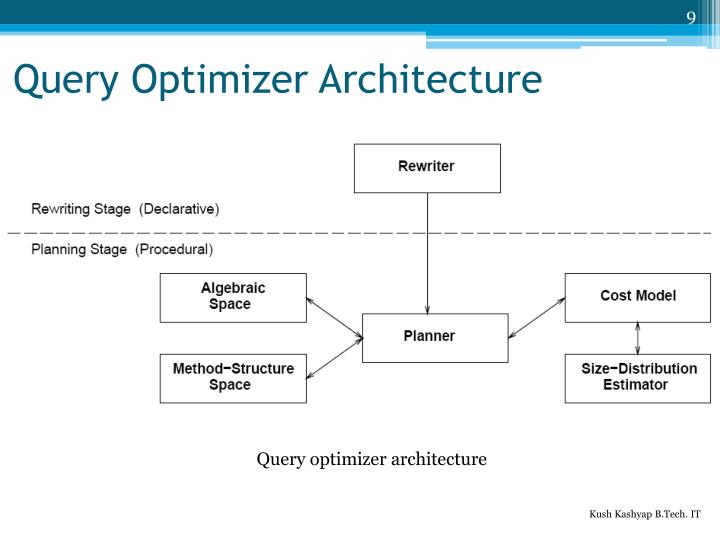
This diagram gives us a map. A query first enters a Rewriting stage, where it's transformed based on logical rules. Then, it enters a Planning stage, where multiple physical plans are generated and evaluated to find the one with the lowest cost.
This leads to the two main strategies optimizers have historically used.
The Science of Query Execution Plans: How Databases Think
The article 'The Science of Query Execution Plans' provides a great definition of these two approaches.
Please read 'Section 1: The Query Optimizer'. Focus on the descriptions of Rule-Based Optimization (RBO) and Cost-Based Optimization (CBO).
-
Rule-Based Optimization (RBO): An older approach that uses a fixed set of heuristics, like "always use an index if one exists." It's predictable but often misses the most efficient plan because it doesn't understand the data itself.
-
Cost-Based Optimization (CBO): The modern standard. The CBO generates many possible plans, estimates the "cost" (CPU, I/O, memory) of each, and picks the one with the lowest estimated cost. This is far more intelligent because its decisions are data-driven.
The rest of our lesson will focus on how the CBO works, as it's what you'll encounter in any modern database.
How a Cost-Based Optimizer "Thinks"
The CBO's job can be broken down into two fundamental questions:
- What are the possible execution plans?
- How do I estimate the cost of each plan?
Let's watch a more in-depth video that explores these questions. Given your interest in low-level theory, this academic lecture will provide the depth you're looking for.
Database Systems: Query Optimization (Part 1), rule- vs cost-based, join graph, interesting orders
This lecture from Prof. Dr. Jens Dittrich's course on Database Systems provides an excellent, detailed look inside the optimizer. We'll watch a few key segments.
Please watch these two segments: Join Order & Access Methods (15:53 - 22:30): This part explains the two most important decisions an optimizer makes: the order in which to join tables and the method to access data (scan vs. index). Notice how join order can dramatically change the size of intermediate results. The Role of Statistics (22:30 - 28:50): This segment answers the crucial question: 'How does the optimizer estimate cost?' Pay close attention to the graph comparing the cost of a scan vs. an unclustered index access. It perfectly illustrates why statistics about data distribution (selectivity) are essential.
Let's summarize the key points from that video.
1. Generating Candidate Plans
The optimizer explores a "search space" of valid execution plans. The most significant choices it makes are:
- Join Order: As the video showed, joining
(A and C) then Bcan be vastly cheaper than(C and B) then Aif the first join produces a much smaller intermediate result set. For a query with many tables, the number of possible join orders explodes, which is why the optimizer can't check all of them. - Access Methods: How should data be retrieved from a table?
- Table Scan: Read every row. Inevitable if you need most of the data.
- Index Seek: Use a B-Tree index to navigate directly to a few specific rows. Very efficient for highly selective queries.
- Index Scan: Read all entries in an index.
- Join Algorithms: What physical operator should be used to combine the data?
- Nested Loops Join: The "for-loop within a for-loop" model. Good for joining a small outer table to a large, indexed inner table.
- Hash Join: Builds an in-memory hash table on the smaller table and probes it with rows from the larger table. Excellent for large, unsorted joins.
- Merge Join: Requires both inputs to be sorted on the join key, then merges them. Extremely fast if the data is already sorted (e.g., via a clustered index).
2. Estimating Cost with Statistics
This is the secret sauce of the CBO. The optimizer cannot make intelligent choices without knowing about the data. It uses statistics stored in the database's internal catalog to estimate the cardinality (number of rows) that will flow through each step of a plan.
These statistics include:
- Number of rows and pages in a table.
- Number of distinct values in a column.
- Histograms describing the distribution of values (e.g., knowing that
'USA'appears far more often than'Luxembourg'in acountrycolumn).
As the video explained, an incorrect estimate can lead the optimizer to make a terrible choice. If it thinks a query will return only a few rows, it might choose an Index Seek. But if the statistics are stale and the query actually returns 50% of the table, that index access could be much slower than a simple Table Scan. This is the most common reason for a "bad" execution plan.
Test your understanding!
Imagine a table Users with 10 million rows and an unclustered index on the status column. The status can be 'active' or 'archived'. About 99% of users are 'active'.
The optimizer has to choose a plan for this query: SELECT * FROM Users WHERE status = 'active';
Why would the optimizer almost certainly choose a Table Scan over using the Index for this query? Relate your answer to cost estimation and statistics.
Show answer
The optimizer would choose a Table Scan because its cost model, informed by statistics, would predict it to be cheaper.
-
Statistics: The database statistics would show that the value
'active'is not selective at all—it applies to 99% of the rows (9.9 million out of 10 million). -
Cost Estimation (Index Seek): Using the unclustered index would require an index lookup for each of the 9.9 million
'active'users. For each lookup, the database has to follow a pointer from the index page to the actual data page on disk. This results in millions of random I/O operations, which are extremely slow. -
Cost Estimation (Table Scan): A Table Scan reads the entire table sequentially. While it reads all 10 million rows, sequential I/O is vastly more efficient than random I/O.
The optimizer's cost model would calculate that the massive cost of millions of random disk reads (for the index plan) is far greater than the cost of one efficient sequential scan of the whole table. Therefore, it correctly chooses the Table Scan.
The Planning Process: A Glimpse into the Algorithm
How does the optimizer efficiently search the vast space of possible plans? Most use a technique called dynamic programming. You don't need to know the full algorithm for a junior role, but the core idea is elegant and aligns with your interest in computational thinking.
Database Systems: Query Optimization (Part 1), rule- vs cost-based, join graph, interesting orders
Let's return to the lecture to see how dynamic programming is used to build up the optimal plan.
Watch from 01:02:39 to 01:05:30. The key concept is that the algorithm builds solutions iteratively: it first finds the best plan for each single table, then uses those optimal 'sub-plans' to find the best plans for joining any two tables, and so on, until it has a plan for the full query.
The process is:
- Find the cheapest access path for each single table (the subproblems of size 1).
- Use those results to find the cheapest plan for joining any pair of tables (subproblems of size 2).
- Continue this process, combining optimal smaller plans into optimal larger plans, until a plan for the entire query is built.
This approach avoids re-computing work and prunes the search space by discarding expensive partial plans early.
Conclusion
You now have a solid mental model of the query optimizer, the engine that powers database performance. It's a highly sophisticated piece of software that embodies decades of computer science research.
Key Takeaways:
- The optimizer's role is to translate a declarative SQL query ("what") into an efficient procedural execution plan ("how").
- Modern databases use a Cost-Based Optimizer (CBO), which enumerates possible plans and chooses the one with the lowest estimated cost.
- The optimizer's key decisions are join order, access methods (scan, seek), and join algorithms (hash, merge, nested loops).
- These decisions are driven by statistics about the data. Inaccurate or stale statistics are the number one cause of suboptimal execution plans.
- The optimizer uses algorithms like dynamic programming to efficiently search the vast space of possible plans.
Preview of the Next Lesson:
We've spent this entire module learning the theory of query optimization. We know what indexes are, how to write SARGable queries, and now, how the optimizer thinks. It's time to put it all into practice. In our next lesson, we will move into the practical application of this knowledge: Use a query's execution plan to identify performance bottlenecks like a full table scan. You'll learn to read a real execution plan and pinpoint exactly where and why a query is slow.