Hello! Welcome back to our module on Query Performance and Optimization.
In our last lesson, we explored the "low-level why" behind database indexes. We established that by using a B+ Tree data structure, an index replaces a slow, full table scan with a highly efficient index seek, drastically reducing the disk I/O required to find a row.
Today, we'll build directly on that theoretical foundation. Our goal is to learn how to create a single-column or composite index to optimize a query. We'll cover the practical SQL syntax and, more importantly, the strategic thinking required to design indexes that make your queries fast. This is where you'll translate your understanding of how indexes work into a job-ready skill.
Creating a Single-Column Index
The simplest and most common type of index is one created on a single column. This is the go-to solution when your queries frequently filter on a specific column, such as a user's ID, email address, or a foreign key.
The syntax is straightforward:
CREATE INDEX index_name ON table_name (column_name);
For example, if you often run queries to find a user by their email, you would create an index like this:
CREATE INDEX idx_users_email ON users (email);
Once this index exists, a query like SELECT * FROM users WHERE email = 'jane.doe@example.com'; will no longer scan the entire users table. Instead, the database will use the idx_users_email B-Tree to quickly find the pointer to the correct row, just as we discussed in the last lesson.
Let's see a practical demonstration of creating a single-column index and observing its impact.
How SQL Indexes Actually Work (Step-by-Step)
The video 'How SQL Indexes Actually Work' by Milan Jovanović provides a clear, step-by-step walkthrough. We'll watch two segments where he creates single-column indexes and uses EXPLAIN ANALYZE to show the performance difference.
Please watch from 03:13 to 04:27 and then from 07:17 to 08:20. Pay close attention to: The CREATE INDEX syntax he uses. The change in the query plan from a 'sequential table scan' to an 'index scan'. The dramatic reduction in execution time after the index is created.
As the video showed, adding the right index can reduce query time by an order of magnitude, from tens ofmilliseconds to just a few. This is the direct result of replacing a full scan with a targeted index seek.
From One Column to Many: Composite Indexes
What happens when your queries filter on more than one column? For instance, a query to find all pending orders for a specific user:
SELECT * FROM orders
WHERE user_id = 12345 AND status = 'pending';
While separate indexes on user_id and status might help a little (some databases can merge two indexes), the most efficient solution is a composite index (or multi-column index). This is a single index built on two or more columns.
The syntax is a simple extension of what you've already seen:
CREATE INDEX index_name ON table_name (column1, column2, ...);
For our query, we could create:
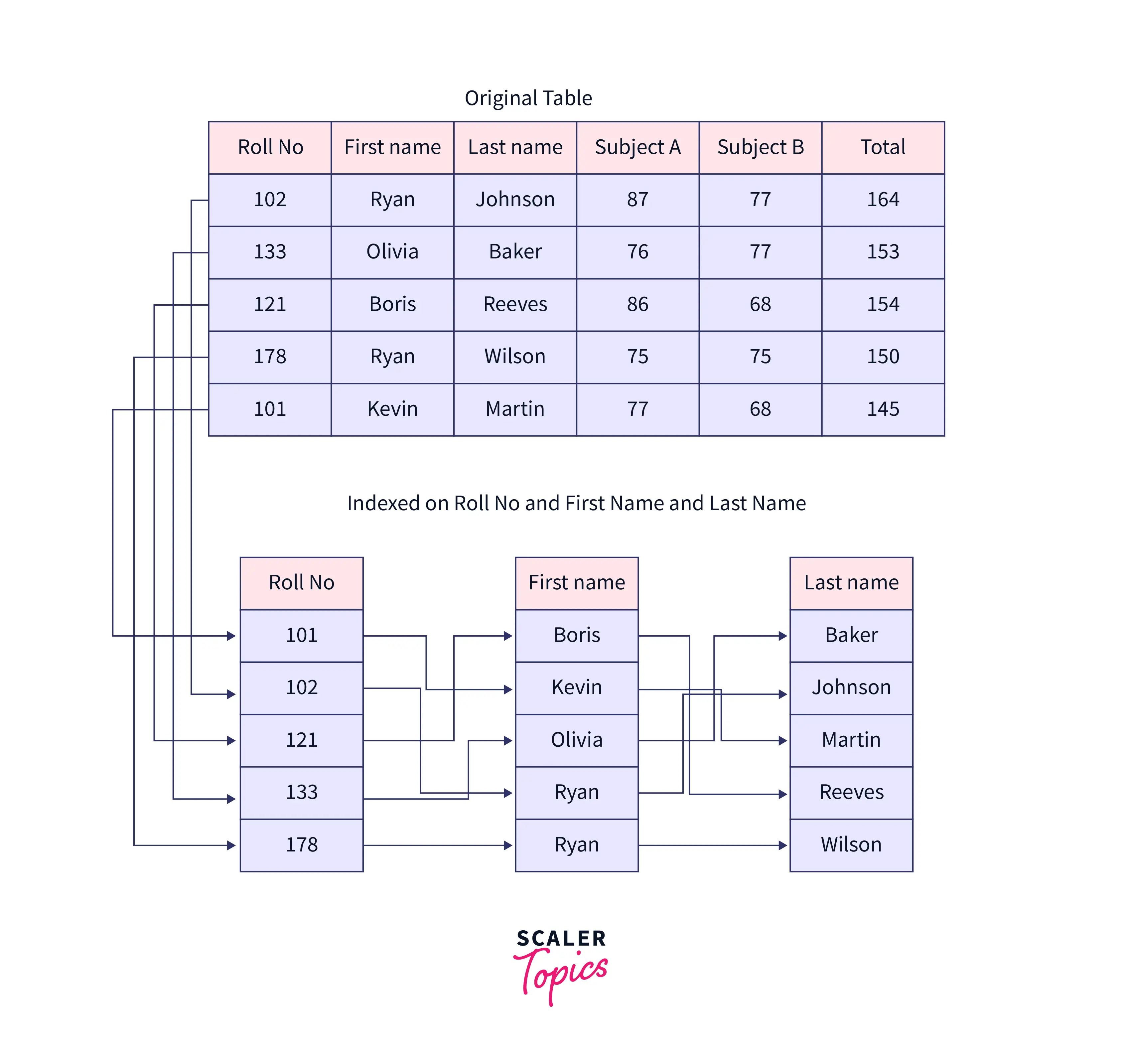
CREATE INDEX idx_orders_user_status ON orders (user_id, status);
This creates a single B-Tree where the keys are sorted first by user_id, and then for each user_id, they are sorted by status.
The Golden Rule: Column Order in Composite Indexes is Critical
This is the most important concept to master when working with composite indexes. The order in which you list the columns in your CREATE INDEX statement matters immensely.
A database can use a composite index on (col_A, col_B, col_C) to efficiently serve queries that filter on:
col_Acol_AANDcol_Bcol_AANDcol_BANDcol_C
This is known as the left-prefix rule. The index can only be used effectively if the query's WHERE clause uses the columns from the left side of the index definition without skipping any.
It cannot be used efficiently for queries that filter only on:
col_Bcol_Ccol_BANDcol_C
This is because the index's B-Tree is sorted lexicographically, like words in a dictionary. If the index is on (last_name, first_name), you can easily look up "Smith, John". But you can't use it to efficiently find everyone whose first name is "John", because their entries are scattered all over the index under different last names.
Let's watch a video that explains this crucial rule and its implications.
MySQL Composite Index Best Practices
The video 'MySQL Composite Index Best Practices' from High-Performance Programming explains this concept clearly, including common mistakes and the reasoning behind the left-prefix rule.
Watch from the beginning to 03:45. Focus on understanding: Why having separate indexes on each column is often less effective than a single composite index. The 'left prefix' rule and how it determines whether an index can be used. The distinction between equality conditions (=) and range conditions (>) and how that affects index design.
To solidify this concept, let's review a detailed written explanation.
Database Indexing Strategies: B-Tree, Hash, and ...
The article 'Database Indexing Strategies' has an excellent section that reinforces the left-prefix rule with clear examples.
Please read the section titled 'Composite Indexes: Order Matters More Than You Think'. Pay close attention to the five query examples and the explanation of which ones can use the composite index effectively and why.
Strategy for Ordering Columns in a Composite Index
Now that you understand that order matters, how do you decide on the correct order? Here are the key strategic guidelines:
-
Equality First, Range Second: Place columns that are used with equality operators (
=,IN) at the beginning of the index. Place columns used with range operators (>,<,BETWEEN,LIKE 'prefix%') after the equality columns. The database can use the index to seek to the start of a range, but it generally cannot use any subsequent columns in the index for seeking after that point. -
Selectivity: As a general rule, place columns with higher selectivity (more unique values) first. For example,
user_idis much more selective than astatuscolumn that only has 'pending', 'shipped', and 'delivered' as values. Putting the highly selective column first allows the database to narrow down the number of potential rows much more quickly. -
Logical Hierarchy (An Exception to Selectivity): Sometimes, your data has a natural hierarchy, like
Country->State->City. Even ifCityis the most selective column, if your queries always filter down fromCountrytoState, your index should follow that logical hierarchy:(Country, State, City). This allows the index seek to follow the same logical path as your query, which can be far more efficient.
Logical hierarchies in composite indexes
The article 'Logical hierarchies in composite indexes' by Jani K. Savolainen provides a deep dive into this exact scenario, showing how following a logical hierarchy can outperform a selectivity-based index order.
Read the sections 'What affects composite index performance in SQL Server?' and 'How to build an efficient composite index from a logical hierarchy?'. You don't need to absorb all the SQL Server-specific syntax, but focus on the core idea: he compares an index ordered by selectivity (DATABASE_NAME, ...) with one ordered by the logical hierarchy (DOMAIN_NAME, SERVER_NAME, ...), and the latter performs dramatically better because it matches the query's filtering pattern, resulting in a fast 'index seek' instead of a slower 'index scan'.
Demonstration: Creating an Optimized Composite Index
Let's conclude by watching the creation of a composite index and seeing the powerful results firsthand.
How SQL Indexes Actually Work (Step-by-Step)
We'll return to the 'How SQL Indexes Actually Work' video to see the author create a composite index to optimize a complex query involving multiple WHERE conditions and an ORDER BY clause.
Watch from 10:59 to 12:26. Notice how the composite index (user_id, issue_id, created_at) perfectly matches the query's filter and sort conditions, leading to a massive performance improvement.
The result is striking. The query time drops from a noticeable delay to being virtually instantaneous. This is because the database could satisfy the entire query—the filtering and the sorting—directly from the highly optimized, pre-sorted composite index. This is known as a covering index, a concept we'll touch on more later.
Test your understanding!
You are working on an e-commerce platform with a products table. One of the most frequent queries is for the product listing page, which looks like this:
SELECT product_id, name, price
FROM products
WHERE category = 'electronics'
  AND in_stock = TRUE
ORDER BY date_added DESC;
Design the optimal composite index for this query. Write out the CREATE INDEX statement and briefly explain your choice for the column order.
Show answer
The optimal CREATE INDEX statement would be:
CREATE INDEX idx_products_cat_stock_date
ON products (category, in_stock, date_added);
Justification for the column order:
category(Equality): This is the first column because it's used in an equality check (= 'electronics'). This allows the database to immediately jump to the 'electronics' section of the index.in_stock(Equality): This is the second column, also an equality check (= TRUE). Within the 'electronics' section, the index is sorted byin_stock, allowing the database to quickly narrow the search to only those products that are in stock.date_added(Sorting): This is the final column. Since the data is already filtered bycategoryandin_stock, the rows are now effectively pre-sorted bydate_addedwithin the index. The database can simply read the results in order from the index leaf nodes without performing a separate, costly sorting operation.
This index is also a "covering index" for this query, as all the columns requested (product_id, name, price) are often implicitly included in the index in many database systems, or could be explicitly added to avoid touching the main table at all.
Conclusion
Today you've moved from the theory of indexes to the practice of creating them. You now have the syntax and, more importantly, the strategic framework to start optimizing real-world queries.
Key Takeaways:
- You can create a single-column index with
CREATE INDEX ... ON table (column);to speed up queries filtering on that one column. - You can create a composite index on multiple columns to optimize queries with multi-part
WHEREclauses. - The left-prefix rule is paramount: the order of columns in a composite index dictates which queries can use it effectively.
- To design an effective composite index, order your columns by equality conditions first, then range/sort conditions, while generally favoring columns with higher selectivity at the beginning.
Preview of the Next Lesson:
Indexes are incredibly powerful, but they aren't free. They take up disk space and, critically, they add overhead to write operations (INSERT, UPDATE, DELETE). In our next lesson, we will explore these trade-offs, helping you understand not just how to create an index, but also when and when not to.