Hello! Let's dive back into SQL.
In our last lesson, we introduced the HAVING clause as the tool for filtering aggregated data, and we touched on the logical order of query execution. You learned that trying to filter with an aggregate function like COUNT(*) in a WHERE clause fails because WHERE is processed before the data is grouped.
Today, we'll solidify that crucial concept. Your learning outcome is to distinguish between the use cases for the WHERE clause and the HAVING clause. Given your interest in low-level systems and computational logic, we won't just memorize the rules. Instead, we'll focus on the why—the logical query processing pipeline—which is the key to mastering this distinction and a high-ROI skill for technical roles.
The Fundamental Rule and a Common Mistake
As a quick refresher, the core difference is:
WHEREfilters individual rows.HAVINGfilters groups created byGROUP BY.
This distinction arises directly from the sequence in which the database engine executes a query. Let's start by watching a short video that clearly explains the difference and demonstrates the common error of trying to use an aggregate function in a WHERE clause.
The Difference Between WHERE and HAVING | WHERE vs. HAVING in SQL
Watch this segment from the video 'The Difference Between WHERE and HAVING' by Frederik Müller. It quickly recaps the core distinction and shows why trying to filter on an aggregation with WHERE doesn't work.
Watch from 00:17 to 01:06, and then from 02:53 to 03:44. Focus on the explanation of what each clause filters and the reasoning provided for why WHERE cannot be used with an aggregate function.
The video correctly points out that when the WHERE clause is being processed, the aggregated value (like a COUNT) "hasn't even been calculated yet." To truly understand this, we need to look at the full logical order of operations.
The Logical Order of Query Execution
This is the "under the hood" model that explains so much of SQL's behavior. The order in which you write a query (lexical order) is not the order in which the database processes it (logical order).
This diagram, which we briefly saw last lesson, clearly contrasts the two. Notice the positions of WHERE, GROUP BY, and HAVING in the execution order on the right.
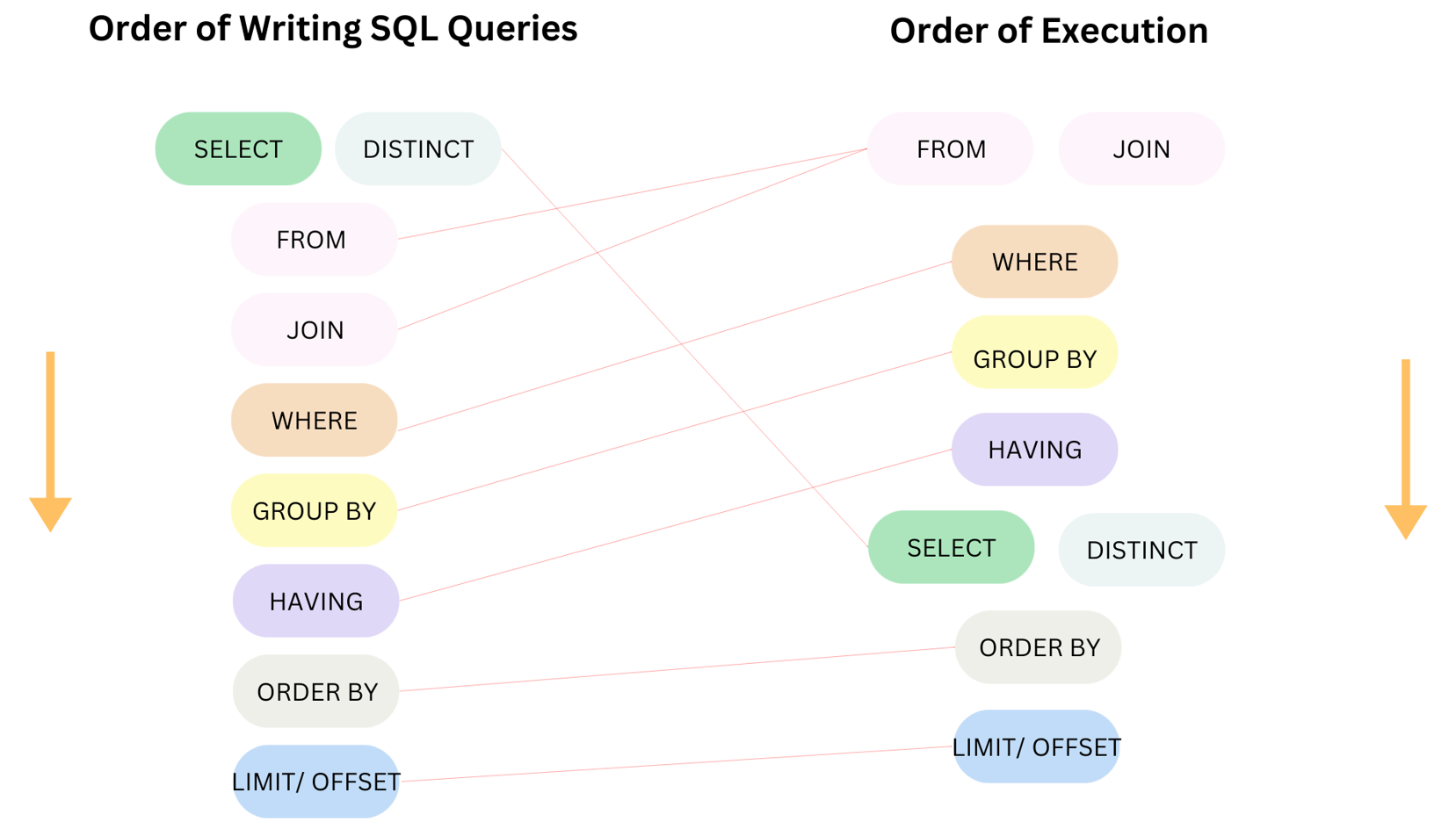
Now, let's watch a detailed walkthrough that explains this execution pipeline step by step. This directly addresses the "why" you're interested in.
SQL Order of Execution (Logical Explanation) | Namaste SQL | Ankit Bansal
This video, 'SQL Order of Execution' by Ankit Bansal, provides an excellent logical explanation of the query processing pipeline. It explains the rationale for each step.
Watch the following segments: From 01:43 to 03:34, which explains why WHERE is executed early to filter data. From 07:03 to 11:20, which shows how GROUP BY and HAVING fit into the sequence. From 13:39 to 15:16, which provides a final summary of the complete logical order. Pay close attention to the distinction made between a 'low-level filter' (WHERE) and a 'grouping level filter' (HAVING).
As the video demonstrates, the logical execution order is (simplified):
FROM/JOIN: Identifies the tables and joins them to create a working set of data.WHERE: Filters individual rows from this working set based on specified conditions. No aggregations are available at this stage.GROUP BY: Arranges the remaining rows into groups.HAVING: Filters these newly created groups based on conditions, which can now include aggregate functions (SUM,COUNT, etc.) calculated over the groups.SELECT: Processes the final list of columns to be returned.ORDER BY: Sorts the final result set.
Understanding this sequence makes the roles of WHERE and HAVING perfectly clear.
Combining WHERE and HAVING for Precise Control
The real power comes from using both clauses in a single query to apply two layers of filtering.
- Use
WHEREto pre-filter individual rows you don't need before any grouping occurs. This is efficient. - Use
HAVINGto post-filter the groups based on a summary calculation.
Scenario: From a Sales table, find product categories where we only consider individual sales over $50, and where the total sales for that category still exceed $10,000.
SELECT
  ProductCategory,
  SUM(SaleAmount) AS TotalCategorySales
FROM Sales
WHERE SaleAmount > 50         -- Step 1 (Execution): Filter individual rows first.
GROUP BY ProductCategory      -- Step 2 (Execution): Group the remaining rows.
HAVING SUM(SaleAmount) > 10000; -- Step 3 (Execution): Filter the aggregated groups.
This query is both correct and efficient:
- The
WHEREclause first throws away all individual sales of $50 or less. - The
GROUP BYclause then works on a smaller, pre-filtered set of rows. - Finally, the
HAVINGclause filters the resulting groups to find the high-value categories.
For more examples and a detailed read on this topic, the following article is a great resource.
The Difference Between WHERE and HAVING in SQL
The article 'The Difference Between WHERE and HAVING in SQL' from DataCamp provides a comprehensive overview, including clear examples, performance tips, and a handy comparison table.
Read the sections titled 'Combining WHERE and HAVING', 'The Difference Between WHERE and HAVING in Performance', and review the 'Comparison table'. These sections will reinforce what we've just discussed and highlight the performance impact of using the correct clause.
Performance Implications: Filter Early, Filter Often
As the DataCamp article notes, using WHERE to filter is almost always more performant than using HAVING for a condition that could apply to individual rows.
Consider this inefficient query:
-- Inefficient Query
SELECT
  ProductCategory,
  COUNT(*)
FROM Sales
GROUP BY ProductCategory
HAVING ProductCategory = 'Electronics'; -- Filtering after grouping
And compare it to the efficient version:
-- Efficient Query
SELECT
  ProductCategory,
  COUNT(*)
FROM Sales
WHERE ProductCategory = 'Electronics' -- Filtering before grouping
GROUP BY ProductCategory;
Both produce the same result, but the second query is much faster on a large table. It tells the database to find only the 'Electronics' rows first, and then it performs the GROUP BY on that much smaller subset of data. The first query forces the database to group all sales by category and then throw away all groups except one. This is a perfect example of how understanding the low-level execution order leads to better code.
Test your understanding!
You have a table named service_logs with columns: log_id, service_name, status (e.g., 'SUCCESS', 'ERROR'), and request_time_ms.
Task: Write a query to find the average request_time_ms for each service_name, but only for requests that had an 'ERROR' status. Furthermore, only show the services whose average error-request time is greater than 500ms.
Which conditions belong in the WHERE clause and which belong in the HAVING clause?
Show answer
SELECT
  service_name,
  AVG(request_time_ms) AS avg_error_time
FROM service_logs
WHERE status = 'ERROR'
GROUP BY service_name
HAVING AVG(request_time_ms) > 500;
Explanation:
WHERE status = 'ERROR': This is a row-level filter. We must first isolate only the log entries that are errors. This happens before grouping.GROUP BY service_name: The remaining 'ERROR' logs are grouped by service.HAVING AVG(request_time_ms) > 500: This is a group-level filter. It acts on the result of theAVG()aggregate function for each group, keeping only those groups that meet the condition.
Conclusion
You've now taken a deep dive into the distinction between WHERE and HAVING. This is one of the most fundamental and frequently tested concepts in SQL, and mastering it moves you well beyond a basic understanding.
Key Takeaways:
- The distinction between
WHEREandHAVINGis determined by the logical order of query execution. WHEREfilters rows beforeGROUP BY. It cannot use aggregate functions. Use it to filter as early as possible for better performance.HAVINGfilters groups afterGROUP BY. It is specifically designed to work with aggregate functions.- You can and should use both in the same query to apply precise, multi-level filtering.
This summary image provides a final, clear comparison.

Preview of the Next Lesson:
Now that you have a firm grasp of aggregation (GROUP BY) and the two types of filtering (WHERE and HAVING), you're ready to create more sophisticated summary reports. In the next lesson, we will explore how to combine multiple aggregate functions in a single query to calculate several metrics at once.