Hello! Welcome to your next lesson on SQL.
In our last session, we focused on the crucial difference between WHERE and HAVING, linking it to the logical order of query execution. You learned that WHERE filters individual rows before grouping, while HAVING filters entire groups after aggregation. This understanding of the query pipeline is the foundation for today's topic.
This lesson is about building more powerful and comprehensive summary reports. Your learning outcome is to combine multiple aggregate functions in a single query. This is a fundamental, high-ROI skill used constantly in data analysis, technical support, and development to get a multi-faceted view of your data in one go.
Creating Richer Summaries
So far, we've calculated one summary statistic at a time, like the count of students or the average GPA. But what if you want to see the total number of products sold, the total revenue, the average sale price, and the highest single sale, all broken down by product category? Writing four separate queries would be inefficient. SQL allows you to do this all at once.
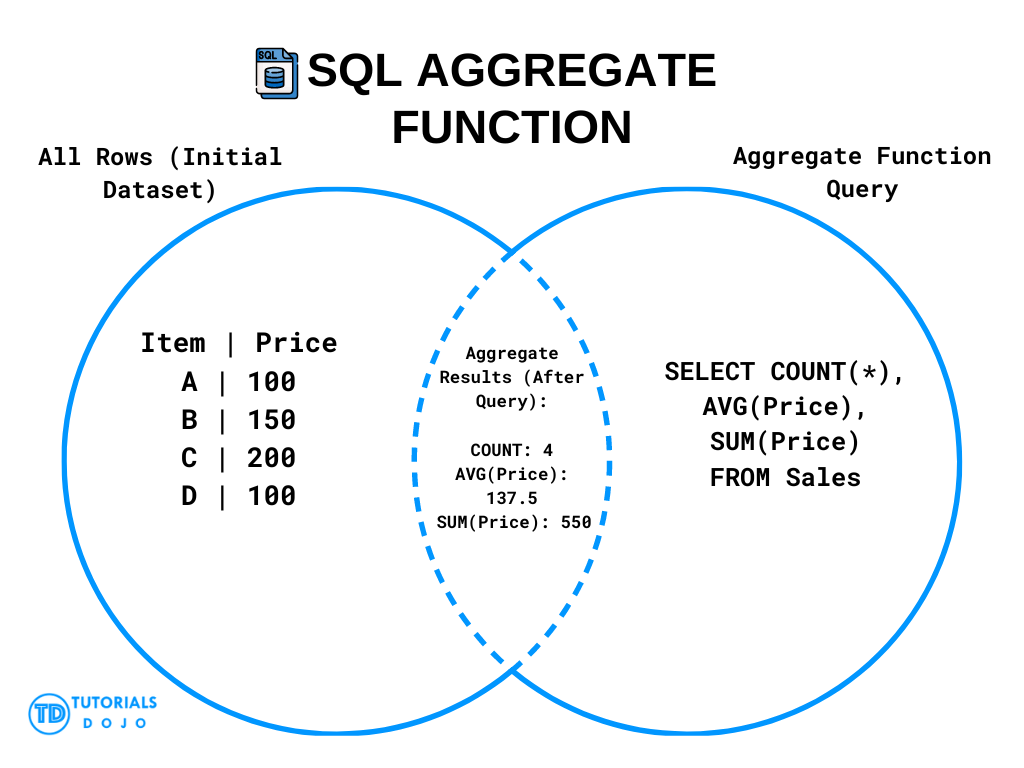
The core idea is simple: you can place multiple aggregate functions directly into your SELECT statement.
The Simple Approach: Multiple Aggregates in the SELECT List
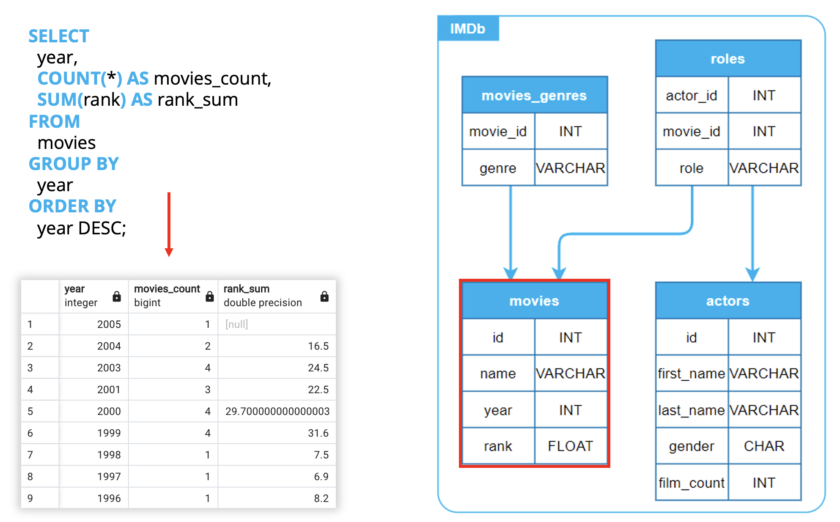
The most direct way to combine aggregations is to list them in the SELECT clause, separated by commas. Each function will operate on the groups defined by your GROUP BY clause, and each will appear as a separate column in your result set. It's essential to give each aggregated column a clear alias using AS for readability.
To see this in action, let's start with a focused reading.
GROUP BY and Aggregate Functions: A Complete Overview
This article from LearnSQL.com clearly explains the most common method for using multiple aggregate functions. We'll focus on what they call the 'simple approach'.
Please read the section titled 'One Query, Two Aggregate Functions: The Simple Approach'. It provides a perfect example of calculating both the total and average number of packages by city in a single query.
As the article demonstrated, the syntax is straightforward:
SELECT
  city_of_delivery,
  SUM(number_of_packages) AS total_number_of_packages,
  AVG(number_of_packages) AS average_number_of_packages
FROM package_deliveries
GROUP BY city_of_delivery;
Now, let's watch a video that shows how you can build up a comprehensive report by adding several different aggregate functions to a query.
Master the SQL SELECT statement part 06: Aggregate Functions, GROUP BY and HAVING clauses
In this segment from Michael Fudge, you'll see a practical demonstration of building a full summary report by adding MIN, MAX, AVG, and COUNT to a single query.
Watch from 14:35 to 16:56. Notice how each new aggregate function adds another column to the final report, providing more insight into the data grouped by student year.
The video creates a powerful summary that, for each student year, shows the number of students, their average GPA, and the minimum and maximum GPA in that year. This is a very common pattern for creating analytical reports.
Test your understanding!
You have a table named transactions with the following columns: transaction_id, product_id, sale_amount, and transaction_date.
Write a single SQL query to find the following information for each product_id:
- The total number of transactions.
- The total revenue (
sale_amount). - The average sale amount.
- The highest single sale amount.
- The lowest single sale amount.
Make sure to use clear aliases for each calculated column.
Show answer
SELECT
  product_id,
  COUNT(transaction_id) AS number_of_transactions,
  SUM(sale_amount) AS total_revenue,
  AVG(sale_amount) AS average_sale,
  MAX(sale_amount) AS highest_sale,
  MIN(sale_amount) AS lowest_sale
FROM transactions
GROUP BY product_id;
Explanation:
Each aggregate function (COUNT, SUM, AVG, MAX, MIN) is included in the SELECT list. When the query is executed, the database groups all rows by product_id, and then applies each of these five functions to every group, producing a single summary row per product.
The "Why": How Does the Database Do This?
Given your interest in low-level systems, you might wonder how the database engine efficiently calculates multiple aggregates simultaneously. It doesn't re-scan the data for each function. Instead, it uses a process that can be likened to a single loop.
For a deeper, logical understanding, let's read a short explanation of how aggregates work internally.
Understanding SQL Aggregate Functions
The article 'Understanding SQL Aggregate Functions' provides a great high-level overview of the internal process of aggregation, which will appeal to your interest in system logic.
Read the section titled 'How Aggregates Work'. Pay attention to the concepts of the 'state transition function' and the 'final function'.
As the article explains, for each group, the database maintains an internal state. When calculating COUNT, SUM, and AVG for a group of numbers, you can imagine the internal state as a set of variables, perhaps like (current_count, current_sum).
- State Transition: For each row in the group, the database updates its internal state. The
current_countis incremented, and the row's value is added to thecurrent_sum. - Final Function: After processing all rows in the group, the final functions are called.
COUNTis simplycurrent_count,SUMiscurrent_sum, andAVGiscurrent_sum / current_count.
This is highly efficient because the database only needs to iterate through the data for each group once, updating all necessary state variables as it goes. This is conceptually similar to how you might write a C program to calculate multiple statistics by iterating through an array once and updating several accumulator variables inside the loop.
Advanced Technique: Combining Conditional Aggregates with FILTER
What if you want to count different things for the same group? For example, for each department, you want to count the number of high-priority tickets and, in a separate column, the number of low-priority tickets.
One powerful, modern SQL feature for this is the FILTER clause. It allows you to apply a WHERE-like condition to a single aggregate function, without affecting the rest of the query.
Understanding SQL Aggregate Functions
Let's return to the 'Understanding SQL Aggregate Functions' article to learn about a powerful, high-ROI technique that isn't as widely known but is part of the SQL standard.
Read the section titled 'Filter'. Focus on the final example that shows multiple aggregate functions, each with its own unique FILTER condition.
Using the FILTER clause, you can create very expressive reports. For instance, to get a count of employees hired before and after the year 2020 for each department:
SELECT
  department_id,
  COUNT(*) FILTER (WHERE hire_date < '2020-01-01') AS experienced_staff,
  COUNT(*) FILTER (WHERE hire_date >= '2020-01-01') AS new_staff
FROM employees
GROUP BY department_id;
This is often much cleaner and more readable than the traditional method of using a CASE statement inside the COUNT function.
Conclusion
You now have a powerful and flexible tool for creating summary reports. By combining multiple aggregate functions, you can extract rich, multi-dimensional insights from your data with a single, efficient query.
Key Takeaways:
- You can include multiple aggregate functions (e.g.,
COUNT,SUM,AVG,MIN,MAX) in a singleSELECTstatement. - Each function creates a new column in the result set, summarizing data for the groups defined by
GROUP BY. - The database processes these efficiently by iterating through each group's data once, updating an internal state for all aggregates simultaneously.
- The
FILTERclause provides an elegant way to apply conditions to individual aggregate functions, allowing you to perform conditional counts or sums within the same query.
Preview of the Next Lesson:
Today, we combined aggregates that all work on the same level of grouping. But what if you need to perform an aggregation on the result of another aggregation? For example, finding the average number of daily package deliveries across all cities. To do this, you first need to sum the packages per day (SUM), and then find the average of those daily sums (AVG). This two-step aggregation requires a new and extremely powerful SQL construct: subqueries. In our next lesson, we will start exploring subqueries by writing one in the WHERE clause to create dynamic filters.