Hello! Welcome to your next lesson on NoSQL databases.
In our last session, we explored key-value stores like Redis. We saw how their simple key -> value model provides incredible speed for use cases like caching and session management. However, we also noted their primary limitation: the inability to handle or query complex, nested data structures efficiently.
Today, we'll examine a model that directly addresses this limitation. This lesson focuses on the learning outcome: Describe the data model and schema flexibility of document databases (e.g., MongoDB). You'll learn how these databases organize complex data in a way that is both intuitive and highly flexible, making them a popular choice for modern application development. Given your experience with REST APIs, you'll find the data format here very familiar.
From Key-Value to Documents
Imagine you want to store a user's profile. In a relational database, this would involve multiple tables (users, user_addresses, user_phone_numbers) linked by foreign keys. In a key-value store, you might serialize a complex object into a single string (like a JSON string), but you couldn't query for users living in a specific city without retrieving and parsing every single user object.
Document databases offer a more elegant solution.
A document database stores data in documents, which are self-contained, hierarchical data structures, most commonly in a JSON-like format (specifically, BSON or "Binary JSON" in MongoDB's case). These documents are then grouped into collections.
- Document: Analogous to a row in a relational database. It contains all the information for a single entity.
- Collection: Analogous to a table. It's a group of related documents.
- Field: Analogous to a column. It's a key-value pair within a document.
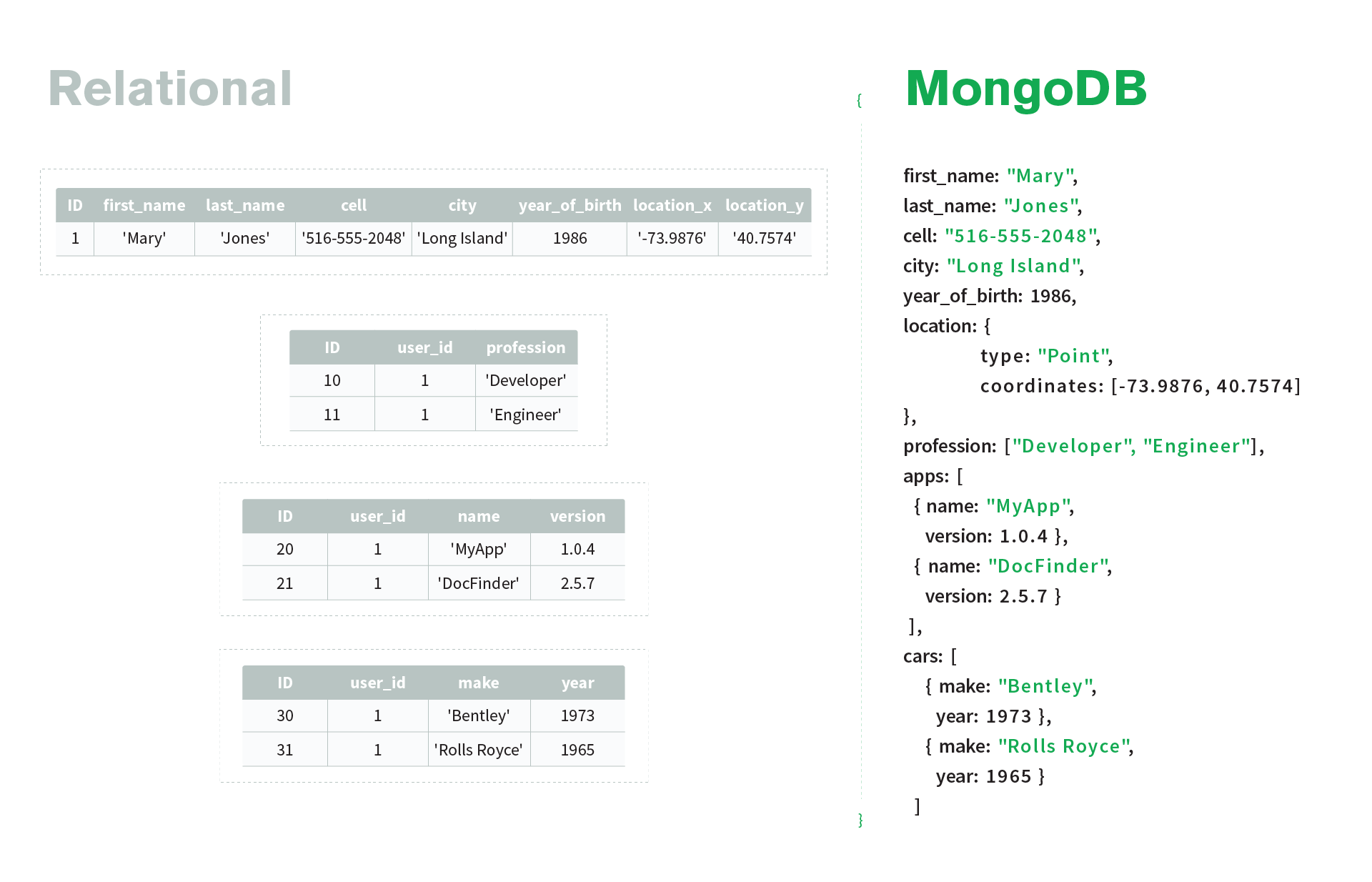
To get a foundational understanding of this model, let's watch a short video from the creators of MongoDB.
MongoDB Data Modeling and Schema Fundamentals | From Relational to Document Model
This video, 'MongoDB Data Modeling and Schema Fundamentals,' provides an excellent introduction to the document model by contrasting it with the relational model you are likely more familiar with.
Please watch the segment from 01:54 to 03:19. Focus on how a 'book' entity, which would require multiple tables in a relational database, is represented as a single, self-contained document.
The Core Principle: Application-Centric Data Modeling
The biggest shift when moving from a relational to a document model is in the philosophy of how you design your schema.
- Relational databases are data-centric. You first analyze the data, normalize it to eliminate redundancy, and define rigid relationships. The application's needs come later.
- Document databases are application-centric. You start by analyzing how your application will read and write data.
This leads to the golden rule of document data modeling:
Data that is accessed together should be stored together.
This principle is about optimizing for performance by minimizing the number of queries. If your application's UI needs to display a user's name, email, and their last five orders all at once, the ideal document model would store all that information in a single user document. This avoids the need for expensive JOIN operations that are common in SQL.
To dig deeper into this philosophical shift, the following article is an excellent read.
What is Data Modeling in MongoDB and Why Does it Matter?
The article 'What is Data Modeling in MongoDB and Why Does it Matter?' explains the 'why' behind the document model's design philosophy.
Please read the introduction ('Data modeling in MongoDB: Same goal, different approach') and the section 'So, what makes a good data model?'. These sections will solidify your understanding of the application-driven approach and its benefits.
Embedding vs. Referencing: The Two Main Strategies
The "store together" principle is usually achieved through embedding (also known as denormalization). This is where you nest related data, either as sub-documents or arrays of documents, inside a parent document.
However, this isn't a universal rule. Sometimes embedding is not the right choice. The alternative is referencing, where you store the ID of a related document, similar to a foreign key in SQL.
Let's watch a video that clarifies when to use each approach.
Mongodb Data Model Examples | Mongodb Schema Design
The video 'Mongodb Data Model Examples' gives clear, practical rules for when to embed data versus when to reference it.
Please watch from 03:18 to 06:14. Pay close attention to the reasons given for not embedding, which are just as important as the reasons to embed. The video covers: The default rule: 'Embed unless you have a valid reason not to.' Reasons to use referencing: to avoid huge documents (mentioning the 16MB limit) and when data needs to be accessed independently.
To summarize the trade-offs:
| Strategy | When to Use It | Example | Pros / Cons |
|---|---|---|---|
| Embedding | Data has a "contains" or "part-of" relationship. You almost always need the child data with the parent. The child data doesn't grow unboundedly. | Comments on a blog post; items in a shopping cart. | Pro: Fast reads (one query, no joins). Con: Can lead to large documents; data is duplicated if multiple parents need it. |
| Referencing | Data has a "uses" or "links to" relationship. The child data needs to be queried on its own. The amount of child data is very large or unbounded. | Books written by an author; products in a manufacturer's catalog. | Pro: Smaller documents; data is normalized (no duplication). Con: Requires a second query (or a $lookup, MongoDB's version of a join) to fetch related data. |
Schema Flexibility (Polymorphism)
This is the second key concept of today's lesson. Unlike relational databases that enforce a rigid, predefined schema for every row in a table, document databases allow for a flexible schema.
This means documents within the same collection do not need to have the same set of fields. This is sometimes called polymorphism. This is incredibly useful for modeling real-world entities that don't fit a neat, uniform structure.

For applications where data consistency is critical, MongoDB and other document DBs do offer schema validation, allowing you to enforce rules on the structure of documents. This gives you the best of both worlds: flexibility by default, with the option for rigidity when needed.
Test your understanding!
Imagine you are designing a database for a social media platform. You need to model Users and the Posts they create. A post consists of text content and a list of tags.
- How would you model the
tagsfor a single post? Would you use embedding or referencing? Why? - How would you model the relationship between a
Userand their manyPosts? Would you embed all of a user's posts inside the user document, or would you use references? Justify your choice.
Show answer
-
Tags: The best approach here is embedding. A post's tags are "part-of" the post and are almost always needed when the post is displayed. You would likely store them as an array of strings inside the post document:
{ "_id": "post123", "author_id": "user456", "content": "Document databases are really flexible!", "tags": ["nosql", "mongodb", "database"] } -
User's Posts: The best approach here is referencing. While you could theoretically embed posts in the user document, a user could create hundreds or thousands of posts over time. This would violate the principle of not having arrays that grow unboundedly and could cause the user document to exceed size limits (like MongoDB's 16MB limit).
The better model is to have a
postscollection and store theauthor_idin each post document.User Document:
{
  "_id": "user456",
  "username": "tech_enthusiast",
  "email": "learner@example.com"
}
Post Document:
{
  "_id": "post123",
  "author_id": "user456", // Reference to the user
  "content": "Document databases are really flexible!",
  "tags": ["nosql", "mongodb", "database"]
}
This way, you can easily query for all posts by a specific user (
WHERE author_id = 'user456') without retrieving a massive, bloated user document.
Conclusion
Today, we've unpacked the document data model, a powerful alternative to both the rigidity of relational tables and the simplicity of key-value stores. Its design philosophy is a fundamental shift that prioritizes application needs and query performance.
Key Takeaways:
- Data Model: Document databases store data in flexible, JSON-like documents that are grouped into collections.
- Application-Centric Design: The core principle is "data that is accessed together should be stored together," which minimizes the need for joins and speeds up reads.
- Embedding vs. Referencing: You have the flexibility to either embed related data for performance or reference it to avoid large documents and data duplication. The choice depends on your specific access patterns.
- Schema Flexibility: Documents in the same collection can have different fields (polymorphism), which is ideal for modeling diverse or evolving data.
Preview of the Next Lesson:
We've seen that NoSQL databases like key-value and document stores offer amazing flexibility and scalability. However, these benefits come with trade-offs, particularly in distributed systems where data is copied across multiple servers. How do you handle a network failure? What happens if one copy of the data is updated but another isn't yet? In the next lesson, we will explore the CAP Theorem, a fundamental principle that governs the trade-offs between Consistency, Availability, and Partition tolerance in all distributed data systems.