Hello! Let's dive back into subqueries.
In our last lesson, we mastered using correlated subqueries in the WHERE clause to filter rows based on a dynamic, row-by-row calculation. This gave us a powerful tool for asking questions like, "Which employees earn more than their department's average salary?"
Today, we'll shift our focus from filtering rows to enriching them. Our goal is to place a subquery in the SELECT clause to create a calculated column. This technique allows you to fetch and display related data alongside each row of your main query result, all in a single, elegant statement.
The Core Principle: The Scalar Subquery
Before we write any code, let's establish the single most important rule for this technique. A subquery used in a SELECT clause must return exactly one column and one row. This is known as a scalar subquery.
From a logical, low-level perspective, this makes perfect sense. The SELECT statement defines the columns of your final result set. Each "cell" in that result set (the intersection of a row and a column) can only hold a single value. Therefore, any subquery that generates a value for a column must resolve to a single, scalar value.
Let's begin by reading a quick definition of a scalar subquery.
Mastering MySQL: How to Use Subqueries in SELECT
The article 'Mastering MySQL: How to Use Subqueries in SELECT' provides a perfect definition of a scalar subquery and its basic syntax.
Please read the sections titled 'What is a Scalar Subquery?' and 'The Anatomy of a Scalar Subquery in SELECT'. Focus on the core definition: 'exactly one row and one column'.
Use Case 1: The Uncorrelated Subquery
The simplest way to use a scalar subquery in SELECT is to calculate an overall aggregate value and display it next to each row of your main result. For example, you might want to show each employee's salary and, in the next column, the average salary for the entire company.
This type of subquery is uncorrelated—it doesn't depend on the outer query and is executed only once.
Let's watch a video that demonstrates this concept visually.
SQL Subquery (Visually Explained) | Complete Guide with Correlated Subquery | #SQL Course 27
This video from 'Data with Baraa' clearly explains and demonstrates how to use an uncorrelated scalar subquery to add a calculated column for total orders.
Watch from 22:48 to 29:51. Pay close attention to: The syntax for placing the subquery within the SELECT list. The fact that the subquery must be enclosed in parentheses (). The step-by-step explanation of how the query is executed. The error that occurs when the subquery tries to return more than one value.
As the video explained, the database engine follows a logical process:
- It first executes the independent subquery, e.g.,
(SELECT AVG(Salary) FROM Employees). - The single result (e.g.,
47909) is stored. - Then, it executes the outer query, e.g.,
SELECT EmployeeID, Salary FROM Employees. - For every row returned by the outer query, it appends the stored result from step 2 as a new column.
This is efficient because the subquery calculation happens only once.
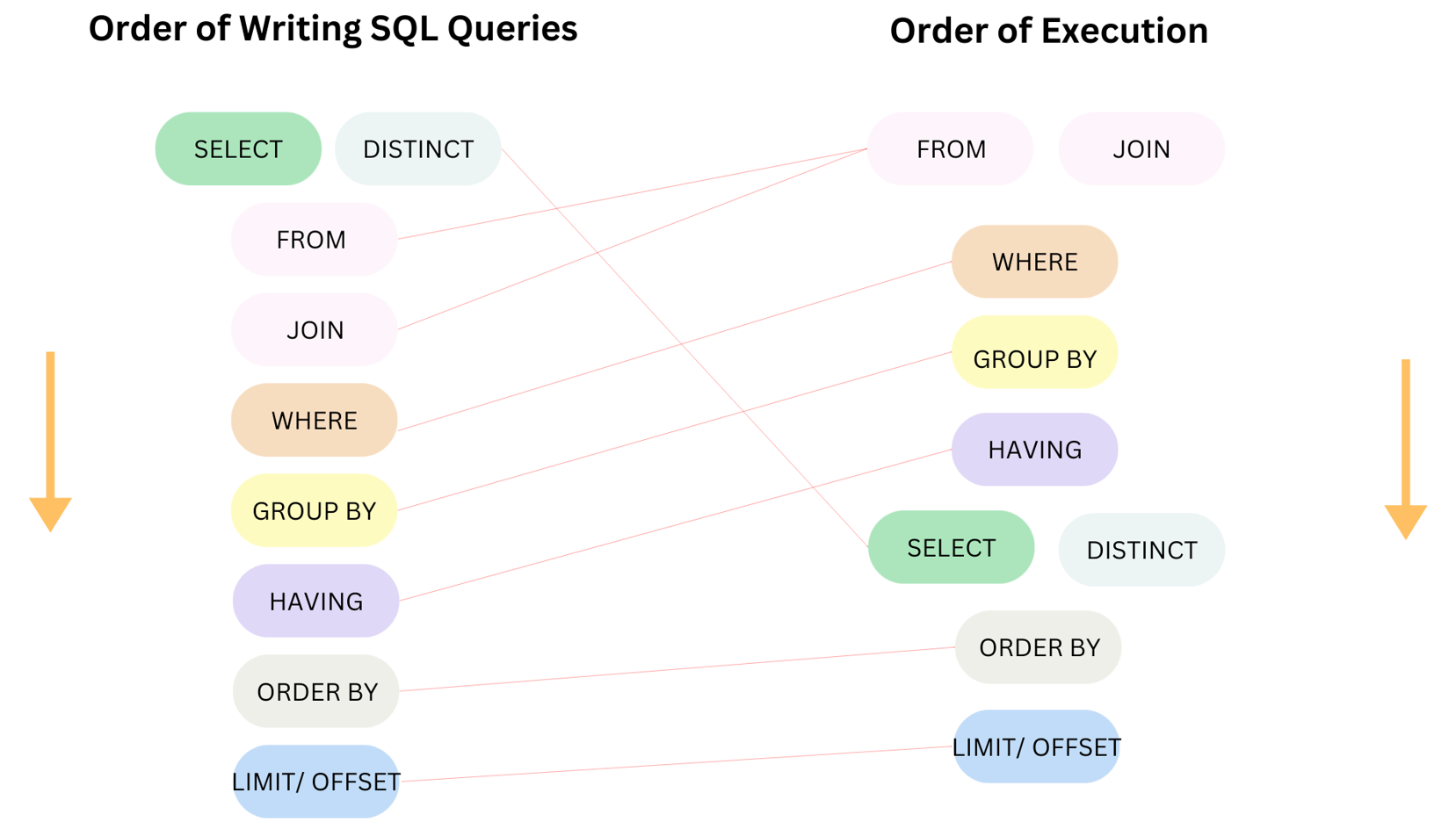
SQL's Order of Execution
You might wonder how the database can execute the SELECT subquery first. It helps to understand the logical order of operations in a SQL query, which often differs from the order you write it in.
Test your understanding!
You have a products table with columns: product_id, product_name, and list_price.
Write a query that returns the product_name and list_price for every product. Additionally, include a third column named avg_company_price that shows the average price of all products in the table on every row.
Show answer
SELECT
    product_name,
    list_price,
    (SELECT AVG(list_price) FROM products) AS avg_company_price
FROM
    products;
Explanation: The subquery (SELECT AVG(list_price) FROM products) is executed once to find the overall average price. This single value is then displayed as the avg_company_price for every product returned by the outer query.
Use Case 2: The Correlated Subquery
Now, let's connect back to our previous lesson. Just like in the WHERE clause, a subquery in the SELECT clause can also be correlated. This is far more powerful because it allows you to calculate a unique value for each row of the outer query.
For example, instead of the company-wide average salary, you could display the average salary for each employee's specific department right next to their own salary.
Let's look at an excellent example of this.
Mastering MySQL: How to Use Subqueries in SELECT
The article 'Mastering MySQL' also contains a great example of a correlated subquery in the SELECT clause to find the latest order date for each employee.
Please read 'Example 2: Getting the Latest Order Date'. Notice how the subquery WHERE clause (o.employee_id = e.id) creates the correlation, forcing the subquery to re-calculate the MAX(order_date) for each individual employee from the outer query.
The logic here mirrors what you learned in the last lesson, but the result is displayed instead of used for filtering:
- The outer query gets a row (e.g., employee 'Alice').
- The correlated subquery runs, but with Alice's ID:
SELECT MAX(order_date) FROM orders WHERE employee_id = 'Alice.id'. - The subquery returns Alice's latest order date, which is placed in the
last_order_datecolumn for her row. - The process repeats for the next employee, 'Bob', triggering the subquery again with his ID.
This row-by-row execution is powerful but can be slow on large tables, a trade-off you must always consider.
Here's another example using the AdventureWorks sample database to calculate the total sales for each customer.
Using a Subquery in a SELECT statement
This article from Simple Talk shows a correlated subquery that uses SUM() to calculate total sales due for each customer.
Read the section 'Using a subquery in a column list' and focus on the example in 'Listing 3: Correlated subquery in selection list'. See how it uses SUM(TotalDue) and correlates on CustomerID to get a per-customer total.
When to Use and When to Be Cautious
Subqueries in the SELECT clause are a fantastic tool, but they are not always the best solution. Knowing the trade-offs is a key job-ready skill.
Mastering MySQL: How to Use Subqueries in SELECT
Let's review the final section of the 'Mastering MySQL' article for some practical advice.
Read the section 'When to Use and When to Be Cautious'. This provides an excellent summary of the pros and cons.
In many cases, especially with correlated subqueries on large datasets, a JOIN or a Window Function (which we'll cover in a future module) can be significantly more performant. For a quick preview of how this technique compares to a Window Function, you can watch the following short clip.
Advanced SQL Tutorial | Subqueries
In this clip, 'Alex The Analyst' solves the same problem (displaying average salary) using both a subquery and a Window Function, showing they produce the same result.
Watch from 00:52 to 02:50. You don't need to understand the OVER() syntax yet; just observe that there are alternative ways to achieve the same outcome, which can be more efficient.
Conclusion
You have now added another powerful subquery technique to your SQL toolkit. By placing a scalar subquery in the SELECT clause, you can create new columns on the fly, enriching your query results with valuable context.
Key Takeaways:
- A subquery in a
SELECTclause is used to create a new calculated column. - It must be a scalar subquery, meaning it returns only a single value (one row, one column).
- Uncorrelated subqueries are executed once, and their single result is appended to every row. They are useful for showing global aggregates.
- Correlated subqueries are executed for each row of the outer query. They are powerful for fetching row-specific data but can be slow on large tables.
- Always give your subquery column a clear alias using
ASfor readability.
Preview of the Next Lesson:
We've now used subqueries in the WHERE and SELECT clauses. What about the FROM clause? In the next lesson, we will learn how to place a subquery in the FROM clause, treating the result of one query as a temporary table (a "derived table") that you can then query from. This is a fundamental technique for breaking down complex analytical problems into logical steps.