Welcome back! In our journey through subqueries, we've used them in the WHERE clause to filter data dynamically and in the SELECT clause to add calculated columns. We've completed most of the puzzle.
Today, we'll explore the final major placement for a subquery: the FROM clause. Your interest in understanding the logical "why" behind concepts will be particularly satisfied here. Placing a subquery in the FROM clause is a foundational technique for breaking down complex problems into logical, sequential steps.
Our learning outcome for this lesson is to place a subquery in the FROM clause to query a derived table. By the end, you'll be able to pre-process data in a subquery and then use that result as if it were a temporary table in your main query.
What is a Derived Table?
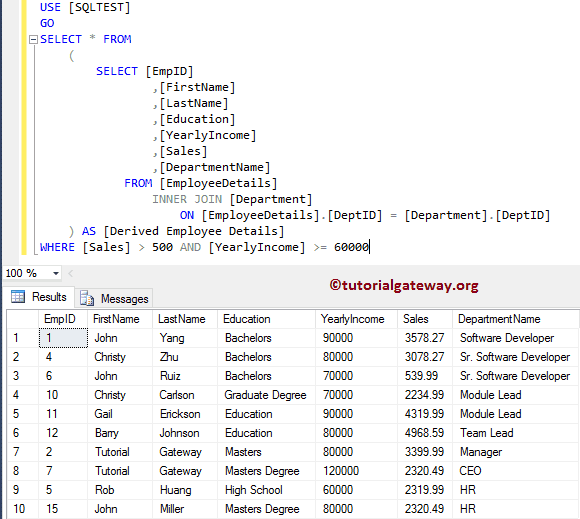
When you place a subquery in the FROM clause of another query, its result set acts as a virtual, in-memory table. This virtual table is called a derived table. The outer query can then select from, filter, or join this derived table just like any other table.
From a low-level, procedural perspective, which aligns with your background in C and systems programming, you can think of it like this:
- The database executes the inner query (the subquery) completely.
- The result of that execution is held in memory.
- The outer query then executes, using the in-memory result as its data source.
Let's start by reading a short article that defines derived tables and their basic syntax.
This article, 'Writing Subqueries in SQL' by ThoughtSpot, provides a clear, step-by-step breakdown of using a subquery in the FROM clause.
Read the section 'Subquery basics.' Pay close attention to how the inner query runs first and its results are used by the outer query. Crucially, note the requirement to give the subquery a name (an alias). This is a mandatory part of the syntax and a common source of errors for beginners.
The basic structure is:
SELECT
    -- Columns from the derived table
    alias_for_derived_table.column1,
    alias_for_derived_table.column2
FROM
    (
        -- This is the inner query. Its result becomes the derived table.
        SELECT column1, column2 FROM some_table
    ) AS alias_for_derived_table -- The alias is required!
WHERE
    alias_for_derived_table.column1 = 'some_value';
The Primary Use Case: Multi-Stage Aggregation
The true power of derived tables is revealed when you need to perform aggregations in multiple steps. For example, imagine you want to find the average of a sum, or the maximum of a count. You cannot nest aggregate functions like AVG(SUM(column)). A derived table is the classic solution to this problem.
The Logic:
- Inner Query (Step 1): Perform the first aggregation (e.g.,
SUM(sales) GROUP BY day). - Outer Query (Step 2): Use the result of Step 1 as your source table to perform the second aggregation (e.g.,
AVG(daily_sales)).
Let's examine a practical example of this.
The article 'Writing Subqueries in SQL' also demonstrates this powerful multi-stage aggregation technique.
Read the section 'Using subqueries to aggregate in multiple stages.' Follow the logic: the inner query first counts incidents per day, and the outer query then calculates the average of those daily counts. To solidify your understanding, try to visualize or even run the inner query on its own to see what its output looks like before it's consumed by the outer query.
Test your understanding!
You have a Orders table with columns: order_id, customer_id, order_date, and order_total.
You want to find the highest total amount a single customer has spent in a single day. How would you approach this using a derived table? Describe the steps for the inner and outer queries.
Show answer
-
Inner Query (Derived Table): First, you need to calculate the total amount spent by each customer on each day.
SELECT customer_id, order_date, SUM(order_total) AS daily_customer_total
FROM Orders
GROUP BY customer_id, order_date
This gives you a derived table with one row for each customer-day combination, and the total they spent on that day.
-
Outer Query: Now, you can query this derived table to find the maximum value in the
daily_customer_totalcolumn.SELECT MAX(daily_customer_total) AS max_daily_spend FROM ( SELECT customer_id, order_date, SUM(order_total) AS daily_customer_total FROM Orders GROUP BY customer_id, order_date ) AS customer_daily_spend;
Performance Optimization with Derived Tables
In your work as a technical support executive or developer, query performance is often a critical concern. Using derived tables is a key optimization technique.
When joining very large tables, performing aggregations before the join can dramatically reduce the number of rows the database has to process, leading to a massive speedup. Joining two small, pre-aggregated derived tables is far more efficient than joining two huge raw tables and then aggregating.
Let's explore a powerful example of using derived tables for performance. This is a crucial real-world application of the concept.
Read the section 'Joining subqueries.' Focus on the Crunchbase data example. Note the 'data explosion' that occurs when joining the large tables directly, resulting in over 6 million rows to process. Compare this to the optimized version that joins two small, pre-aggregated derived tables. This illustrates a fundamental principle of query optimization: reduce the size of your datasets as early as possible.
This principle also applies when comparing derived tables to the correlated subqueries you've learned about. A correlated subquery often runs once for every row of the outer query. Rewriting it as a derived table with a JOIN often allows the database engine to find a more efficient execution plan.
Correlated Subqueries vs Derived Tables
This video provides a direct performance comparison between a correlated subquery and a derived table that achieves the same result. This visually demonstrates the performance benefits we've been discussing.
Watch from 03:06 to 05:40. The presenter rewrites a correlated subquery into a derived table. The key takeaway is that the derived table allows the data to be filtered and aggregated earlier, which reduces the work required for the final join. Pay close attention to the comparison of the execution plans and the resulting CPU time.
The Readability Challenge and a Glimpse of the Future
While powerful, derived tables can make queries hard to read, especially when they are nested inside each other. The logic becomes buried deep inside parentheses.
-- This kind of nesting can be hard to follow
SELECT ...
FROM (
    SELECT ...
    FROM (
        SELECT ... FROM ...
    ) AS inner_derived_table
    JOIN ...
) AS outer_derived_table
...
To address this, SQL provides a more readable and structured alternative: Common Table Expressions (CTEs). A CTE allows you to name a subquery at the beginning of your statement and then refer to it by name.
Let's watch a quick demonstration of a complex nested subquery being refactored into a much cleaner CTE.
Subquery in SQL | Correlated Subquery + Complete SQL Subqueries Tutorial
This video segment shows how a complex query with nested derived tables can be dramatically simplified using a WITH clause, which defines a Common Table Expression (CTE).
Watch from 41:04 to 46:29. First, observe how complex and difficult to read the query becomes with nested subqueries in the FROM clause. Then, see how the presenter refactors it using WITH sales AS (...). You don't need to memorize the CTE syntax yet; just appreciate how much cleaner and more logical the refactored version is. This is a preview of our next lesson.
Conclusion
You have now learned the final major application of subqueries: creating derived tables in the FROM clause. This technique is a cornerstone of writing complex analytical queries, allowing you to break down problems into logical steps and optimize performance.
Key Takeaways:
- A subquery in the
FROMclause creates a temporary, in-memory result set called a derived table. - Derived tables must always be given an alias using
AS. - They are the standard solution for multi-stage aggregations (e.g., finding the
AVGof aSUM). - They are a critical tool for query optimization, allowing you to aggregate or filter data before a
JOINto reduce the workload on the database. - For simple, one-time logic, a derived table is compact and effective. For more complex, multi-step logic, they can become hard to read.
Preview of the Next Lesson:
We've just seen a hint of a more readable alternative to complex derived tables. In our next lesson, we will formally learn about Common Table Expressions (CTEs). You'll learn how to use the WITH clause to define named, reusable subqueries that will make your advanced SQL code dramatically cleaner, more organized, and easier to debug.