Hello! Welcome to the first lesson of your course on SQL and databases.
Given your goal of becoming job-ready for technical support and developer roles, a solid understanding of why certain technologies exist is just as important as knowing how to use them. Your interest in low-level systems and abstract, logical thinking provides a great foundation for this.
Today, we'll start at the very beginning by answering a fundamental question: Why do we need complex Database Management Systems (DBMS) when we could just store data in files?
To do this, we'll spend this lesson exploring the inherent limitations of using a simple file system for managing structured data. Understanding these problems is the crucial first step before we can appreciate the solutions that databases offer. By the end of this lesson, you will be able to explain the key drawbacks of a file-based approach.
The World Before Databases: The File System Approach
Imagine you're building an application for a small college. You might decide to store student information in one file (e.g., students.csv), course details in another (courses.txt), and enrollment records in a third (enrollments.dat). Each file would be managed by a different part of your application, perhaps even written in different programming languages like C or Python.
This is the traditional "file system approach." Each application directly accesses and manipulates its own files.
This diagram from GeeksforGeeks illustrates a simple banking system where different departments (loans, accounts) manage their own separate files. This separation is the root cause of many of the problems we will discuss.
While this seems simple enough for small tasks, it quickly breaks down as the data and the number of users grow. Let's start by exploring the most common and immediate problems this approach creates.
1. Data Redundancy and Inconsistency
When data is scattered across different files, you inevitably end up with duplication. This is called data redundancy. For example, a student's name and address might exist in the registrar's file, the library's file, and the billing department's file.
What's wrong with that?
- Wasted space: Storing the same data multiple times is inefficient.
- Data inconsistency: This is the more serious problem. If a student moves and updates their address with the registrar, what ensures the library's and billing's files are also updated? If they are not, the data becomes inconsistent. The system now holds conflicting information, and you don't know which version is correct.
To see a clear explanation of these two interconnected problems, please watch the following video segment.
File System vs. Database Management System
The following video from Neso Academy provides an excellent walkthrough of the limitations of file systems. Let's start with the first, and most common, set of problems.
Watch the section from 01:29 to 06:29. The speaker uses an employee data example to illustrate how easily data redundancy (duplication) and data inconsistency (conflicting data) can occur in a file-based system.
This issue of redundancy leading to inconsistency is a core reason why managing data in separate files is so fragile. In your work with REST APIs, you can think of it like having the same configuration parameter hard-coded in multiple microservices. Changing it in one place but forgetting another leads to system-wide inconsistencies that are difficult to debug.
2. Difficulty in Accessing Data and Data Isolation
What if the college dean wants a list of all students from a specific city who are enrolled in an advanced mathematics course?
With data stored in separate files (e.g., a students file and an enrollments file), there's no straightforward way to answer this question. You would need to:
- Write a custom program or script.
- This script would have to open both files.
- It would need to parse them, understand their different formats, and then manually link the data (e.g., by matching a student ID).
- Finally, it would filter the results based on the dean's criteria.
This process is slow, inefficient, and requires new programming effort for every new type of query. This is the "difficulty in accessing data" problem.
Compounding this is data isolation. Because the data is scattered across different files, possibly in different formats, it's difficult to get a single, unified view of the information.
File System vs. Database Management System
Let's continue with the Neso Academy video to see how it explains these access and isolation challenges.
Please watch from 06:29 to 09:55. This part covers the difficulty of retrieving data for specific queries and how scattered files lead to data isolation.
3. Integrity Problems
Data integrity refers to the correctness, consistency, and completeness of data. File systems offer no built-in way to enforce rules (or constraints) on the data they store.
For example, how would you enforce these business rules in a simple text file?
- An employee's salary must be a positive number.
- A student's GPA must be between 0.0 and 4.0.
- Every course must have a unique course ID.
You could write checks for these rules into every application program that modifies the file, but that's unreliable. If a new application is written, or an existing one is updated carelessly, invalid data can easily be introduced.
This lack of integrity enforcement leads to data anomalies.

Test your understanding!
Imagine you have a single text file, projects.txt, that stores project assignments. Each line has the format: EmployeeID, EmployeeName, ProjectID, ProjectName.
What kind of anomaly (insertion, update, or deletion) would occur in each of the following scenarios?
- A new employee, Jane Doe, is hired, but she hasn't been assigned to a project yet. You can't add her to the file.
- Employee John Smith gets married and changes his name to John Miller. You have to find and update every single line in the file where he is listed. If you miss one, the data becomes inconsistent.
- Project 'Phoenix' is cancelled, and you delete all lines associated with it. If the project's manager, Bob, was only assigned to that one project, you have now lost all record of Bob from this file.
Show answer
- Insertion Anomaly: You cannot record the existence of an employee without also assigning them to a project.
- Update Anomaly: You have to update the same information (the employee's name) in multiple places, creating a risk of inconsistency. This is a direct result of data redundancy.
- Deletion Anomaly: Deleting project information has the unintended side effect of deleting all information about an employee.
4. The "Hard" Problems: Atomicity, Concurrency, and Security
The final set of limitations are the most complex and are particularly relevant to your interests in systems and low-level programming. These are the problems that are exceptionally difficult to solve correctly using a file-based approach.
-
Atomicity Problems: Many real-world operations consist of multiple steps. A classic example is a bank transfer: (1) debit account A, (2) credit account B. What happens if the system crashes after step 1 but before step 2? The money is gone from A but never arrived at B, leaving the data in an inconsistent state. An operation that is atomic is "all or nothing"—it either completes fully, or it doesn't happen at all, leaving the system unchanged. File systems have no mechanism to guarantee this.
-
Concurrent Access Anomalies: What happens when two users try to modify the same file at the same time? For example, two airline agents trying to book the last seat on a flight. Both might read that "1 seat is available" and proceed to sell it. This is a classic race condition. Simple file systems often handle this crudely by locking the entire file, preventing the second user from even reading it, which is highly inefficient.
-
Security Problems: How do you enforce granular access control? For instance, in an employee file, you might want managers to see the
salarycolumn but prevent other employees from seeing it. A file system typically only offers all-or-nothing protection at the file level (e.g., via OS permissions). It's very difficult to control access to specific parts of a file for different users.
These three challenges—ensuring atomicity, managing concurrency, and providing fine-grained security—are where file systems truly fall short for modern applications.
File System vs. Database Management System
The final part of the Neso Academy video covers these three difficult challenges. Pay close attention to the examples used for each.
Watch from 09:55 to 22:39. This section details the integrity, atomicity, concurrent access, and security problems inherent in file systems.
Conclusion
As we've seen, while storing data in files is simple on the surface, it introduces a host of serious problems as soon as your data has any structure or is accessed by more than one user or application.
Key Takeaways:
- Data Redundancy & Inconsistency: Duplicating data wastes space and, more importantly, leads to conflicting versions of the truth.
- Difficult Data Access & Isolation: Querying data is cumbersome, requiring custom programs, and getting a unified view of scattered data is challenging.
- Integrity Problems: File systems cannot enforce business rules, leading to invalid data and anomalies.
- Atomicity Failures: "All or nothing" operations are not guaranteed, making the system unreliable in case of failures.
- Concurrency Issues: Simultaneous access by multiple users can corrupt data or lead to incorrect results.
- Limited Security: Providing granular, data-level security is nearly impossible.
These limitations are precisely the problems that Database Management Systems (DBMS) were designed to solve. A DBMS isn't just a fancy file holder; it's a sophisticated software layer that sits between your applications and the data, providing solutions for every one of these issues.
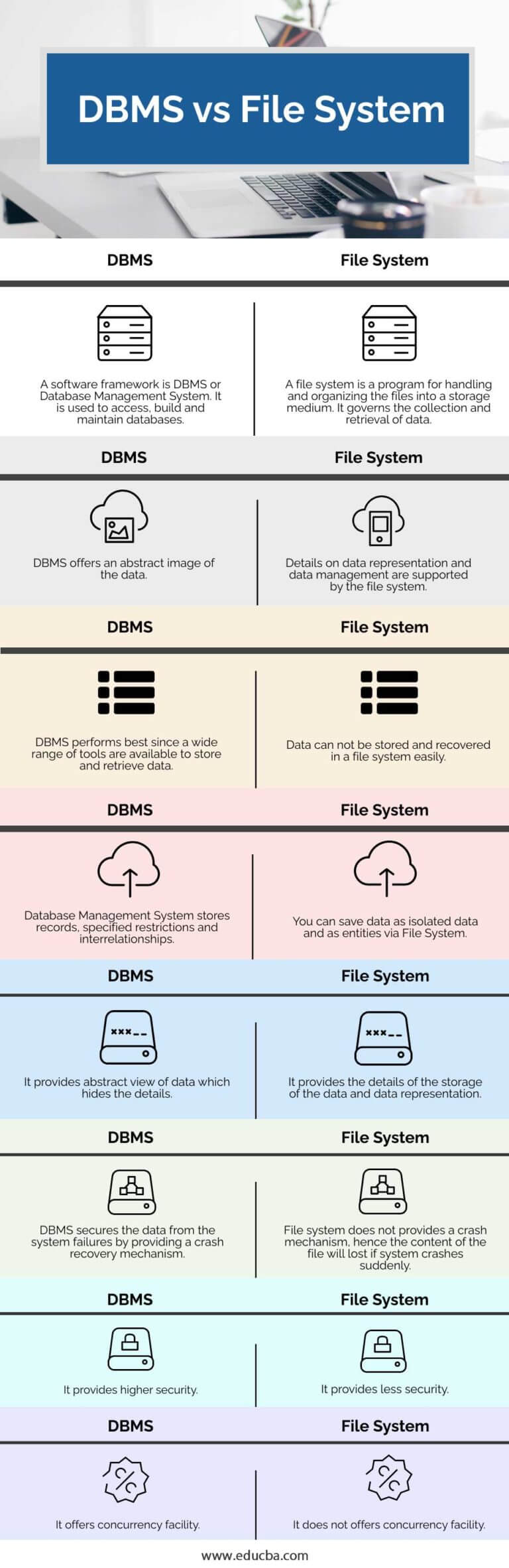
Preview of the Next Lesson:
Now that we have a firm grasp of the problem, our next lesson will introduce the solution. We will begin to explore what a Database Management System (DBMS) is and describe how its core components are specifically architected to tackle challenges like data integrity, concurrent access, and recovery from failure.