Welcome. This course begins with the rule that makes every later skill—Linux commands, network observation, Nmap, web testing, and reporting—ethical and professional: do not test a system unless you are authorized to test that exact system in the allowed way.
This first module builds a safe foundation for hands-on cybersecurity practice on your Windows PC. In this lesson, you will learn to classify a testing situation as authorized or unauthorized by checking three things: who controls the system, whether permission is explicit, and whether the planned activity fits the stated scope.
The rule before any tool
Ethical hacking is not defined by the tool someone uses. A browser’s developer tools, a network scanner, or a password-testing tool can be used for legitimate defense or for harm. What changes the situation is authorization.
A penetration test is a controlled attempt to find weaknesses so that the owner can fix them. It may imitate attacker behavior, but it is done for the owner, under agreed rules. By contrast, testing a random website “just to see what happens” is not ethical hacking—even if no damage was intended.
Penetration Testing - CompTIA Security+ SY0-701 - 4.3
Watch “Penetration Testing - CompTIA Security+ SY0-701 - 4.3” by Professor Messer for a concise explanation of penetration testing and the Rules of Engagement: the written rules that make a test controlled and legitimate.
Watch the purpose to distinguish a penetration test from an uncontrolled attack. Then watch rules of engagement. Notice the kinds of limits a real engagement records: approved systems, test times, methods, contacts, and handling of confidential information.
The professional baseline is simple:
If you cannot clearly show why you are allowed to test it, do not test it.
“Probably okay” is not permission. “It is publicly reachable” is not permission. “I have an account there” is not permission to security-test the service. And a security contact page or a “Report a bug” link does not automatically allow active testing.
For this course, you will work only in safe places:
- Practice files and services you set up locally on your own authorized computer.
- The loopback address,
localhost, once we create a local target later in the course. - Designated training sandboxes, only according to their rules and using your own training account.
- Any additional asset only after clear authorization has been established.
The three checks: authority, permission, and scope
Before doing anything beyond normal use of a system, make these three checks in order.
1. Who owns or controls the asset?
An asset is something that can be tested: a computer, website, Wi-Fi network, mobile app, cloud account, IP address, or API.
Find the person or organization with the authority to approve testing. This is not always the person you happen to know.
- A company’s public website is controlled by the company, not by every visitor.
- A school Wi-Fi network is controlled by the school or its IT team, not by a student connected to it.
- A family computer may be owned by a parent or shared among family members.
- A cloud-based app may use services controlled by another vendor.
- A local practice service you personally installed is normally under your control.
Ownership matters because the owner is the party that can decide what testing is acceptable. If the system is not yours, you need permission from someone who genuinely has that authority—not merely a friend who uses the system.
2. Is there explicit permission?
Explicit permission means the owner, or someone authorized to act for the owner, has clearly said that a particular type of security testing is allowed.
For professional work, this should be written: for example, a signed agreement, a clear email from the responsible organization, or a platform’s published training rules. Written permission avoids misunderstandings and provides a record of what was agreed.
A useful distinction:
| Situation | Permission status |
|---|---|
| You installed a deliberately vulnerable app on a computer you control for practice | Potentially authorized, provided you keep it local and follow any software rules |
| A friend says, “Try hacking my website sometime” | Not enough yet; the exact website, allowed actions, and limits are unclear |
| A training platform says participants may solve a listed lab | Authorized only within that lab’s stated rules |
| You can reach a company website in your browser | Not permission to scan, probe, or exploit it |
| You found a website that appears poorly secured | Not permission to investigate |
Access is not authorization. Having a login, knowing an IP address, being on the same Wi-Fi network, or discovering a possible weakness does not grant testing rights.
3. Does your action fit the scope?
Scope is the boundary of permission. It tells you exactly what may be tested and how. A proper scope is more than a list of website names.
It may specify:
- Assets: exact domains, apps, IP address ranges, accounts, or lab machines.
- Allowed methods: for example, passive observation, a limited port scan, or a particular test procedure.
- Forbidden methods: such as denial-of-service attacks, phishing, physical entry attempts, or social engineering.
- Timing: perhaps only during certain hours.
- Safety limits: request-rate limits, no altering data, no attempts to access other users’ data.
- Credentials and data rules: which account to use and what to do if sensitive information appears.
- Contacts: who to notify if something unexpected happens.
A target can be “in scope” while a particular action is still prohibited. For example, a company could allow a researcher to test www.example.com but forbid high-volume scanning and denial-of-service testing. The website is allowed; those methods are not.
Read a policy as a boundary document
Organizations sometimes publish a vulnerability disclosure policy (VDP). A good VDP tells researchers what is allowed, what is excluded, how to report a problem, and how the organization will handle good-faith research.
CISA’s template shows how authorization and boundaries can be written clearly.
Vulnerability Disclosure Policy Template
Read the CISA Vulnerability Disclosure Policy Template as an example of how an organization can state authorization, safety expectations, prohibited methods, and target scope. It is a template for organizations—not permission to test any system yourself.
Read the “Authorization,” “Guidelines,” “Test methods,” and “Scope” sections. In “Guidelines,” follow the researcher duties, especially the instruction to avoid disruption and to stop if sensitive data is encountered. In “Scope,” read the explanation beginning vendor authorization. Then examine the sample allowlist and exclusions: an asset is not approved merely because it is related to an approved organization.
The policy’s key safety idea is often called safe harbor: the organization says that good-faith research that follows its policy will be treated as authorized. But safe harbor applies only when the researcher actually follows the policy. Ignoring an excluded asset, using a prohibited method, or continuing after seeing sensitive data can take the activity outside that protection.
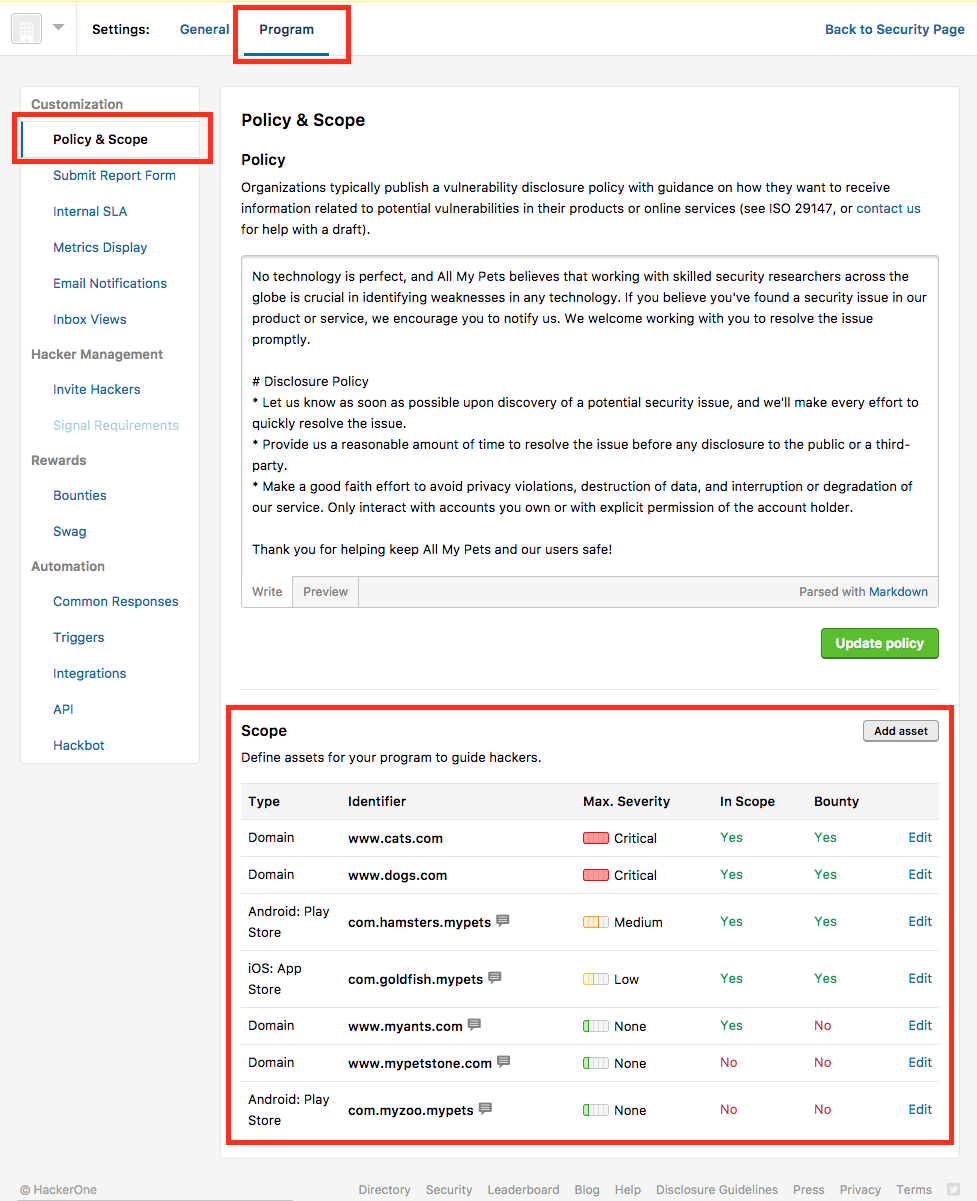
Notice the important lesson in the Policy & Scope image: two domains associated with the same program can have different statuses. One may be in scope; another may be explicitly excluded. You must read the exact target name and the rules attached to it.
A domain pattern also has precise meaning. Permission for www.example.com does not automatically include api.example.com, shop.example.com, a mobile app, a cloud service connected to the site, or another company’s service. Do not “expand” scope based on guesses.
A quick classification method
Use this decision process whenever a cybersecurity action comes to mind:
- Name the asset. Write the exact thing: a local service, a domain, a school network, an app, or an account.
- Identify the authority. Who has the right to approve testing?
- Find the permission record. Is there a clear written approval, training rule, or policy?
- Match the scope. Is this exact asset included? Is your exact method allowed?
- Check conditions. Are you using the correct account, time window, rate, and safety limits?
- Stop if uncertain. Ask the owner or course instructor before proceeding.
Classify the following examples using that method:
| Scenario | Classification | Why |
|---|---|---|
You use future course instructions to scan a web service running only on your own localhost |
Authorized | The target is local, deliberately created for the course, and the method will be defined in the lesson |
| You scan the school’s public website after class | Unauthorized | You do not control the asset and have no explicit permission or scope |
| You work through a designated training lab’s listed challenge | Authorized within limits | The platform provides permission, but only for that challenge and its stated rules |
| You test a company domain that is not listed in its vulnerability policy | Unauthorized | Related systems are not automatically included; unlisted assets are commonly out of scope |
| You test an allowed website with a denial-of-service technique | Unauthorized | The target may be allowed, but the method is outside scope |
| You discover customer information while proving a bug and keep collecting screenshots of it | Unauthorized and unsafe | Responsible policies require you to stop, avoid collecting unnecessary data, and report through the approved channel |
The safest decision is not always the most exciting one. A mature security tester knows that stopping is sometimes the correct technical action.
Create your personal course safety card
Since this course will become hands-on quickly, create a short note in Windows Notepad called course-safety-card.txt. This takes about five minutes and gives you a rule to consult before every lab.
Use this structure:
Purpose:
Learn cybersecurity safely in this course.

Authorized assets:
- My own computer, only if I am allowed to use it for this course
- Future local practice services that I personally start
- Designated course training sandboxes, using my own account

Excluded assets:
- School networks and devices
- Public websites and apps
- Friends' accounts, devices, and websites unless written scope is provided
- Any system or account where permission is uncertain

Safety rules:
- Follow the lesson instructions and platform rules
- Do not test other people’s data or accounts
- Do not use disruptive methods
- Stop and ask before continuing if something unexpected appears
Adjust the first authorized item honestly. If the Windows PC is managed by a parent, guardian, school, or workplace, get approval to install course software and use it for local practice. That approval still does not grant permission to test the school network, internet provider, websites, or online accounts connected through the computer.
Key takeaways
Ethical hacking starts with authorization, not with tools.
- First identify who owns or controls the exact asset.
- Obtain explicit, preferably written, permission from someone authorized to grant it.
- Follow the scope: exact targets, methods, times, accounts, data rules, and exclusions.
- Being able to access a system is not the same as being allowed to security-test it.
- If a policy is unclear, a target is unlisted, a method is forbidden, or sensitive data appears: stop and ask.
Next, you will build security vocabulary by separating four ideas that are often confused: threats, vulnerabilities, exploits, and risks.