Hello again. In the previous lesson, you learned the rule that comes before every security tool: test only assets you are explicitly allowed to test, and stay inside the agreed scope. That same careful thinking helps with today’s vocabulary. Security professionals need to describe a problem precisely before they can decide what to fix.
This lesson separates four closely connected ideas: threats, vulnerabilities, exploits, and risks. By the end, you should be able to read a beginner scenario and label each part without treating these words as synonyms. This is useful later when you examine network services, web applications, and security findings in authorized labs.
Four different roles in one security story
Imagine a system contains something valuable—an account, files, a website, or a device. A bad outcome usually becomes possible through several different pieces:
| Term | The question it answers | Plain-language meaning |
|---|---|---|
| Threat | What could cause harm? | A possible source of harm: a person, event, or condition |
| Vulnerability | What weakness exists? | A flaw or gap that could be taken advantage of |
| Exploit | How is that weakness used? | The technique, code, or method that abuses the weakness |
| Risk | How worried should we be? | The chance of harm and how serious the harm could be |
A compact way to remember the roles is:
Threat finds a vulnerability, uses an exploit, and creates risk.
That is a useful model, but do not treat it as a rule that every threat must follow exactly. For example, a power failure is a threat to availability, but it does not “exploit” a software bug. Exploits are most commonly discussed when an attacker deliberately takes advantage of a weakness.
The following short video gives a visual everyday analogy before we move into cybersecurity examples.
Threats Vulnerabilities and Exploits
Watch “Threats Vulnerabilities and Exploits” by IBM Technology for a concise explanation of each term using a bank-security analogy. Notice that the weakness and the method used against it are different things.
Watch the threat definition first. Then watch the vulnerability and the exploit examples. Finish with risk assessment, focusing on why likelihood and consequences both matter.
Here is the same relationship in the cybersecurity concept flow diagram:
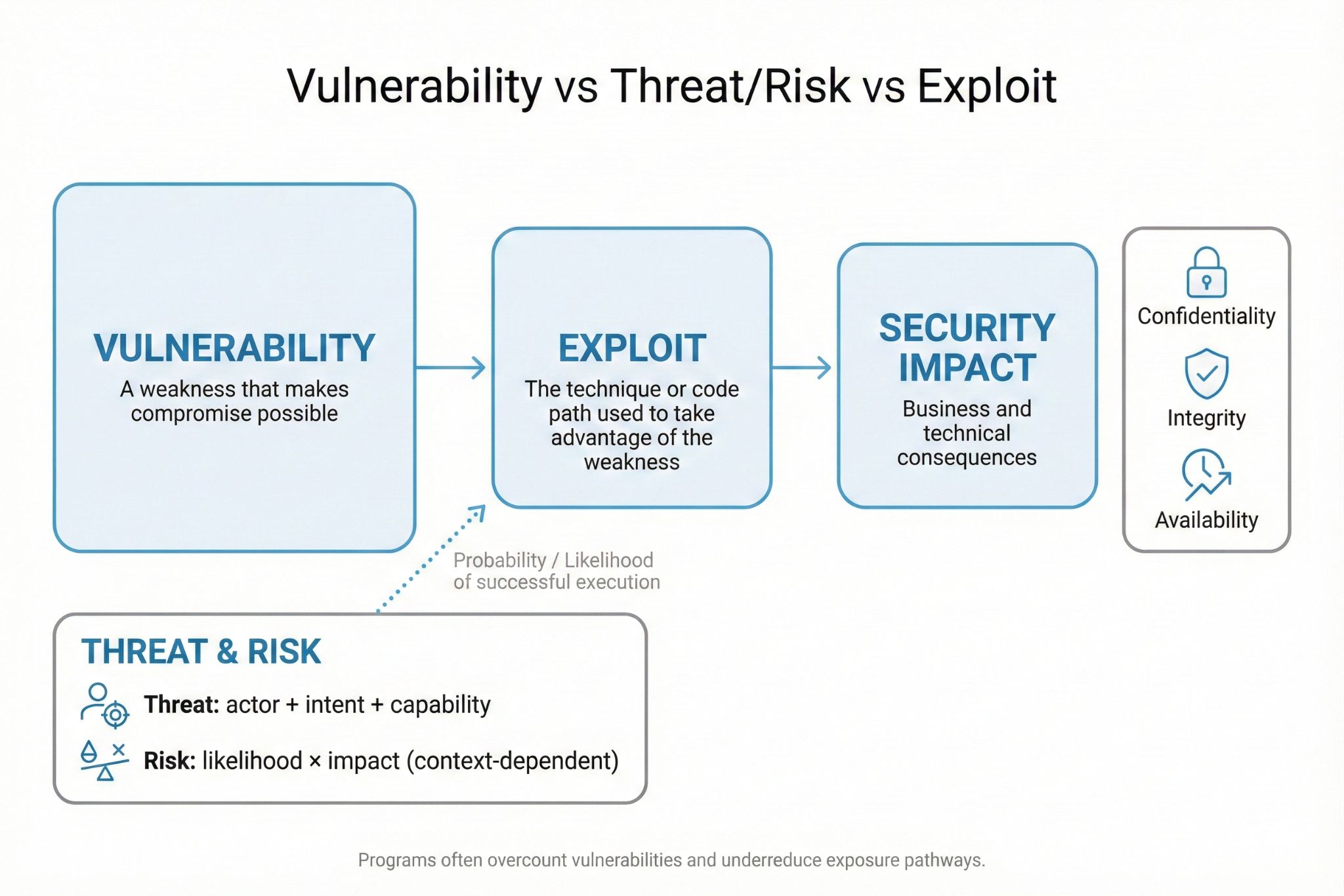
One detail in the diagram is especially important: security impact is not exactly the same as risk.
- Impact is what could go wrong if the event succeeds.
- Risk considers both the possible impact and the likelihood that it will happen.
For a beginner-friendly model:
This is not always a literal calculation with exact numbers. Often, a team uses labels such as low, medium, high, and critical. The point is to consider both sides. A serious weakness with little chance of being reached may be lower risk than the same weakness exposed to many attackers.
Look closely at each term
Threat: a possible source of harm
A threat is a person, event, condition, or action that has the potential to cause harm. The official cybersecurity definition is broad on purpose: threats can be intentional, accidental, physical, or environmental.
Examples include:
- A criminal trying to steal account information.
- A phishing email that tries to trick someone.
- Malware.
- A disgruntled employee misusing legitimate access.
- A laptop being stolen.
- A fire, flood, or power outage.
A threat is not automatically a successful attack. “An attacker may try to access an account” is a threat. If the attacker actually gains access, that is an incident or security event that needs attention.
Vulnerability: a weakness in the asset or its protection
A vulnerability is a weakness that leaves a system more open to harm. It may be a bug in software, an unsafe setting, an outdated program, a missing procedure, or a weak human process.
Examples include:
- Software that has not received a security update.
- A default password that was never changed.
- A website that accepts unsafe input.
- A computer left unlocked in a public place.
- An account protected only by a short, easy-to-guess password.
- A backup that was never tested.
The vulnerability belongs to the system, process, or protection—not to the attacker. An attacker is a threat; the unpatched software is a vulnerability.
Exploit: the method used against the weakness
An exploit is the technique or code path used to take advantage of a vulnerability. It can be a program, a crafted request, a sequence of actions, or a physical method.
For instance:
- If a door is unlocked, entering through it is the method that uses the weakness.
- If a practice account has an extremely weak password, repeated login guesses are a possible exploit method.
- If a web application mishandles input, a specially formed request could be an exploit.
In this course, you will encounter the word exploit in authorized training labs. A security professional may use a harmless, controlled exploit to verify whether a weakness is real and to demonstrate why it should be fixed. The activity is ethical only when it follows the authorization and scope rules from the previous lesson.
Risk: likelihood combined with consequences
Risk is the possibility of an unwanted outcome when a threat takes advantage of a vulnerability. It is not merely “a bug exists,” and it is not merely “an attacker exists.” It is the overall concern created by the combination.
When estimating risk, ask two questions:
- Likelihood: How likely is successful exploitation?
- Impact: If it succeeds, how much harm could result?
A publicly reachable service with a known, easy-to-use weakness may have higher likelihood than a service available only on a private local network. A weakness involving customer payment information may have higher impact than one affecting an unimportant practice file.
A formal vocabulary check
The NICCS glossary collects definitions used across U.S. cybersecurity work. Its wording is more formal than you need to memorize, but it confirms the key distinction: a threat has the potential to exploit a vulnerability; risk concerns likelihood and consequences.
Read the formal definitions of threat, vulnerability, exploit, and risk in the NICCS glossary. This is a useful professional reference when you want to check whether you are using security terminology precisely.
Use the page search function to find each exact definition in the glossary’s “T,” “V,” “R,” and “E” entries. In the “T” entry, read the threat definition. In the “V” entry, read the vulnerability definition. In the “R” entry, read the risk definition. Finally, in the “E” entry, read the exploit definition. Focus on the different job each term performs rather than trying to memorize the source names.
Follow one scenario from start to finish
Consider this hypothetical situation. Do not test any real account or service.
A small club has a member portal. One account uses the password Welcome123, and the portal does not use multi-factor authentication.
We can label the story carefully:
| Part of the story | Correct label | Why |
|---|---|---|
| Someone who wants to enter accounts without permission | Threat | This is a potential source of harm |
| The short, predictable password and absence of MFA | Vulnerability | These are weaknesses in protection |
| A method that tries likely passwords until one works | Exploit | This is the technique used against the weakness |
| Members’ private information could be viewed or changed | Impact | This describes the possible harm |
| The chance of unauthorized access and the resulting harm | Risk | This combines likelihood and impact |
Notice what would be incorrect:
- Calling
Welcome123an “exploit” is wrong; it is the weakness. - Calling the attacker a “vulnerability” is wrong; the attacker is the threat.
- Calling data theft “risk” is incomplete; data theft is a possible impact or outcome. The risk is the possibility of that outcome, considering how likely and harmful it is.
A useful professional sentence format is:
Because of [vulnerability], [threat] could use [exploit method] to cause [impact], creating [risk level].
Applied to the scenario:
Because the account has a predictable password and no MFA, an account attacker could use repeated login guesses to gain access to member information, creating a high risk of unauthorized access if the portal is exposed to the internet.
You do not need to know exact risk-scoring systems yet. What matters is being able to explain why a risk exists.
The CIA triad: what kind of impact is at stake?
The diagram introduced the CIA triad, which describes three important types of security impact. CIA here does not refer to an organization; it stands for:
| Security property | Meaning | Example of harm |
|---|---|---|
| Confidentiality | Information is visible only to authorized people | Someone views private member records |
| Integrity | Information and systems are not changed improperly | Someone alters an account’s email address or grades |
| Availability | Systems and data remain usable when needed | A service is unavailable during an important event |
Return to the club-portal example:
- Viewing private member details harms confidentiality.
- Changing a member’s role or contact details harms integrity.
- Preventing members from reaching the portal harms availability.
A single issue can affect more than one part of CIA. If an attacker enters an administrator account, they might view information, alter it, or lock other people out.
Why context changes the risk
The same vulnerability does not always mean the same risk. Context changes both likelihood and impact.
Imagine two intentionally vulnerable practice web services:
| Situation | Likelihood | Impact | Overall risk |
|---|---|---|---|
A service runs only on your own computer at localhost, contains no real data, and is used for a course lab |
Low | Low | Low, but still worth learning from |
| The same vulnerable service is public on the internet and stores real customer records | Higher | High | High or critical |
The software weakness may be identical. But the second system is exposed to more possible threats and has much more valuable data. That raises risk.
This is also why later course labs will use local targets and designated sandboxes. They let you observe vulnerabilities and controlled exploit behavior without putting other people’s systems or data at risk.
Reducing risk: fix what you can control
Defenders cannot make every threat disappear. Criminals, mistakes, device failures, and natural events can still exist. But they can reduce risk by reducing likelihood, reducing impact, or both.
For example:
- Patch software to remove known vulnerabilities.
- Use strong, unique passphrases and MFA to make account attacks less likely to succeed.
- Limit access so fewer people and systems can reach sensitive services.
- Use backups and recovery plans to reduce the impact of data loss or ransomware.
- Monitor logs and alerts to detect suspicious activity earlier.
- Train users to recognize phishing and report it.
This is often called defense in depth: using multiple protections rather than trusting a single one. Even if one weakness remains, another control may stop or limit an exploit.
Key takeaways
You can now separate the four terms:
- A threat is a potential source of harm, such as an attacker, malware, accident, or outage.
- A vulnerability is a weakness in a system, configuration, process, or protection.
- An exploit is the method or technique that takes advantage of a vulnerability.
- Risk is the possibility of harm, assessed through likelihood and impact.
- Impacts commonly affect confidentiality, integrity, availability, or more than one of them.
- A risk statement becomes clearer when it links the weakness, possible threat action, exploit method, and impact.
Next, you will turn this safety and vocabulary foundation into a working environment by installing Ubuntu through Windows Subsystem for Linux and creating a dedicated directory for course practice files.