Hello! Welcome back to our journey building the simple-bank API.
In the last lesson, we learned how to manage dependencies with go get and go mod tidy. You saw that whenever we added or removed a dependency, a file named go.sum was either created or updated. You now have a go.mod that lists what your project needs and a go.sum file that, until now, has been a bit of a mystery.
Today, we're going to solve that mystery.
Today's Learning Outcome: Explain the role of the go.sum file in ensuring dependency integrity and creating reproducible builds.
This is a critical topic in software engineering. For any robust system, especially one like the message broker you aim to build, you must be able to guarantee that the code you build today is the exact same code you build tomorrow, and that none of its components have been maliciously altered. The go.sum file is Go's primary mechanism for providing this guarantee.
What is go.sum and What's Inside?
At its core, the go.sum file is a log of cryptographic checksums for every version of every dependency your project uses, both direct and indirect. Think of it as a "lock file" for the content of your dependencies, while go.mod is the lock file for their versions.
Take a look at your own go.sum file in the simple-bank project. You'll see lines that look something like this:
To understand the structure, let's break it down.
The article 'Talking about go.sum' by spacewander provides an excellent breakdown of the file's format. It clarifies what each part of a line represents.
Please find the section titled 'The format of go.sum'. Read the entry structure, and focus on understanding the three components of each line and the fact that there are often two entries for a single module version.
As the article explains, each line follows the pattern:<module-path> <version>[/go.mod] <hash>
You'll notice two key things:
- The hash starts with
h1:, which signifies it's a SHA-256 hash. - For a single dependency version (e.g.,
github.com/google/uuid v1.3.0), there are typically two entries:- One for the module's source code files (as a
.ziparchive):github.com/google/uuid v1.3.0 h1:... - One for just its
go.modfile:github.com/google/uuid v1.3.0/go.mod h1:...
- One for the module's source code files (as a
This separation is important. The hash of the go.mod file verifies the integrity of that module's own dependency list, while the hash of the full module verifies the integrity of its source code. Together, they lock down the entire dependency graph.
The following video provides a great visual walkthrough of how go get generates this file and what it contains.
EVERYTHING You SHOULD know about Go Modules (Go Basics #8)
This segment from 'EVERYTHING You SHOULD know about Go Modules' by Steve Hook demonstrates the creation of the go.sum file and gives a clear explanation of its contents.
Starting around two and a half minutes in, watch the go.sum file. The first part shows the go.sum file being generated, and the second part dives into its structure, contrasting it with the go.mod file.
The "Why": Integrity and Reproducible Builds
Now that we know what is in the go.sum file, let's focus on why it's so critical.
1. Ensuring Dependency Integrity
As a senior software engineer, you're undoubtedly aware of supply-chain attacks, where malicious code is injected into a dependency that your project relies on. The go.sum file is your first line of defense against this.
When the Go toolchain downloads a module, it calculates its SHA-256 hash. It then compares this newly calculated hash against the one recorded in your go.sum file.
- If they match, the build proceeds.
- If they do not match, the build fails immediately with an error.
This verification step guarantees that the code you just downloaded is bit-for-bit identical to the code that was used when the go.sum entry was first created. It prevents an attacker from tampering with a library's repository (e.g., force-pushing a malicious change to a version tag) and having it silently pulled into your project.
This video from Hitesh Choudhary frames the importance of go.sum in the context of real-world security threats like the SolarWinds attack.
Starting around 8 minutes and 50 seconds in, watch the go.sum explanation. The video clearly explains how go.sum acts as a safeguard against malicious code injection in your dependencies.
2. Enabling Reproducible Builds
The direct consequence of ensuring integrity is that you get reproducible builds. Because go.sum locks down the exact content of every single dependency (direct and indirect), any developer on your team, or any CI/CD server, that checks out the same commit of your repository will build the project with the exact same dependency code.
This eliminates "works on my machine" problems related to dependencies and ensures that a build artifact produced today is identical to one produced a month from now from the same source code.
What if a dependency is new? The Go Checksum Database
A key question arises: what happens when you add a new dependency that isn't yet in go.sum? How can you trust the initial download?
Go doesn't just trust the code it downloads. Instead, it queries a global, append-only, and publicly auditable server called the Go Checksum Database (or SumDB), which by default is sum.golang.org. This database acts as a global witness, holding the checksums for public modules.
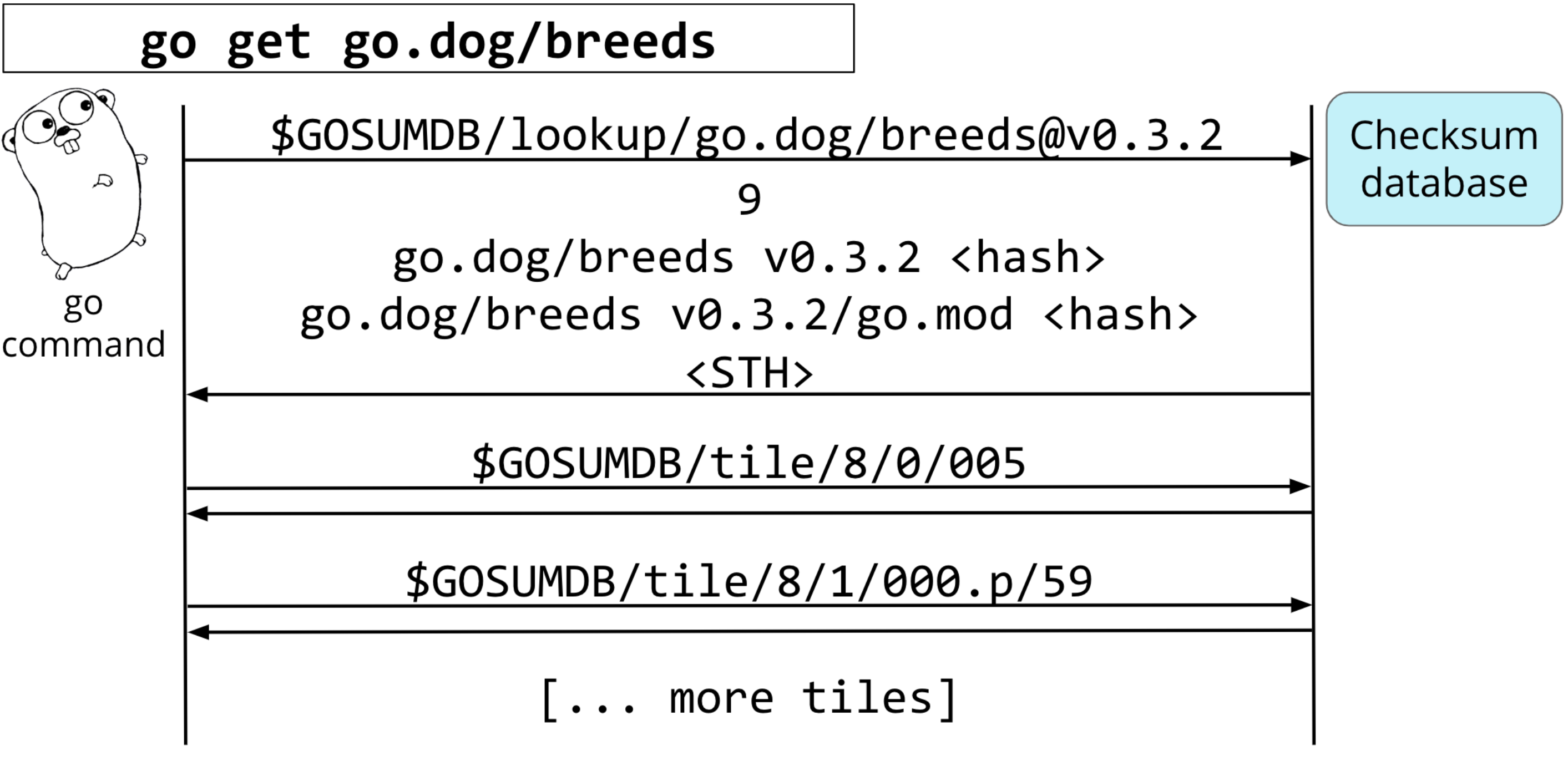
This process, detailed in the GitLab documentation below, provides a "trust-on-first-use" mechanism that is far more secure than simply downloading and hashing the code yourself.
The 'Dependency Management in Go' guide from GitLab offers a concise, technical summary of this checksum verification process.
Read the section 'Checksums' for a direct explanation. Then, skim the 'Fetching' section, paying close attention to steps 4, 5, and 6, which show exactly where go.sum validation fits into the overall process.
Hands-On: Verifying Integrity
Go provides a command to explicitly trigger the integrity check: go mod verify. This command checks that the dependencies cached on your disk match the hashes in go.sum.
Let's try a quick experiment in your simple-bank project directory.
-
Verify the current state. Run this command in your terminal:
go mod verifyIt should print
all modules verified. -
Tamper with the
go.sumfile. Opengo.sumin your editor. Find any hash value and change a single character. For example, change aBto aC. Save the file. -
Verify again. Run
go mod verifyone more time.go mod verifyThis time, the command will fail, reporting a checksum mismatch for the dependency you altered. The Go toolchain has detected that the expected content (from
go.sum) does not match the actual content in the module cache. -
Fix the file. How do you fix it? You can simply run
go mod tidy. It will re-evaluate your dependencies and correct the invalid hash ingo.sum.go mod tidy -
Final verification. Run
go mod verifyagain, and you'll seeall modules verified.
This simple exercise demonstrates the entire security loop in action. This next video clip shows the go mod verify command in a live demonstration.
Let's return to Hitesh Choudhary's video to see a practical demonstration of the go mod verify command.
At around 18 and a half minutes, watch the command in action.
Conclusion
You've now demystified the go.sum file and understand its vital role. It is not an optional artifact to be ignored; it is a cornerstone of Go's security and dependency management strategy.
Here are the key takeaways from this lesson:
- The
go.sumfile contains cryptographic hashes for all direct and indirect dependencies. - It ensures dependency integrity by verifying that downloaded module content matches the recorded hashes, preventing supply-chain attacks.
- It enables reproducible builds by ensuring everyone on a team builds with the exact same dependency code.
- The Go Checksum Database provides a global source of truth for verifying new dependencies.
- The
go mod verifycommand allows you to manually check the integrity of your project's dependencies at any time.
Next Up
We have now covered the essential files and commands for initializing a project and managing its dependencies. The next logical step is to give our project a clean, scalable structure. In the next lesson, we will organize our simple-bank API code into standard Go project layout directories: cmd/, internal/, and pkg/. This will set us up for building a well-organized and maintainable application.