Hello again. Welcome back to building our message broker.
In our last lesson, we established a crucial foundation: a reliable message framing layer. Using length-prefixing and io.ReadFull, we created Encode and Decode functions that can pull a complete, distinct message payload as a raw []byte from a continuous TCP stream.
Today, we take the next logical step. That []byte payload is still just an opaque sequence of bytes. Our goal is to give it meaning by converting it into our Go protocol structs (like ProduceRequestBody) and vice versa.
Your Goal for Today
Learning Outcome: Encode and decode protocol messages using binary serialization with encoding/binary.
This lesson is all about the art of serialization—the process of translating a data structure into a format that can be stored or transmitted. You will learn to use Go's encoding/binary package to implement the core logic that allows our client and server to understand each other's requests and responses, moving from simply framing data to interpreting it.
1. Why Binary Serialization?
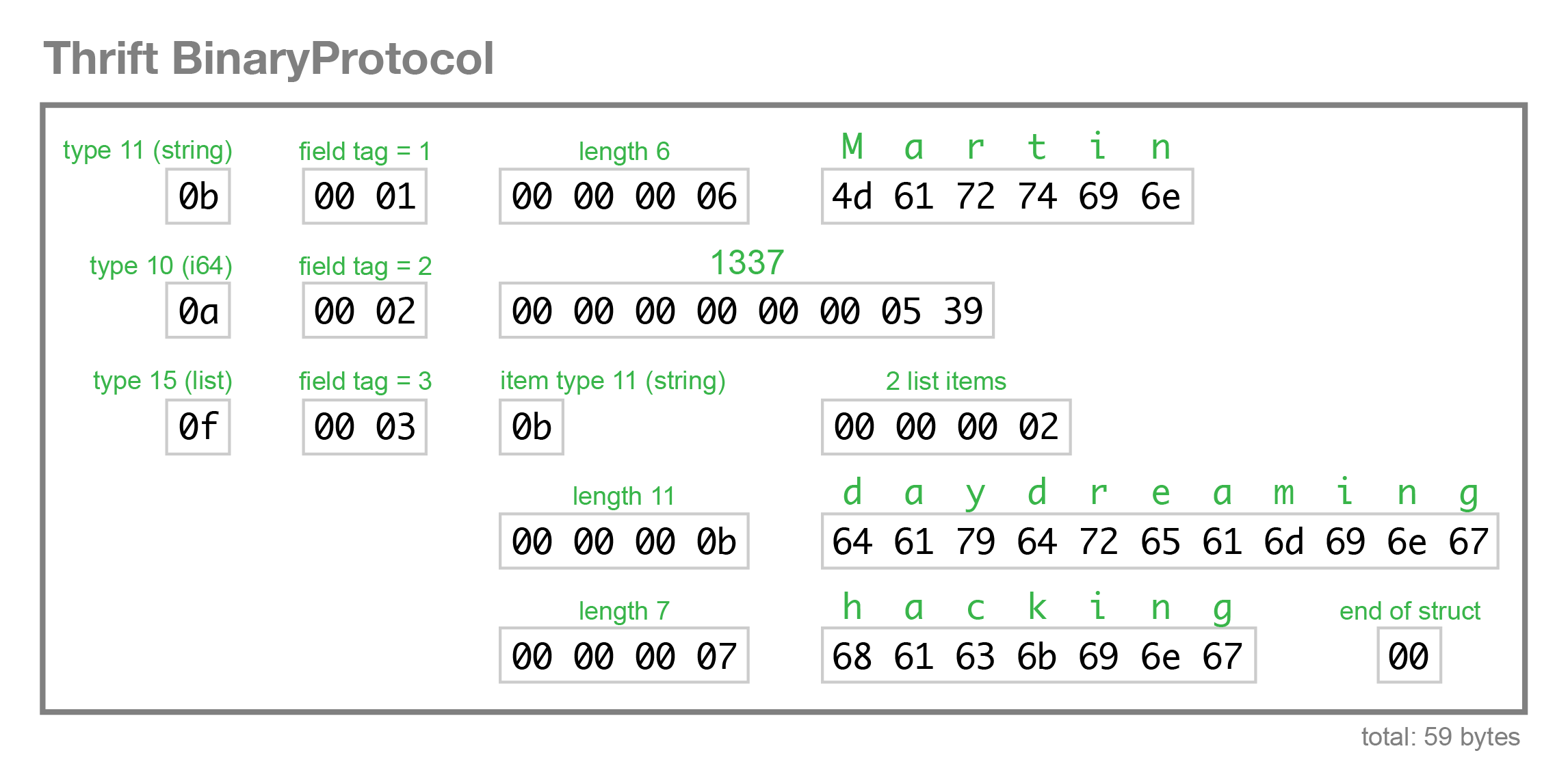
Before we write code, it's important to understand the landscape. In software engineering, serialization is a common task, and you have many options, from text-based formats like JSON or XML to binary formats like Protocol Buffers, Avro, or Thrift.
For our message broker, where performance and low overhead are key design goals, a custom binary protocol is a strong choice. It allows us to create messages that are much smaller and faster to parse than their JSON equivalents. However, this control comes with responsibility. We must handle details that higher-level formats manage automatically.
To get a clear picture of these challenges, let's watch a short segment from a talk on binary serialization. Although the examples are in C++, the concepts are universal and highly relevant.
Building a High-Performance Binary Serialization Format with In-Place Modification - Hamish Morrison
In this video, 'Building a High-Performance Binary Serialization Format', Hamish Morrison provides an excellent overview of the fundamental problems in binary serialization.
Please watch from 00:58 to 03:10. The speaker defines serialization and highlights three common issues with a naive approach: endianness, inconsistent type sizes across platforms, and struct padding bytes. This sets the stage for why we need a robust library like Go's encoding/binary.
As the video explains, simply copying the memory of a struct to the network is not portable or safe. We must define a clear, unambiguous byte-level representation for our data. This means making explicit choices about:
- Endianness: The order of bytes for multi-byte numbers. We will use Big Endian, which is the conventional network byte order.
- Data Types: How to represent integers, strings, and byte arrays.
This is precisely what Go's encoding/binary package is for.
2. Mastering encoding/binary
Go's standard library provides two primary ways to perform binary serialization, each with its own trade-offs. The following article gives a fantastic tour of both.
Fixed/Variable-length encoding in Go
The article 'Fixed/Variable-length encoding in Go' by Ryo Nakao is a practical guide to the encoding/binary package. It clearly explains the two main approaches.
Please read the sections 'binary.ByteOrder', 'binary.Write/Read', and the performance benchmark that follows. You'll learn: The manual method using binary.BigEndian.PutUint32() for direct byte slice manipulation. The convenience method using binary.Read() and binary.Write() which use reflection. The significant performance difference between the two.
Key Takeaways from the Article
- Manual (
binary.ByteOrder): This approach is extremely fast and generates zero memory allocations (0 allocs/op). It gives you full control but requires you to manage buffer offsets manually. - Convenience (
binary.Read/Write): This method is simpler to write, as it can automatically serialize an entire struct into anio.Writer. However, it relies on reflection, making it significantly slower and causing memory allocations. Crucially, it only works for data types of a fixed size.
Our protocol structs, like ProduceRequestBody, contain variable-length fields (TopicName string and Data []byte). Therefore, the convenient binary.Write is not an option for us. We must use the manual, high-performance ByteOrder approach.
3. Implementing Marshal and Unmarshal for Our Protocol
Let's put this knowledge into practice. A standard Go idiom for custom serialization is to implement the encoding.BinaryMarshaler and encoding.BinaryUnmarshaler interfaces.
type BinaryMarshaler interface {
    MarshalBinary() (data []byte, err error)
}

type BinaryUnmarshaler interface {
    UnmarshalBinary(data []byte) error
}
We will add these methods to our message body structs, starting with ProduceRequestBody.
MarshalBinary: From Struct to []byte
Let's define the MarshalBinary method for our ProduceRequestBody struct. Our on-the-wire format for this struct will be:[TopicName Length (2 bytes)][TopicName (N bytes)][PartitionID (4 bytes)][Data Length (4 bytes)][Data (M bytes)]
We'll use a bytes.Buffer as a convenient io.Writer to build our byte slice.
// file: internal/protocol/messages.go

package protocol

import (
    "bytes"
    "encoding/binary"
    "errors"
    "io"
)

// Let's assume these structs are defined from our protocol design phase.
type ProduceRequestBody struct {
    TopicName   string
    PartitionID uint32
    Data        []byte
}

// ... other message structs

// MarshalBinary implements encoding.BinaryMarshaler.
func (p *ProduceRequestBody) MarshalBinary() ([]byte, error) {
    var buf bytes.Buffer

    // 1. Write TopicName length (as uint16, 2 bytes)
    // We choose uint16, limiting topic names to 65535 bytes, which is plenty.
    if err := binary.Write(&buf, binary.BigEndian, uint16(len(p.TopicName))); err != nil {
        return nil, err
    }
    // 2. Write TopicName itself
    if _, err := buf.WriteString(p.TopicName); err != nil {
        return nil, err
    }

    // 3. Write PartitionID (uint32, 4 bytes)
    if err := binary.Write(&buf, binary.BigEndian, p.PartitionID); err != nil {
        return nil, err
    }

    // 4. Write Data length (as uint32, 4 bytes)
    // We allow larger data payloads, so we use uint32.
    if err := binary.Write(&buf, binary.BigEndian, uint32(len(p.Data))); err != nil {
        return nil, err
    }
    // 5. Write Data itself
    if _, err := buf.Write(p.Data); err != nil {
        return nil, err
    }

    return buf.Bytes(), nil
}
Note: Even though we're using binary.Write here, we are not writing the whole struct at once. We are writing each fixed-size numeric field individually, which is efficient and avoids reflection on the entire struct.
UnmarshalBinary: From []byte to Struct
The UnmarshalBinary method does the exact reverse. It takes a byte slice and populates the struct fields. Using a bytes.Reader provides a helpful io.Reader interface over the slice.
// file: internal/protocol/messages.go (continued)

// UnmarshalBinary implements encoding.BinaryUnmarshaler.
func (p *ProduceRequestBody) UnmarshalBinary(data []byte) error {
    r := bytes.NewReader(data)

    // 1. Read TopicName length
    var topicLen uint16
    if err := binary.Read(r, binary.BigEndian, &topicLen); err != nil {
        return err
    }

    // 2. Read TopicName
    topicNameBytes := make([]byte, topicLen)
    if _, err := io.ReadFull(r, topicNameBytes); err != nil {
        return err
    }
    p.TopicName = string(topicNameBytes)

    // 3. Read PartitionID
    if err := binary.Read(r, binary.BigEndian, &p.PartitionID); err != nil {
        return err
    }

    // 4. Read Data length
    var dataLen uint32
    if err := binary.Read(r, binary.BigEndian, &dataLen); err != nil {
        return err
    }

    // 5. Read Data
    // A simple guard against malicious payloads
    const MaxDataSize = 1 << 20 // 1MB
    if dataLen > MaxDataSize {
        return errors.New("data payload too large")
    }
    p.Data = make([]byte, dataLen)
    if _, err := io.ReadFull(r, p.Data); err != nil {
        return err
    }

    return nil
}
With these two methods, we now have a complete, self-contained, and high-performance way to serialize and deserialize our ProduceRequestBody. You would repeat this pattern for every request/response body in our protocol.
4. Integrating with the Framing Layer
Now, we can see how this lesson's work fits perfectly with the previous one.
On the client (sending a request):
- Create the request struct:
reqBody := &protocol.ProduceRequestBody{...} - Serialize it:
payload, err := reqBody.MarshalBinary() - Frame and send it:
protocol.Encode(conn, protocol.MsgProduceRequest, payload)
On the server (handling a request):
- Decode the frame:
msgType, payload, err := protocol.Decode(conn) - Check the type and deserialize:
if msgType == protocol.MsgProduceRequest {
    var reqBody protocol.ProduceRequestBody
    if err := reqBody.UnmarshalBinary(payload); err != nil {
        // Handle error
    }
    // Process reqBody...
}
Conclusion
Today you've moved from the physical layer of our protocol (framing) to the presentation layer (serialization). You've implemented the logic that translates between the broker's native Go structs and the compact binary format sent over the network.
Key Takeaways:
- Binary serialization is chosen for performance and size efficiency in systems like a message broker.
encoding/binaryis Go's standard tool for this, but requires careful handling of endianness and data layout.- The high-performance
ByteOrderapproach is necessary for protocols with variable-length fields like strings or byte slices. - Implementing the
BinaryMarshalerandBinaryUnmarshalerinterfaces provides a clean, idiomatic way to make your structs serializable. - The pattern for serializing variable-length data is to first write its length as a fixed-size integer, followed by the data itself.
Next Up
We now have all the pieces for a complete client-server interaction: a protocol design, a framing layer, and a serialization mechanism. In the next lesson, we will build a function on the client side to establish a connection to our TCP server, send a fully framed and serialized message, and prepare to receive a response. This will complete our first end-to-end request-response cycle.