Hello again! Welcome back.
In our last lesson, you successfully built the client-side logic to connect to our broker, serialize a Produce request, and send it over the wire as a single, framed message. You've completed the "write" half of the client-server interaction.
Today, we'll build the other half. After the server processes a request, it sends a response back. The client needs to be able to receive this response, decode it, and understand its contents.
Your Goal for Today
Learning Outcome: Implement a read loop in the TCP client to receive and decode framed messages from the server.
You will implement the logic to listen on the TCP connection, correctly parse our length-prefixed binary messages from the incoming byte stream, and deserialize the payload back into a Go struct. This completes the fundamental request-response cycle.
1. The Challenge of Reading from a TCP Stream
As we've discussed, TCP provides a reliable, ordered stream of bytes, not a stream of messages. When the client calls conn.Read(), the operating system might return:
- A fragment of a single message.
- Exactly one full message.
- One and a half messages.
Without a framing protocol, the client has no way to know where one message ends and the next begins. This is the problem our length-prefixed framing solves. Our protocol.Decode function, which you've already implemented for the server, is the key to solving this on the client side as well.
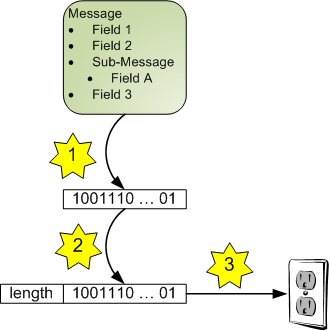
The core logic for reliably reading one framed message from a stream is always the same:
- Read a fixed number of bytes to get the header.
- Parse the payload length from the header.
- Read exactly that many bytes to get the full payload.
For step 3, a simple conn.Read() is insufficient because it provides no guarantee it will return all the bytes you ask for in one call. The right tool for this job is io.ReadFull.
io.ReadFull(r io.Reader, buf []byte) reads exactly len(buf) bytes from r into buf. It will block until all bytes are read, or it will return an error (e.g., if the connection closes prematurely). This predictable behavior is essential for protocol implementation.
Let's look at how this pattern is implemented in practice.
How to Implement Custom Binary Protocols Over TCP in Go
The article 'How to Implement Custom Binary Protocols Over TCP in Go' provides a perfect implementation of a Decode function that correctly handles reading from a stream. It demonstrates the use of io.ReadFull to ensure message integrity.
Please read the section titled 'Decoding Messages'. Focus on how it first reads the fixed-size header and then uses io.ReadFull a second time to read the exact number of bytes for the payload, as determined from the header. This is the canonical pattern we will use.
This Decode function encapsulates the logic for reading a single, complete message, abstracting away the complexities of the underlying TCP stream.
2. The Read Loop
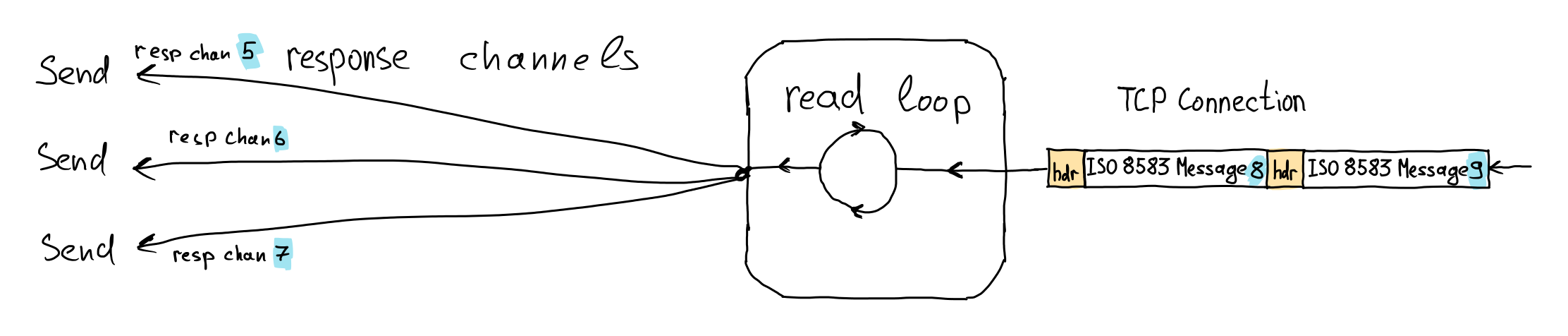
Now that we know how to read a single message, how does a client listen continuously? The simplest and most direct approach is an infinite for loop that blocks on each attempt to read a message.
for {
    // Block here until a full message is received and decoded.
    msg, err := protocol.Decode(conn)
    if err != nil {
        // Handle error (e.g., connection closed)
        if err == io.EOF {
            log.Println("Connection closed by server.")
        } else {
            log.Printf("Error decoding message: %v", err)
        }
        break // Exit the loop on error or EOF
    }

    // Process the successfully decoded message
    log.Printf("Received message of type %d", msg.Type)
}
This structure forms the heart of a TCP client's listening logic. In a more complex client, this loop would run in a dedicated goroutine, dispatching received messages to the parts of the application that are waiting for them.
3. Hands-On: Completing the Request-Response Cycle
Let's get this working in our project. This will involve two steps:
- Updating the server to send a response.
- Updating the client to read that response.
Step 1: Update the Server to Respond
First, our server's handleProduceRequest function needs to send an acknowledgment back to the client. Let's make it send a ProduceResponse after successfully writing the message to its (conceptual) log.
In your internal/protocol/protocol.go file, make sure you have the necessary message types and response body struct:
// internal/protocol/protocol.go

// ... existing MessageType constants

// Add response message types if you haven't already
const (
    // ...
    MsgProduceResponse MessageType = 2
)

// ProduceResponseBody defines the structure of a response to a produce request.
type ProduceResponseBody struct {
    PartitionID int32
    Offset      int64
}

func (b *ProduceResponseBody) MarshalBinary() ([]byte, error) {
    buf := new(bytes.Buffer)
    // Writing binary data can be done field by field.
    // We'll explore more robust ways later, but this is clear and effective.
    if err := binary.Write(buf, binary.BigEndian, b.PartitionID); err != nil {
        return nil, err
    }
    if err := binary.Write(buf, binary.BigEndian, b.Offset); err != nil {
        return nil, err
    }
    return buf.Bytes(), nil
}

func (b *ProduceResponseBody) UnmarshalBinary(data []byte) error {
    buf := bytes.NewReader(data)
    if err := binary.Read(buf, binary.BigEndian, &b.PartitionID); err != nil {
        return err
    }
    if err := binary.Read(buf, binary.BigEndian, &b.Offset); err != nil {
        return err
    }
    return nil
}
Note: Ensure your ProduceResponseBody also satisfies the encoding.BinaryMarshaler and encoding.BinaryUnmarshaler interfaces.
Now, update your handleProduceRequest function in cmd/server/main.go to send the response.
// cmd/server/main.go

func handleProduceRequest(conn net.Conn, reqHeader *protocol.Header, reqBody *protocol.ProduceRequestBody) {
    // For now, let's just log it. In later lessons, we'll write to a real log.
    log.Printf(
        "Received produce request for topic '%s', partition %d, with %d bytes of data.",
        reqBody.TopicName,
        reqBody.PartitionID,
        len(reqBody.Data),
    )

    // === ADD THIS SECTION ===
    // Send a response back to the client.
    // We'll pretend the message was written at offset 42.
    respBody := &protocol.ProduceResponseBody{
        PartitionID: reqBody.PartitionID,
        Offset:      42,
    }

    payload, err := respBody.MarshalBinary()
    if err != nil {
        log.Printf("Error marshalling response: %v", err)
        return // Can't send a response
    }

    err = protocol.Encode(conn, protocol.MsgProduceResponse, payload)
    if err != nil {
        log.Printf("Error encoding/sending response: %v", err)
    } else {
        log.Println("Successfully sent produce response.")
    }
    // === END OF ADDED SECTION ===
}
Step 2: Implement the Read Loop in the Client
Now, let's update cmd/client/main.go to wait for and process this response.
// cmd/client/main.go
package main

import (
	"bytes"
	"encoding/binary"
	"fmt"
	"io"
	"log"
	"net"

	"our-project/internal/protocol" // Use your project's module path
)

const serverAddr = "localhost:9000"

// ... keep your sendRequest function ...

func main() {
    // ... connection logic from previous lesson ...
    conn, err := net.Dial("tcp", serverAddr)
    if err != nil { /* ... */ }
    defer conn.Close()

    log.Println("Connection established. Sending a produce request...")

    reqBody := &protocol.ProduceRequestBody{
        TopicName:   "logs",
        PartitionID: 0,
        Data:        []byte("hello from client at " + conn.LocalAddr().String()),
    }

    err = sendRequest(conn, protocol.MsgProduceRequest, reqBody)
    if err != nil {
        log.Fatalf("Failed to send request: %v", err)
    }

    log.Println("Produce request sent successfully! Waiting for response...")

    // === ADD THE READ LOOP HERE ===
    // For this simple client, we expect exactly one response.
    msg, err := protocol.Decode(conn)
    if err != nil {
        if err == io.EOF {
            log.Fatal("Connection closed by server before response was received.")
        }
        log.Fatalf("Failed to decode response: %v", err)
    }

    // Check if the response is of the expected type
    if msg.Header.MsgType != protocol.MsgProduceResponse {
        log.Fatalf("Received unexpected message type: got %d, want %d",
            msg.Header.MsgType, protocol.MsgProduceResponse)
    }

    // Unmarshal the payload into the response body struct
    respBody := &protocol.ProduceResponseBody{}
    err = respBody.UnmarshalBinary(msg.Payload)
    if err != nil {
        log.Fatalf("Failed to unmarshal response body: %v", err)
    }

    log.Printf(
        "Successfully received produce response: PartitionID=%d, Offset=%d",
        respBody.PartitionID,
        respBody.Offset,
    )
}

// ... sendRequest function implementation ...
Now, run your server first, then run your client. You should see the full conversation in your terminal logs:
- Client connects and sends the request.
- Server receives the request and sends a response.
- Client receives the response, decodes it, and prints the offset.
You have now built a complete, synchronous, request-response cycle using a custom binary protocol.
Conclusion
In this lesson, you bridged the final gap in our client-server communication. You've seen that reading from a TCP stream requires the same discipline as writing to it, with careful attention to message boundaries.
Key Takeaways:
- TCP is a stream protocol; you must implement your own framing to delineate messages.
io.ReadFullis the essential tool for reliably reading a specific number of bytes from anio.Reader.- A
forloop calling aDecodefunction is the fundamental pattern for a client-side read loop. - The client's decoding logic is the symmetric opposite of the server's encoding logic, using the same shared protocol definitions.
Next Up
Our current client is simple: it sends one request, waits for one response, and then exits. This is a blocking, synchronous model. A real-world client needs to handle multiple requests, potentially in parallel, without blocking the entire application. In the next lesson, we will compose our sendRequest and receiveResponse logic into a more robust client that can manage a full request-response cycle asynchronously, setting the stage for concurrent operations.