Hello! Welcome back to our project.
In the last lesson, we built the foundation of our message broker: a concurrent TCP server that uses the idiomatic "one goroutine per connection" pattern. You saw how Go's runtime makes this model incredibly efficient. However, as we noted, our server has a critical flaw: when we stop it with Ctrl+C, it terminates abruptly, dropping all active client connections. This is unacceptable for a reliable system.
Today, we will fix that.
Your Goal for Today
Learning Outcome: Implement concurrent connection handling using a goroutine per connection and sync.WaitGroup for graceful shutdown.
We will transform our basic server into a robust service that can shut down cleanly. This involves two key Go concurrency primitives:
sync.WaitGroup: To keep track of our activehandleConnectiongoroutines.os/signal: To catch operating system signals (likeCtrl+C) and initiate an orderly shutdown sequence.
By the end of this lesson, our server will, upon receiving a shutdown signal, stop accepting new connections but wait patiently for all existing connections to finish their work before exiting.
1. The Problem: Tracking Concurrent Work
Our current server fires off goroutines for each connection and then forgets about them. The main goroutine has no idea if these worker goroutines are still active. To shut down gracefully, we first need a way to track them.
This is the classic use case for sync.WaitGroup. Think of it as a concurrent-safe counter for active goroutines.
wg.Add(n): Increments the counter byn. We'll callwg.Add(1)just before we launch a new goroutine.wg.Done(): Decrements the counter by one. We'lldeferthis call inside our goroutine to ensure the counter is decremented when the goroutine finishes, no matter how it exits.wg.Wait(): Blocks the calling goroutine until the counter becomes zero.
The following video explains this pattern in the context of a server shutdown.
How to Gracefully Shutdown a Go Server
The video 'How to Gracefully Shutdown a Go Server' by cdruc provides a clear explanation of why we need to track background goroutines and how to use sync.WaitGroup to do it.
Please watch from 05:53 to 08:18. Focus on how the WaitGroup is used: A WaitGroup variable is created. wg.Add(1) is called before the go statement. defer wg.Done() is called inside the goroutine's function. wg.Wait() is called in the main function to block until all goroutines are finished.
A crucial detail for an experienced developer is avoiding race conditions. If you were to call wg.Add(1) inside the new goroutine, it's possible for the main function to race ahead and call wg.Wait() before wg.Add(1) ever runs, causing a premature exit.
This excellent article on TCP server shutdown explains this exact safety pattern.
Graceful shutdown of a TCP server in Go
The article 'Graceful shutdown of a TCP server in Go' by Eli Bendersky is a fantastic resource. We'll look at a small but vital footnote it contains about WaitGroup safety.
Please read the short footnote labeled '[[1]]'. You can find it at the very bottom of the page. It reinforces the importance of calling wg.Add(1) before the go statement.
2. Triggering the Shutdown with OS Signals
Now that we have a way to wait for goroutines, we need a trigger to start the shutdown process. The standard way to do this is by listening for signals from the operating system, such as SIGINT (sent when you press Ctrl+C) and SIGTERM (a generic termination signal sent by process managers).
The os/signal package in Go provides the tools for this. We can create a channel and tell the runtime to send os.Signal values to it when they occur.
The same video we just watched demonstrates this clearly.
How to Gracefully Shutdown a Go Server
Let's return to the 'How to Gracefully Shutdown a Go Server' video to see how to capture OS signals.
Now watch from 02:41 to 03:38. This section shows how to use signal.NotifyContext (a modern convenience wrapper around signal.Notify) to create a context that is canceled when a SIGTERM or SIGINT signal is received. The key takeaway is that we can create a mechanism that blocks the main goroutine until a shutdown signal arrives.
With this, we have the two pieces of our puzzle: a way to track goroutines (WaitGroup) and a way to trigger the shutdown (signal). Now let's combine them.
3. The Graceful Shutdown Sequence
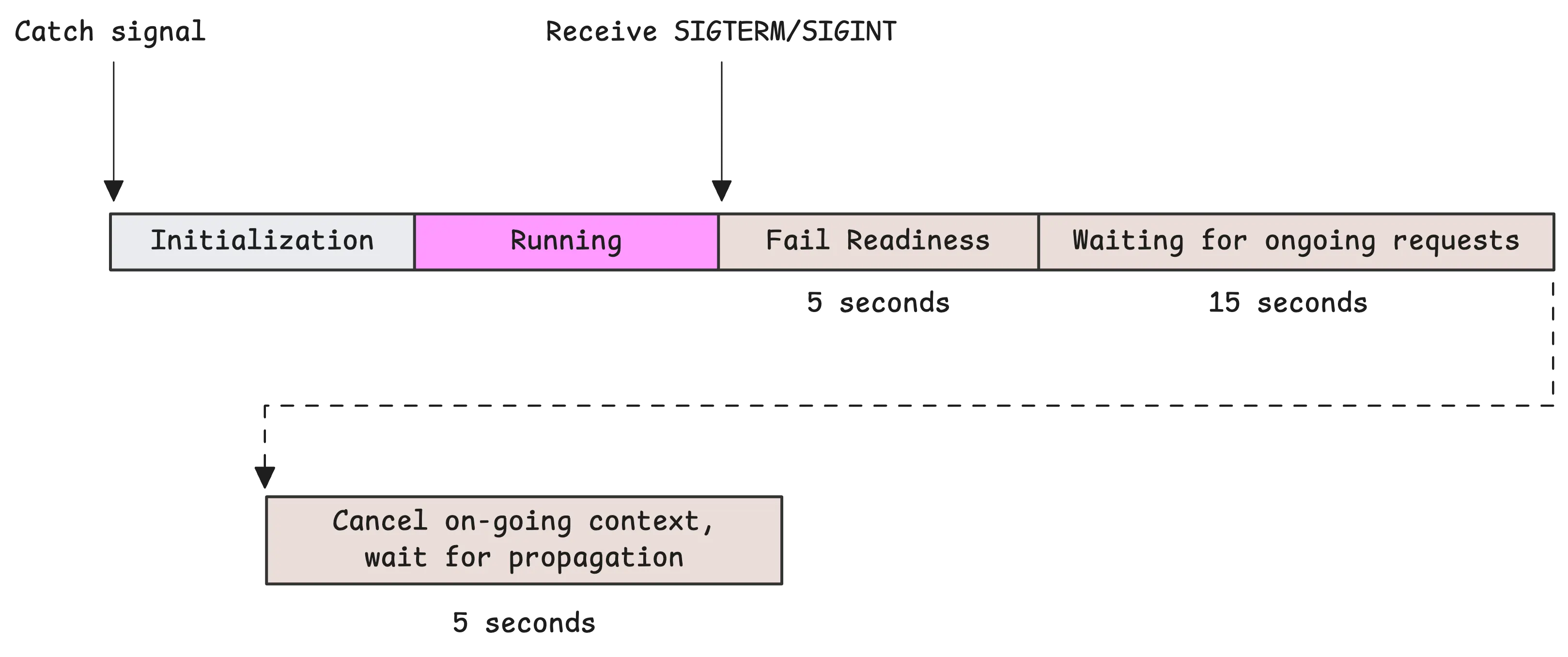
Here is the complete logic for a graceful shutdown, which is a fundamental pattern in Go services:
- The server starts its
listenerandWaitGroup. - A separate goroutine is launched to listen for OS signals on a channel.
- The server enters its
Acceptloop. For each new connection, it callswg.Add(1)and launches ahandleConnectiongoroutine. - Eventually, a
SIGINTorSIGTERMsignal is received by the signal-handling goroutine. - Shutdown Step 1: Stop accepting new connections. The signal handler immediately calls
listener.Close(). This is critical, as it causes the blockinglistener.Accept()call in the main loop to unblock and return an error. - Shutdown Step 2: Wait for existing connections. The
Acceptloop terminates. Themaingoroutine then callswg.Wait(). This call will block until every singlehandleConnectiongoroutine has finished and calledwg.Done(). - Shutdown Step 3: Exit. Once
wg.Wait()returns, we know all connections have been closed cleanly. Themainfunction can now print a final log message and exit.
This timeline visualizes the process beautifully.
4. Hands-On: Implementing Graceful Shutdown
Let's update the cmd/server/main.go file from our last lesson. The following code integrates the WaitGroup and signal handling logic we've just discussed.
The changes are clearly marked with comments.
cmd/server/main.go
package main

import (
	"bufio"
	"fmt"
	"io"
	"log"
	"net"
	"os"
	"os/signal"
	"sync"
	"syscall"
)

func main() {
	// --- NEW: Create a WaitGroup to track active goroutines. ---
	var wg sync.WaitGroup

	// 1. Listen for incoming connections.
	listener, err := net.Listen("tcp", ":8080")
	if err != nil {
		log.Fatalf("Failed to bind to port 8080: %v", err)
	}
	// We no longer defer listener.Close() here. We'll close it strategically.
	log.Println("TCP server listening on port 8080")

	// --- NEW: Set up a channel to receive OS signals. ---
	sigChan := make(chan os.Signal, 1)
	signal.Notify(sigChan, syscall.SIGINT, syscall.SIGTERM)

	// --- NEW: Goroutine to handle shutdown. ---
	go func() {
		// Block until a signal is received.
		sig := <-sigChan
		log.Printf("Received signal: %s. Shutting down...", sig)

		// Close the listener to stop accepting new connections.
		// This will cause the listener.Accept() call below to return an error.
		if err := listener.Close(); err != nil {
			log.Printf("Error closing listener: %v", err)
		}
	}()

	// 2. The Accept Loop.
	for {
		conn, err := listener.Accept()
		if err != nil {
			// When listener.Close() is called, Accept() returns an error.
			// We check if the server is shutting down and break the loop.
			// The error is expected, so we can just exit gracefully.
			log.Println("Listener closed, server shutting down.")
			break
		}

		log.Printf("Accepted connection from %s", conn.RemoteAddr())

		// --- NEW: Increment the WaitGroup counter. ---
		wg.Add(1)

		go handleConnection(conn, &wg) // Pass the WaitGroup pointer.
	}

	// --- NEW: Wait for all active connections to finish. ---
	log.Println("Waiting for all connections to close...")
	wg.Wait()
	log.Println("All connections closed. Server stopped.")
}

// handleConnection now accepts a WaitGroup pointer.
func handleConnection(conn net.Conn, wg *sync.WaitGroup) {
	// --- NEW: Defer wg.Done() to decrement the counter when the function returns. ---
	defer wg.Done()
	defer conn.Close()
	defer log.Printf("Closing connection from %s", conn.RemoteAddr())

	reader := bufio.NewReader(conn)

	for {
		line, err := reader.ReadString('\n')
		if err != nil {
			if err != io.EOF {
				log.Printf("Read error: %v", err)
			}
			return
		}

		_, err = conn.Write([]byte("Echo: " + line))
		if err != nil {
			log.Printf("Write error: %v", err)
			return
		}
	}
}
The article "How to Build a Concurrent TCP Server for 10K+ Connections in Go" provides another excellent, complete example that you can use for reference. It combines all of these concepts into a production-ready structure. Skimming the "Graceful Shutdown" and "Putting It All Together" sections will solidify your understanding of this pattern.
5. Test Your New Server
Now for the satisfying part: seeing it work.
- Run the server:
go run ./cmd/server - Open a new terminal and connect a client:
telnet localhost 8080. Type something to verify it works. - Open a second terminal and connect another client:
telnet localhost 8080. - Now, go back to your server's terminal and press
Ctrl+C.
Observe the server's logs. You should see something like this:
2023/10/27 10:30:00 TCP server listening on port 8080
2023/10/27 10:30:05 Accepted connection from 127.0.0.1:54321
2023/10/27 10:30:10 Accepted connection from 127.0.0.1:54322
2023/10/27 10:30:15 Received signal: interrupt. Shutting down...
2023/10/27 10:30:15 Listener closed, server shutting down.
2023/10/27 10:30:15 Waiting for all connections to close...
The server is now stuck on "Waiting...". It will not exit. Now, go to your telnet windows and close them (usually with Ctrl+] then quit). As you close each one, you will see a "Closing connection from..." message in the server log. Once the last client disconnects, the server will print "All connections closed. Server stopped." and exit.
You have successfully implemented graceful shutdown.
Conclusion
Today you've added a critical piece of production-readiness to our broker. By combining sync.WaitGroup with OS signal handling, you've ensured that your server can terminate cleanly without disrupting active clients. This pattern is not just for TCP servers; it's fundamental to any long-running background service you'll build in Go.
Key Takeaways:
sync.WaitGroupis the standard tool for tracking a dynamic number of goroutines.- The
wg.Add(1)call must happen before thegostatement to prevent a race condition. os/signalallows your application to intercept signals likeSIGINTandSIGTERM.- The graceful shutdown sequence is: receive signal -> stop accepting new work (
listener.Close()) -> wait for existing work to finish (wg.Wait()) -> exit.
Next Up
Our server is now robust, but its communication is primitive—it just echoes lines of text. For a real message broker, we need to send and receive structured commands like "produce this message to topic X" or "consume messages from topic Y". This requires a well-defined protocol.
In the next lesson, we will design and implement a simple binary protocol. You will learn about message framing (ensuring you can read a whole message at a time from a TCP stream) and binary serialization (encoding and decoding your Go structs into bytes for network transmission). This will be the next major step toward building a functional broker.