Hello! Welcome to the next lesson in our journey to Go mastery.
In our last lesson, we dove deep into unit testing, using interfaces and the mockery tool to test our application's logic in complete isolation. This is a critical skill for ensuring individual components behave as expected. However, mocks can't tell you if your application will actually work with its real dependencies. A perfectly unit-tested repository method might still fail if its SQL query has a syntax error.
Today, we bridge that gap by moving from isolation to integration.
Your Goal for Today
Learning Outcome: Write integration tests against a real PostgreSQL instance using testcontainers-go.
We will build on your understanding of testing and interfaces to cover:
- The role of integration tests and the challenges of managing test dependencies.
- How
testcontainers-gosolves these challenges by providing ephemeral, containerized services for your tests. - The complete workflow for setting up a PostgreSQL container, running migrations, and connecting your repository to it.
- How to write tests that validate your repository's interaction with a real database.
- Best practices for ensuring your integration tests are reliable and maintainable.
1. From Mocks to Integration: Why We Need Both
Unit tests are fast and precise, but they operate on an assumption: that the mocked dependency (like our database repository) will behave as the mock says it will. Integration tests challenge this assumption by replacing the mock with a real service.
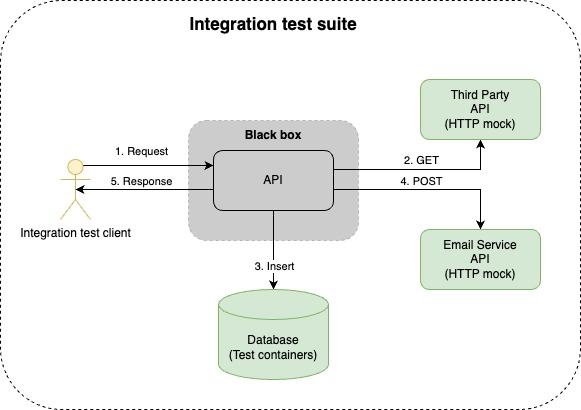
Running tests against a real database can be clumsy. You might rely on a shared development database, which can be slow and have its state altered by other developers. Another common approach, using docker-compose, can lead to its own set of problems.
This video succinctly explains the common pitfalls of using shared or manually managed containers for testing and introduces Testcontainers as the solution.
Testcontainers have forever changed the way I write tests
Watch this segment from 'Testcontainers have forever changed the way I write tests' to understand the motivation behind this testing philosophy.
Please watch from 00:32 to 03:36. Pay attention to the problems the presenter demonstrates: Port conflicts: What happens when a required port is already in use on your machine? Stale data: How can data left over from a previous test run cause a subsequent test to fail? \nThese are the exact issues Testcontainers is designed to prevent.
By programmatically controlling the lifecycle of a dependency like PostgreSQL, Testcontainers provides a clean, isolated environment for every test run, making your integration tests as reliable as your unit tests.
2. The Core of testcontainers-go
testcontainers-go is a Go library that allows you to spin up and manage Docker containers directly from your test code. For popular services like PostgreSQL, it provides specialized "modules" that simplify the setup even further.
Let's see how easy the postgres module makes it to get a database running.
Testcontainers have forever changed the way I write tests
This short clip, also from 'Testcontainers have forever changed the way I write tests', demonstrates the power of the pre-built PostgreSQL module.
Watch from 07:54 to 09:22. Focus on these key points: The use of postgres.Run(...) to start the container. The simple, fluent API for configuration (postgres.WithDatabase, postgres.WithUsername, etc.). The convenience of the container.ConnectionString() method, which saves you from manually constructing the connection string with a dynamic port.
This module abstracts away the complexities of Docker networking and container startup, letting you focus on the test logic itself.
3. A Complete Integration Test Workflow
To write robust integration tests, we need a structured approach to manage the container's lifecycle. A standard and powerful pattern in Go is to use the special TestMain function. This function acts as the entry point for all tests within a package, allowing us to perform setup once before any tests run and teardown once after all tests are complete.
The following guide from OneUptime provides an excellent, production-grade template for this workflow. We'll adapt its structure for our project.
How to Write Integration Tests for Go APIs with Testcontainers
This article, 'How to Write Integration Tests for Go APIs with Testcontainers', demonstrates a best-practice setup using TestMain.
Please read the following two sections: 'Setting Up the Test Container Infrastructure': This is the most important part. Study the TestMain function. Understand its role in starting the container, connecting to it, running tests with m.Run(), and finally cleaning up with Cleanup. 'Writing PostgreSQL Integration Tests': Skim through the TestUserCreation example. Notice how it uses the testContainers.PostgresDB connection that was set up in TestMain. Also, pay close attention to the testContainers.ResetDatabase call at the start of the test. This is crucial for test isolation.
Let's break down the key steps from that guide and apply them to our project:
- Define
TestMain: This function will orchestrate the entire test run for the package. - Start the Container: Inside
TestMain, we'll usepostgres.Runto start a PostgreSQL container. We'll also define await.Strategyto ensure our tests don't start until the database is ready to accept connections. - Get Connection & Migrate: We'll retrieve the dynamic connection string and establish a connection using
pgx. Since we don't have a migration tool integrated yet (that's for the next module!), we'll execute a simpleCREATE TABLEquery directly to set up our schema. - Run Tests: The call to
m.Run()executes all theTest...functions in the package. - Teardown: After
m.Run()finishes, we'll callcontainer.Terminate()to shut down and remove the Docker container, leaving our system clean. - Write the Test Function: Each test will use the shared database connection but will first call a helper function to
TRUNCATEthe tables, ensuring a clean slate for every test case.
4. Hands-On Application
It's time to put this into practice. We will create a new test file, user_integration_test.go, inside the internal/user directory. This file will be dedicated to integration tests for our repository.
1. Add Dependencies
First, add the necessary Testcontainers packages to your go.mod file:
go get github.com/testcontainers/testcontainers-go
go get github.com/testcontainers/testcontainers-go/modules/postgres
2. Create the Integration Test File
Create internal/user/user_integration_test.go and add the following code. This code assumes you have a Repository interface and a PostgresRepository struct that implements it (as we'll build in the next module). For now, we'll test a hypothetical NewPostgresRepository constructor and its Create method.
Note: Integration test files are often marked with a build tag //go:build integration to allow you to run them separately from fast unit tests, but we'll omit that for simplicity right now.
internal/user/user_integration_test.go
package user

import (
	"context"
	"fmt"
	"os"
	"testing"
	"time"

	"github.com/jackc/pgx/v5/pgxpool" // Using pgxpool as per our course syllabus
	"github.com/stretchr/testify/assert"
	"github.com/stretchr/testify/require"
	"github.com/testcontainers/testcontainers-go"
	"github.com/testcontainers/testcontainers-go/modules/postgres"
	"github.com/testcontainers/testcontainers-go/wait"
)

var dbPool *pgxpool.Pool

// TestMain manages the lifecycle of the test database container.
func TestMain(m *testing.M) {
	ctx := context.Background()

	// 1. Set up the PostgreSQL container
	pgContainer, err := postgres.Run(ctx,
		"postgres:16-alpine",
		postgres.WithDatabase("testdb"),
		postgres.WithUsername("user"),
		postgres.WithPassword("password"),
		testcontainers.WithWaitStrategy(
			wait.ForLog("database system is ready to accept connections").
				WithOccurrence(2).
				WithStartupTimeout(5*time.Second),
		),
	)
	if err != nil {
		fmt.Printf("Could not start postgres container: %v\n", err)
		os.Exit(1)
	}

	// 2. Get the connection string and connect to the database
	connStr, err := pgContainer.ConnectionString(ctx, "sslmode=disable")
	if err != nil {
		fmt.Printf("Could not get connection string: %v\n", err)
		os.Exit(1)
	}

	dbPool, err = pgxpool.New(ctx, connStr)
	if err != nil {
		fmt.Printf("Could not connect to database: %v\n", err)
		os.Exit(1)
	}

	// 3. Run migrations (simple schema setup for now)
	_, err = dbPool.Exec(ctx, `CREATE TABLE users (id SERIAL PRIMARY KEY, email TEXT UNIQUE NOT NULL);`)
	if err != nil {
		fmt.Printf("Could not run migrations: %v\n", err)
		os.Exit(1)
	}

	// 4. Run the tests
	code := m.Run()

	// 5. Teardown
	// You can't defer this because os.Exit doesn't care about defer
	if err := pgContainer.Terminate(ctx); err != nil {
		fmt.Printf("Could not terminate postgres container: %v\n", err)
	}

	os.Exit(code)
}

// resetDatabase truncates the users table to ensure a clean state for each test.
func resetDatabase(ctx context.Context, t *testing.T) {
	_, err := dbPool.Exec(ctx, "TRUNCATE TABLE users RESTART IDENTITY")
	require.NoError(t, err, "Failed to reset database")
}

// TestPostgresRepository_Create tests the Create method against a real PostgreSQL instance.
func TestPostgresRepository_Create(t *testing.T) {
	// This assumes you have a NewPostgresRepository constructor that takes a *pgxpool.Pool.
	// We will implement this in the next module. For now, this demonstrates the test structure.
	// repo := NewPostgresRepository(dbPool)

	ctx := context.Background()

	t.Run("should create user successfully", func(t *testing.T) {
		resetDatabase(ctx, t) // Ensure a clean state

		email := "test@example.com"
		// err := repo.Create(ctx, email)
		// require.NoError(t, err)

		// For now, let's simulate the repository's action directly
		_, err := dbPool.Exec(ctx, "INSERT INTO users (email) VALUES ($1)", email)
		require.NoError(t, err)

		// Assert: Verify the user was actually inserted
		var count int
		err = dbPool.QueryRow(ctx, "SELECT COUNT(*) FROM users WHERE email = $1", email).Scan(&count)
		require.NoError(t, err)
		assert.Equal(t, 1, count, "Expected user to be inserted into the database")
	})

	t.Run("should return error for duplicate email", func(t *testing.T) {
		resetDatabase(ctx, t)

		email := "duplicate@example.com"

		// Insert the first user
		_, err := dbPool.Exec(ctx, "INSERT INTO users (email) VALUES ($1)", email)
		require.NoError(t, err)

		// Attempt to insert the second user (simulating repo.Create(ctx, email))
		_, err = dbPool.Exec(ctx, "INSERT INTO users (email) VALUES ($1)", email)

		// Assert: We expect a unique constraint violation error from postgres.
		require.Error(t, err)
		assert.Contains(t, err.Error(), "duplicate key value violates unique constraint", "Expected a unique constraint error")
	})
}
When you run go test in this package, Testcontainers will automatically:
- Find an available port on your machine.
- Start a PostgreSQL Docker container.
- Wait for it to be ready.
- Provide your test with a connection string to it.
- Run your tests against this real, but temporary, database.
- Shut down and remove the container.
This entire process is automated, reproducible, and won't interfere with any other database services running on your machine.
Conclusion
Congratulations! You have now learned the complete workflow for writing robust integration tests in Go. This is a massive step towards building production-ready applications. While unit tests verify your logic, integration tests provide the confidence that your system's components—in this case, your application code and your database schema—are correctly aligned.
Key Takeaways:
- Integration tests validate the contracts between different parts of your system.
testcontainers-goprovides ephemeral, isolated Docker containers, making integration tests reliable and easy to run.- The
TestMainfunction is the idiomatic Go pattern for managing setup and teardown for a test package. - Always ensure a clean state for each test by resetting the database (e.g., using
TRUNCATE). - Assertions in integration tests should query the database directly to verify the state change, proving the operation was successful end-to-end.
Next Up
With solid unit and integration testing strategies in place, our application is becoming much more robust. The next step in building production-grade software is to understand its performance characteristics.
In the next lesson, we will explore benchmarking critical code paths using Go's built-in testing.B tools. You'll learn how to measure the speed and memory allocation of your functions, providing the data needed to make informed optimization decisions.