Welcome to the final lesson in our first module on the foundations of learning. In our previous lesson, we established that learning is fundamentally about connecting new information to what we already know, organized within mental frameworks called schemas. But this raises a critical question for any designer or educator: what happens when a user doesn't have the necessary prior knowledge to tackle a new task? How do you help them succeed without overwhelming them or simply giving them the answer?
This lesson introduces the answer: scaffolding. We will explore how this pedagogical concept provides temporary, structured support to help a learner bridge the gap between their current ability and the goal. For you, as a product designer, understanding scaffolding is key to creating user experiences that are not just usable, but that actively guide and empower your users, especially when they face complex tasks in your career guidance app.
What is Scaffolding?
The term "scaffolding" offers a powerful and intuitive metaphor. In construction, a scaffold is an external, temporary structure that supports a building while it's being erected. Once the building is stable enough to stand on its own, the scaffold is removed. In education, the principle is identical. Scaffolding is the temporary support given to a learner to help them complete a task that they could not yet do independently.
This idea is rooted in the work of psychologist Lev Vygotsky and his concept of the Zone of Proximal Development (ZPD). The ZPD is the "sweet spot" for learning—the space between what a learner can do unassisted and what they can achieve with guidance from a more knowledgeable other (a teacher, a peer, or even a well-designed digital tool).
To get a clear overview of scaffolding and its connection to the ZPD, please watch this short video.
Scaffolding in Education (Explained in 4 Minutes)
This video from Helpful Professor Explains! provides a concise and clear definition of scaffolding, its origins, and its relationship to the Zone of Proximal Development.
Watch the first part of the video, from the beginning to the explanation of the ZPD.
As the video explains, effective learning happens inside this zone. A task that is too easy (inside the learner's current, independent ability) leads to boredom. A task that is too difficult (outside the ZPD, even with help) leads to anxiety and frustration. Scaffolding is the art of providing just enough support to keep the learner productively challenged within their ZPD.
The Process: Gradual Release of Responsibility
The core process of scaffolding is the gradual release of responsibility. Support is systematically withdrawn as the learner's competence grows, ensuring they eventually become autonomous. A common framework for this is the "I Do, We Do, You Do" model.
- I Do (Modeling): The expert (e.g., the teacher or the app itself) demonstrates the task and explains the process. This is about setting a clear example.
- We Do (Guided Practice): The learner attempts the task with direct support and feedback from the expert. This is a collaborative phase.
- You Do (Independent Practice): The learner performs the task on their own. The scaffold has been removed, and the learner demonstrates their new mastery.
The same video you just watched provides a great walkthrough of this model.
Scaffolding in Education (Explained in 4 Minutes)
Now, let's look at the "I Do, We Do, You Do" model in action.
Please watch the section from the beginning of the model description to the end. Notice how responsibility for the task gradually shifts from the teacher to the student.
This gradual process ensures that the learner builds confidence and skill without being abandoned to figure things out alone.
Types of Scaffolds
Scaffolding isn't a single technique but a collection of strategies. The image below presents a mind map of several key scaffolding approaches.
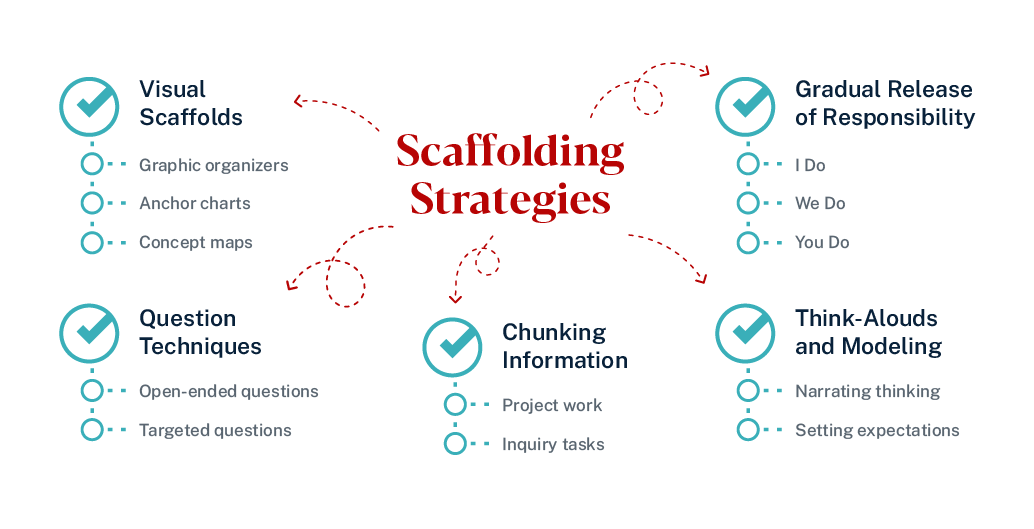
To add more structure to this, educational researchers have proposed several categories of scaffolds. A particularly useful framework identifies four types. We'll explore these through a research paper that studied how they were used in an online course.
[PDF] a design case of scaffolding hybrid/online student-centered learning
This paper provides excellent, concrete examples of different types of scaffolds used in a digital learning environment.
First, read the introductory section on page 1. Focus on the paragraph that defines the four types of scaffolds: conceptual, procedural, strategic, and metacognitive. Next, jump to page 3 and review the "Design Pattern" section. This shows how each of the four scaffold types was put into practice. Read the numbered lists from point 1 through point 4 to see specific examples of each.
Let's summarize those four types and think about how they could apply to your career guidance app:
-
Conceptual Scaffolds: These help the user organize their thinking and understand the relationships between ideas.
- Example: Providing an interactive diagram that shows how different career "clusters" (like Healthcare, Technology, Arts) are related, and which specific jobs fall under each. This helps a user build a schema for the world of work.
-
Procedural Scaffolds: These support the user in navigating the tool and completing the steps of a task.
- Example: A multi-step "wizard" that guides a user through the process of building their first resume. Each step focuses on one section (Contact Info, Experience, Education), with clear instructions and examples.
-
Strategic Scaffolds: These provide the user with approaches or heuristics for tackling complex, open-ended problems.
- Example: When a user is exploring a potential career, the app could offer a "Research Checklist" with prompts like: "Find 3 companies that hire for this role," "Identify 2-3 key skills listed in job descriptions," or "Watch a 'day in the life' video of someone in this career."
-
Metacognitive Scaffolds: These prompt the user to reflect on their own learning, thinking, and goals.
- Example: After a user completes a personality-based career assessment, the app could ask: "Which part of this result surprised you the most?" or "How does this result align with what you already thought about yourself?"
Scaffolding as a UX Design Method
As a product designer, these concepts might already feel familiar. That's because scaffolding is a fundamental principle of good user experience design, even if it's not always called by that name. It's the core of user onboarding, feature tutorials, and any process that guides a user from novice to expert.
The following article makes this connection explicit, drawing parallels between scaffolding in education, games, and digital products.
Scaffolding as a UX method for designing better products
This article by UX designer Odette Jansen is the perfect bridge from educational theory to design practice.
Start by reading the introduction and the definition of scaffolding in education. Next, read the section on scaffolding in games. Note the parallels to UX: teaching controls, understanding the UI, and fading support over time. Finally, read the concluding section, "Improving your UX through scaffolding...". This provides a fantastic checklist for applying scaffolding in a digital product context, covering competencies, user needs, tools, and content.
The article highlights that in digital products, "the system" takes on the role of the teacher. Your design must anticipate where users will struggle and build in the necessary supports. The most common place we see this is in user onboarding.
This video on user onboarding showcases several classic scaffolding techniques, though it uses UX terminology. As you watch, try to map these onboarding types to the scaffolding principles we've discussed.
Master the 4 Types of User Onboarding for Stellar UX Design
This video from Wired to Design breaks down four common onboarding patterns that are, in essence, different scaffolding strategies.
Watch the descriptions of the four onboarding types: Passive onboarding (like a quick conceptual scaffold) Active onboarding (a clear example of procedural scaffolding) Tooltip onboarding (another form of procedural scaffold, often called a "soft scaffold") Checklist onboarding (a mix of strategic and metacognitive scaffolding)
By using checklists, tooltips, and guided "first tasks," you are scaffolding the user's initial experience. You are helping them build a schema of your product and develop the skills needed to use it effectively, then getting out of their way.
Conclusion
In this lesson, we've defined scaffolding as the temporary support that enables a learner to accomplish tasks within their Zone of Proximal Development. This concludes the first module of our course, tying together the core principles we've covered.
Here are the key takeaways:
- Scaffolding bridges the knowledge gap: It provides the necessary support when a user's prior knowledge is insufficient for a task.
- It follows a gradual release of responsibility: The "I Do, We Do, You Do" model ensures support is faded as the user's competence grows, fostering autonomy.
- Scaffolding takes many forms: It can be conceptual (organizing ideas), procedural (guiding steps), strategic (offering approaches), or metacognitive (prompting reflection).
- It is a cornerstone of effective UX design: Principles of scaffolding are embedded in user onboarding, wizards, tooltips, and guided workflows that help users master a digital product.
You have now built a solid foundation in the principles of how people learn: the importance of active learning, the constructivist idea of building knowledge, the role of prior knowledge (schemas), and the use of scaffolding to provide support.
In our next module, we will apply this foundation to a specific audience. We will shift our focus to the learners you are designing for with your career guidance app—16 to 22-year-olds—and explore their unique cognitive and developmental characteristics.