Hello! Welcome back to your course on applying legal frameworks in a professional setting.
In our last lesson, we focused on the first pillar of primary legal sources: statutes and codes. You learned a strategic workflow for locating the specific laws passed by legislative bodies. Now, we turn to the second pillar: case law. While statutes provide the rules, case law shows us how those rules are interpreted and applied by the courts in real-world situations.
This lesson directly addresses the learning outcome: to find and retrieve case law using citation indexes and keyword searches. As a legal assistant, you'll constantly be asked to pull up specific cases or research case law on a particular topic. Mastering this skill is non-negotiable.
We'll break this down into two core scenarios you'll face daily:
- An attorney gives you a citation (like a unique address for a case) and asks you to retrieve the document.
- An attorney gives you a legal issue and asks you to find relevant cases using keywords.
1. Decoding the Language of Case Law: Citations
Before you can find a case, you need to understand how it's referenced. Every published court decision has a unique identifier called a citation. Think of it as the case's mailing address, guiding you to its exact location in a series of books called "law reporters."
Let's start with a short video that explains the concept of case law and breaks down the structure of a typical citation.
This video, 'How to Research Case Law' from LegalYou, provides a concise introduction to case law and explains the components of a standard case citation.
Watch the first two minutes of the video (00:00 - 02:02). Focus on how it deconstructs a case citation into its parts: volume, reporter, page number, and year.
As the video explained, a standard citation contains all the information you need to locate the case. Let's look at this visually.
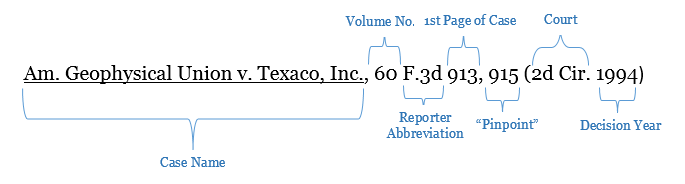
In recent years, courts have also adopted a "neutral citation" format. This format is independent of any commercial publisher and identifies a decision based on the year, the court, and a unique case number.

To dive a bit deeper into these components, the following resource provides clear definitions. Your law degree has likely exposed you to these concepts, but a professional-level understanding is crucial.
How to find legal cases by citation | SFU Library
The Simon Fraser University Library's guide, 'How to find legal cases by citation,' offers detailed definitions of the key terms in a citation.
Read the sections 'How legal cases are cited' and 'Quick definitions'. Pay special attention to the definitions of 'Law reporter' and 'Neutral citation' as these are fundamental concepts in legal research.
2. Method 1: Finding a Case with a Known Citation
This is the most straightforward research task you'll have. An attorney might email you saying, "Please pull up Harris v. Forklift Systems, 510 U.S. 17." Your job is to take that citation and retrieve the full text of the decision.
Let's watch a demonstration of how to do this using a free and powerful tool, Google Scholar.
Legal Research Tutorial: Finding Case Law Using Google Scholar
This tutorial from the Library of Congress shows how to use Google Scholar for legal research. We'll first focus on finding a case using its citation.
Watch the segment from 00:49 to 01:55. The presenter demonstrates finding the famous case of Brown v. Board of Education by simply typing its citation, 347 U.S. 483, into the search bar.
As you saw, the process is simple:
- Navigate to the legal research platform (e.g., Google Scholar, Westlaw, LexisNexis, CanLII).
- Ensure you are searching within the "Case Law" database.
- Enter the citation into the search bar.
The platform's "citation index" will recognize the format and retrieve the corresponding document. This works on virtually all legal research databases, not just Google Scholar.
Test your understanding!
An attorney asks you to find the case at 2012 BCCA 122. Based on the resources you've reviewed, what do you know about this citation format, and what are its components?
Show answer
This is a neutral citation.
- 2012: The year the decision was made.
- BCCA: The court abbreviation, which likely stands for the British Columbia Court of Appeal.
- 122: The unique case number assigned by the court for that year. It was the 122nd decision issued by that court in 2012.
3. Method 2: Finding Cases with Keyword Searches
More often, you won't have a specific citation. Instead, you'll be given a set of facts or a legal question, such as, "Find cases that define what constitutes a 'hostile work environment' under employment law."
This is where your skills from our lesson on Boolean searching become critical. The goal is to combine keywords and legal concepts to find relevant case law.
Let's review the strategy. This document from the Law Society of British Columbia provides a perfect, practical example.
Learning Materials: Legal Research Essentials Course
This excerpt from the 'Legal Research Essentials Course' explains how to use a Boolean search string to find cases on a specific topic.
Read the section 'Module 6a – Primary Sources (Finding Cases on Point)'. Focus on how they construct the search string “occupiers liability” AND “waiver of liability” to find cases that discuss both concepts. Also, note the list of options for filtering and sorting results.
Now, let's see this keyword search strategy in action. We'll return to the Library of Congress video, where the presenter searches for cases on "hostile work environment."
Legal Research Tutorial: Finding Case Law Using Google Scholar
This segment demonstrates how to perform a keyword search and, crucially, how to narrow the results to find the most relevant cases.
Watch from 01:55 to 02:57. Pay close attention to how the presenter uses the 'Select courts' filter on the left to narrow thousands of results down to only those from the Supreme Court. This is a vital technique to avoid information overload.
The key steps for a successful keyword search for case law are:
- Brainstorm Keywords: Identify the key legal terms, facts, and concepts related to your issue.
- Construct a Search Query: Use Boolean operators (
AND,OR,NOT) and quotation marks ("...") to create a precise search, just as you learned in the previous module. - Execute the Search: Run your query in the case law database.
- Filter and Refine: This is the most important step. Use the database's filters to narrow your results by:
- Jurisdiction/Court: Limit results to the Supreme Court, a specific Federal Circuit, or a particular state/provincial court system. This is essential.
- Date: Focus on more recent cases if the law has been evolving.
- Relevance or "Most Cited": Sort the results to see the most important cases first.
A Preview of the Next Step: Is This Case Still Good Law?
Finding a case is just the first step. Law changes. A case from 1988 might have been overturned by a higher court in 1990, or later courts might have disagreed with its reasoning. Relying on an outdated or overturned case is a major professional error.
Therefore, after finding a case, you must always check its subsequent history. This process is often called "noting up" or using a "citator." These tools show you every subsequent case that has mentioned your case.
Google Scholar has a basic version of this feature called "Cited by." Let's see how it works.
Legal Research Tutorial: Finding Case Law Using Google Scholar
This final clip from the Library of Congress video introduces the 'Cited by' feature, a basic citator tool.
Watch from 02:57 to 04:26. Notice how the 'Cited by' link shows you a list of later cases that referenced the Harris case. Importantly, listen to the presenter's warning: this feature doesn't tell you how the case was treated (e.g., if it was supported or criticized).
This "Cited by" feature is a powerful tool for finding more related cases, but as the video notes, it has limitations. Professional-grade citators like KeyCite (Westlaw) and Shepard's (LexisNexis) use special symbols or flags (e.g., a red flag for negative treatment) to instantly tell you if a case is still "good law."
Conclusion
Excellent work. Today, you've learned the essential, practical skills for finding case law—a task you will perform countless times as a legal assistant. You now know how to take either a specific citation or a general legal issue and efficiently retrieve the relevant court decisions.
Key Takeaways:
- A case citation is a unique address that includes the parties, volume, law reporter, page number, court, and year.
- You can find a case instantly by entering its citation into the search bar of a legal database.
- To find cases on a topic, use keyword searches with Boolean operators, then aggressively filter your results by jurisdiction and date.
- Finding a case is not enough. The next crucial step is to verify its status to see if it's still "good law," a process we briefly introduced with the "Cited by" feature.
Preview of the Next Lesson:
In our next lesson, we will dive deep into that final, critical step: verifying the currency and validity of legal sources to ensure they are good law. We will move beyond Google Scholar's basic "Cited by" feature and learn how to use the professional citator tools that law firms rely on to guarantee the accuracy and authority of their research.