Introduction
Welcome to your first lesson! We're starting your journey to becoming a technical support analyst right at the beginning: understanding what the job is all about. By the end of this lesson, you will be able to describe the role and the typical day-to-day responsibilities of a support analyst. This is the foundation upon which we will build all the technical and communication skills in the modules to come.
We'll look at the job from a few different perspectives. First, we'll establish a clear definition of the role. Then, we'll explore a detailed list of duties. Finally, we'll walk through what a typical day looks like, so you can get a real feel for the work. Let's begin.
The Role of a Problem Solver
At its heart, a technical support analyst is a professional problem-solver. When an employee in a company has a technology issue—whether it's a frozen computer, a printer that won't connect, or an application that's crashing—the support analyst is usually the first person they call. The analyst's primary goal is to diagnose the issue and guide the user to a solution, ensuring they can get back to their work with minimal disruption.
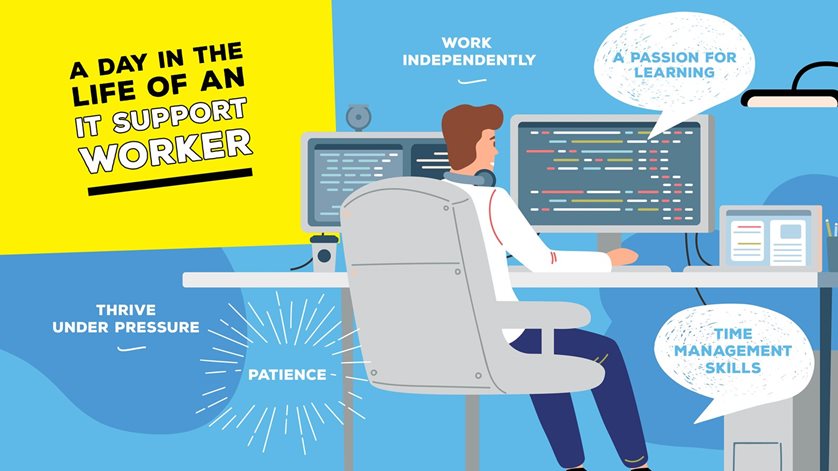
This role is a unique blend of technical know-how and people skills. As you can see in the image below, qualities like patience, time management, and a passion for learning are just as important as knowing your way around a computer.
To get a more formal understanding, let's start with a clear definition of the role and its core responsibilities.
What Is a Technical Support Analyst, and How Do I Become One?
This article from Coursera provides a concise and professional overview of the technical support analyst role. It's a great starting point for building our definition.
Please read the first two sections. Start with the definition of a technical support analyst. Then, skip to the section titled "Technical support analyst job description" and read the bulleted list of typical responsibilities.
As you can see, the responsibilities are varied. They range from directly helping users with their problems to behind-the-scenes work like installing software and documenting solutions.
A Deeper Look at Responsibilities
Now that we have a high-level overview, let's dive deeper into the specific tasks you would encounter. The previous article gave us a list; the next one will add more detail and context to those duties.
Day in the Life of a Computer Support Technician: What to Expect
This article breaks down the responsibilities into clear, practical categories.
In the section "Roles and Responsibilities of a Computer Support Technician," please read the list of duties. As you read, notice how these tasks map onto the ones you saw in the Coursera article, but with more descriptive detail.
By combining these two resources, we can build a comprehensive list of what a technical support analyst does:
- Provide Technical Assistance: Act as the first point of contact for users via phone, email, or ticketing systems.
- Troubleshoot Hardware and Software: Diagnose and resolve issues with everything from computers and printers to operating systems and applications.
- Perform System Maintenance: Install updates and run routine checks to keep systems running smoothly and securely.
- Manage User Accounts: Create new accounts for new employees, reset forgotten passwords, and manage permissions.
- Install and Configure Hardware: Set up new workstations, monitors, and other devices for users.
- Document Everything: Keep detailed records of issues and their solutions in a helpdesk system. This builds a "knowledge base" that helps the entire IT team solve problems faster in the future.
A Day in the Life
A list of duties is helpful, but seeing how they fit into a workday is even better. Let's watch a video that follows an IT support specialist through his day. This will make the role feel much more tangible.
A Day in Life of an IT Support Specialist
This "day in the life" video by Sirat in Tech gives a realistic and engaging look at the daily flow of an IT support job. Pay attention to the variety of tasks he handles and how he communicates.
Watch the following segments to see these responsibilities in action: Morning Priorities: See how he starts his day by checking the ticketing system and immediately tackles a high-priority "P1" issue affecting an entire department. Routine Tasks: Observe the mix of smaller tasks, such as checking printers, resetting a user's password, and preparing old laptops for disposal. Project Work: Notice how his afternoon is dedicated to a more involved project—setting up a new laptop for an employee, which includes installing the operating system and multiple software programs. Wrapping Up: Watch how he ends his day by updating his tickets and documenting his work, preparing for the next day.
To reinforce what you just saw, let's look at a written example that breaks down a similar day. This fictional narrative helps solidify the rhythm and pace of the job.
Day in the Life of a Computer Support Technician: What to Expect
This part of the article provides a structured breakdown of a typical day and a narrative example.
Read the section on the Daily Routine, which organizes tasks by morning, afternoon, and end of day. Then, read the full example of James's day. Notice how his day, like the one in the video, is a mix of reacting to urgent problems and handling planned tasks.
Conclusion
In this first lesson, we've defined the world of the technical support analyst. You've learned that this role is the front line of an IT department, focused on solving user problems efficiently and professionally. We've seen that the daily responsibilities are a dynamic mix of troubleshooting, system maintenance, user support, and careful documentation. Most importantly, you now understand that success in this field depends on a balanced combination of technical skills and people-centric soft skills like clear communication and patience.
In our next lesson, we'll begin developing one of the most critical soft skills for a support analyst: active listening. You'll learn techniques to accurately understand what a user is reporting, which is the essential first step to solving any technical problem.