Hello! Welcome to the next lesson in our module on designing people-centric systems.
In our last session, we designed the "frontend" of our onboarding system—a dynamic, personalized dashboard that tells a new hire what they need to do. Today, we address the crucial next question: how do they find the information to do it? This brings us to the heart of organizational effectiveness.
Our learning outcome is to design a knowledge management (KM) system that facilitates the capture, organization, and retrieval of company information. We will explore the architectural principles behind building a "single source of truth" that is both scalable and easy to maintain—a cornerstone of any robust business operating system in Notion.
1. The Strategic Foundation of Knowledge Management
Before diving into database schemas, it's essential to understand the strategic goals of a KM system. An effective system isn't just a digital filing cabinet; it's a strategic asset that breaks down information silos, empowers employee autonomy, and prevents knowledge loss.
For a high-level perspective on these principles, which are often grouped under the term Organizational Knowledge Management (OKM), the following article is an excellent primer.
Notion For Business: The Ultimate Guide - Khe Hy
The article 'Notion For Business: The Ultimate Guide' by Khe Hy outlines the core best practices for any enterprise-grade knowledge system.
Read the introduction and the section 'Best Practices for Organisational Knowledge Management (OKM)'. Focus on the five principles: Accessible, Scalable, Independent, Agency, and Responsibilities. Think about how these principles address common pain points you've seen in businesses.
As Khe Hy points out, the goal is to create a system that scales with the company and empowers employees to "unstuck" themselves, which is a powerful value proposition for any client.
2. The First Architectural Decision: Types of Knowledge
A common failure point in KM systems is treating all information as equal. A scalable architecture begins by distinguishing between two fundamental types of documentation.
- Operational Documentation: These are transient, "in-flight" documents tied to active work—project briefs, meeting notes, campaign plans, brainstorms. They are dynamic and live alongside the projects and tasks they support.
- Long-Term Knowledge: This is the evergreen, canonical information that defines how the business runs—Standard Operating Procedures (SOPs), company policies, brand guidelines, and onboarding manuals. It changes infrequently and serves as a stable reference.
This distinction is the most important architectural principle for designing a KM system. This blog post explains it clearly.
Building in Notion: Internal Documentation Systems
The article 'Building in Notion: Internal Documentation Systems' by Boldtech provides a clear framework for separating these two types of information.
Read the section 'What all teams need to know: managing both operational documentation and long-term knowledge in Notion'. Pay close attention to the argument for why these two types of content shouldn't be treated the same and how they map to different Notion features (databases for operational docs, wikis for long-term knowledge).
For the rest of this lesson, we will focus on designing the system for long-term knowledge, as "operational documentation" is best managed within the project management systems we'll discuss in a later module.
3. Architectural Pattern 1: The Structured Company Wiki
The most common and effective pattern for managing long-term knowledge is the Company Wiki. This is a centralized, hierarchical collection of pages that acts as the company's official knowledge base.
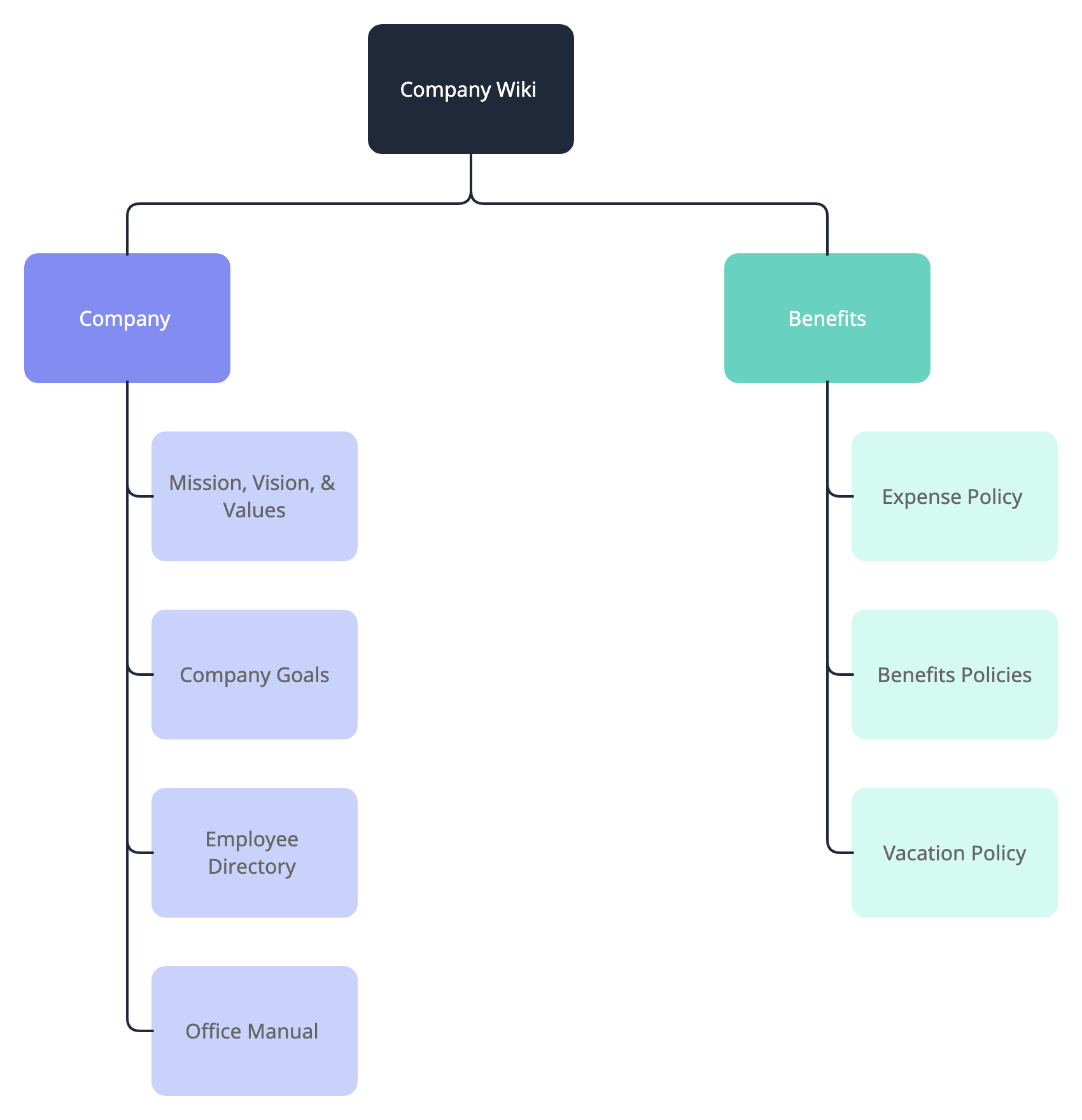
While it looks like a simple collection of pages to the end-user, the backend of a scalable wiki should always be a database. This allows you to add properties for governance and create curated views.
The guide from Khe Hy that we read earlier provides a step-by-step walkthrough of how to architect the database for a Company Wiki. You don't need to worry about the specific formulas, but understanding the properties and the concept of automated review cycles is key from a design perspective.
Notion For Business: The Ultimate Guide - Khe Hy
Returning to Khe Hy's guide, this section details the practical construction of a wiki database.
Read the section 'How to build a Company Wiki in Notion'. Focus on the recommended database properties ('Type', 'Department', 'Responsible', 'Review Cycle', 'Last Review Date'). Note the strategic purpose of these properties: they enable governance, filtering, and automated reminders to keep content from going stale.
Test your understanding!
A client's marketing team has a set of brand guidelines that must be reviewed every six months, while their general company policies are reviewed annually. When designing their Company Wiki database, how would you use the properties described by Khe Hy to manage this requirement?
Show answer
You would create a Review Cycle select property with options like "Bi-Annual" and "Yearly." You'd also have a Last Review Date property. Using a formula (which a developer could implement or you could generate with Notion AI), the system would automatically calculate the Next Review Date. You could then create a database view filtered to show all documents where the Next Review Date is approaching, creating an automated content review dashboard for the system owner.
4. Architectural Pattern 2: The Dynamic "Knowledge Lab"
While a Wiki is excellent for official, published knowledge, what about capturing and synthesizing new ideas, insights from articles, and spontaneous team thoughts? For this, we can turn to a more dynamic architectural pattern popularized by Notion expert August Bradley: the Knowledge Lab.
This system is designed less like a library and more like a brain. It has three main components:
- Input Vaults: Databases for capturing raw information (e.g., a
Notes & Ideasdatabase, aMediadatabase for articles and videos). - Synthesis Hub (The Knowledge Lab): A central database organized by topic. This is where insights from all the different inputs are distilled and connected.
- Frictionless Capture: Easy ways to add to the input vaults from anywhere in the workspace.
This video provides a masterclass in this system's architecture and flow.
Knowledge Management System in Notion – Introducing Vaults (Life OS)
In his video on 'Knowledge Management System in Notion', August Bradley introduces the concept of 'Vaults' and the 'Knowledge Lab' to create a living, breathing knowledge engine.
This is a strategically dense video. Please watch the following clips: (00:00 - 02:50): Get an overview of the philosophy: capturing information and turning it into actionable knowledge. (13:40 - 16:10): Understand the 'Knowledge Lab' itself. Notice how it's organized by topic (e.g., 'Design Thinking', 'Goal-Setting') rather than by source. (17:13 - 19:54): Pay close attention to how notes and ideas are contextually resurfaced within a Knowledge Lab topic. This is a powerful retrieval mechanism that goes beyond simple search.
The key strategic takeaway from the Knowledge Lab model is the focus on synthesis and contextual retrieval. While a Wiki presents finalized information, a Knowledge Lab helps a team connect disparate ideas to build deeper understanding on topics crucial to their business.
5. Designing for Retrieval and Governance
A KM system is only useful if people can find what they need and trust that it's current.
Retrieval:
Your design should support three modes of retrieval:
- Browsing: A clean, well-organized dashboard with logical hierarchies. The "Playbook Vault" in the image below is a great example of a user-friendly entry point.
- Searching: Relying on Notion's built-in search functionality.
- Linking (Contextual): Proactively linking knowledge pages where users will need them—in project templates, task descriptions, and onboarding checklists. This connects your KM system directly to your operational systems.

Governance:
To ensure information is trusted, you need clear ownership and access controls. In a corporate environment, it's crucial that not everyone can edit official policies.
Organizing docs & wikis for large teams
This clip from Notion's official channel covers the essential sharing and permission settings needed to govern a knowledge base effectively.
Watch the section from 06:47 to 09:33. Focus on how to restrict page access to specific groups or individuals, and the different levels of access (full access, can edit, comment, view). This is critical knowledge for designing secure systems for clients.
Conclusion
In this lesson, we have designed the architectural foundation for a robust knowledge management system. You've learned to think strategically about how to capture, organize, and retrieve information for different business needs.
Key Takeaways:
- Differentiate Knowledge Types: The most critical design decision is to separate transient operational documentation from evergreen long-term knowledge.
- The Structured Wiki: For official, canonical knowledge (SOPs, policies), use a database-backed Wiki with properties for governance (Owner, Review Date).
- The Dynamic Knowledge Lab: For emergent ideas and synthesis, a system of "Vaults" organized by topic can create a powerful engine for learning and innovation.
- Design for Retrieval: A great KM system supports browsing (clear dashboards), searching (native search), and contextual linking (relations to projects/tasks).
- Govern with Permissions: Use Notion's sharing settings to control who can view, edit, and share sensitive or official information.
In our next module, we will shift our focus from building systems for the end-user to documenting those systems for the client. Our first lesson will be to develop a standardized System Owner's Manual template, a crucial document for client handover that will draw upon the very documentation principles we've established today.