Hello! Welcome back to our course on mastering Notion for businesses.
In our last lesson, you designed a high-level "Hub & Spoke" architecture for our case study, Growth Co. You established the core structure of the workspace by defining teamspaces, setting their boundaries, and organizing their top-level content. That was the equivalent of drawing the blueprints for a new office building.
Today, we're going to decide who gets the keys. Your goal for this lesson is to design a role-based permission structure that balances security with cross-departmental collaboration needs. We'll move from the macro-view of teamspaces to the micro-view of pages and databases, establishing the rules that protect sensitive information while still enabling the seamless collaboration that makes Notion powerful.
For a Notion consultant, this is a critical skill. A poorly designed permission model can either lead to data breaches and system chaos or create so much friction that users abandon the system. A well-designed model builds trust and ensures the architecture you created remains stable and secure as the company scales.
The Philosophy of Notion Permissions
Before diving into settings, we must establish our guiding principles. Notion's default openness is a feature, not a bug, but it requires intentional governance.
Building in Notion: Permissions and Security
The article 'Building in Notion: Permissions and Security' from Bold Tech provides an excellent strategic overview. It frames security not just as a technical setting, but as a business necessity to prevent chaos and maintain structure.
Read the introduction and the section 'What all teams need to know'. Focus on the core argument: security isn't just about who can view or edit, but about who can create systems, control data visibility, and maintain structure.
This perspective elevates our work from a series of clicks to a strategic function. To implement this, we will be guided by two fundamental concepts:
- The Principle of Least Privilege: This is a standard security principle which states that any user should have only the minimum necessary rights, permissions, and access to perform their role. We won't give someone
Full Accessif all they need to do isCan Comment. - Clarity and Predictability: Users should intuitively understand who can see and do what. The permission structure shouldn't be a maze of exceptions.
The Three Layers of Notion Permissions
To build a predictable structure, it helps to think of Notion permissions in three layers, from broadest to most specific:
- The Workspace/Teamspace Layer: This controls who is in the "building" and which "floors" they can access. It's managed via Workspace Roles (Workspace Owner, Member, Guest) and Teamspace Settings (Open, Closed, Private).
- The Page Layer: This controls access to individual "rooms" and what users can do inside them. It's managed via the Share menu on each page, using levels like
Full Access,Can Edit,Can Comment, andCan View. - The Database Entry Layer: This offers advanced, "row-level" control within a database, allowing different users to see different entries in the same database. This is managed via Granular Database Permissions.
These layers interact through two simple but powerful rules that you must internalize to design any permission scheme.
The Core Mechanics: Cascade and Precedence
To truly master permissions, you need to understand how they flow through the system.
Notion Sharing & Permissions: The Ultimate Guide
Thomas Frank's 'Notion Sharing & Permissions: The Ultimate Guide' offers the most detailed explanation of the underlying mechanics. We'll focus on the two most important concepts: the 'Permissions Cascade' and the 'Highest Permission Wins' rule.
First, read the section 'Pages and Sub-Pages: The Permissions Cascade'. This is the single most important concept for understanding how permissions are inherited. Then, review the last three paragraphs of the 'How to Share a Page in Notion' section (starting with 'In Notion, the highest permission rule wins') to understand how conflicts are resolved.
Let's summarize these critical rules:
-
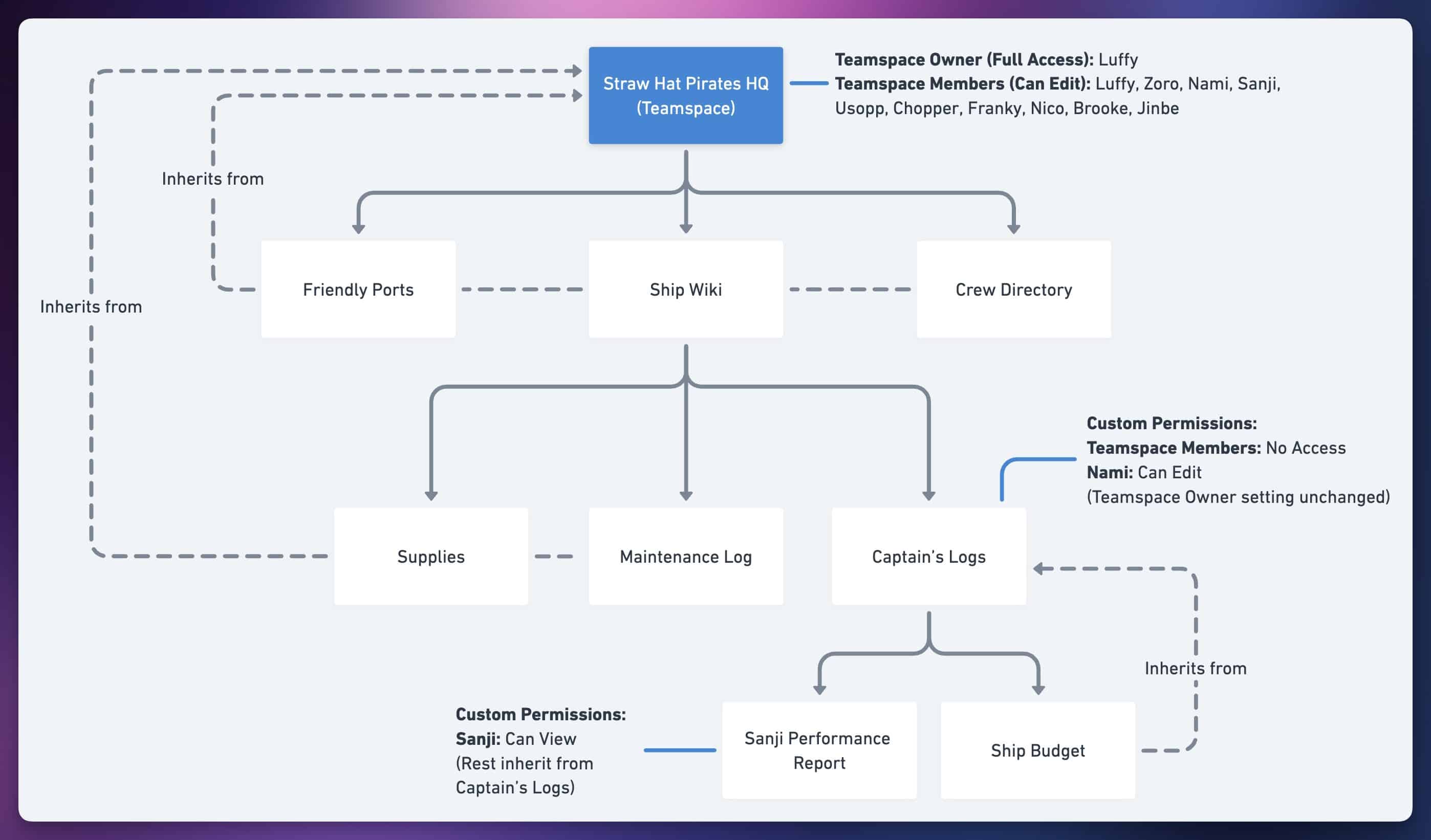
The Permissions Cascade (Inheritance): Permissions flow downwards. A sub-page automatically inherits the permissions of its parent page. If you give a user
Can Viewaccess to a top-level page, they will haveCan Viewaccess to all pages nested inside it, unless you explicitly override it. Teamspace settings act as the parent for all top-level pages within that teamspace. -
The Highest Permission Wins (Precedence): If a user has access to a page through multiple rules (e.g., they are in a Group with
Can Editaccess but are also a Teamspace Member withCan Viewaccess), Notion will grant them the highest level of access. In this case, they will be able to edit the page.
This diagram from the guide you just read beautifully illustrates the cascade in action.
Designing a Role-Based Access Control (RBAC) Model
Now, let's apply these principles to create a practical, role-based model for Growth Co. An RBAC model involves defining business roles and then mapping them to Notion's permission tools.
Step 1: Define Business Roles
First, we identify the key user archetypes in the organization:
- Executives/Leadership: Need high-level visibility and control.
- Department Heads/Managers: Need control over their team's area but not the entire workspace.
- Team Members: Need access to do their daily work but shouldn't be able to change core system structures.
- External Collaborators (Contractors, Clients): Need limited, temporary access to specific pages or projects.
Step 2: Map Roles to Notion's Tools
Next, we map these roles to Notion's features. Managing permissions person-by-person is not scalable. We will use Groups as our primary tool.
Let's watch a quick overview of Notion's permission features to ensure we have a shared understanding of the tools at our disposal. This video covers workspace roles, teamspace settings, and page-level access.
Watch the segments covering Workspace roles (00:30-02:18), Teamspace settings (02:18-04:15), and Page sharing levels (04:15-05:50). As you watch, think about how each feature could be used to implement the business roles we defined above.
Here is a recommended RBAC model for Growth Co:
| Business Role | Notion Implementation | Rationale |
|---|---|---|
| Executives/Admins | Workspace Owner Role. Keep this group extremely small (1-3 people, e.g., CEO, Head of Ops, "Notion Architect"). | This role has ultimate power over billing, security, and members. Limiting it is the single most important security measure. |
| Department Heads | Teamspace Owner role for their department's teamspace. Member of an "All Managers" Group. | Gives them control over their domain (their teamspace) without giving them global workspace control. The Group allows easy sharing of manager-only docs. |
| Team Members | Member role in the workspace. Teamspace Member of their department's teamspace. Added to departmental Groups (e.g., "Marketing Team"). | This is the standard employee setup. Groups make it easy to grant access to cross-functional pages without inviting dozens of individuals. |
| External Collaborators | Guest role, invited to specific pages. | Guests are free and can't access the full workspace, making this the most secure way to collaborate externally. They can't be added to Groups. |
This structure provides a clear, scalable foundation. The day-to-day work of granting access now becomes adding a user to the correct Group, rather than managing permissions on hundreds of individual pages.
Advanced Strategies: Protecting Structure & Fine-Tuning Access
With our core RBAC model in place, we can now implement advanced strategies to protect the integrity of the systems you're building and fine-tune the balance between security and collaboration.
This is where you, as a consultant, add immense value by moving beyond default settings.
Notion Sharing & Permissions: The Ultimate Guide
The 'Recommended Permissions for Teams' section in Thomas Frank's guide is a playbook for hardening a Notion workspace. It provides actionable advice that we will adopt for our Growth Co. strategy.
Please read the following sections: 'Databases and “Can Edit Content”', 'Recommended Permissions for Teams', 'Locking Pages and Databases', and the introduction to 'Granular Database Permissions'. These sections contain the advanced techniques we will now discuss.
Strategy 1: Protect Database Structure with Can Edit Content
For critical databases (e.g., Project Tracker, CRM, Company Directory), you must prevent well-meaning employees from accidentally deleting a property or changing a view.
- Action: On your master databases, change the permission for most Members and Groups from
Can EdittoCan Edit Content. - Impact: Users can still create and edit pages within the database (e.g., add a new project, update a task status), but they cannot change the database's structure (its properties, views, or filters). This separates the role of the "System Architect" (you) from the "System User" (the team).
Strategy 2: Prevent Accidental Edits with Locking
For static, important pages like a company mission statement, a dashboard, or a locked database view, the Lock feature is a useful guardrail.
- Action: From the
•••menu on a page, selectLock page. - Impact: This prevents anyone from making changes to the page or its database views. It's important to remember this is a "soft" lock: anyone with
Can Editaccess can unlock it. Its purpose is to prevent accidents, not to provide true security.
Strategy 3: Enable Secure Collaboration with Granular Permissions
This is Notion's most powerful feature for balancing security and collaboration. It allows you to share one database but let users see only specific entries ("rows").
- Scenario: Growth Co. has a master "Performance Review" database. A manager should only see the reviews for their direct reports, not for employees in other departments.
- Action: Use Page-level access rules (a Business/Enterprise feature). You can create a rule that says: "A user can only access pages where the 'Manager' property is set to that user."
- Impact: You can have one centralized, secure database instead of creating separate, siloed databases for each manager. This is a game-changer for cross-functional workflows, task management (see only your own tasks), and sensitive data management.
Test your understanding!
Growth Co. has a master Projects database. The Marketing team needs to collaborate with the Product team on a new launch project within this database. However, the Product team's entries contain sensitive technical details that shouldn't be visible to the entire Marketing team. How could you structure permissions to allow this collaboration securely?
Show answer
There are a few good approaches, but one of the most robust is:
- Use
Can Edit Content: Set the default permission for the "Marketing Team" Group on theProjectsdatabase toCan Edit Content. This prevents them from changing the database structure. - Create a "Project Team" Property: Add a
Personproperty to the database called "Project Team". - Implement Granular Permissions: Create a page-level access rule. The base rule would be that a user can only see projects where they are listed in the "Project Team" property.
- Add a Group Override: For Project Managers (who need to see all projects), you can give their "Project Managers" Group
Can Editaccess to the entire database. Remember, the highest permission wins, so this will override the granular rule for them.
This setup allows specific marketers to be added to and collaborate on the launch project, while hiding other sensitive Product projects from them.
Conclusion
You have now learned how to design a comprehensive, role-based permission structure that is both secure and scalable. By moving beyond basic settings and applying a strategic framework, you can build a Notion workspace that empowers users without risking the integrity of its architecture.
Key Takeaways:
- Think in Layers: Design permissions at the Workspace, Teamspace, Page, and Database Entry levels.
- Master the Mechanics: The
Permissions CascadeandHighest Permission Winsrules govern all access in Notion. - Use Groups for Scale: Don't manage permissions for individuals. Map business roles to Notion Groups to create a scalable system.
- Protect the Structure: Use
Can Edit Contenton databases andLockingon key pages to prevent accidental changes by users. - Balance with Granularity: Leverage Granular Permissions to share a single source of truth (one database) while restricting access to specific entries, achieving the perfect balance between collaboration and security.
In our next lesson, we will build upon this foundation to establish a governance framework. Now that you know how to design the architecture and its permission model, we will define the rules, processes, and documentation needed to manage and evolve the system over time, ensuring your elegant design endures.