Hello! Welcome back to our course on mastering Notion for businesses.
In our last lesson, we analyzed the fundamental architectural models for enterprise workspaces: centralized, decentralized, and hybrid. We established the core trade-offs between consistency and autonomy, and you learned how a company's size and operational style influence its ideal Notion structure.
Today, we move from analysis to application. Your goal for this lesson is to design a scalable workspace and teamspace hierarchy for a given enterprise case study. This is where your expertise as a consultant truly shines—translating organizational needs into a concrete, robust, and maintainable Notion architecture. We will use a case study to simulate a real-world client engagement, allowing you to apply the principles we've discussed.
From Models to Design Principles
Before drawing a single box in an architecture diagram, a strategic consultant first establishes design principles. The previous lesson's models (centralized/decentralized) are our raw materials; principles are the blueprint that guide how we use them.
The ultimate goal is to build what Notion's co-founder, Akshay Kothari, calls a "Connected Company."
Build a Connected Company to bust silos and regain speed
The article 'Build a Connected Company to bust silos and regain speed' provides the strategic 'why' behind our architectural work. It frames our goal not just as organization, but as a competitive advantage.
Please read the introduction and the section '3 actionable steps to start building a Connected Company'. Focus on how central documentation and standardized processes combat information silos. This is the problem our architecture aims to solve.
Building a "Connected Company" in Notion requires a structure that is more nuanced than a simple centralized or decentralized model. For this, we can borrow a powerful analogy from data architecture.
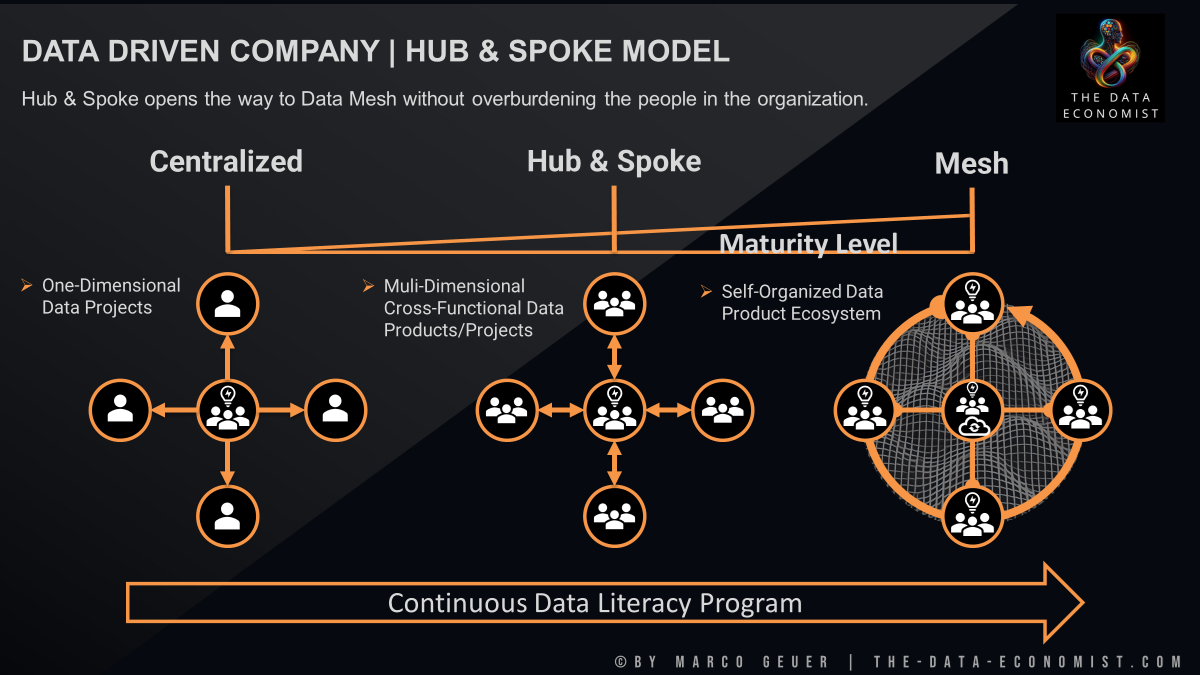
Let's break down this analogy for Notion:
- Centralized: One teamspace and one set of master databases for everyone. Simple, but brittle at scale.
- Hub & Spoke (Hybrid): A central "Hub" teamspace contains universal company information (Mission, Directory, Goals). Departmental "Spoke" teamspaces branch off this hub, containing specialized information and systems. This is our target model for most growing enterprises.
- Mesh (Highly Decentralized): A network of highly autonomous, interconnected teams, each with their own systems. This offers maximum flexibility but requires immense maturity and governance to prevent chaos. It's rare and difficult to manage effectively.
For our purposes, the Hub & Spoke model is the most practical and scalable architecture for a growing enterprise. It balances the need for a single source of truth (the Hub) with the need for departmental autonomy (the Spokes).
The Case Study: "Growth Co."
Let's apply these principles to a fictional client.
Client: Growth Co.
Size: ~700 employees.
Industry: B2B SaaS (Software as a Service).
Situation: Growth Co. adopted Notion organically. It has been a massive success for individual productivity, but the workspace is now a "haphazard" collection of hundreds of top-level pages and dozens of redundant, competing teamspaces (e.g., "Marketing," "Mktg Team," "Content"). Information is siloed, new hires are overwhelmed, and cross-functional projects are chaotic.
Mandate: You have been hired to redesign their entire Notion workspace architecture for scalability, clarity, and performance.
Key Requirements:
- Centralized Knowledge: Leadership needs a "single pane of glass" view of company-wide goals and key cross-functional projects.
- Departmental Autonomy: The Product & Engineering teams have highly specialized workflows (Agile sprints, roadmaps) that differ significantly from the Sales team's CRM and pipeline management needs.
- Security & Privacy: HR and Finance require secure, private areas for sensitive information like compensation and employee performance reviews.
- Cross-Functional Collaboration: Product launches are a core business process, involving Product, Engineering, Marketing, and Sales. The current system for managing these is ad-hoc and varies from launch to launch.
Designing the Hub & Spoke Architecture for Growth Co.
Let's walk through the design process step-by-step.
Step 1: Define the Hub (The "Company OS" Teamspace)
The foundation of our architecture is the central hub. This will be a Default Teamspace that every employee is automatically a part of. We can call it "Growth Co. OS" or simply "General." Its purpose is to house information and resources relevant to every single employee.
To understand what goes into this Hub, let's review Notion's own best practices.
Best practices for an organized workspace
The video 'Best practices for an organized workspace' gives clear guidance on what should live in a general, company-wide teamspace. This directly informs the design of our 'Hub'.
Watch the segment from 01:26 to 02:15. Pay close attention to the list of items suggested for the 'general team space'—this is our blueprint for the Hub's content.
Based on this, the Growth Co. OS teamspace will contain:
- Top-level pages:
- Mission, Vision, & Values
- Company-Wide Goals (OKRs)
- New Hire Onboarding Central
- Employee Directory
- Benefits & Policies
- Key universal databases:
Company-Wide AnnouncementsAll Hands Meeting NotesDocs(A master knowledge base for non-departmental information)
This hub provides the "alignment" and "transparency" that the "Connected Company" article advocates for.
Step 2: Design the Spokes (Departmental Teamspaces)
Next, we create the "spokes"—dedicated teamspaces for each major function. This de-clutters the sidebar and gives each department a clear home.
For Growth Co., this would look like:
- Teamspace: Product & Engineering (Permission: Open)
- Teamspace: Marketing (Permission: Open)
- Teamspace: Sales & Success (Permission: Open)
- Teamspace: People (HR) (Permission: Closed)
- Teamspace: Finance & Legal (Permission: Closed or Private)
The choice of permission level is a key architectural decision.
Creating teamspaces for your organization
To make informed decisions about permissions, let's quickly review the definitions of Open, Closed, and Private teamspaces from Notion's guide.
Watch from 00:39 to 01:45 to review the definitions, and then from 02:59 to 03:51 for strategic recommendations on when to use each type. This will justify our choices for HR and Finance.
- Open teamspaces promote transparency. Anyone at Growth Co. can join them to see what Marketing is working on.
- Closed teamspaces are visible, but require an invitation to join. This is perfect for the People team; it signals the teamspace exists but protects its content.
- Private teamspaces are invite-only and invisible to non-members. This is ideal for highly sensitive work, like a confidential M&A project within the Finance team.
Step 3: Architecting the Content Within Spokes
A good hierarchy extends inside each teamspace. Simply creating the spokes isn't enough. Each departmental teamspace should have a standardized internal structure.
Following best practices from the Best practices for an organized workspace video (sections 1, 4), each teamspace should contain:
- A Team Homepage: A landing page that acts as a dashboard for that team, outlining their goals, key projects, and team members.
- Core Databases: The operational databases specific to that team (e.g., the
Campaignsdatabase in Marketing; theEngineering Roadmapin Product & Eng). - Nested Pages: Other pages (meeting notes, project docs) should be nested logically under the homepage or related database entries, not left as a long, flat list of top-level pages.
This structure creates predictable, navigable homes for departmental work, empowering the autonomy that the spokes are meant to provide.
Test your understanding!
A new, temporary "Innovation Task Force" is formed at Growth Co. to explore a confidential new product line. The team consists of members from Product, Marketing, and Sales. How should their workspace be provisioned according to our Hub & Spoke architecture?
Show answer
The best solution is to create a new, temporary Private Teamspace for the task force.
- Why a new teamspace? Their work is cross-functional and doesn't belong to any single department. Giving them a dedicated space keeps their work contained.
- Why Private? The project is confidential. A private teamspace ensures it's invisible and inaccessible to anyone not on the task force, meeting the security requirement.
- Why not a page in the "General" Hub? The Hub is for universally accessible information. A confidential project page would violate that principle.
This demonstrates the flexibility of the model—it provides a standard structure but allows for secure exceptions when needed.
Step 4: Governance and Enforcement
This elegant design will collapse back into chaos without enforcement. As the consultant, your final and most critical recommendation is to establish governance. This involves using Notion's enterprise admin tools to maintain the architecture.
Everything you need to know about setting up and ...
The article 'Everything you need to know about setting up and...' provides the key to making our architecture last. It details the administrative levers we need to pull.
Read the section 'Notion’s recommended workspace settings'. Focus on the recommendation to 'Limit teamspace creation to only workspace owners'.
The primary governance lever for Growth Co. is to limit teamspace creation to workspace owners only. This single setting prevents the organic, haphazard creation of new teamspaces that caused the initial problem. Any new teamspace (like the one for our Innovation Task Force) must now be a deliberate, approved architectural decision.
Conclusion
Today you've moved beyond theory and designed a complete workspace hierarchy for a realistic enterprise client. By applying the Hub & Spoke model, you created a solution that balances central control with departmental flexibility, solving the client's core challenges of chaos and information silos.
Key Takeaways:
- Design from Principles: Start with a strategic vision (like the "Connected Company") before defining the structure.
- Hub & Spoke is a Powerful Framework: It provides a scalable and understandable structure for most growing companies, implementing a practical hybrid model.
- Architecture is Layers: A good design considers the workspace level (Hub vs. Spokes), the teamspace permission level (Open, Closed, Private), and the page structure within teamspaces.
- Structure without Governance Fails: Your design is only as strong as the rules that enforce it. Use admin controls like limiting teamspace creation to protect the architecture's integrity.
In our next lesson, we will zoom in from the teamspace level to the page and database level. You will learn how to design a role-based permission structure that balances security with cross-departmental collaboration needs, ensuring the right people have the right access within the beautiful architecture you've just created.