Hello! Welcome back to our course on mastering Notion for businesses.
In our last lesson, we explored the "why" and "what" of database normalization, covering the principles up to the Third Normal Form (3NF). We established that a well-structured database is the foundation of any scalable and maintainable system. The key takeaway was the mantra: every non-key attribute should depend on "the key, the whole key, and nothing but the key."
Today, we move from theory to practice. Our goal is to apply these normalization principles to design a relational database structure for a given business process. You will act as the system architect, translating a set of business requirements into a logical and efficient data model within Notion. This is a critical skill that separates a good Notion user from a great Notion systems consultant.
A Quick Refresher on the Normal Forms
Before we dive in, let's briefly refresh our memory of the normal forms using a simple, clear video explanation.
Introduction to Database Normalization
This short video by Cody Baldwin provides a concise summary of 1NF, 2NF, and 3NF. Pay close attention to the simple examples he uses to illustrate each form.
Watch from 01:45 to 04:29. This will serve as a quick recap of the rules we learned in the previous lesson.
As a reminder:
- 1NF: Eliminates repeating groups and ensures atomicity.
- 2NF: Builds on 1NF and eliminates partial dependencies on a composite key.
- 3NF: Builds on 2NF and eliminates transitive dependencies (where non-key attributes depend on other non-key attributes).
With these rules fresh in our minds, let's tackle a real-world scenario.
Step 1: Deconstruct a Business Process
As a systems architect, your first job is to understand the business process you're trying to model. Let's use a common use case for Notion consultants: building a client project management system for a small agency.
Here's the scenario:
An agency manages projects for various client companies. For each project, there are multiple tasks and deliverables. The agency also stores important documents and meeting notes related to each project. A single company can have multiple projects.
Your first step is to identify the core entities or "things" we need to track information about. Based on the description, what are the distinct categories of information?
You likely identified:
- Companies (the clients)
- Projects
- Tasks / Deliverables
- Documents / Meeting Notes
These entities will form the basis of our individual databases in Notion. Storing them all in one giant "master database" would lead to the redundancy and data anomalies we discussed in the last lesson.
Step 2: Apply Normalization to Define the Structure
Now, let's design the structure by applying the normalization rules. We'll use a helpful article written from a no-code perspective to guide our thinking.
Database Normalization for Beginners: A No-Code Perspective
The article 'Database Normalization for Beginners: A No-Code Perspective' from Knack clearly demonstrates how to move from an unnormalized state to a normalized one with simple 'Before' and 'After' tables.
Please read the sections 'Common Database Anomalies Explained' and 'Database Normal Forms Explained (1NF to 3NF)'. Focus on how the 'Before' tables are transformed into the 'After' tables for each normal form. This will help solidify the process of separating data.
Let's walk through the logic for our agency scenario:
- Start with an unnormalized mess. Imagine one big table where each row is a task. We might have columns for
Task Name,Project Name,Company Name,Company Address,Project Due Date. - Apply 1NF. We can't have repeating groups. A project can't have "Task 1, Task 2" in a single field. So, we immediately know we need a
Tasksdatabase separate from theProjectsdatabase. This is the first split. - Apply 2NF & 3NF. Now look at our
Taskstable. DoesProject Namedepend on theTask Name? No. DoesCompany Namedepend on theTask Name? No. These are attributes of other entities.- The 3NF violation: In our imaginary
Projectstable that still hasCompany NameandCompany Address, theCompany Addressdepends on theCompany Name, not theProject ID. This is a classic transitive dependency. - The solution: We create separate databases for each entity and link them with relations.
- The 3NF violation: In our imaginary
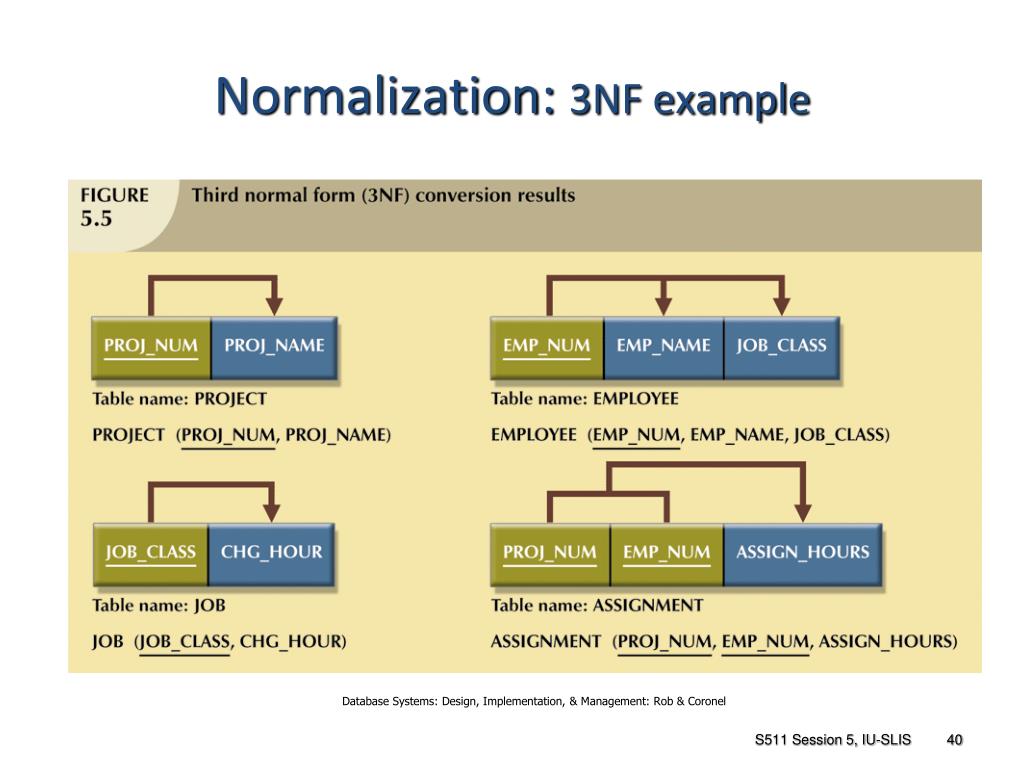
This thought process leads us to the following 3NF structure:
- Companies Database: Holds information only about companies (Name, Address, Primary Contact, etc.).
- Projects Database: Holds information only about projects (Name, Status, Due Date). It will have a Relation property linking to the
Companiesdatabase. - Tasks Database: Holds information only about tasks (Name, Assignee, Due Date). It will have a Relation property linking to the
Projectsdatabase. - Documents Database: Holds information only about documents (Name, File, Type). It will also have a Relation property linking to the
Projectsdatabase.
This structure ensures that if a company changes its address, you only need to update it in one place: its entry in the Companies database. This is the power of a normalized design.
Step 3: See it in Action – A Notion Case Study
Now, let's see how this exact structure is built in Notion for a real client portal. This video is a detailed walkthrough, but we will focus on the initial architectural setup where the databases and relations are created.
How to Build a Client Portal in Notion (Step-by-Step)
In this video, 'How to Build a Client Portal in Notion,' Sam from WorkflowLab implements a system using the very principles we've just discussed. Watching him build the database architecture is a perfect practical application of normalization.
Please watch from 05:40 to 08:01. In this specific segment, the creator adds the crucial 'Relation' properties that link the databases together. Notice how he creates a two-way relation between Projects and Companies, and then between Tasks and Projects. This is the practical implementation of creating foreign key relationships to build a normalized structure.
As you saw in the video, the core architecture relies on creating separate databases for each entity (Companies, Client Projects, Tasks and Deliverables, Docs) and then explicitly linking them using Notion's Relation property. This is normalization in action within a no-code environment. Each database is responsible for its own data, preventing redundancy and ensuring data integrity.
Test your understanding!
In the video, the creator adds a Relation property from the Tasks & Deliverables database to the Client Projects database. From a normalization perspective, what is the purpose of this relationship? What kind of data anomaly does it help prevent?
Show answer
The Relation property serves as a foreign key, linking a task to its parent project.
Its purpose is to adhere to the First Normal Form (1NF) by ensuring tasks are atomic records rather than being part of a "repeating group" within the project page. It also helps achieve Third Normal Form (3NF) by ensuring that task-specific details (like task status or due date) are dependent on the task itself, not transitively on the project.
This structure helps prevent update anomalies and deletion anomalies. For example, if you change a project's name, you only change it in the Client Projects database, and the link remains intact for all tasks. Similarly, deleting a task doesn't risk deleting any project information.
Your Turn: Design a Database Architecture
Now it's time for you to put on your architect hat. Let's tackle a new business scenario.
Scenario:
You are designing a system for a small consulting firm. They need to track their Consultants, the Skills each consultant possesses (e.g., "Notion API," "Process Improvement," "CRM Design"), the Clients they work with, and the specific Projects they are assigned to.
Your Task:
On a piece of paper or in a blank Notion page, sketch out the database architecture for this system.
- List the databases you would create.
- For each database, list a few key properties (e.g., Name, Email, Status).
- Most importantly, describe the relations you would create between the databases to connect them. Your goal is to create a design that adheres to 3NF.
Take about 10-15 minutes to work on this. Think carefully about the relationships, especially between Consultants and Skills.
Click here to see a suggested solution and explanation.
Here is a robust, normalized solution for the consulting firm scenario:
You would need five databases:
-
Consultants Database
- Properties:
Consultant Name(Title),Email,Role, etc. - This database holds information only about the consultants.
- Properties:
-
Skills Database
- Properties:
Skill Name(Title),Description. - This database acts as a master list of all possible skills.
- Properties:
-
Clients Database
- Properties:
Client Name(Title),Industry,Main Contact. - This holds information only about the clients.
- Properties:
-
Projects Database
- Properties:
Project Name(Title),Status,Start Date,End Date. - Relations:
- A relation to the Clients Database (A project has one client; a client can have many projects).
- A relation to the Consultants Database (A project can have multiple consultants; a consultant can be on multiple projects). This is a many-to-many relationship.
- Properties:
-
Consultant Skills Database (A "Junction" Table)
- Properties:
Name(this can be a formula to combine Consultant and Skill names). - Relations:
- A relation to the Consultants Database.
- A relation to the Skills Database.
- Why is this needed? The relationship between Consultants and Skills is many-to-many (one consultant has many skills, one skill is possessed by many consultants). A single relation property in Notion can't capture this without creating messy multi-selects (which violates 1NF!). A "junction" or "join" database solves this by having each entry represent a single link:
[Consultant A] --- [has Skill X]. This is the purest way to model many-to-many relationships in a normalized fashion.
- Properties:
This five-database structure is highly scalable, flexible, and avoids data redundancy.
Conclusion
Well done! Today you've made the crucial leap from understanding database theory to applying it in a practical design context. This process of identifying entities, analyzing dependencies, and structuring related databases is the core of your work as a Notion systems architect.
Key Takeaways:
- Applying normalization starts with deconstructing a business process into its core entities (Companies, Projects, Tasks, etc.).
- Each entity becomes its own database in Notion.
- Relations are the tools you use to implement the links between normalized tables, acting as foreign keys.
- The goal is to create a structure where each piece of data lives in one logical place, preventing redundancy and anomalies.
- Complex relationships, like many-to-many, often require a "junction" database to remain properly normalized.
In our next lesson, we'll explore how to leverage the normalized structure you've designed. We'll focus on "Design multi-level relational hierarchies and rollup chains to aggregate data efficiently." This is where you'll see the payoff: once data is properly separated, we can use Rollups and other advanced properties to pull it back together into powerful, dynamic dashboards and reports.