Welcome to our next lesson. In our previous sessions, we've built a solid foundation in Dart's syntax, object-oriented features, and functional data handling. Now, we're moving on to one of the most critical topics for any app developer: managing operations that don't complete instantly.
Today's lesson is all about asynchronous programming in Dart. Your experience with JavaScript/TypeScript, particularly with Promises and async/await, will be a significant advantage here. The core concepts are nearly identical, so our focus will be on mapping what you already know to Dart's specific syntax and conventions. We will cover:
- The
Futureobject, Dart's equivalent of a JavaScriptPromise. - How to write clean, readable asynchronous code using the
asyncandawaitkeywords. - The proper way to handle errors in asynchronous operations.
By the end of this lesson, you'll be able to confidently handle asynchronous tasks like network requests, which are fundamental to building the dynamic, data-driven apps you aim to create.
Asynchronous Programming: The Why and the What
In mobile app development, a smooth, responsive user interface is paramount. If your app freezes while fetching data from the internet, reading a large file, or querying a database, it creates a poor user experience. Asynchronous programming is the technique that allows your app to perform these long-running tasks in the background without blocking the UI.
The following short video provides an excellent high-level overview of why asynchronous programming is so important in the context of building applications.
Flutter Async/Await & Futures Tutorial - Dart Asynchronous Programming Guide
This video by Hussain Mustafa introduces the concept and importance of asynchronous programming for maintaining a good user experience.
Watch the first section from the beginning. The examples of fetching products or uploading a video will be very relevant to the features you plan to build.
At the heart of asynchronous programming in Dart is the Future class. A Future is an object that represents a potential value, or error, that will be available at some time in the future.
A Future in Dart is directly analogous to a Promise in JavaScript.
Like a Promise, a Future can be in one of two states:
- Uncompleted: The asynchronous operation has not finished yet. This is like a
pendingPromise. - Completed: The operation has finished. It can complete with either:
- A value: The operation was successful. This is like a
fulfilledorresolvedPromise. - An error: The operation failed. This is like a
rejectedPromise.
- A value: The operation was successful. This is like a

Working with Futures: async and await
Just as in modern JavaScript, the clearest and most common way to work with Futures is by using the async and await keywords. This syntax allows you to write asynchronous code that reads almost like synchronous code, avoiding the "callback hell" or complex chaining that can arise from using methods like .then().
The official Dart documentation provides an excellent, in-depth tutorial on this topic. We'll work through its key sections.
Asynchronous programming: futures, async, await
This guide from dart.dev is the definitive resource for understanding asynchronous programming in Dart. It provides clear explanations and interactive examples.
First, read the introductory sections that explain why it matters. The incorrect example clearly shows what happens when you don't wait for a Future to complete—you get an Instance of '_Future', much like you'd get [object Promise] in JavaScript if you forgot to await. Next, read the section defining a Future. This formally explains the uncompleted and completed states. Finally, focus on the core section, "Working with futures: async and await". Pay close attention to the two main rules: marking a function with async and using await inside it. The side-by-side comparison of synchronous and asynchronous code here is particularly effective.
The key rules are simple:
- To use
awaitin a function, you must mark the function with theasynckeyword.Future<String> myFunction() async { // ... } - An
asyncfunction automatically wraps its return value in aFuture. If you return aString, the function's actual return type isFuture<String>. If you don't return anything, its type isFuture<void>. - The
awaitkeyword pauses the execution of theasyncfunction until theFuturecompletes. It then "unwraps" the value from theFuture.
Let's see this in action. The following video from Net Ninja is perfect for developers with a web background and clearly demonstrates creating and consuming a Future.
Dart Crash Course #11 - Async, Await & Futures
This video from the Net Ninja channel directly compares Dart's Futures to JavaScript Promises and walks through using async/await.
First, watch the introduction where he explicitly compares Futures to Promises. Next, see how a mock asynchronous function is created using Future.delayed from this segment. This is a very common pattern for simulating network latency during development. Finally, watch the key section on using async and await. Notice how await unwraps the Future<Post> to a Post object, allowing you to access its properties directly. This is identical to how you would await a Promise in JavaScript.
Execution Flow and Error Handling
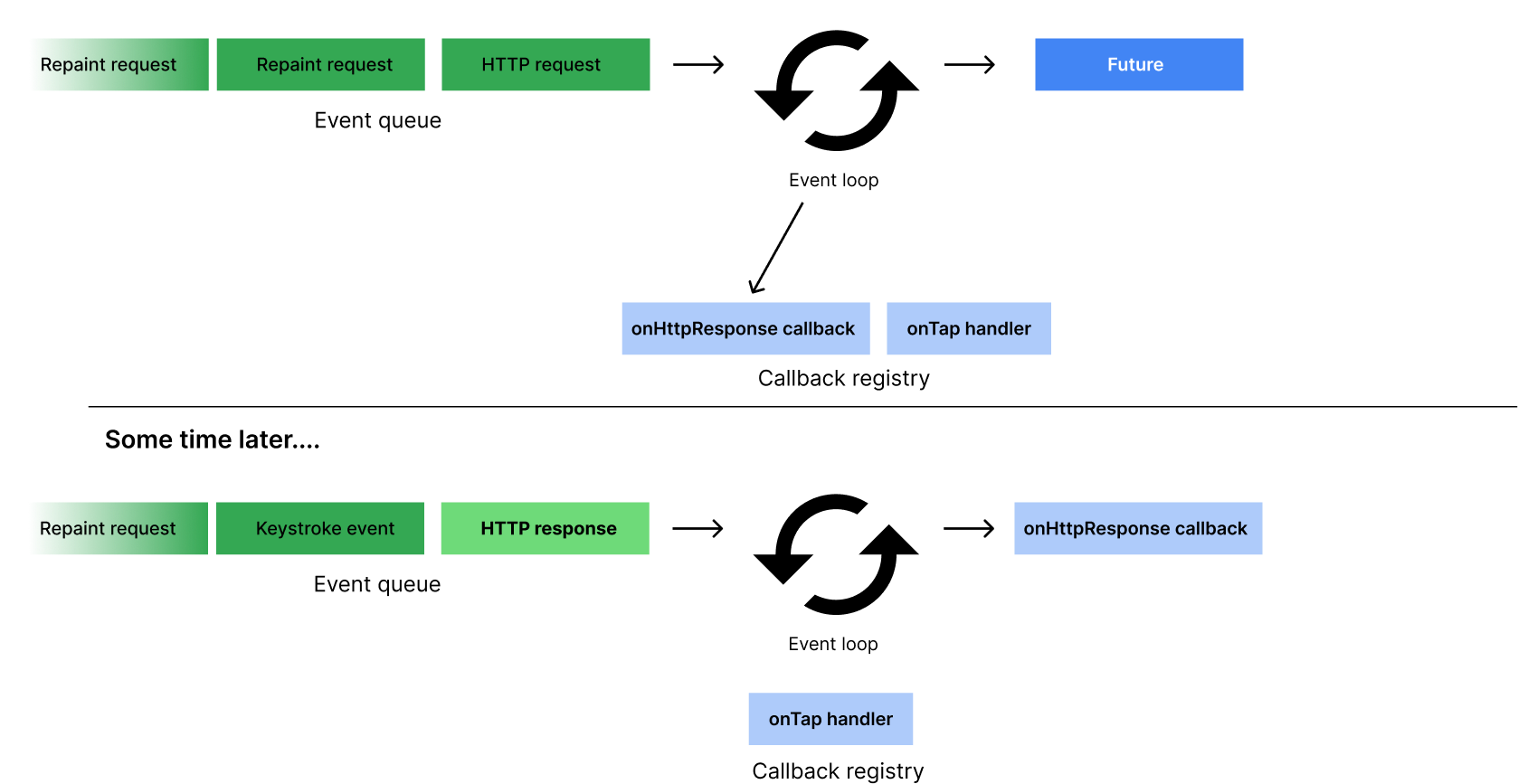
It's important to understand that an async function runs synchronously until the first await keyword. At that point, it pauses the function, schedules the rest of the function to run when the awaited Future completes, and returns an uncompleted Future to its caller. This allows the event loop to continue processing other events, keeping the app responsive.
Handling errors is also straightforward and should feel familiar. With async/await, you use a standard try-catch block, just as you would in synchronous code.
Future<void> getUserData() async {
  try {
    final String userId = await fetchUserId();
    final String userData = await fetchUserData(userId);
    print(userData);
  } catch (e) {
    print('An error occurred: $e');
  }
}
The Dart documentation you started reading earlier has excellent interactive exercises to solidify these concepts. Now is a great time to complete them.
Asynchronous programming: futures, async, await
Let's continue with the official Dart tutorial to practice what you've learned.
Read the section on Execution flow to cement your understanding of how async functions execute. Complete the interactive first exercise directly in DartPad. It's a great hands-on test. Read the section on Handling errors and review the try-catch example. Complete the second exercise on error handling. Finally, tackle the last exercise, "Putting it all together," which combines everything you've learned.
The Alternative: .then()
Before async/await became standard, Futures were handled using the .then() method, which registers a callback to run when the Future completes successfully. This is identical to the promise.then() syntax in JavaScript.
// Using .then()
fetchUserOrder().then((order) {
  print('Your order is: $order');
}).catchError((error) {
  print('Caught error: $error');
});

// Equivalent using async/await
try {
  final order = await fetchUserOrder();
  print('Your order is: $order');
} catch (error) {
  print('Caught error: $error');
}
While you will primarily use async/await in modern Flutter development for its superior readability, it's useful to recognize .then() as you may encounter it in older code or specific APIs.
Beginner Dart Language Tutorial for JavaScript Developers
This article from RisingStack is specifically for developers with your background.
Read the section on Asynchronous programming. It provides a perfect side-by-side comparison of the callback-style .then() approach and the modern async/await syntax, reinforcing the parallels with JavaScript.
Conclusion
In this lesson, we've seen how Dart handles asynchronous operations, a concept you were already familiar with from your JavaScript background. We've established a clear mapping from JavaScript's Promise to Dart's Future.
Key Takeaways:
Future<T>is Dart's equivalent of a JavaScriptPromise<T>, representing a value that will be available later.asyncandawaitare the preferred tools for working with Futures, offering clean, readable, and sequential-looking code.- An
asyncfunction always returns aFuture. Theawaitkeyword pauses the function and unwraps the value from aFuture. - Error handling in
asyncfunctions is done with standardtry-catchblocks.
Mastering asynchronous programming is a major step forward. You now have the tools to handle data structures (from the last lesson) and time-consuming operations. You're now ready to connect these concepts to a user interface.
In our next lesson, we will dive into Flutter's UI paradigm. You'll learn about its declarative UI model, the widget tree, and the fundamental difference between StatelessWidget and StatefulWidget. This will be our first step in taking data and asynchronous results and actually displaying them on the screen.