In our previous lesson, we established the crucial difference between primitive types and their wrapper classes, focusing on how they are stored in memory and their fundamental behavioral distinctions. You learned that wrapper classes come with significant memory overhead but are essential for use in generics and for representing null values. We ended with a brief introduction to boxing and unboxing, the mechanisms that bridge the gap between these two worlds.
This lesson dives into the mechanics behind that bridge. We will unravel how autoboxing and unboxing actually work, revealing that they are not a runtime feature of the JVM, but a clever trick performed by the Java compiler. We will then explore a critical performance optimization related to this process: the Integer object cache. By the end, you'll understand why comparing Integer objects with == can lead to surprising results and how to avoid this common pitfall.
Autoboxing and Unboxing: The Compiler's Syntactic Sugar
In the last lesson, you saw that code like Integer i = 10; is an example of autoboxing. It's easy to assume this is some special feature of the JVM, but it's actually just syntactic sugar provided by the javac compiler. During compilation, the compiler translates these convenient assignments into explicit method calls.
- Autoboxing: A primitive-to-wrapper assignment like
Integer i = 10;is converted intoInteger i = Integer.valueOf(10);. - Auto-unboxing: A wrapper-to-primitive assignment like
int j = i;is converted intoint j = i.intValue();.
The following video provides a clear walkthrough of this translation process for both autoboxing and unboxing.
What is Autoboxing and Unboxing in Java? - 045
This video from Deege explains how the compiler automatically inserts method calls to handle conversions between primitives and wrapper types.
Please watch the following segments: Autoboxing: This part shows how a simple assignment is converted into a valueOf() method call. Unboxing: Here, the video demonstrates the reverse, where the compiler inserts an intValue() call. Risks of null: Pay close attention to the explanation of how unboxing a null wrapper leads to a NullPointerException.
As you can see, what appears to be a direct assignment in your source code is actually a method call in the compiled bytecode. This is a powerful convenience, but it also means that a seemingly innocuous line of code can hide a method invocation, which has implications for both performance and correctness, especially regarding null values.
Peeking at the Bytecode
Since you're interested in the inner workings of Java, let's verify this compiler behavior. We don't have to take it on faith; we can inspect the bytecode generated by the compiler. The javap tool we used in Module 1 is one way, but another is to look at the community's analysis.
The following Stack Overflow discussion provides a concise, bytecode-level explanation.
autoboxing - How does auto boxing/unboxing work in Java? - Stack Overflow
This Stack Overflow answer gets straight to the point, showing the bytecode generated for autoboxing and unboxing and demonstrating a compiler flag to see the desugared code.
Please read the top-voted answer by Joachim Sauer. Focus on these parts: The bytecode for Integer n = 42; which clearly shows the call to Integer.valueOf(). The bytecode for int n = Integer.valueOf(42); which shows the call to intValue() for unboxing. Next, look at the answer by mightyWOZ. It introduces a useful compiler flag, -XD-printflat, which shows you the source code after the compiler has inserted the autoboxing calls. This is a great debugging technique to remember.
The key takeaway is that autoboxing uses the static factory method Integer.valueOf(int), not the constructor new Integer(int). This is a deliberate design choice with a significant performance benefit, which we'll explore now.
The Integer Cache: A Memory-Saving Optimization
So, why does the compiler prefer Integer.valueOf(int)? Because this method contains an important optimization: an object cache.
The Java language specification requires that Integer objects for values in the range -128 to 127 (inclusive) are cached. When you call Integer.valueOf(i) with i in this range, the method doesn't create a new Integer object. Instead, it returns a pre-existing object from a pool. This saves memory and reduces the pressure on the garbage collector by avoiding the creation of thousands of small, identical objects that are very common in programs.
The workflow is simple:
- When
Integer.valueOf(i)is called, it checks if the valueiis within the cached range. - If yes, it returns the reference to the existing object from the cache.
- If no, it creates a new
Integerobject on the heap (new Integer(i)) and returns its reference.
This flowchart illustrates the logic inside Integer.valueOf().

This caching mechanism has a very surprising side effect when it comes to object comparison. The following video provides a perfect demonstration, framed as a common technical interview question.
Interview Question : Compare Two Integer Numbers (Integer Caching) in #Java
This video from Naveen AutomationLabs clearly demonstrates the surprising behavior of the == operator on Integer objects due to caching.
Watch the video from the beginning until the end of the main explanation. The presenter will: Compare two Integer objects with the value 100 and get true. Change the value to 190 and get false. Explain that this is due to the Integer cache and its range of -128 to 127. Test the boundary conditions (127, 128, -128, -129) to solidify the concept.
As the video demonstrates, == on object references checks if two variables point to the exact same object in memory.
- When you write
Integer a = 127; Integer b = 127;, autoboxing callsInteger.valueOf(127)for both. Since 127 is in the cache, bothaandbreceive a reference to the same cached object. Thus,a == bistrue. - When you write
Integer c = 128; Integer d = 128;, autoboxing callsInteger.valueOf(128). Since 128 is outside the cache, anew Integer(128)is created for each assignment. Nowcanddpoint to two different objects on the heap, even though they contain the same value. Thus,c == disfalse.
This diagram perfectly visualizes the outcome.
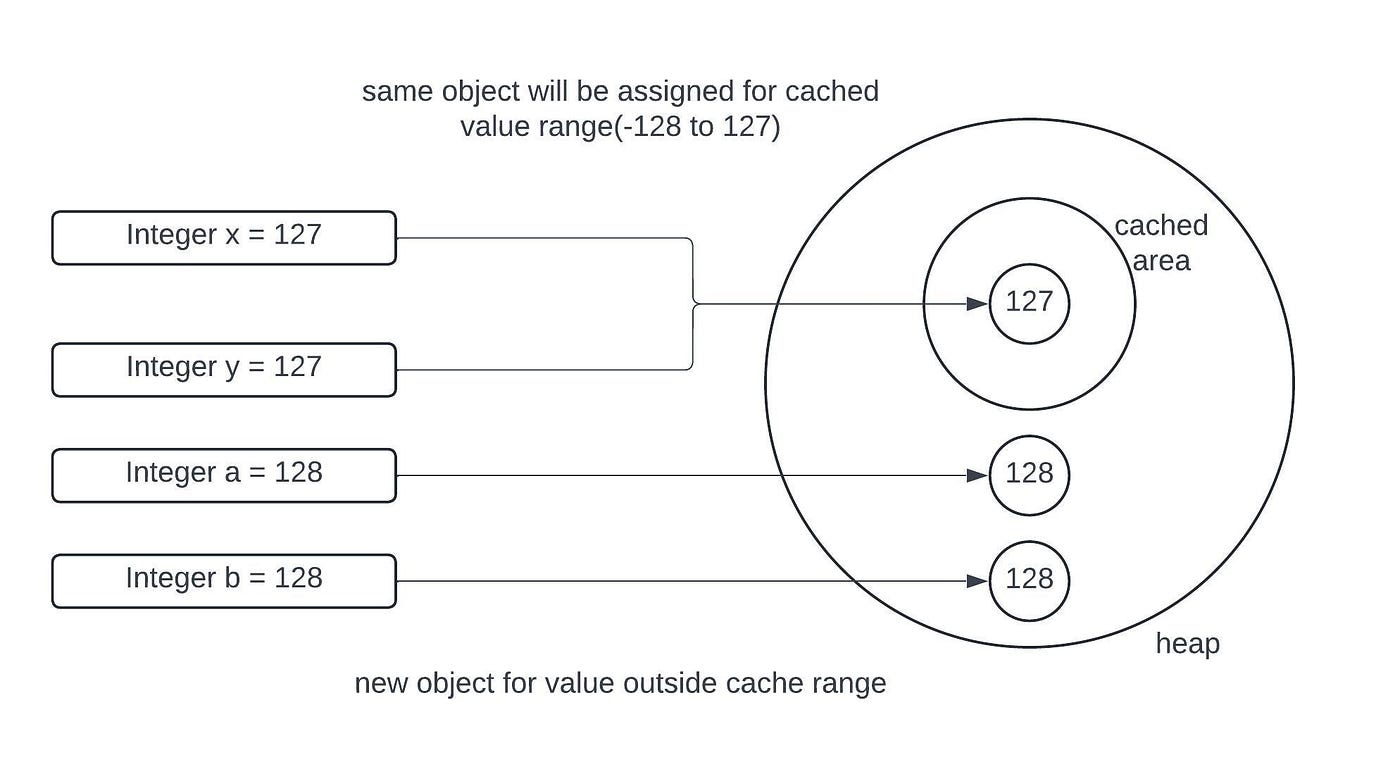
This behavior is one of the most famous "gotchas" in Java. It underscores the rule from our previous lesson: when comparing wrapper objects for their value, always use the .equals() method. The == operator should only be used if you specifically need to check for reference equality.
The following reading provides a final summary of this behavior and the compiler's role.
Java: Primitive `int` vs Wrapper `Integer` - Complete Guide
This article provides a detailed breakdown of the caching behavior and the compiler's execution flow.
Please read the following sections: Start at the heading Integer Caching Behavior and review the comparison examples. This reinforces the difference in == behavior inside and outside the cache range. Next, read the section Compiler Execution Flow. This provides a step-by-step trace of how Integer a1 = 10; is processed, connecting lexical analysis to the final bytecode generation. Finally, read the short section under "Common Pitfalls" titled Inconsistent Behavior with Cache, which shows the classic code snippet demonstrating the issue.
It's worth noting that while the range -128 to 127 is guaranteed, the high end of the cache can be configured with the JVM option -XX:AutoBoxCacheMax=<size> or the system property java.lang.Integer.IntegerCache.high. However, relying on this for program correctness is poor practice; .equals() is always the safe choice.
Conclusion
In this lesson, we demystified the process of autoboxing and unboxing, and uncovered a crucial internal optimization. You now have a much deeper understanding of what happens when you mix primitives and their wrapper types.
Key Takeaways:
- Compiler Magic: Autoboxing and unboxing are syntactic sugar applied by the compiler, which replaces assignments with
valueOf()andintValue()method calls respectively. - The Integer Cache: To improve performance,
Integer.valueOf()caches and reusesIntegerobjects for values between -128 and 127. - The
==Trap: Using==to compareIntegerobjects yields inconsistent results depending on whether the values fall within the cache range. It compares references, not values. - Best Practice: Always use
.equals()to compare the values of wrapper objects to avoid bugs related to caching. - Hidden Dangers: Auto-unboxing a
nullwrapper object will result in aNullPointerException. Autoboxing inside a tight loop can create many objects and hurt performance.
In our next lesson, we will continue exploring the internals of core Java classes by turning our attention to String. You will learn about its immutability, why it was designed that way, and how the JVM uses a similar, but distinct, optimization called the String Constant Pool.