Hello! Welcome to your second lesson.
In our last session, we built a custom useFetch hook. It was a great exercise to see how much logic is involved in even a basic data-fetching scenario: managing data, loading, and error states. We also acknowledged its limitations, particularly the lack of caching. Every time we need the data, we have to fetch it again, showing a loading spinner each time.
Today, we'll dive into the conceptual heart of TanStack Query. You'll learn how it addresses these problems by introducing the idea of server state. We'll explore its powerful default strategy, stale-while-revalidate, and the core caching mechanisms that make your applications feel faster and more responsive.
This lesson is about the "why" and "how" behind TanStack Query's magic. Understanding these concepts is crucial before we start writing code in the next lesson.
What is Server State?
First, it's important to understand the type of state TanStack Query is designed to manage. In modern applications, we can generally divide state into two categories: Client State and Server State.
- Client State: This is state that lives entirely within your application's UI. It's not persisted anywhere else and you have full control over it. Think of the value of an input field, whether a modal is open, or the current theme (dark/light mode). You're already using
useStateanduseEffectfor this, and it works perfectly. - Server State: This is data that is persisted remotely on a server. Your application doesn't "own" this state; it "borrows" it by fetching it. This brings challenges: the data can become outdated without you knowing, it requires asynchronous APIs to fetch and update, and network latency affects the user experience.
TanStack Query is a library for managing server state.

Because server state lives outside your app, managing it with useState/useEffect (like in our useFetch hook) quickly becomes complex. Let's look at the specific problems TanStack Query solves.
React Data Fetching Best Practices with TanStack Query - rtCamp
The following article from rtCamp details the common pitfalls of manual data fetching with useEffect. Reading this will reinforce why a specialized tool like TanStack Query is necessary.
Please read the section titled 'The problem with naive data fetching'. It lists several issues, including race conditions, lack of caching, and network waterfalls. You'll see that our useFetch hook from the last lesson solves some, but not all, of these problems.
As you can see, our useFetch hook was a good first step, but it doesn't handle caching, request deduplication, or automatic refetching. This is where TanStack Query's core caching strategy comes in.
The Stale-While-Revalidate Strategy
The default caching behavior in TanStack Query is a powerful strategy called stale-while-revalidate. The name says it all:
- Show STALE data: When a component needs data, TanStack Query first checks its cache. If it finds data (even if it's old, or "stale"), it displays it immediately. The user sees content right away, not a loading spinner.
- WHILE REVALIDATING: In the background, it silently sends a request to the server to "revalidate" the data—i.e., fetch a fresh copy.
- Update: When the fresh data arrives, TanStack Query seamlessly updates the UI.
This provides an excellent user experience. The user gets instant feedback with the cached data and then sees the most up-to-date information moments later.
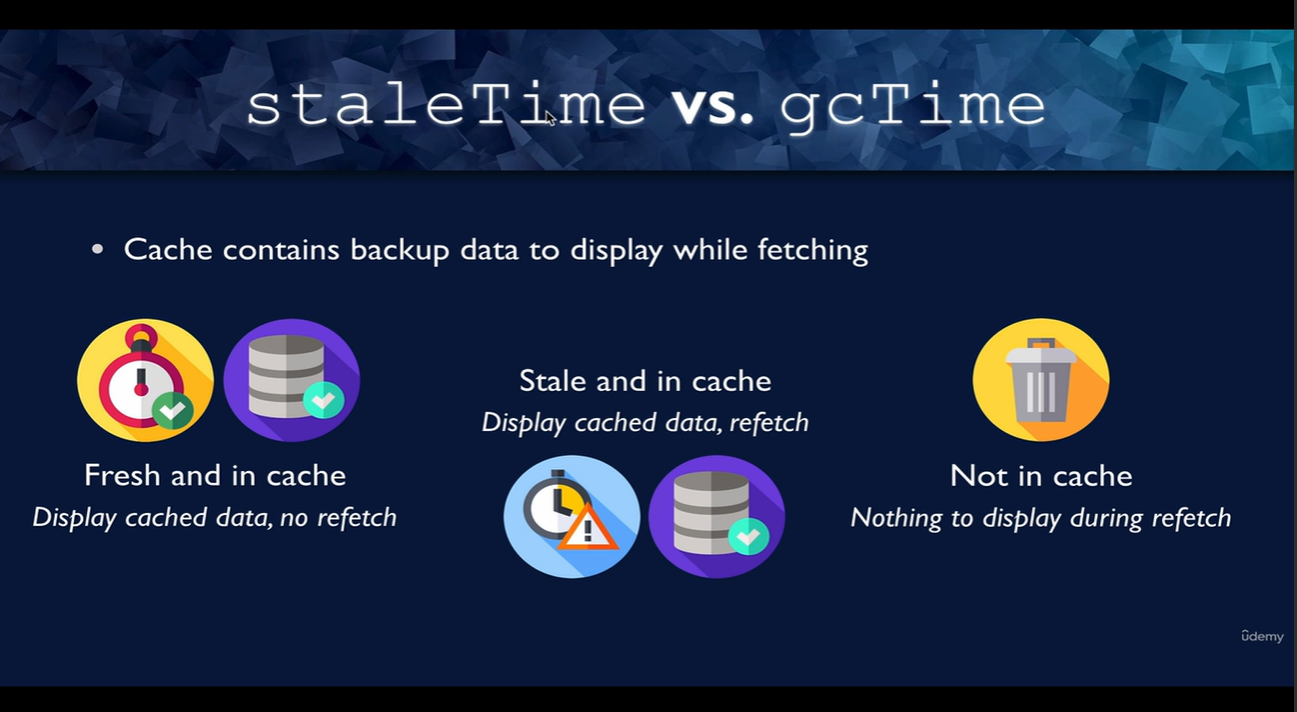
Now, let's dig into how TanStack Query decides if data is "fresh" or "stale".
Controlling the Cache: staleTime and gcTime
TanStack Query uses two key timers to manage the cache lifecycle: staleTime and gcTime. Understanding these is the key to mastering its caching behavior.
TanStack Query Lifecycle: The Difference Between staleTime and gcTime | VXD Blog
The VXD Blog provides a fantastic explanation of staleTime and gcTime. These two settings are the most important configuration options for controlling your cache.
Read the first three sections: '1. Data Freshness: Fresh vs. Stale', '2. Memory Management: Inactive and gcTime', and '3. Lifecycle at a Glance'. Focus on understanding the distinct role of each timer.
Let's summarize the crucial points from that reading:
staleTime
- What it is: The duration until fetched data goes from
freshtostale. - Default value:
0milliseconds. - Implication: By default, data is considered stale immediately after it's fetched. This is why TanStack Query will refetch data when you refocus the window or when a component remounts—it sees the data is stale and triggers a revalidation.
- Analogy: You can think of
staleTimeas the "best before" date on a food item. Before this time, you consume it without checking. After this time, you still might consume it, but you'll probably check if it's still good first (revalidate).
gcTime (Garbage Collection Time)
- What it is: The duration until inactive cached data is removed from memory (garbage collected). A query becomes inactive when no components are mounted that are using it.
- Default value:
5minutes. - Implication: When you navigate away from a page, the data doesn't disappear from the cache right away. It sticks around for 5 minutes. If you navigate back within that time, the stale data is still available to be shown instantly while the revalidation happens. If you wait longer than 5 minutes, the data is deleted, and the next visit will trigger a full refetch with a loading state.
- Analogy: Given your computer science background, this is directly analogous to garbage collection in memory management. The
gcTimeis the timer that runs on an "un-referenced" query before cleaning it up to free memory.
The Data Lifecycle Summarized
Combining these concepts gives us the full lifecycle of a query:
- Fetching: A network request is made. On success, the data is stored in the cache and is considered
fresh. - Fresh: While the
staleTimehas not passed, the data is served directly from the cache. No new network requests are made. - Stale: After
staleTimepasses, the data is nowstale. It is still served from the cache instantly, but background revalidation will occur on events like component mounts or window focus. - Inactive: When all components using a query unmount, the query becomes
inactiveand thegcTimetimer begins. - Deleted: If the
gcTimepasses while the query isinactive, the data is deleted from the cache.
Mastering the interplay between staleTime and gcTime allows you to fine-tune caching behavior for different types of data, optimizing for both performance and data freshness.
Conclusion
Today, we laid the conceptual groundwork for TanStack Query. You now understand the fundamental ideas that make it so effective for data fetching in React applications.
Key Takeaways:
- TanStack Query is designed to manage server state, which has different challenges than client state.
- Its default caching strategy is stale-while-revalidate, which prioritizes showing data to the user quickly while updating it in the background.
staleTimedetermines how long data is consideredfreshand when it needs revalidation. The default is 0.gcTimedetermines how longinactivedata stays in the cache before being deleted. The default is 5 minutes.
Next Lesson Preview:
We've covered the theory. In the next lesson, we'll get our hands dirty with code. You will learn how to set up the QueryClient and wrap your application in the QueryClientProvider, which are the two necessary steps to start using TanStack Query in any React project.