Welcome to your first lesson in the course on building AI agents. Our goal is to move from understanding the core concepts of AI assistants to constructing your own automated agents, with a specific focus on the Claude ecosystem and a no-code approach that aligns with your professional background.
This initial lesson provides the essential foundation for everything that follows. Before you can effectively command or build with an AI, you must understand its fundamental nature: what are its strengths, what are its different forms, and, just as importantly, what are its limitations? Today, we will identify the core capabilities and limitations of the Claude AI model family. Think of this as the preliminary analysis phase of a project—scoping the tool before you deploy it.
1. The Claude Model Family: Choosing the Right Specialist
It's helpful to think of "Claude" not as a single entity, but as a family of specialized models, each with a different balance of intelligence, speed, and cost. As a manager, you're familiar with assigning the right person to the right task based on their skills and the project's budget. The same principle applies here.
Anthropic, the company behind Claude, offers three primary models: Opus, Sonnet, and Haiku.

This visual gives you a quick overview. Opus is for heavy-duty tasks, Haiku is for speed and volume, and Sonnet strikes a balance.
To get a more detailed understanding of how these models differ, please read the following section from the Zapier guide to Claude. It breaks down their intended uses and the cost implications, which are important considerations for any business application.
Claude 4.7: A guide to Anthropic's AI models and chatbot - Zapier
This article from Zapier provides a clear, business-oriented overview of the Claude ecosystem. We'll be referring to it several times in this lesson.
Please read the section titled Claude's model family. As you read, focus on the "Best for" descriptions to mentally map each model to potential consulting tasks. For example, think about when you might need the "maximum performance" of Opus versus the cost-effectiveness of Sonnet.
The key takeaway is that you have a choice. For high-stakes, complex analysis where nuance and accuracy are paramount—akin to a deep strategic review—Opus is the top-tier choice. For most everyday business tasks, from drafting emails to summarizing reports, Sonnet is the intelligent and efficient workhorse. For applications requiring near-instant responses at a large scale, such as powering a customer service bot, the fast and economical Haiku model is ideal.
The following short video clip from Anthropic shows where you can select the model in the Claude interface, making this concept tangible.
Getting started with Claude.ai
This clip from Anthropic's "Getting started" video demonstrates the model selector in action.
Watch the segment from choosing the best model. It will show you how to switch between models like Opus and Sonnet for different tasks.
2. Core Capabilities for Business and Consulting
Now that we've distinguished the models, let's explore what they can actually do, focusing on features that are particularly relevant to your work.
Deep Research and Analysis
Claude is not just a conversationalist; it's a powerful research assistant. It has modes designed specifically for in-depth analysis, which are highly applicable to consulting tasks like market research or competitive analysis.
- Extended Thinking Mode: When toggled, Claude takes more time to "think" step-by-step before answering complex questions that require nuanced reasoning.
- Research Feature: This allows Claude to conduct comprehensive investigations across hundreds of sources to produce detailed, cited reports on a topic. It even uses a multi-agent approach internally to speed up the process.
You can learn more about these features by reading this section from the same Zapier guide.
Claude 4.7: A guide to Anthropic's AI models and chatbot - Zapier
This section delves into Claude's capabilities for deep thinking.
Read the section on Research and extended thinking. Notice how the "multi-agent research approach" hints at the more complex agentic systems we'll be exploring later in the course.
Interactive Content and Organized Workflows
Your interest in building with agents points toward a desire for AI to do more than just return text. Claude's ecosystem includes features that facilitate this move from conversation to creation and organization.
- Artifacts: This is a key feature that allows Claude to generate content like code snippets, documents, or even simple web applications in a separate, editable window. This creates a dynamic workspace where you can iterate on AI-generated content in real-time. We will use this feature extensively in Module 2.
- Projects: This feature acts as a container for your work. You can group related chats, files, and instructions into a single Project (e.g., "Client X Market Analysis"). This maintains long-term context, so you don't have to re-explain the project's background in every new chat.
- Skills: These are reusable sets of instructions for a repeatable process. For example, you could create a "Skill" that tells Claude how to format a weekly status report, ensuring consistency every time.
Claude 4.7: A guide to Anthropic's AI models and chatbot - Zapier
Let's return to the Zapier guide to understand these powerful organizational and creative features.
First, read the section on Artifacts. Then, jump down and read the section on Projects and Skills. As you read, consider how you might use Projects to manage different client engagements and Skills to standardize repetitive analysis tasks.
3. Agentic Capabilities: Claude as a Doer
This is where we get to the core of your goal: building agents. "Agentic" capabilities refer to the AI's ability to autonomously take actions to achieve a goal. Claude offers two groundbreaking features in this domain.
- Claude Code: This is the "natural language coding" tool you were interested in. You can give it a high-level goal (e.g., "write a script to analyze this CSV file and find all entries from India"), and it will plan the steps, write the code, and execute it. While powerful for developers, it's also designed to be used by non-technical users through plain English commands. We'll dive into this in Module 4.
- Claude Cowork: This feature allows Claude to perform tasks directly on your computer. You can instruct it to organize files, extract data from a folder of PDFs into a spreadsheet, or streamline other administrative tasks. It acts as a true digital assistant, taking actions in a sandboxed environment. This is a prime example of a personal AI agent at work.
These two capabilities are central to our course, and you can get a concise introduction to them here:
Claude 4.7: A guide to Anthropic's AI models and chatbot - Zapier
This final reading from the Zapier guide introduces the two main agentic features.
Please read the sections on Claude Code and Claude Cowork. These represent the shift from using AI as a source of information to using it as a partner in execution.
Finally, connecting this all back to your interest in no-code platforms, Claude's intelligence can be the "brain" inside automations you build on platforms like Zapier or Make. We'll explore this in depth in Module 5, but it's important to know from the start that Claude's capabilities are not limited to its own app.
4. Understanding the Limitations
No tool is perfect. A critical part of using AI effectively and responsibly is understanding its limitations. Ignoring these can lead to inaccurate results and flawed workflows.
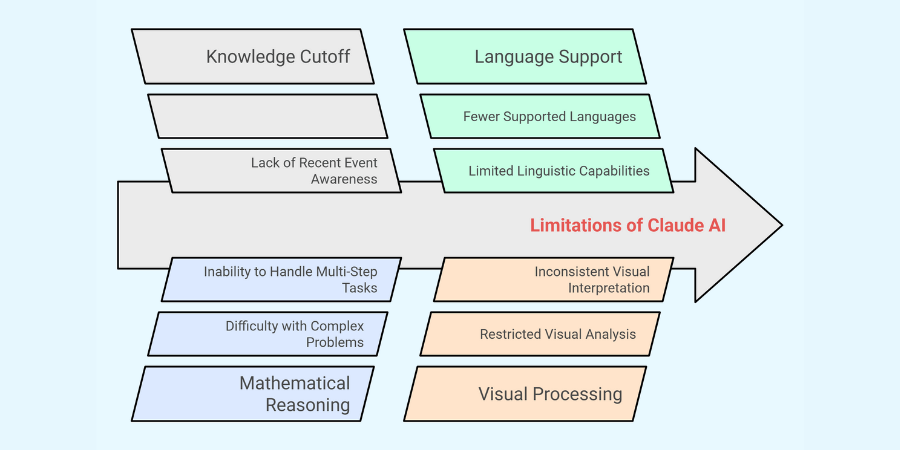
Let's briefly touch on the key areas shown in the diagram:
- Knowledge Cutoff: While Claude's models can be connected to the internet for live research, their base training data has a "knowledge cutoff" date. This means they are not inherently aware of events that have happened very recently.
- Complex Task Handling: Although powerful, models can sometimes struggle to maintain logical consistency through very long, complex, multi-step tasks without careful guidance. This is precisely why prompt engineering, which we'll start in the next lesson, is so important.
- Mathematical Reasoning: LLMs are designed for language, not for calculation. While they can perform simple math, they can make errors with complex quantitative reasoning. It is always best to treat them as reasoning engines and use dedicated tools (like a calculator or code execution) for precise math.
- Visual Processing: Claude's vision capabilities are state-of-the-art for tasks like interpreting charts and transcribing text from images. However, it can still have difficulty with highly niche, ambiguous, or imperfect visual data.
Being aware of these boundaries is not a critique but a strategic imperative. It allows you to design more robust agentic workflows, for instance, by having an agent verify a critical piece of information with a web search or by outsourcing a complex calculation to a code block.
Conclusion
In this lesson, we've established the foundational knowledge required to work with Claude effectively. You now have a strategic overview of the AI you'll be building with for the rest of this course.
Key Takeaways:
- Claude is a family of models: Opus for power, Haiku for speed, and Sonnet for a balance of both, allowing you to choose the right tool for the job.
- Capabilities extend beyond chat: Features like Research, Artifacts, Projects, and Skills provide a rich environment for analysis, creation, and workflow organization relevant to consulting.
- Claude has agentic power: Claude Code and Claude Cowork enable the AI to autonomously execute tasks, forming the basis of the agents you will learn to build.
- Limitations are real: Awareness of boundaries like the knowledge cutoff and challenges in complex reasoning is crucial for building reliable systems.
Now that we have a map of what Claude can do, our next step is to learn how to give it effective instructions. In the next lesson, we'll dive into the art of prompt engineering, starting with how to formulate clear, contextual zero-shot prompts for common business tasks.