In our previous lesson, we surveyed the landscape of Claude's capabilities, identifying the different models in its family and exploring its advanced features for research, content creation, and task automation. This gave us a strategic understanding of what the tool can do. Now, we shift our focus to how to command it effectively.
This lesson marks your first step into the practical art of prompt engineering, the skill of communicating your intent to an AI. We will concentrate on zero-shot prompting, which simply means giving Claude direct instructions for a task without providing any prior examples of the desired output. Your goal is to formulate clear, contextual prompts for common business tasks like creating summaries and drafting emails. Mastering this is the foundation for the "natural language coding" you're aiming for; it's about learning to issue directives that are so precise, the AI executes your intent flawlessly on the first try.
1. The Core Principles of Effective Prompting
Communicating with a large language model is a new kind of dialogue. While conversational, it requires a degree of precision that we often omit in human-to-human interaction. A vague request leads to a generic, unhelpful response. A clear, contextual directive, however, yields a targeted, high-quality output. Think of it as the difference between telling a junior analyst to "look into our competitors" versus asking them to "analyze the Q3 pricing strategies of our top three competitors and summarize the key differences in a table."
Anthropic, the creators of Claude, have published official guidelines on this. The following video distills some of the most critical rules.
99% Of Claude Users STILL Don't Know These 7 Official Prompting Rules
This video, from Dylan Davis, explains several official prompting rules directly from Anthropic's guide. It provides excellent business-centric examples of how to move from weak to strong prompts.
Please watch the following segments: Tip 1: Be Clear: This section emphasizes the importance of specificity to avoid generic "AI slop." Tip 2: Explain Why: This explains how providing intent or purpose helps Claude infer context and improve the output. Tip 4: Ask for the Format: Focus on how to state what you do want, rather than what you don't. Tip 5: Be Direct about Actions: This highlights the use of strong action verbs to ensure Claude performs a task instead of just discussing it.
Let's consolidate these ideas into four guiding principles for your zero-shot prompts:
-
Be Clear and Specific: State your task explicitly. Instead of
Help me with a presentation, useCreate a 10-slide presentation outline for our quarterly sales meeting, covering Q2 performance, top products, and Q3 targets.The more detail you provide about the deliverable, purpose, and scope, the better the result. -
Provide Intent (Explain "Why"): Giving the model the reason for your request allows it to infer unstated details.
Write this in a formal toneis good.Write this in a formal tone because it's for our board of directors and we need to look credible and professionalis much better. The AI can use that context to adjust its vocabulary, structure, and level of detail. -
Use Direct Action Verbs: To get Claude to perform a task, use direct commands. Avoid suggestive language like "Can you think about..." or "Suggest some changes...". Instead, be direct:
Analyze...,Rewrite...,Compare...,Generate a list of.... This moves the AI from being a conversational partner to an executer. -
Specify the Output Format: Explicitly tell the model how you want the information structured. If you don't, it will default to standard paragraphs. Ask for what you want:
Present the key findings in a markdown table,Use bullet points for the recommendations, orProvide the summary as a three-paragraph executive brief.
To see these principles summarized in a handy checklist, you can refer to this guide.
Prompting Best Practices Guide - Claude Blattman · AI for Professionals Who Don't Code
This guide offers a practical, professional-oriented reference for writing effective prompts.
Review the Quality Checklist section. It serves as a great pre-flight check before sending a complex prompt.
2. Zero-Shot Prompts in a Business Context
Now let's apply these principles to the business tasks central to this lesson: summarization and email drafting.
Task 1: Summarizing Documents
As a consultant, you are constantly distilling large volumes of information. Claude can be an exceptionally powerful tool for this, but the quality of the summary depends entirely on the quality of your prompt.
The following video demonstrates the basic mechanics of uploading a document and asking for a summary.
How to Use Claude AI (Beginner Tutorial)
This tutorial by Kevin Stratvert shows a simple, practical example of using Claude for summarization.
Watch the segment on summarizing information. Note how a file is uploaded and then a simple prompt is used to get the key takeaways.
While the prompt in the video (summarize this and give me the key takeaways) is a good start, we can vastly improve it using our principles.
Basic Prompt:
Summarize this report.
Improved, Contextual Prompt:
You are a senior strategy consultant. Summarize the attached 50-page market analysis report for a C-suite audience who are short on time.
- Executive Summary: Provide a 3-paragraph summary focusing on the most critical market trends and competitive threats.
- Strategic Recommendations: List the top 3 data-driven recommendations from the report in a numbered list.
- Key Metrics: Extract the key financial metrics (CAGR, market size, profit margins) and present them in a markdown table.
The tone should be formal, authoritative, and concise.
This improved prompt leverages all our principles: it's specific, provides intent (for a C-suite audience), uses direct action verbs (Summarize, List, Extract), and clearly defines the output format (paragraphs, numbered list, table).
Task 2: Drafting Emails
Claude can also be your co-writer for professional correspondence. For common email types, you can use templates that structure your prompt clearly.
The "Awesome Claude Prompts" repository on GitHub is a great source of such templates. They are designed for you to simply fill in the blanks with your specific context.
langgptai/awesome-claude-prompts
This GitHub repository collects a wide variety of prompt examples. We'll look at a few templates for business emails.
First, review the template for writing update emails. Then, look at the template for writing cold outreach emails. Notice how these prompts break down the request into clear components like Job role, Client, Reason, Tone, and CTA (Call to Action).
Let's break down the update email template:
Write an email from [job role] to [client] updating him about [update] in [project]. The email should maintain [tone].
This simple structure is powerful because it forces you to provide the necessary context. It specifies the actors (job role, client), the subject (update, project), and the style (tone). By filling in these blanks, you are creating a contextual, zero-shot prompt that will produce a highly relevant draft.
3. A Perfect Zero-Shot Prompt in Action
To bring all these concepts together, let's analyze a simple but perfectly constructed zero-shot prompt.
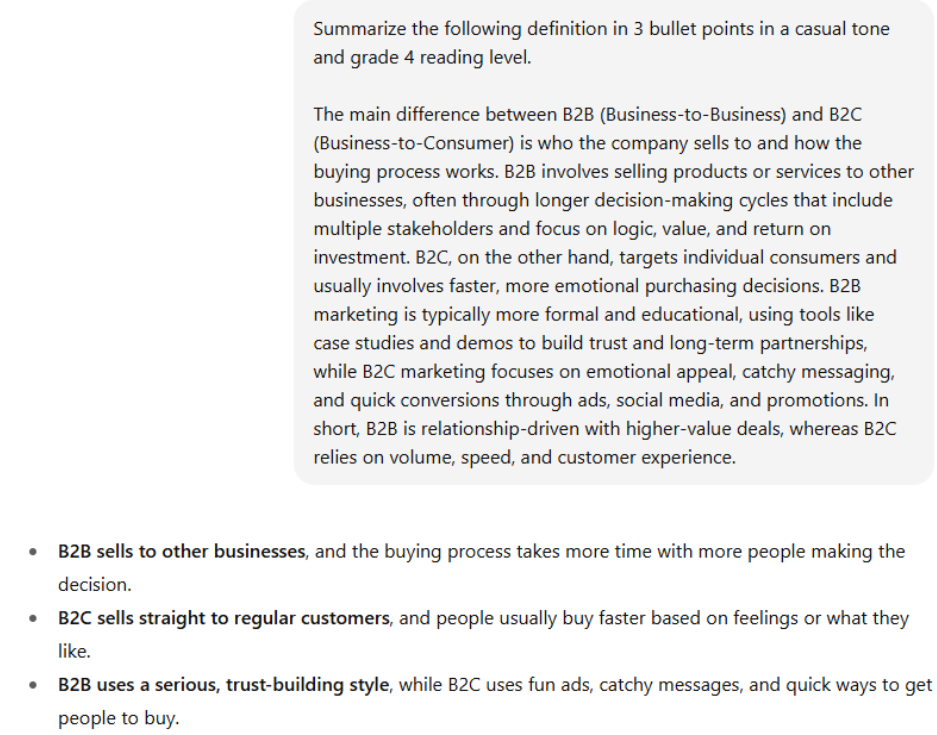
The prompt is: Summarize the following definition in 3 bullet points in a casual tone and grade 4 reading level.
Let's deconstruct it:
- Direct Action Verb:
Summarize - Specific Context:
the following definition - Output Format:
in 3 bullet points - Style and Audience Constraints:
casual toneandgrade 4 reading level
In a single sentence, the user has given Claude a clear task, context, format, and style constraints. This is the essence of effective zero-shot prompting. The result is a simple, accurate summary that perfectly matches the user's request.
Conclusion
In this lesson, we transitioned from understanding Claude's potential to directing its power. You've learned the fundamental skill of zero-shot prompting, which is less about technical knowledge and more about the discipline of clear communication.
Key Takeaways:
- Zero-shot prompting is direct instruction: It involves telling the AI what to do without providing examples.
- Clarity is paramount: Your prompts must be specific, provide context and intent, use direct action verbs, and define the desired output format.
- Contextual prompts yield better results: Providing details about audience, tone, and purpose allows Claude to generate more relevant and higher-quality responses for business tasks.
- Templates can streamline your workflow: For recurring tasks like emails, using structured prompt templates ensures you provide all the necessary context.
You now have the foundational skill to get reliable results from Claude for a wide range of tasks. In our next lesson, we will build on this by exploring few-shot prompting. This technique involves providing Claude with examples to control its output with even greater precision, which is especially useful for tasks requiring a very specific style or format.