Hello! We've reached the final lesson of our first module. Over the past several lessons, you've mastered the Hangul alphabet, learned the tricky pronunciation rules, and even explored how intonation shapes meaning in conversation. Now, we'll connect that knowledge to the digital world.
Today's lesson will focus on a crucial practical skill: typing Korean characters and words efficiently using a standard computer or phone keyboard. This will empower you to text, search online, and practice your writing in a modern context. By the end of our session, you'll be set up and ready to type.
Step 1: Setting Up Your Korean Keyboard
First things first, you don't need to buy a special Korean keyboard. The necessary software, called an Input Method Editor (IME), is built into every major operating system. Your first task is to enable it on your computer and/or smartphone. The standard layout you'll want to select is called 2-Set Korean or 2벌식 (dubeolsik).
The following guide from the HangeulMate blog provides clear, step-by-step instructions for Windows, macOS, iPhone, and Android.
How to Type Korean on Any Device: Complete Keyboard Guide | HangeulMate Blog
This article provides concise instructions for adding the Korean keyboard to all major operating systems.
Please follow the instructions under the heading "Setting Up Korean Input by Platform." Go through the steps for the devices you use (e.g., Windows and Android). Once you've added the Korean keyboard, practice switching between English and Korean input a few times to get a feel for it.
Step 2: The 2-Set (2벌식) Keyboard Layout
Now that your keyboard is set up, let's examine the layout. The 2-Set system is elegant in its design. All the basic consonants are on the left side of the keyboard, and all the basic vowels are on the right side. This division is logical and ergonomic, as you'll naturally alternate between your left and right hands when typing syllables.
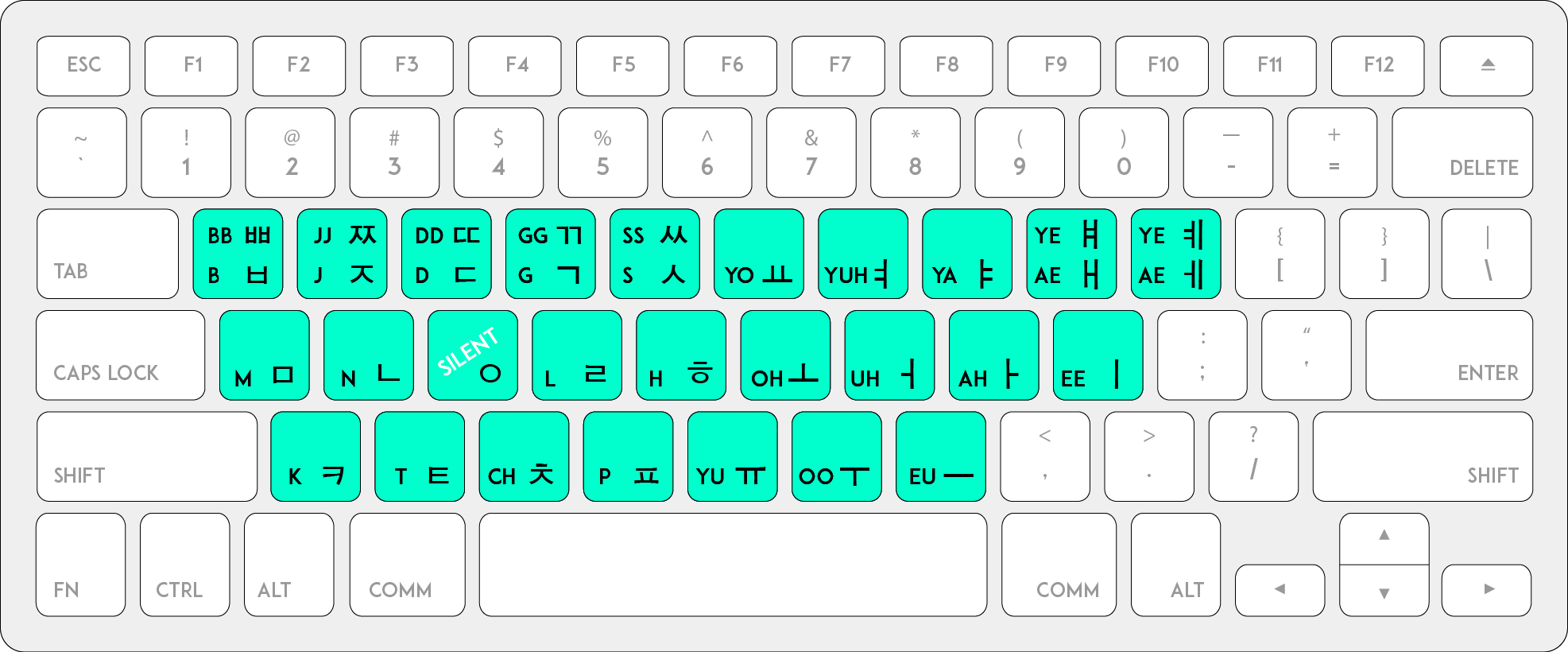
To type the letters you've learned, including the more complex double consonants and compound vowels, there are two simple rules.
- Double Consonants (ㄲ, ㄸ, ㅃ, ㅆ, ㅉ): Hold the
Shiftkey and press the key for the corresponding single consonant. For example,Shift+ㄱ(the 'r' key) producesㄲ. - Compound Vowels (ㅘ, ㅙ, ㅝ, etc.): Simply type the component vowels in order. The IME will automatically combine them. For example, to type
ㅘ, you press the key forㅗ('h') followed by the key forㅏ('k').
Let's read a more detailed breakdown of this layout.
How to Type Korean on Any Device: Complete Keyboard Guide | HangeulMate Blog
This part of the guide explains the logic of the layout and provides clear tables for finding each character.
Start by reading the section "Understanding the 2벌식 Keyboard Layout" to grasp the core concept. Then, review the tables under "Consonant Positions" and "Vowel Positions" to see where each letter is located. Finally, read the sections "Typing Double Consonants" and "Typing Compound Vowels," paying attention to the tables that show the key combinations.
Step 3: Automatic Syllable Assembly
Here is where the process becomes particularly interesting, especially from a technical standpoint. Unlike English, where one keystroke equals one character on screen, the Korean IME actively assembles letters into syllable blocks (글자) as you type.
You type the individual components (jamo), and the system intelligently arranges them into the correct initial, medial, and final positions. Sometimes, as you're typing a word, a letter might temporarily attach to the wrong syllable. Don't worry and don't backspace! Just keep typing, and the IME will correct the block as soon as you type the next vowel.
This video from Go! Billy Korean demonstrates this self-correcting process perfectly.
How to Type in Korean - Learn the Korean Keyboard
Watch this short clip to see how the keyboard automatically builds and corrects syllables as you type.
Pay close attention to the example from this part of the video. Notice how when typing 사람 (saram), the ㄹ initially appears as the final consonant of the first syllable, but as soon as the vowel ㅏ is typed, the IME understands it's the start of a new syllable and automatically rearranges it.
Step 4: Time to Practice
The best way to get comfortable is to start typing. Open a text editor and switch your input to Korean. Try typing the following words. I've included the key sequences for the first one to get you started.
-
안녕하세요 (annyeonghaseyo - Hello)
- Keys:
dkssudgktpy
- Keys:
-
감사합니다 (gamsahamnida - Thank you)
-
한국어 (hangugeo - Korean language)
-
짜다 (jjada - salty) - Practice for double consonant
-
의자 (uija - chair) - Practice for compound vowel
As you get more comfortable, you can use online typing practice tools. Many of these are designed as games, which can make learning the layout more fun.

Conclusion
Congratulations on completing the first module of your Korean learning journey! You now have a solid foundation covering all aspects of Hangul, from reading and writing to pronunciation and typing.
Key Takeaways:
- You can enable a Korean keyboard on any standard device through its language settings. The standard layout is 2-Set (2벌식).
- The layout is logical: consonants are on the left side of the keyboard, and vowels are on the right.
- Double consonants are typed using the
Shiftkey. - Compound vowels are typed by pressing the keys of their component vowels in sequence.
- The Korean Input Method Editor (IME) automatically assembles letters into syllable blocks as you type.
In our next lesson, we will leave the mechanics of Hangul behind and dive into our first conversations. We'll start Module 2 by learning how to greet people and introduce yourself using essential patterns like 안녕하세요 and [Noun]입니다. The typing skill you learned today will be immediately useful as you begin to write your first Korean sentences.