Introduction
In our last lesson, you did an excellent job mapping your user's end-to-end journey, which uncovered a rich list of pain points and corresponding design opportunities. This is like completing a detailed process audit and identifying all potential areas for improvement. However, just like in business, not all opportunities are created equal. You can't—and shouldn't—tackle everything at once.
Today, we'll focus on the crucial final step of the user research process: translating those research insights into a prioritized list of actionable design opportunities. We will learn structured methods to evaluate the opportunities you've identified, deciding which ones offer the most value to both the user and the business. This skill is vital for a freelancer, as it allows you to propose a clear, defensible action plan that maximizes your client's return on investment.
From Insights to Actionable Opportunities
The user journey map you created helped you spot problems. Now, we need to frame these problems in a way that inspires solutions. A powerful and widely used technique for this is formulating "How Might We..." (HMW) questions. This simple rephrasing shifts the mindset from being stuck on a problem to exploring potential solutions.
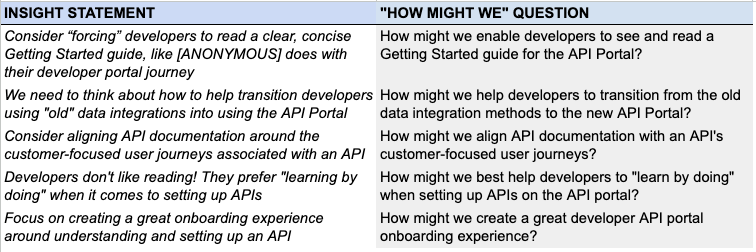
This table clearly demonstrates the simple but powerful shift from a problem statement (Insight) to a solution-oriented question (How Might We?).
How to Turn User Research into a Product Roadmap - Cardinal Peak
This article from Cardinal Peak neatly outlines the process of turning raw data into a strategic plan. We'll focus on the first two steps.
Please read the sections titled "Step 1: Synthesize Raw Data into Key Insights" and "Step 2: Translate Insights into Opportunities". Notice how they move from identifying patterns (like "Users are confused by our pricing tiers") to creating a forward-looking HMW question ("How might we simplify our pricing page...?").
Quick Practice: Your Turn to Reframe
Let's take a couple of the opportunities we identified in the previous lesson for Priya, the event planner, and reframe them as HMW questions.
- Opportunity: Offer curated, shoppable "looks" or themes.
- HMW: How might we present curated themes so that Priya can easily shop a complete look?
- Opportunity: Use badges for "Top Quality" or "Fast Ship".
- HMW: How might we visually signal quality and reliability to reduce Priya's research time and purchase anxiety?
This reframing makes the opportunities feel more concrete and ready for brainstorming.
Frameworks for Prioritization
With a list of HMWs, the next question is: where do we start? This is where prioritization frameworks come in. They provide a structured, objective way to make decisions, moving beyond personal opinion or the "loudest voice in the room." Given your background in structured financial analysis, you'll find these frameworks logically sound and highly effective.
There are many frameworks available. Let's get a quick overview of some of the most common ones.
UX Design Prioritization Methods
This video from the Nielsen Norman Group provides a concise overview of five different UX prioritization methods.
Please watch the full video in its entirety. Pay attention to the different criteria each method uses. While all are useful, we are going to focus on the Impact-Effort Matrix as our primary tool because it is visual, collaborative, and highly effective for starting out.
Deep Dive: The Impact-Effort Matrix
The Impact-Effort Matrix is your most valuable tool for quick, visual prioritization. It helps you and your clients immediately see which ideas are "quick wins" and which are larger, more strategic "bets."
It plots each opportunity on a 2x2 grid:
- Impact (Vertical Axis): How much value will this bring to the user and the business?
- Effort (Horizontal Axis): How difficult, time-consuming, or expensive will this be to design and build?
This next video demonstrates how to use the matrix in a practical, workshop-style setting.
How to PRIORITIZE IDEAS in Meetings Fast (The Impact Effort Matrix)
The team at AJ&Smart are masters of practical workshop exercises. This video shows you exactly how to run an Impact-Effort (or "Action Board") prioritization session.
Watch these key parts to understand the process: First, get familiar with the four quadrants from the breakdown. They call them "Do Now," "Make it a Project," etc., which map directly to our "Quick Wins" and "Big Bets." Next, observe the process of placing the first few items from the walkthrough. Notice that it's a relative comparison—each new item is placed in relation to the others. It's about building a shared understanding, not achieving mathematical precision.
A Freelancer's Lens: The LNO Framework
While the Impact-Effort matrix is a great tool, how do you define "Impact"? For a freelancer working with businesses, impact almost always ties back to the bottom line. This is where your commerce background is a superpower.
The LNO framework is a simple but powerful mental model to help you assess impact from a business perspective.
How to prioritize as a "design team of one" (with real examples)
This LinkedIn post by Tommy Geoco provides a ruthlessly practical framework perfect for a solo designer or freelancer.
Read the entire post. Internalize the three categories: L: Losing deals/revenue. These are critical issues actively costing the business money. They represent the highest possible impact. N: Noticeable issues. These are UX problems that damage the experience but won't sink the business overnight (e.g., inconsistent buttons, poor mobile layout). They are medium impact. O: Optimization opportunities. These are "nice-to-have" improvements that could add delight but aren't solving a core problem (e.g., new illustrations, micro-interactions). They are low impact.
When you're plotting items on your Impact-Effort matrix, use the LNO framework as your guide for the "Impact" axis.
Your Turn: Create a Prioritized Action Plan
Now, let's put it all together. You will take the opportunities from your user journey map and create a prioritized list.
Task:
- Set Up Your Matrix in Figma:
- Create a new page in your project file called "Prioritization."
- Draw a large 2x2 grid. Label the vertical (Y) axis Impact (with "Low" at the bottom and "High" at the top). Label the horizontal (X) axis Effort (with "Low" on the left and "High" on the right).
*   Label the four quadrants:
    *   Top-Left: **Quick Wins** (High Impact, Low Effort)
    *   Top-Right: **Big Bets** (High Impact, High Effort)
    *   Bottom-Left: **Fill-ins / Tasks** (Low Impact, Low Effort)
    *   Bottom-Right: **Money Pits / Reconsider** (Low Impact, High Effort)
2. List and Plot Your Opportunities:
* Review the "Opportunities" you brainstormed in the user journey map from the last lesson.
* For each one, create a sticky note in Figma and write it as a "How Might We..." question.
* Place each sticky note on the matrix. Use the LNO framework to guide your Impact rating and your own judgment for the Effort rating. Talk yourself through it: Is this solving a problem that loses sales? High Impact. Is this a minor annoyance? Low impact.
Here are the sample opportunities from the previous lesson to get you started:
*   HMW offer curated, shoppable "looks"?
*   HMW provide a style quiz to narrow down options?
*   HMW create a "one-cart" experience for items from multiple vendors?
*   HMW use badges to signal "Top Quality" or "Fast Ship"?
*   HMW show social proof with customer photos?
3. Create Your Prioritized List:
* Once all your stickies are placed, create a new text box next to your matrix.
* Title it "Actionable Design Opportunities."
* List your HMWs in order of priority:
1. Start with everything in the Quick Wins quadrant.
2. Next, list the items in the Big Bets quadrant.
3. Finally, list any items from the Fill-ins quadrant.
4. Ignore the "Money Pits" for now.
Spend about 20-25 minutes on this exercise. This is the final deliverable from your research phase—a clear, prioritized plan that you can confidently present to a client.
Conclusion
Congratulations on completing the User Research & Empathy module! You've successfully navigated the entire process from identifying a user's needs to creating a strategic action plan. By turning vague problems into a prioritized list, you've built a bridge between user empathy and business value—a skill that is absolutely essential for a successful freelance career.
Key Takeaways:
- "How Might We..." questions are a powerful tool for reframing problems into solution-oriented opportunities.
- The Impact-Effort Matrix is a simple, visual framework for prioritizing work by balancing value against cost.
- The LNO (Losing Revenue, Noticeable, Optimization) framework provides a business-centric lens to define "Impact," ensuring your design efforts are focused on what truly matters.
- The final output is a prioritized list of opportunities that serves as a clear roadmap for the design phase.
Preview of the Next Lesson:
With our research complete and our priorities set, we are ready to move from strategy to execution. The next module, Applied Visual Design for Web Interfaces, will kick off with a foundational topic: color. You'll learn how to translate a brand's identity into a digital UI color palette while ensuring it meets critical accessibility standards. We're about to start bringing these opportunities to life visually.