Welcome to the final lesson of our first module on cloud foundations. In our previous lessons, we've explored the essential characteristics and advantages of cloud computing, culminating in a look at elasticity and scalability. These powerful capabilities allow you to build dynamic, cost-effective systems. However, running applications in the cloud is a partnership, and it's crucial to understand who is responsible for what, especially concerning security and operations.
This lesson addresses that fundamental question by introducing the AWS Shared Responsibility Model. We will define the division of responsibilities between AWS and you, the customer. More importantly, we'll see how your level of responsibility changes depending on the services you use—from running virtual servers with EC2 to using serverless functions with Lambda. Understanding this model is not only a cornerstone of the AWS Cloud Practitioner exam but is also essential for securely and effectively managing any workload on AWS.
The Core Principle: Security "of" vs. "in" the Cloud
At its heart, the Shared Responsibility Model can be summarized with a simple but powerful distinction:
- AWS is responsible for security of the Cloud. This means AWS secures the underlying global infrastructure that runs all AWS services.
- The customer is responsible for security in the Cloud. This means you are responsible for securing the workloads and data you place in that infrastructure.
Let's begin by reading the official AWS definition of this model.
Shared Responsibility Model - Amazon Web Services (AWS)
This official AWS page provides the authoritative definition of the Shared Responsibility Model. It clearly outlines the core principle of security "of" vs. "in" the cloud.
Please read the Overview section to grasp the main concept. Then, continue to the section "Understanding the AWS Shared Responsibility Model" and read the descriptions for AWS and customer responsibilities.
As you've just read, AWS handles the physical security of data centers, the hardware and software for core services (compute, storage, networking), and the management of their global network. You, in turn, are responsible for things like managing your data, configuring access permissions, and securing your applications.
To reinforce this, the following video provides a concise, exam-oriented explanation.
AWS Shared Responsibility Model - Exam Reviewer for AWS Certified Cloud Practitioner
This video from Digital Cloud Training breaks down the Shared Responsibility Model specifically for the Cloud Practitioner exam.
Watch these segments to hear the distinction explained clearly: First, the explanation of AWS's responsibility ("security of the cloud"). Next, the breakdown of the customer's responsibility ("security in the cloud"). Finally, review the quick summary slide at the end of the first question, which recaps these points.
How Responsibilities Shift with Service Models
The key to mastering this model is understanding that your responsibilities are not static. They change significantly based on the type of AWS service you choose. As you move from services that give you more control (like IaaS) to more abstracted services (like PaaS or Serverless), AWS takes on a greater share of the responsibility.
Your experience with a range of AWS services, from EC2 to Lambda, gives you a practical foundation for understanding this shift.
Let's look at a visual representation of this principle. The diagram below compares the responsibilities for an on-premises environment with two common AWS service models.

Let's break this down using service categories you're familiar with.
1. Infrastructure as a Service (IaaS) - Example: Amazon EC2
In an IaaS model, you are renting fundamental building blocks: virtual servers, storage, and networking. This gives you the most control but also assigns you the most responsibility.
- AWS Responsibility: The physical hardware, data center security, power, cooling, and the virtualization layer (the hypervisor).
- Your Responsibility: You are responsible for everything "above" the hypervisor. This includes:
- Patching and securing the guest operating system (e.g., Windows Server or Linux).
- Installing and configuring your application runtime (e.g., Java, Python).
- Managing all application code and data.
- Configuring network firewalls (Security Groups and Network ACLs).
- Managing identity and access through IAM.
If you deploy a Spring Boot application to an EC2 instance, you are responsible for keeping the underlying OS up to date, securing your application against vulnerabilities, and controlling who can access it.
2. Platform as a Service (PaaS) - Example: Amazon RDS
In a PaaS model, AWS manages the underlying infrastructure and the platform software for you. You are primarily responsible for your application code and data that run on that platform. Amazon RDS is a classic example, where AWS manages the database so you don't have to.
- AWS Responsibility: Everything in IaaS, plus OS patching, database software installation and patching, and automated backups.
- Your Responsibility: You are still responsible for:
- The data you store in the database.
- Controlling network access to the database.
- Managing database user permissions and credentials.
- Deciding on schema design and query optimization.
3. Serverless & Managed Services - Example: AWS Lambda & Amazon S3
This category represents the highest level of abstraction, where AWS manages the most, allowing you to focus almost entirely on your application logic and data. Your experience with Lambda and S3 directly illustrates this.
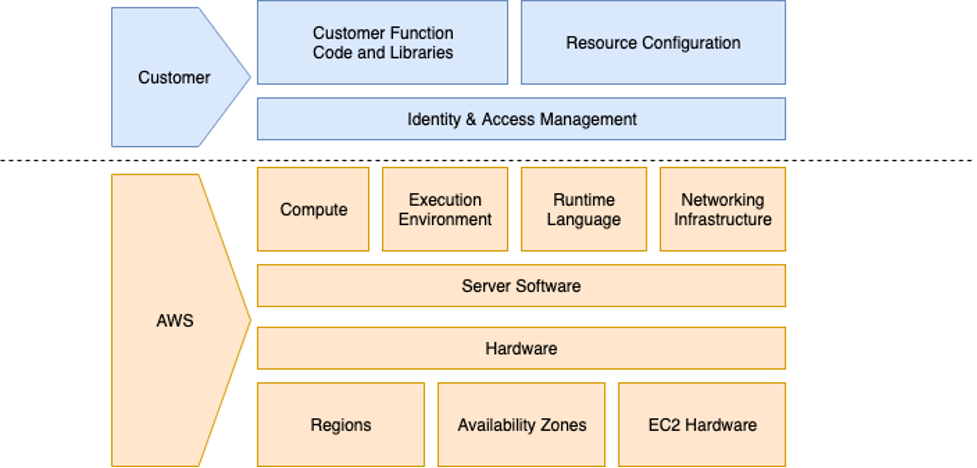
- AWS Responsibility: Everything from the physical hardware up to and including the runtime environment and scaling.
- Your Responsibility:
- For Lambda: Your function code and its dependencies, the resource configuration (memory, timeout), and the IAM role that grants it permissions.
- For S3: Your data (the objects you store), managing access policies (bucket policies and IAM), and configuring features like versioning and encryption.
The image below specifically illustrates the model for AWS Lambda.
To see these distinctions laid out clearly, the following article provides an excellent breakdown.
Understand the AWS Shared Responsibility Model
This article from a dev.to series on the Cloud Practitioner exam provides a practical, scenario-based explanation of how responsibilities shift.
Please read the section titled How Responsibilities Shift by Service Type. Pay close attention to the specific examples for EC2, RDS, and Lambda, as they directly map to the concepts we've just discussed.
The core takeaway is this: The more managed the service, the less operational and security burden you have. This is a key reason why services like Lambda and S3 are so powerful for building scalable, event-driven applications quickly.
Applying the Model: Exam Scenarios
The Cloud Practitioner exam will test your ability to apply this model by asking you to classify who is responsible for a specific task. Let's work through a couple of typical exam-style questions.
AWS Shared Responsibility Model - Exam Reviewer for AWS Certified Cloud Practitioner
This video includes several practice questions with detailed walkthroughs of the answers. This is a great way to test your understanding.
Watch the following two practice questions: The question starting at "which of the following tasks are the responsibility of the aws customer". Listen carefully to the explanation for why user training and data encryption are customer tasks. The second question, which also asks about customer responsibilities, starting at "what is the customer responsible for". Note the distinction made for RDS patching (AWS's job) versus S3 encryption setup (your job).
These questions highlight a critical rule of thumb for the exam:
- Anything related to physical infrastructure (data centers, hardware disposal) is always AWS's responsibility.
- Anything related to your data, user access permissions (IAM), and application code is always your responsibility.
- Tasks like OS patching are your responsibility on IaaS (EC2) but AWS's responsibility on PaaS (RDS) or Serverless (Lambda).
Conclusion
In this lesson, we demystified the AWS Shared Responsibility Model, a foundational concept for cloud security and operations.
Here are the key takeaways:
- Security and compliance are a shared effort. AWS secures the cloud infrastructure (security of the cloud), while you secure what you build on it (security in the cloud).
- Your level of responsibility is highest with IaaS services like EC2 and lowest with serverless and managed services like Lambda and S3.
- Regardless of the service, you are always responsible for managing your data, identities, and access permissions.
This lesson concludes our first module, "Cloud Foundations and Economics." You now have a solid understanding of what the cloud is, why it's valuable, and the operational framework that governs its use.
In our next lesson, we will begin Module 2, "AWS Global Infrastructure." We will explore the physical building blocks that AWS is responsible for securing—its Regions, Availability Zones, and Edge Locations—and see how this global footprint enables the scalability, availability, and performance of your applications.