Welcome to the next lesson in our exploration of cloud foundations. In our last session, we detailed the six key business advantages of cloud computing, one of which was the ability to "stop guessing capacity." Today, we will explore the two core technical concepts that make this advantage a reality: scalability and elasticity.
While often used interchangeably, these terms describe distinct capabilities that are fundamental to designing cost-effective and resilient cloud architectures. Your experience building scalable microservices and event-driven systems gives you a practical head start in understanding these concepts. This lesson will formalize that understanding, clearly distinguish between the two, and demonstrate their implementation using real-world AWS examples. Mastering this distinction is crucial for the AWS Cloud Practitioner exam and for making sound architectural decisions.
Scalability vs. Elasticity: A Visual Introduction
Before diving into formal definitions, let's establish a mental model. In traditional IT, you often had to engage in "static scaling," which meant provisioning resources for the highest anticipated peak load. This leads to wasted resources during normal or low-traffic periods. The cloud enables "elastic scaling," where resources dynamically match the workload.
The image below illustrates this fundamental difference.
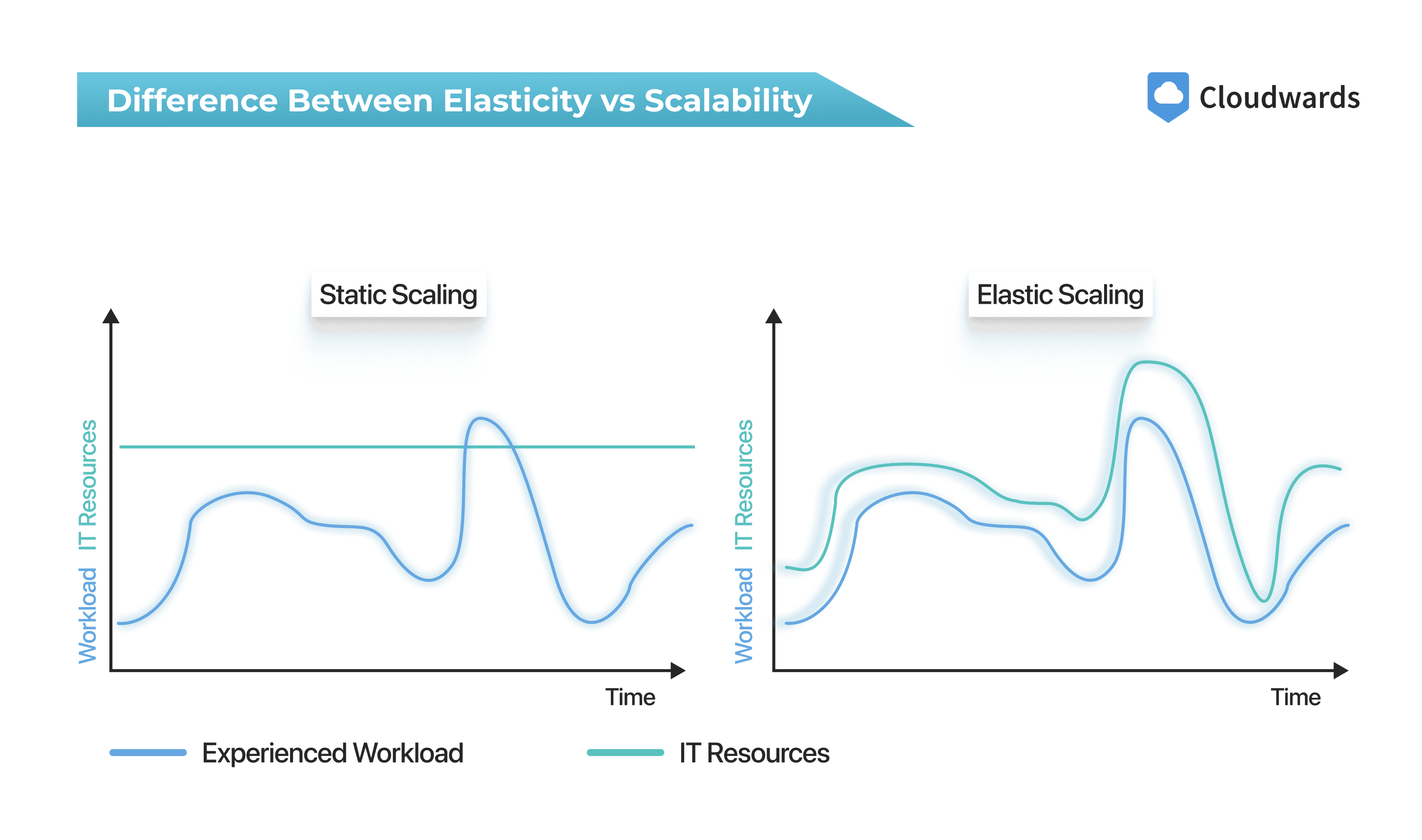
The left-hand graph shows static scaling: a fixed level of IT resources that is either insufficient for peaks or wasteful during lulls. The right-hand graph shows elastic scaling: resources dynamically expanding and contracting to meet demand. This is the ideal state we aim for in the cloud. Now, let's define the concepts that achieve this.
Understanding Scalability: Planning for Growth
Scalability is the ability of a system to increase its capacity to handle a growing amount of work. It's about designing a system that can gracefully accommodate growth over the long term without degrading performance.
For a deeper dive into the architectural perspective on this, the following video offers excellent definitions.
Lesson 85 - Defining Scalability and Elasticity
This video from the "Software Architecture Monday" series by Mark Richards provides a clear, architect-focused definition of scalability.
Watch the initial segment that defines scalability as the ability to remain responsive as user load gradually increases over time.
Scalability is typically achieved in two ways:
-
Vertical Scaling (Scaling Up/Down): This involves increasing the size and power of a single resource. For example, upgrading an EC2 instance from a
t2.microto anm5.largeto get more CPU, RAM, and network throughput. This is like upgrading your personal computer with a better processor or more memory. It's often simpler to implement but has an upper limit—you can only make a single server so powerful. -
Horizontal Scaling (Scaling Out/In): This involves adding more resources to a pool of resources. For example, adding more EC2 instances to an Auto Scaling group behind a load balancer. This is the predominant scaling model in the cloud because it offers virtually limitless scale and improves fault tolerance. Your work with microservices, where you can run multiple instances of a service, is a direct application of horizontal scaling.
The article below provides a good summary of these concepts.
Elasticity vs Scalability in Cloud: Key Differences
This article from Motadata provides clear definitions for scalability and its different forms.
Start by reading the section titled "What is Scalability?" and continue to the explanation of how scalability works. Focus on the distinction between horizontal and vertical scaling.
A key takeaway is that scalability is often a proactive measure. You anticipate business growth—more users, more data, more features—and you design your architecture to handle that future state.
Understanding Elasticity: Reacting to Fluctuations
Elasticity is the ability to automatically acquire resources as you need them and release resources when you no longer need them. While it relies on horizontal scaling (scaling out), its defining characteristic is the automation and the "scaling in" part—the ability to shrink capacity to minimize costs.
Elasticity is reactive. It’s designed to handle the unpredictable, short-term spikes and dips in demand, like those caused by a flash sale, a viral marketing campaign, or daily usage patterns.
Let's return to the "Software Architecture Monday" video to see the definition of elasticity.
Lesson 85 - Defining Scalability and Elasticity
This segment contrasts scalability with elasticity, focusing on its ability to handle sudden, high-demand spikes.
Now, watch the section that defines elasticity as the ability to handle instantaneous spikes in user load, and pay attention to the real-world examples provided, such as concert ticket sales.
The e-commerce flash sale is a classic example. An online store might have steady traffic most of the time but experience a 100x surge in users for a few hours during a sale. Elasticity allows the system to automatically add dozens of servers to handle the load and then terminate them once the sale is over.
To see how this works in practice, let's explore AWS Auto Scaling, the service that provides elasticity for Amazon EC2.
AWS EC2 Auto Scaling - How it Works
This video from Digital Cloud Training explains how EC2 Auto Scaling works and explicitly connects it to the concepts of elasticity and scalability.
Watch the following segments: The introduction explaining what Auto Scaling does. The explanation of how it integrates with CloudWatch and Elastic Load Balancing. The demonstration of automatic scaling in response to CPU utilization. Finally, pay close attention to the segment that explicitly states Auto Scaling provides both elasticity and scalability, clarifying the difference.
The video highlights a critical point: an elastic system is inherently scalable, but a scalable system is not necessarily elastic. You can have a system that is scaled to handle a large load (scalable), but if it cannot automatically scale in and out with demand, it is not elastic.
The diagram below shows this entire feedback loop in an AWS context. You can see how metrics from your application (ECS Tasks on EC2 Instances) are sent to CloudWatch, which triggers alarms that tell an Auto Scaling group (ASG) to either add or remove instances. This is the mechanism of elasticity.

Comparing Scalability and Elasticity
Let's solidify the distinction with a direct comparison. The following reading clearly outlines the key differences.
Elasticity vs Scalability in Cloud: Key Differences
This part of the article provides a head-to-head comparison, which is perfect for clarifying any remaining confusion.
Please read the section Differentiating Elasticity and Scalability. Then, review the next section, Which Should You Choose?, which summarizes when to apply each concept.
Here is a summary of the key differences:
| Aspect | Scalability | Elasticity |
|---|---|---|
| Goal | To handle long-term, predictable growth. | To handle short-term, unpredictable fluctuations. |
| Approach | Proactive (planning for the future). | Reactive (responding to the present). |
| Timeframe | Long-term strategic planning. | Minute-by-minute tactical adjustments. |
| Mechanism | Adding capacity (scaling up or out). | Adding and removing capacity (scaling out and in). |
| Cost | Optimizes for performance under anticipated future load. | Optimizes for cost by matching resources to current load precisely. |
Test Your Understanding
The distinction between elasticity and scalability is a common topic in the AWS Cloud Practitioner exam. Let's try a couple of practice questions to see how this concept is tested.
AWS Cloud Practitioner Practice Test Questions
These practice questions and their detailed explanations will help you understand how to apply these concepts in an exam context.
First, read and answer Cloud Practitioner Exam Question 5, which begins with "For bursty workloads...". After forming your answer, read the detailed explanation that follows. Pay close attention to the "Cameron's Certification Exam Tip" about keywords like bursty and idle capacity. Next, try Cloud Practitioner Exam Question 27, which starts with "Riverbend Outfitters...". Again, read the explanation that follows to understand why elasticity is the correct architectural characteristic.
These questions demonstrate that when you see language related to fluctuating demand, unpredictable spikes, or avoiding costs from idle resources, the answer is almost always elasticity.
Conclusion
In this lesson, we have dissected two of the most important concepts in cloud computing. While related, scalability and elasticity serve different purposes.
Here are the key takeaways:
- Scalability is about designing your system to handle future growth. It's a proactive, long-term strategy, typically achieved by scaling up (bigger servers) or scaling out (more servers).
- Elasticity is about automatically matching resources to current demand, both up and down. It's a reactive, short-term tactic that leverages horizontal scaling to optimize costs and maintain performance during volatile workloads.
- AWS Auto Scaling is a primary service for achieving elasticity, allowing you to automatically add and remove resources based on metrics.
- An elastic system is always scalable, but a scalable system is not always elastic.
You have now completed the first module, "Cloud Foundations and Economics," covering the essential characteristics, models, and advantages of the cloud. In our next lesson, we will begin the second module, AWS Global Infrastructure. We'll explore the physical backbone of AWS—its Regions, Availability Zones, and Edge Locations—which are the building blocks that make global scale and elasticity possible.