Hello! Welcome to the next lesson in our "Economy & Build-Buy Mode" module.
In our last session, we brought your game's economy to life by setting up a basic income and bill system. Your characters now earn a daily stipend and pay weekly bills, creating a simple but crucial financial loop. This establishes the why for managing money. Now, it's time to give them the what—things to spend that money on.
This lesson focuses on creating a robust data blueprint for all the purchasable objects in your game, from beds and chairs to refrigerators. We will achieve this by defining a JSON Schema. This schema will act as a strict contract, ensuring that every object, whether created by you or a modder, has a consistent structure with essential properties like cost and its effect on character needs.
By the end of this lesson, you will have defined a complete JSON schema that describes the properties and validation rules for any purchasable object in your game.
1. The Role of Schemas in Game Development
As a Computer Science student, you're likely familiar with data schemas from contexts like database design or API definitions. A schema enforces structure and validates data. We're applying that same powerful concept to our game's item data.
For a moddable game, a well-defined schema is critical. It provides clear, machine-readable documentation for anyone wanting to add new content, preventing crashes from malformed data and ensuring all new items integrate smoothly into the game's systems.
To start, let's explore why using a schema is a standard practice in modern development, especially in gamedev.
How to apply JSON Schema in game development
The article 'How to apply JSON Schema in game development' on Medium gives a concise overview of why schemas are so valuable. It frames the concept perfectly for our project's goals.
Please read the first two sections, 'What is JSON Schema' and 'How does JSON Schema fit in game development'. Focus on the three main advantages it lists: checking structure, defining the data structure for collaboration (and modding!), and controlling data parameters.
2. Anatomy of a JSON Schema
A JSON Schema is itself a JSON file that describes other JSON files. It uses a specific vocabulary of keywords to define the rules.
This short video provides a great visual and conceptual introduction to the fundamental keywords and purpose of a JSON Schema.
What is a JSON Schema? Generate, Modify, and Understand a JSON Schema: Example
The video 'What is a JSON Schema?' by Brandan Jones will quickly get you up to speed on the core concepts.
Watch the video from the beginning until the 03:05 mark. Pay attention to: The distinction between JSON Schema and OpenAPI. The meaning of metadata keywords like $schema, title, and description. How properties are used to define an object's fields. The basic validation rules for numbers (minimum, maximum) and strings.
Now, let's put this theory into practice by designing the schema for our game's purchasable objects.
3. Defining Our Purchasable Object Data
Before writing the schema, let's first define what a typical purchasable object looks like as a plain JSON object. This hands-on approach of defining the data first makes it much easier to write the schema afterward.
In our game, an object needs several key pieces of information:
id: A unique string to identify the object internally (e.g., "obj_bed_simple").name: A user-friendly name for the UI (e.g., "Simple Single Bed").description: Flavor text for the item catalog.cost: The price of the object.need_effects: An object describing how this item affects a character's needs when used.
Here is an example for a simple bed:
{
  "id": "obj_bed_simple",
  "name": "Simple Single Bed",
  "description": "A straightforward bed for a good night's sleep. No frills attached.",
  "cost": 350,
  "need_effects": {
    "energy": 75,
    "fun": -5
  }
}
This example tells us that buying this bed costs 350 currency units. Using it will restore 75 points of energy but slightly decrease fun. Notice that hunger and social are not listed, meaning this object doesn't affect them.
This structure is very similar to how items are defined in many games, as shown in the "Item Database" video from GameGrind (resource LINK), where a JSON file is used to hold a list of all game items. Our goal now is to create a schema that validates this exact structure.
4. Constructing the Object Schema
We will now build our JSON Schema step-by-step in a file we'll call object.schema.json.
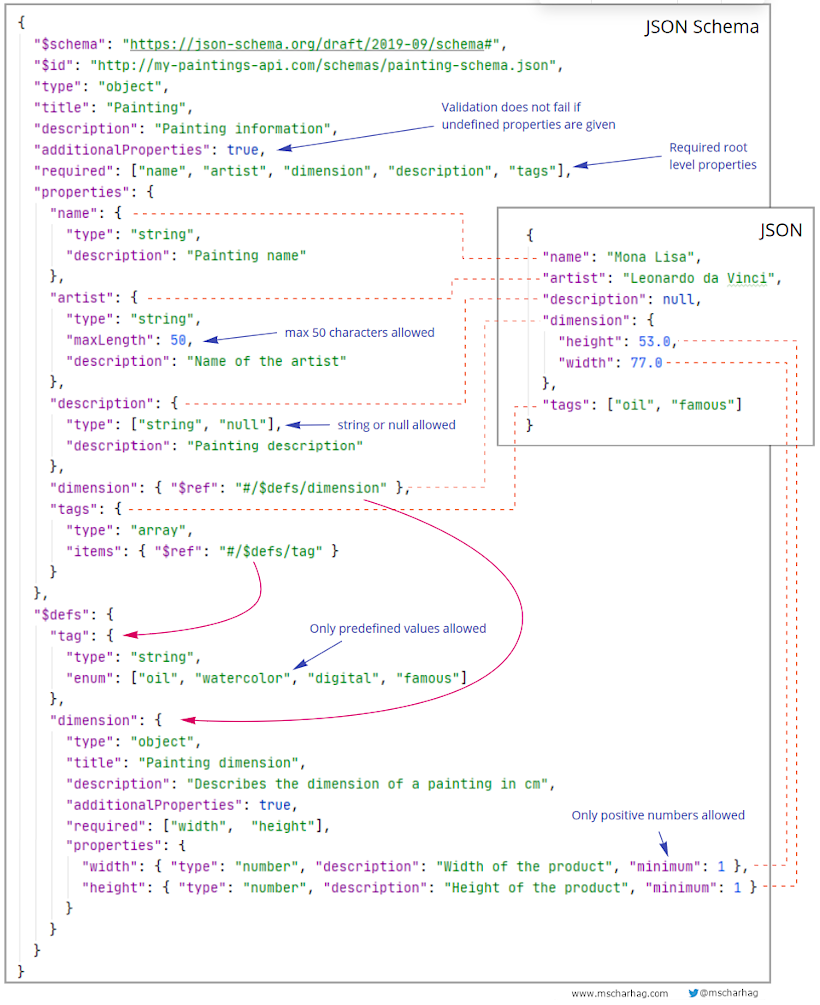
This image provides an excellent visual reference for how a schema's rules correspond to a JSON data instance. Keep it in mind as we build our own.
Step 4.1: Basic Structure and Metadata
Every schema should start with some metadata. We'll use the Draft 2020-12 version of the schema standard.
{
  "$schema": "https://json-schema.org/draft/2020-12/schema",
  "$id": "https://sim-game.com/schemas/object.json",
  "title": "Purchasable Object",
  "description": "Schema for a single purchasable object in the game.",
  "type": "object",
  "properties": {

  }
}
$schema: Declares which version of the JSON Schema standard is being used.$id: A unique URI for this schema.title&description: Human-readable information about the schema's purpose.type: "object": This schema describes a JSON object.
Step 4.2: Defining Core Properties
Now, let's fill in the properties section. For each field from our example, we define its type and any constraints.
"properties": {
  "id": {
    "description": "Unique identifier for the object, used for internal lookup.",
    "type": "string"
  },
  "name": {
    "description": "Display name shown in the UI.",
    "type": "string"
  },
  "description": {
    "description": "Flavor text for the object catalog.",
    "type": "string"
  },
  "cost": {
    "description": "The purchase price of the object.",
    "type": "integer",
    "minimum": 0
  }
}
Here, we've defined id, name, and description as strings. For cost, we've specified it must be an integer and have a minimum value of 0, preventing negative prices. This is a simple but powerful validation rule.
Step 4.3: Defining the Nested need_effects Property
The need_effects property is itself an object. We can define a nested schema for it directly. The needs it can affect are hunger, energy, social, and fun.
"properties": {
    // ... other properties ...
    "need_effects": {
      "description": "Specifies the change in character needs upon using this object.",
      "type": "object",
      "properties": {
        "hunger": { "type": "number" },
        "energy": { "type": "number" },
        "social": { "type": "number" },
        "fun": { "type": "number" }
      },
      "additionalProperties": false
    }
}
We define need_effects as an object where each of our four needs is a property with a number value (we use number instead of integer to allow for fractional changes). additionalProperties: false ensures that no undefined needs (e.g., a typo like "engery") can be added.
Step 4.4: Specifying Required Properties
Right now, all properties are optional. We need to enforce that essential fields are always present. We do this with the required keyword.
{
  // ... all the previous schema content ...
  "properties": {
      // ... all properties ...
  },
  "required": ["id", "name", "cost"],
  "additionalProperties": false
}
required: We've madeid,name, andcostmandatory. An object without these will fail validation. Thedescriptionandneed_effectsare optional.additionalProperties: false: We add this at the top level to prevent any fields other than the ones we've defined (id,name, etc.) from being part of the object. This is crucial for maintaining a strict data structure for modders.
5. Final Schema for the Object Catalog
In the game, you won't load a single object but a catalog of many objects. This catalog will be a JSON array, where each element is an object that must conform to the schema we just built.
Here is the complete schema for an objects.json file. Let's name it catalog.schema.json.
{
  "$schema": "https://json-schema.org/draft/2020-12/schema",
  "$id": "https://sim-game.com/schemas/catalog.json",
  "title": "Object Catalog",
  "description": "A collection of purchasable objects for the game.",
  "type": "array",
  "items": {
    "title": "Purchasable Object",
    "description": "Schema for a single purchasable object in the game.",
    "type": "object",
    "properties": {
      "id": {
        "description": "Unique identifier for the object, used for internal lookup.",
        "type": "string"
      },
      "name": {
        "description": "Display name shown in the UI.",
        "type": "string"
      },
      "description": {
        "description": "Flavor text for the object catalog.",
        "type": "string"
      },
      "cost": {
        "description": "The purchase price of the object.",
        "type": "integer",
        "minimum": 0
      },
      "need_effects": {
        "description": "Specifies the change in character needs upon using this object.",
        "type": "object",
        "properties": {
          "hunger": { "type": "number" },
          "energy": { "type": "number" },
          "social": { "type": "number" },
          "fun": { "type": "number" }
        },
        "additionalProperties": false
      }
    },
    "required": ["id", "name", "cost"],
    "additionalProperties": false
  }
}
The key change is at the top: type: "array" and the items keyword. This tells any validator that the root of the JSON file must be an array, and every item inside it must validate against the object schema we defined.
Conclusion
You have now successfully defined a complete and robust JSON schema for all purchasable objects in your game. This is a critical step in building a data-driven, mod-friendly architecture. This schema will act as the single source of truth for your object data, preventing errors and providing clear documentation.
Key Takeaways:
- A JSON Schema is a "contract" that defines the structure, types, and constraints for your JSON data.
- In game development, schemas are invaluable for ensuring data integrity, especially in a moddable project.
- We used core keywords like
type,properties,required, andminimumto define a precise structure for purchasable objects. - We defined a nested object for
need_effects, demonstrating how schemas can handle complex, structured data. - The final catalog schema describes an array of objects, which is the structure you'll use to load all items into your game.
Preview of the Next Lesson:
With our data structure formally defined, the next step is to bring it into the game. In the upcoming lesson, you will build a 'buy mode' catalog UI in Unity that reads a JSON file conforming to this schema and displays the available objects to the player, ready for purchase.