Welcome back! In our first lesson, we established a foundational understanding of the YouTube algorithm as a "matchmaker" focused on viewer satisfaction. You learned that its goal is to connect the right viewer with the right video, using signals like click-through rate and audience retention.
Now, we'll build on that foundation by exploring where on the platform this matchmaking happens. This lesson addresses a common misconception: that there is one single "algorithm." In reality, YouTube is a collection of different recommendation systems, each governing a different surface of the platform. By the end of this lesson, you will be able to distinguish between the three main traffic sources—Search, Browse, and Suggested—and understand the unique user mindsets and strategic opportunities associated with each.
Push vs. Pull: The Two Forces of Discovery
Before diving into specific traffic sources, it's useful to think about them in terms of two fundamental forces: pull and push.
- Pull Traffic (The Intent Engine): This is when a viewer actively pulls content towards them. They have a specific question or topic in mind and are using YouTube to find an answer.
- Push Traffic (The Discovery Engine): This is when YouTube pushes content to a viewer. The viewer isn't actively searching; the algorithm is proactively recommending videos it thinks they will enjoy.
Understanding this distinction is the first step to a sophisticated content strategy. You need to create content that serves both viewers who are looking for you and viewers who don't know you exist yet.

To begin, let's explore the core idea that YouTube uses multiple, independent recommendation systems. The following article from Miraflow AI explains this concept well.
YouTube Algorithm Explained: What Creators Need to Know ...
Start by reading the introduction and the section titled "YouTube Does Not Have One Algorithm."
Please read from the beginning of the article down to the end of the section "YouTube Does Not Have One Algorithm," finishing just before the heading "How the Home Feed Algorithm Works." Focus on the core idea that the systems for the Home feed, Search, and Suggested videos operate independently with different priorities.
With this crucial context in mind, let's break down each of these systems.
1. YouTube Search: The Intent Engine
YouTube Search is the primary source of "pull" traffic. It's what happens when a viewer types a query into the search bar, just like they would on Google. Since you're building a tech and AI edutainment channel, Search will be a cornerstone of your strategy.
- User Intent: High and specific. The viewer has a problem to solve, a question to answer, or a concept to understand. They might search for "how to fine-tune a large language model," "what is a generative adversarial network," or "M3 MacBook Pro review."
- Algorithm's Goal: To provide the most relevant and satisfying answer to the user's query.
The video below gives a concise overview of what YouTube Search traffic represents.
YouTube Traffic Sources, Explained (What do they mean?)
Watch this short segment from the "Grow with grouphugs" channel for a clear definition of search traffic.
Watch the clip from the beginning to understand how search traffic is generated and its importance as an indicator of your video's SEO performance.
For your channel, search-optimized videos act like a library of evergreen content. A well-made explainer on "The Basics of Diffusion Models" could attract highly motivated viewers for years, long after it's published. We will dedicate our entire next lesson to the art and science of ranking in YouTube Search.
2. Browse Features: The Discovery Engine
Browse Features is the largest source of "push" traffic for most channels. It primarily includes views from the YouTube Homepage and the Subscriptions feed.
- User Intent: Low and passive. The viewer has opened YouTube without a specific video in mind. They are "browsing," open to being entertained or educated. They are thinking, "Show me something interesting."
- Algorithm's Goal: To act as a personalized TV guide, recommending a diverse slate of videos it predicts the individual viewer will find compelling based on their unique watch history.
The algorithm for Browse is highly sophisticated. It considers not only topics you've watched but also the performance of a video (its click-through rate and retention) with viewers similar to you.
The following video features an explanation directly from a YouTube employee about how Browse Features and the Homepage work.
YouTube Browse Features vs Suggested Videos - which one gets the most traffic?
Watch this section from Drost Video to understand the mechanics behind Browse Features.
Pay close attention to the explanation of how the algorithm combines personalization for the viewer with the performance of the video. Watch the segment from the discussion of browse features.
For your tech/AI channel, Browse is where you can reach a broader audience. While someone might not search for "The Ethical Implications of AI in Art," a compelling title and thumbnail could make them click when it appears on their homepage, introducing them to a new topic and to your channel.
3. Suggested Videos: The Relational Engine
Suggested Videos are the second component of the "push" discovery engine. These are the videos that appear in the "Up Next" column on the side of a video you're watching (or below it on mobile).
- User Intent: Contextual. The viewer is already engaged with a specific topic or creator and is likely open to more of the same. If they are watching a video about building a PC, they are in the mindset to watch another one.
- Algorithm's Goal: To keep the viewing session going by recommending a topically related or contextually relevant next video.
This system works on two main principles:
- Topical Adjacency: Showing videos on similar subjects.
- Collaborative Filtering: Showing videos that other people tended to watch next (e.g., "Viewers who watched this video about AI programming also watched your video").
Let's return to the Drost Video to hear the explanation for Suggested Videos.
YouTube Browse Features vs Suggested Videos - which one gets the most traffic?
Now, watch the segment that defines and explains Suggested Videos.
Focus on how this differs from Browse. Suggested is about what to watch next, given the context of what you're watching now. Watch the explanation from the start of the segment.
For a growing channel, traffic from Suggested Videos is a powerful signal that the algorithm understands your "neighborhood." When your videos on AI news start getting suggested after videos from major tech journalists, it means YouTube sees you as a relevant voice in that conversation. This is essentially free, highly targeted promotion.
Reading the Story in Your Analytics
In YouTube Studio, you will see these sources broken down, often looking something like this:
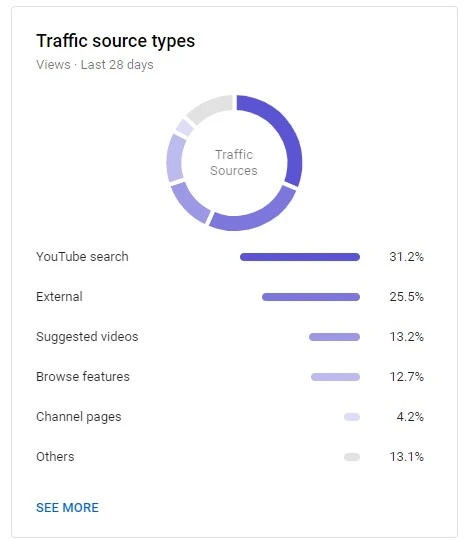
A healthy, growing channel typically has a balanced mix of these sources. An over-reliance on any single one can indicate a strategic vulnerability. The Humble&Brag article you'll read next provides a brilliant framework for interpreting your traffic source split.
YouTube Traffic Sources Explained: Browse Features, Search ...
This article provides an excellent, in-depth breakdown of each traffic source and, most importantly, what different combinations of traffic mean for your channel's health.
First, read the sections on the Discovery Engine and the Intent Engine. Then, skip down and read the section titled "Reading Your Traffic Source Split," which introduces concepts like "The Library" and "The Magazine." This will be invaluable for diagnosing your channel's performance in the future.
As you can see, a channel that is only a "Library" (high search, low browse) might have high-quality traffic but limited growth potential. A channel that is only a "Magazine" (high browse, low search) might get lots of views but struggle to build a dedicated community around specific topics. For your tech/AI channel, the goal will be to build a balanced portfolio: search-driven explainers to act as your library, and story-driven, thought-provoking videos to capture the browse and suggested audience.
Conclusion
In this lesson, you've moved from a general understanding of the algorithm to a more nuanced view of its different components. You can now distinguish between the major traffic sources and understand the different viewer mindsets they represent.
Here are the key takeaways:
- Three Systems, Three Jobs: YouTube doesn't have one algorithm; it has multiple systems for Search, Browse, and Suggested, each with a different goal.
- Search is for Seekers: This is high-intent, "pull" traffic from viewers actively looking for answers. It's your evergreen library.
- Browse is for Surfers: This is low-intent, "push" traffic for passive viewers on the homepage. It's your billboard for broad-appeal topics.
- Suggested is for Session-Watchers: This is contextual, "push" traffic that keeps viewers engaged with a topic. It's how you build authority in your niche.
- Strategy is in the Mix: A successful channel balances content designed for all three sources, avoiding over-reliance on any single one.
Now that you understand the unique power of high-intent search traffic, our next lesson will focus exclusively on that. We will dissect the key ranking factors for YouTube search, giving you the tools to ensure your educational videos are found by the viewers who need them most.