Welcome to our next lesson in Object-Oriented Programming. In our previous session, we explored how the JVM manages memory, distinguishing between the stack, which handles method execution, and the heap, where object data resides. You now understand that when you create an object, its instance variables are stored in a block of memory on the heap. This raises a crucial question: how do we protect this data from accidental or malicious modification?
Today, we will address this by diving into encapsulation, a fundamental principle of OOP. The goal of this lesson is to learn how to apply encapsulation using Java's access modifiers and special methods called getters and setters. This concept is not just a theoretical pillar of OOP; it is a practical technique used daily by software engineers to build robust, maintainable, and secure code. Mastering encapsulation is a key step toward writing professional-grade Java.
1. The Problem: Uncontrolled Data Access
Imagine we have a Student class. Without any protection, its data is a free-for-all.
public class Student {
    public String name;
    public int age;
}

public class Main {
    public static void main(String[] args) {
        Student student = new Student();
        student.name = "Ravi";
        student.age = -5; // Problem! Age should not be negative.

        System.out.println(student.name + " is " + student.age + " years old.");
    }
}
In this example, because the name and age fields are directly accessible, any part of the program can set them to any value. There's nothing stopping another programmer (or even yourself, by mistake) from assigning an invalid age like -5. This breaks the integrity of our object's state and can lead to unpredictable bugs. The object has no control over its own data.
This is where encapsulation comes in. It's about bundling an object's data (its fields) with the methods that operate on that data, and hiding the data from the outside world.
2. The Solution: Hiding Data and Controlling Access
Encapsulation is achieved in Java through a simple, two-step process:
- Declare the instance variables of a class as
private. - Provide
public"setter" and "getter" methods to modify and view the variable values.
Let's break down this process with a video explanation. The following video from Telusko clearly demonstrates the problem with direct access and then walks through the solution.
This video provides a step-by-step walkthrough of why encapsulation is needed and how to implement it using private variables and public methods.
Please watch the following segments: First, watch the introduction and the problem demonstration from the initial example. This shows how variables can be changed to invalid states without any control. Next, see how the private keyword solves this problem by restricting access from making variables private. Then, learn how to provide controlled read access using "getter" methods from implementing getters. Finally, understand how to provide controlled write access using "setter" methods from implementing setters.
As the video explained, the core idea is to make the fields themselves inaccessible and force all interactions to happen through methods that the class author controls.
Here's our improved Student class:
public class Student {
    private String name;
    private int age;

    // Getter for name
    public String getName() {
        return this.name;
    }

    // Setter for name
    public void setName(String name) {
        this.name = name;
    }

    // Getter for age
    public int getAge() {
        return this.age;
    }

    // Setter for age (with validation)
    public void setAge(int age) {
        if (age > 0) {
            this.age = age;
        } else {
            System.out.println("Invalid age. Age must be positive.");
        }
    }
}
Now, the age field cannot be set to a negative number from outside the class. Any attempt to do so must go through the setAge method, which contains our validation logic. We have successfully protected our object's state.
This pattern of private fields and public getters/setters is extremely common in Java and forms the basis of what is known as a JavaBean.
For another practical example, let's look at a BankAccount class, which is a classic illustration of encapsulation.
Encapsulation in Java Explained: Write Clean and Secure ...
This article provides a concise code example using a BankAccount class that clearly shows how setters can enforce business rules.
Please read the short section titled "Example: Bank Account". Notice how the deposit and withdraw methods act as specialized setters that don't just assign a value, but perform operations based on rules.
3. The Full Toolkit: Java Access Modifiers
We've used private and public so far, but Java provides four levels of access control. Understanding all four is crucial for effective OOP design, especially when we get to inheritance in our next lesson.
public: Accessible from any other class, anywhere.protected: Accessible within its own package and by subclasses in other packages.default(or package-private): Accessible only by classes in the same package. This is the level of access you get if you don't specify any modifier.private: Accessible only within its own class.
The following short video provides a clear summary of these four modifiers.
This video from Telusko explains all four access modifiers and their scopes of visibility.
Watch the video from the beginning, paying attention to the explanations for each modifier: Introduction to the four types. Public and default access, highlighting the difference when crossing package boundaries. Private access, which is the strictest. Protected access, which is especially relevant for inheritance.
To summarize these rules, here is a handy table that shows where members with each access modifier can be accessed.
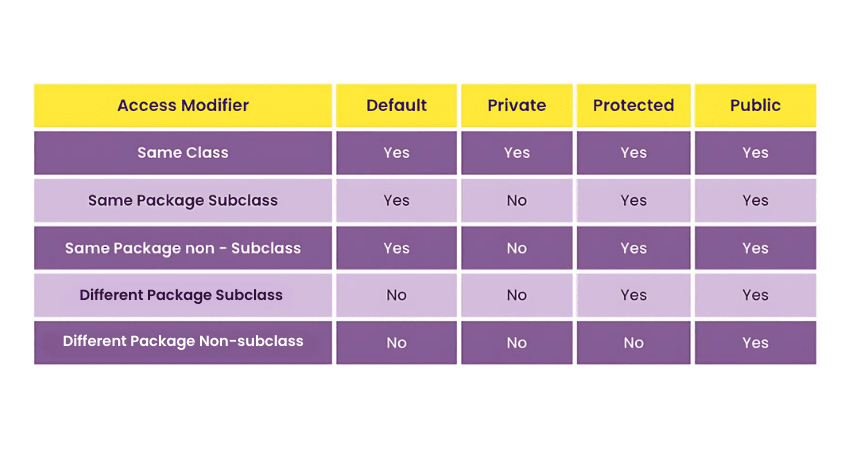
A good rule of thumb, especially as a beginner, is to always start by making your instance variables private. You can then selectively expose functionality through public methods as needed. This "default-to-private" strategy maximizes encapsulation.
Coming from Python, you might be familiar with the convention of using a leading underscore (e.g., _my_var) to signal that a variable is "private." In Java, this is not just a convention; the private keyword is a strict rule enforced by the compiler. This strong enforcement is one of the features that helps developers build large, reliable applications in Java.
4. The Payoff: Why Encapsulation Matters
Applying encapsulation is not just an academic exercise. It brings tangible benefits that are critical for professional software development.

Here’s what these advantages mean in practice:
- Total Control & Data Hiding: As we saw, you control how your data is accessed and modified. You can add validation, logging, or other logic inside your setters.
- Flexibility & Maintainability: You can change the internal implementation of your class without breaking the code of other classes that use it. For example, you could change the
agefield from anintto aStringinternally. As long as thegetAge()andsetAge()methods still work as expected (perhaps by converting theStringto anint), no other part of the application needs to change. This is a massive advantage in large projects. - Code Reusability: Encapsulated classes are self-contained modules. They are easier to understand, test, and reuse across different parts of an application or in different projects.
For a deeper look into the practical benefits and common interview topics related to encapsulation, the following reading is highly recommended.
Encapsulation in Java Explained: Write Clean and Secure ...
This part of the article discusses common mistakes, interview questions, and key best practices that are directly relevant to your goal of becoming a job-ready developer.
Please read the following sections from the article we looked at earlier: "Common Pitfalls (and Fixes)": This section highlights frequent mistakes, such as exposing mutable objects, which is an important advanced consideration. "Common Interview Questions (With Answers)": This will help you solidify your understanding and prepare for technical interviews. "Key Takeaways": A great summary of best practices.
Conclusion
In this lesson, we established the importance of protecting an object's internal state. You learned how to achieve this through encapsulation, a core OOP principle that is fundamental to writing clean, robust, and maintainable Java code.
Here are the key takeaways:
- Encapsulation is the practice of bundling data (fields) and the methods that operate on them within a single class, hiding the data from direct external access.
- It is implemented by declaring fields as
privateand providingpublicgetter and setter methods. - Getters provide read-only access, while setters provide write access and are the perfect place to add validation logic.
- Java has four access modifiers—
public,protected,default, andprivate—that define different levels of visibility for classes, fields, and methods.
You now have the tools to create well-defined, self-contained objects. In our next lesson, we will build upon this by exploring inheritance. You will see how access modifiers, particularly protected, play a critical role in defining the relationship between a parent class and a child class.