In our last lesson, we successfully mapped our Java Employee class to a database table using JPA annotations like @Entity and @Id. We've defined the what—the structure of our data. Today, we'll focus on the how: interacting with that data. This lesson is all about performing the fundamental Create, Read, Update, and Delete (CRUD) operations that are the bedrock of any data-driven application.
Your goal for this lesson is to master the use of Spring Data JPA's repository interfaces. You'll discover how Spring Boot allows you to perform complex database operations with a surprisingly small amount of code, a powerful abstraction that is a cornerstone of modern backend development in Java. This will bring our layered architecture to life by connecting the service layer to the database.
The Repository: Your Data Access Layer
In our layered architecture, we have a Controller that handles web requests and a Service that contains business logic. But where does the code that actually talks to the database go? This is the job of the Repository layer.
Instead of writing JDBC code or manual SQL queries, Spring Data JPA provides a more elegant solution. You simply define a Java interface, and Spring automatically generates a class at runtime that implements it, complete with all the necessary code to perform CRUD operations.
This generated implementation is highly optimized and abstracts away the tedious boilerplate code, letting you focus on your application's logic.
The Repository Hierarchy
Spring Data provides several repository interfaces, each building upon the last. The most important ones for you to know are organized in a hierarchy.
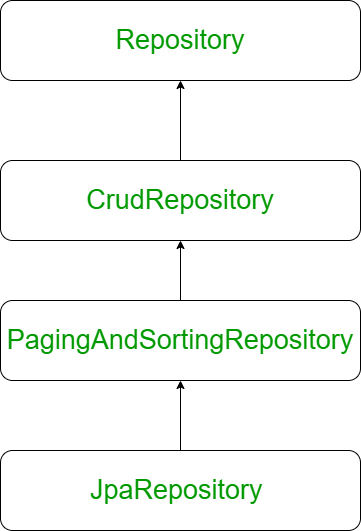
Repository: The base interface. It's a marker interface that tells Spring to start creating a repository bean. It has no methods of its own.CrudRepository: Provides standard methods for Create, Read, Update, and Delete operations (e.g.,save(),findById(),findAll(),deleteById()).PagingAndSortingRepository: ExtendsCrudRepositoryand adds methods for retrieving data in sorted order and in paginated "chunks".JpaRepository: ExtendsPagingAndSortingRepositoryand adds JPA-specific methods, such asflush()(to force changes to the database) and batch deletion methods. It's the most commonly used interface in Spring Boot applications.
For our purposes, we will use JpaRepository as it gives us the full suite of features.
Creating Your First Repository
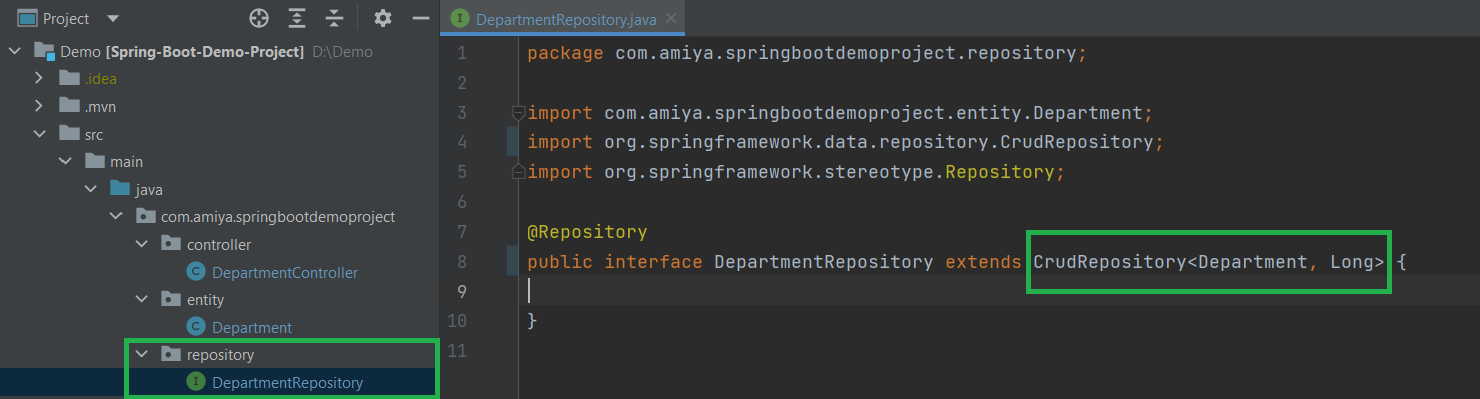
Creating a repository is straightforward. You define an interface that extends JpaRepository and specify two generic types:
- The entity class the repository will manage (e.g.,
Employee). - The data type of the entity's primary key (e.g.,
Long).
Let's see what this looks like.
Spring Boot JpaRepository with Example
This article from GeeksforGeeks provides a clear introduction to JpaRepository and its methods.
First, read the introduction to understand the purpose and syntax of JpaRepository. Then, skip down to "Step 4: Repository Interface" and examine the code example for creating the repository. Notice how simple it is—just an interface extending JpaRepository with the entity and ID types.
By defining this interface, Spring Data JPA automatically provides implementations for methods like save(), findById(), findAll(), deleteById(), and many more.
Implementing CRUD in the Service Layer
Now, let's put this repository to use. In our EmployeeService, we will inject our EmployeeRepository and use its methods to implement our business logic.
The "Java Guides" channel offers an excellent, practical walkthrough of building a complete CRUD API. We will watch it in segments, focusing on how each CRUD operation is implemented in the service layer by calling the repository.
Java, Spring Boot, PostgreSQL, Spring Data JPA, Hibernate CRUD REST API Tutorial [2025]
This video builds a full Employee management API from scratch. We will focus on the parts where the EmployeeRepository is created and then used within the EmployeeService to perform each of the four CRUD operations.
Watch the following segments carefully: Creating the Repository (<span data-type="resource_video_timerange" data-resource-subitem-id="f15bd897" data-range-start="834" data-range-end="915">EmployeeRepository</span>): The presenter creates the EmployeeRepository interface and explains how it inherits CRUD methods from JpaRepository. He also makes a crucial point: Spring's SimpleJpaRepository class provides the implementation automatically, so you don't need to add the @Repository annotation on your interface (though it doesn't hurt). Create/Save (<span data-type="resource_video_timerange" data-resource-subitem-id="91a17821" data-range-start="1538" data-range-end="1588">Implement create employee</span>): Observe how the createEmployee method in the service uses employeeRepository.save(employee). The save() method handles inserting a new record into the database. Read by ID (<span data-type="resource_video_timerange" data-resource-subitem-id="9938982a" data-range-start="2108" data-range-end="2202">Get by ID</span>): Here, you'll see employeeRepository.findById(id). Notice that it returns an Optional<Employee>. This is a modern Java approach to handle cases where no employee with the given ID exists. The code then uses .orElseThrow() to throw an exception if the optional is empty. Read All (<span data-type="resource_video_timerange" data-resource-subitem-id="46c1d86e" data-range-start="2493" data-range-end="2609">Get all employees</span>): The getAllEmployees method uses employeeRepository.findAll() to retrieve a List<Employee> of all records from the table. Update (<span data-type="resource_video_timerange" data-resource-subitem-id="97157aea" data-range-start="2891" data-range-end="3093">Update employee</span>): The updateEmployee logic first fetches the existing employee using findById. Then, it updates the fields on the retrieved object and calls employeeRepository.save(employee) again. This is a key concept: the save() method is smart. If the entity object you pass to it has a primary key that already exists in the database, JPA performs an UPDATE statement instead of an INSERT. Delete (<span data-type="resource_video_timerange" data-resource-subitem-id="0f4304eb" data-range-start="3385" data-range-end="3445">Delete employee</span>): Finally, the deleteEmployee method simply calls employeeRepository.deleteById(employeeId) to remove a record from the database.
Beyond CRUD: Derived Query Methods
What if you need to find an employee by their email address? Or find all employees in a specific department? CrudRepository doesn't have a findByEmail() method. Do you have to write the query yourself?
No! This is another magical feature of Spring Data JPA: derived query methods.
You can declare a new method in your repository interface, and as long as you follow a specific naming convention (findBy<PropertyName>), Spring Data will automatically generate the corresponding query for you.
For example, if your Employee entity has a field named email, you can simply add this method to your EmployeeRepository:
public interface EmployeeRepository extends JpaRepository<Employee, Long> {
    Optional<Employee> findByEmail(String email);
}
That's it! At runtime, Spring will implement this method to execute a SELECT * FROM employees WHERE email = ? query.
You can create more complex queries as well:
findByDepartmentAndStatus(String department, String status)findBySalaryGreaterThan(BigDecimal salary)findByLastNameContainingIgnoreCase(String partialName)
Spring Boot, Spring Data JPA - Rest CRUD API example
This tutorial from BezKoder provides another full CRUD example and includes a clear demonstration of derived query methods.
Find the section Create Repository Interface in the article. Look at the TutorialRepository example. Notice the two custom methods declared: findByPublished(boolean published) and findByTitleContaining(String title). The author doesn't implement them; they are simply declared, and Spring Data JPA takes care of the rest.
This powerful feature significantly reduces boilerplate code and keeps your data access logic clean and readable, directly inside your repository interface.
Conclusion
In this lesson, you've bridged the final gap between your Java application and the database. You now have the tools to build a fully functional data access layer.
Key Takeaways:
- Repository Interface: A Java interface that extends
JpaRepositoryis the foundation of the data access layer in Spring Data JPA. - Automatic Implementation: Spring Boot automatically provides a complete implementation of your repository interface at runtime, saving you from writing boilerplate database code.
- Standard CRUD Methods:
JpaRepositoryprovides out-of-the-box methods likesave(),findById(),findAll(), anddeleteById(). - Save for Create and Update: The
save()method intelligently handles bothINSERTandUPDATEoperations based on whether the entity's primary key exists. - Derived Queries: You can create custom database queries simply by declaring methods in your repository with specific names, like
findByEmail()orfindByDepartment().
You are now equipped to build the core logic of our REST API. In the next lesson, we will focus on making our API more robust by implementing server-side input validation. This ensures that the data sent to our API is clean and correct before we even attempt to save it to the database.