Hello! Welcome to the third lesson in our module on Advanced Infrastructure as Code with Terraform.
In our last session, we mastered creating reusable Terraform modules. This was a huge step in applying the "Don't Repeat Yourself" (DRY) principle to our infrastructure code. We learned to encapsulate resources, define clear interfaces with input and output variables, and use local values for internal logic.
Today, we'll build directly on that knowledge to tackle a fundamental challenge in any real-world project: managing infrastructure across multiple environments. This lesson directly addresses the learning outcome: Use Terraform workspaces and directory structures to manage multiple environments (dev, staging, prod).
We will explore the two primary strategies for separating your environments, discuss the pros and cons of each, and establish clear guidelines on when to use one over the other. By the end, you'll be able to structure your Terraform projects to handle complexity and scale safely.
1. The Challenge: From Monolith to Multi-Environment
When a project starts, it's common to have a single Terraform configuration in one directory that defines all your infrastructure. This is often called a monolithic configuration. While simple at first, this approach quickly becomes unmanageable and risky.
Imagine you want to test a change before deploying to production. With a monolithic setup, you risk impacting your production environment with a development change. The core problem is that a single configuration directory is tied to a single state file. Applying a change for "dev" would cause Terraform to see a difference from the "prod" infrastructure recorded in the state and try to "fix" it, potentially destroying your production resources.
To solve this, we need a way to isolate the state and configuration for each environment.
Refactor monolithic Terraform configuration
The HashiCorp Developer tutorial 'Refactor monolithic Terraform configuration' perfectly illustrates this problem. It starts with a single configuration that deploys both a 'dev' and 'prod' resource and shows why this is dangerous.
Please read the introduction and the sections 'Apply a monolith configuration' and 'Separate configuration'. Focus on the 'Simulate a hidden dependency' part, which demonstrates how a change intended for one environment accidentally impacts another. This will set the stage for the solutions we'll discuss next.
As the tutorial highlights, we need true state separation. There are two main ways to achieve this: using separate directories or using Terraform workspaces.

2. Strategy 1: Directory Structure
This is often considered the most robust and explicit method for managing distinct, long-lived environments like dev, staging, and prod.
The core idea is simple: create a separate directory for each environment. Each directory will have its own main.tf file that calls your reusable modules, and crucially, each directory will have its own independent state file.
A common project structure looks like this:
├── environments/
│   ├── dev/
│   │   ├── main.tf
│   │   ├── terraform.tfvars
│   │   └── backend.tf
│   ├── staging/
│   │   ├── main.tf
│   │   ├── terraform.tfvars
│   │   └── backend.tf
│   └── prod/
│       ├── main.tf
│       ├── terraform.tfvars
│       └── backend.tf
└── modules/
    └── web-app/
        ├── main.tf
        ├── variables.tf
        └── outputs.tf
In this structure:
- The
modules/directory contains the reusable components you learned to build in the last lesson. - Each directory inside
environments/represents a complete, self-contained Terraform configuration (a root module) for that specific environment. - The
main.tffile withinenvironments/dev/would call theweb-appmodule with variables suitable for development.
Refactor monolithic Terraform configuration
The HashiCorp tutorial you just read provides a practical walkthrough for refactoring a monolith into a directory-based structure.
Follow the steps in the 'Directories' tab within the 'Separate states' section. This will guide you through creating the prod and dev directories and deploying them as isolated environments.
Pros and Cons of Directory Structures
- Pros:
- Maximum Isolation: Each environment is completely separate. An error in the
devconfiguration cannot possibly affectprod. - Separate Permissions: You can use different cloud provider credentials for each environment, enforcing stricter security for production.
- Flexibility: It's easy to have structural differences between environments (e.g., production has a multi-region database, but dev does not).
- Maximum Isolation: Each environment is completely separate. An error in the
- Cons:
- Boilerplate Code: You have to duplicate some "scaffolding" code (like
providerblocks andbackendconfigurations) in each environment's directory. - Potential for Drift: If you're not disciplined about using modules, it's easy for configurations to diverge over time, defeating the purpose of consistency.
- Boilerplate Code: You have to duplicate some "scaffolding" code (like
3. Strategy 2: Terraform Workspaces
Terraform workspaces offer a different approach. They allow you to use the same set of configuration files but with multiple, independent state files.
A workspace is essentially a named container for a state file. When you switch workspaces, you're telling Terraform to use a different state file, but you remain in the same working directory with the same .tf files.
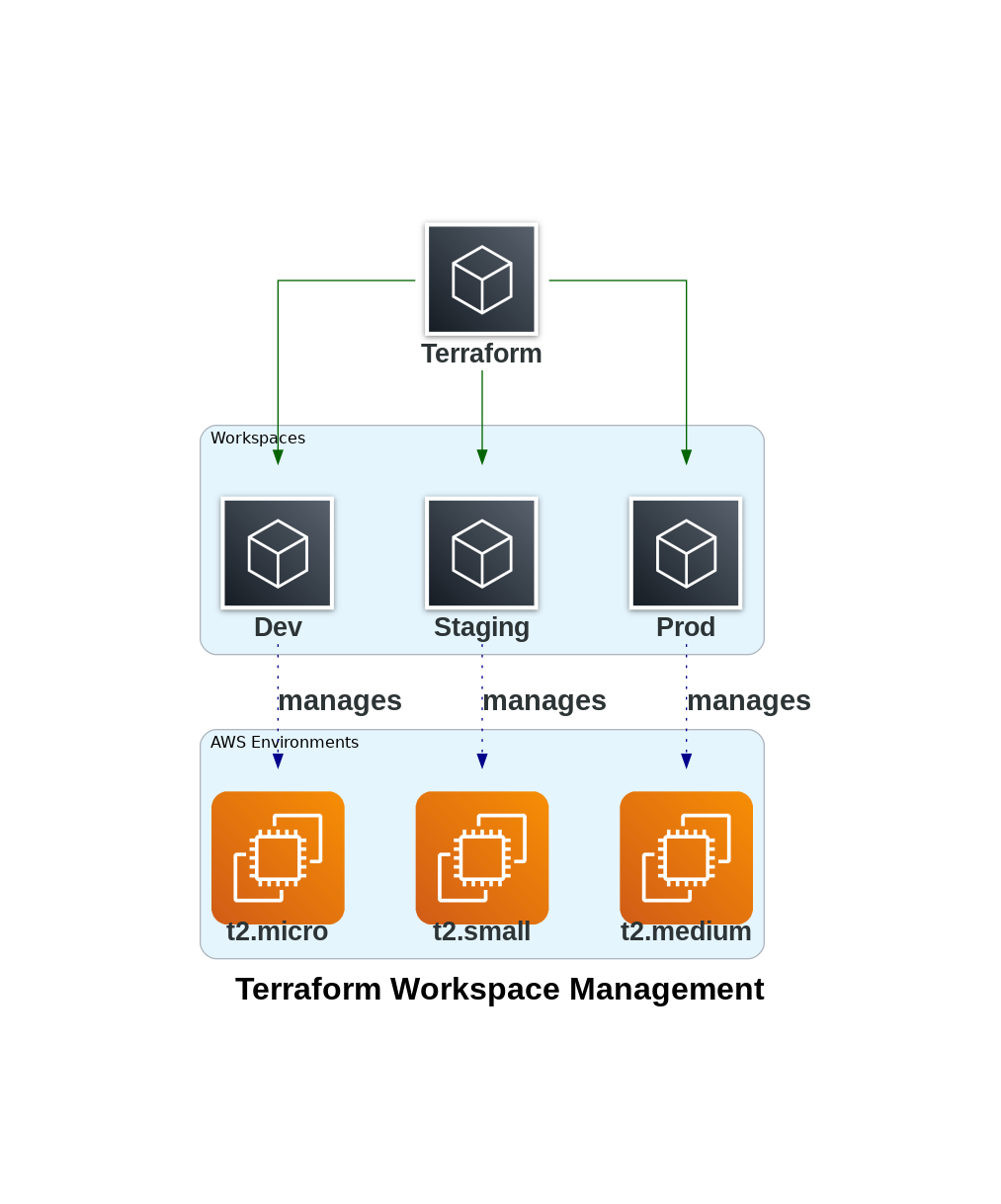
Let's see this in action.
Day-6 | Terraform Workspaces Demo | Dev - QA - Stage | #terraform #abhishekveeramalla #terraform
The video 'Terraform Workspaces Demo' by Abhishek Veeramalla provides an excellent, practical walkthrough of using workspaces from start to finish.
First, watch from 00:33 to 01:40 and 04:27 to 11:32 to understand the problem workspaces solve—the single state file conflict—and the conceptual solution they provide.
Now that you understand the "why," let's look at the "how." The core commands are terraform workspace new <name>, terraform workspace select <name>, and terraform workspace list.
Day-6 | Terraform Workspaces Demo | Dev - QA - Stage | #terraform #abhishekveeramalla #terraform
Let's continue with the same video to see how to create, switch, and deploy to different workspaces.
Watch from 26:55 to 33:21. This segment demonstrates: Creating dev, stage, and prod workspaces. Selecting a workspace and applying a configuration. Switching to another workspace and applying again, showing that a new, separate resource is created without affecting the first one.
Making Configurations Workspace-Aware
A key feature of workspaces is the terraform.workspace variable, which holds the name of the currently selected workspace. You can use this to dynamically change your configuration.
A common pattern is to use a map and the lookup function to select a value based on the current workspace.
Day-6 | Terraform Workspaces Demo | Dev - QA - Stage | #terraform #abhishekveeramalla #terraform
The final part of this demo shows a powerful pattern for avoiding manual changes and making your configuration truly dynamic.
Watch from 33:50 to 41:56. This is a critical section that shows how to use a map variable, the lookup() function, and the terraform.workspace variable to automatically select the correct instance type (t2.micro, t2.medium, t2.xlarge) for the active environment.
Another common pattern is to have separate variable files for each environment (e.g., dev.tfvars, prod.tfvars) and specify which one to use during apply:terraform apply -var-file="prod.tfvars"
Pros and Cons of Workspaces
- Pros:
- DRY: You maintain a single codebase, which is great for ensuring consistency.
- Simplicity: The directory structure is simpler, and it's easy to spin up a new temporary environment.
- Cons:
- Risk of Human Error: It's easier to accidentally run
terraform applyin the wrong workspace, potentially affecting the wrong environment. - Reduced Flexibility: It's more difficult to manage configurations where environments have significant structural differences. While possible with conditional logic (
countandfor_each), it can make the code complex. - Shared Backend/Provider: All workspaces in a configuration share the same backend and provider blocks.
- Risk of Human Error: It's easier to accidentally run
4. Workspaces vs. Directories: Which Should You Use?
This is a crucial decision. While workspaces seem simpler, the directory structure is generally considered safer and more scalable for managing core environments.
How to Structure Terraform Workspaces Properly
The article 'How to Structure Terraform Workspaces Properly' provides an excellent summary and a decision matrix to help you choose.
Read the sections 'When to Use Workspaces' and 'Workspace vs Directory Structure'. Pay close attention to the 'Decision Matrix' table, which gives a clear, side-by-side comparison.
Here is the widely accepted best practice in the DevOps community:
- Use Directory Structures for long-lived, static environments like
dev,staging, andprod. The isolation and explicitness they provide are invaluable for stability and security. - Use Workspaces for short-lived, dynamic environments. A perfect use case is for feature branches. A CI/CD pipeline could automatically create a new workspace named after the Git branch (
terraform workspace new feature-xyz), deploy a full copy of the app for testing, and then destroy it when the branch is merged (terraform workspace select feature-xyz && terraform destroy).
In your role as a DevOps Engineer, you will likely encounter and use both patterns. For your main application environments, a directory structure is the industry standard. For ancillary tasks or temporary test environments, workspaces are a powerful tool.
5. Best Practices and CI/CD
When using workspaces, a few best practices are essential for safety and maintainability.
How to Structure Terraform Workspaces Properly
Let's review some key best practices and see how workspaces fit into a CI/CD pipeline.
Read the 'CI/CD Integration' and 'Best Practices' sections. Notice how the GitHub Actions example uses a matrix strategy to run plans across dev and staging automatically, but prod requires a separate, manual-approval step.
Key best practices from the article include:
- Never use the
defaultworkspace for real infrastructure. Always create named workspaces. - Prefix resource names with
${terraform.workspace}to avoid naming conflicts and make resources easily identifiable in your cloud console. - Use a remote backend (like the S3 backend we configured) with the
workspace_key_prefixargument to ensure state files are stored in a clean, organized manner (e.g.,s3://my-bucket/env:/prod/terraform.tfstate).
Conclusion
You have now learned the two primary methods for managing multiple environments in Terraform. This knowledge is not just theoretical; it is the foundation upon which all stable and scalable infrastructure automation is built.
Key Takeaways:
- Directory Structures provide maximum isolation and are the recommended approach for managing distinct, long-lived environments like
dev,staging, andprod. - Terraform Workspaces allow you to use a single codebase with multiple state files, making them ideal for creating temporary or feature-specific environments that are structurally identical.
- You can make your configuration workspace-aware using the
terraform.workspacevariable, often combined withlookupmaps or conditional logic. - The choice between these two strategies depends on the required level of isolation and the degree of similarity between your environments.
In our next lesson, we will dive deeper into dynamic configurations by learning to use the count and for_each meta-arguments to create multiple resource instances dynamically. This technique is often used within environment-specific configurations to scale resources, such as deploying one web server in dev and five in production.