Hello! Welcome to your next lesson in the "Advanced AWS for DevOps" module.
In our last session, we dug into detective and corrective controls by automating compliance checks with AWS Config and SSM. That was about ensuring your infrastructure stays in a known good state. Today, we're tackling a different but related challenge: how to update your applications without causing downtime or introducing risk.
This lesson focuses on the learning outcome: Implement a blue/green deployment strategy for an application running on EC2 or ECS. This is a cornerstone technique for achieving high availability and a critical skill for any DevOps Engineer responsible for production services.
We will cover:
- The core principles of blue/green deployments and how they compare to other strategies.
- How to implement blue/green deployments for applications on EC2 using AWS CodeDeploy and Auto Scaling Groups.
- How to leverage the native blue/green capabilities of Amazon ECS for containerized applications.
- The trade-offs involved and how to articulate your design decisions in an interview setting.
1. The "Why" Behind Blue/Green Deployments
Before diving into the "how," let's establish the "why." In a traditional deployment, you might stop the old version of your application and start the new one, causing downtime. A rolling update improves this but can result in running two different versions of your code simultaneously, and rollbacks can be slow.
Blue/green deployments offer a powerful alternative. The core idea is to have two identical, independent production environments: "Blue" (the current live version) and "Green" (the new version).
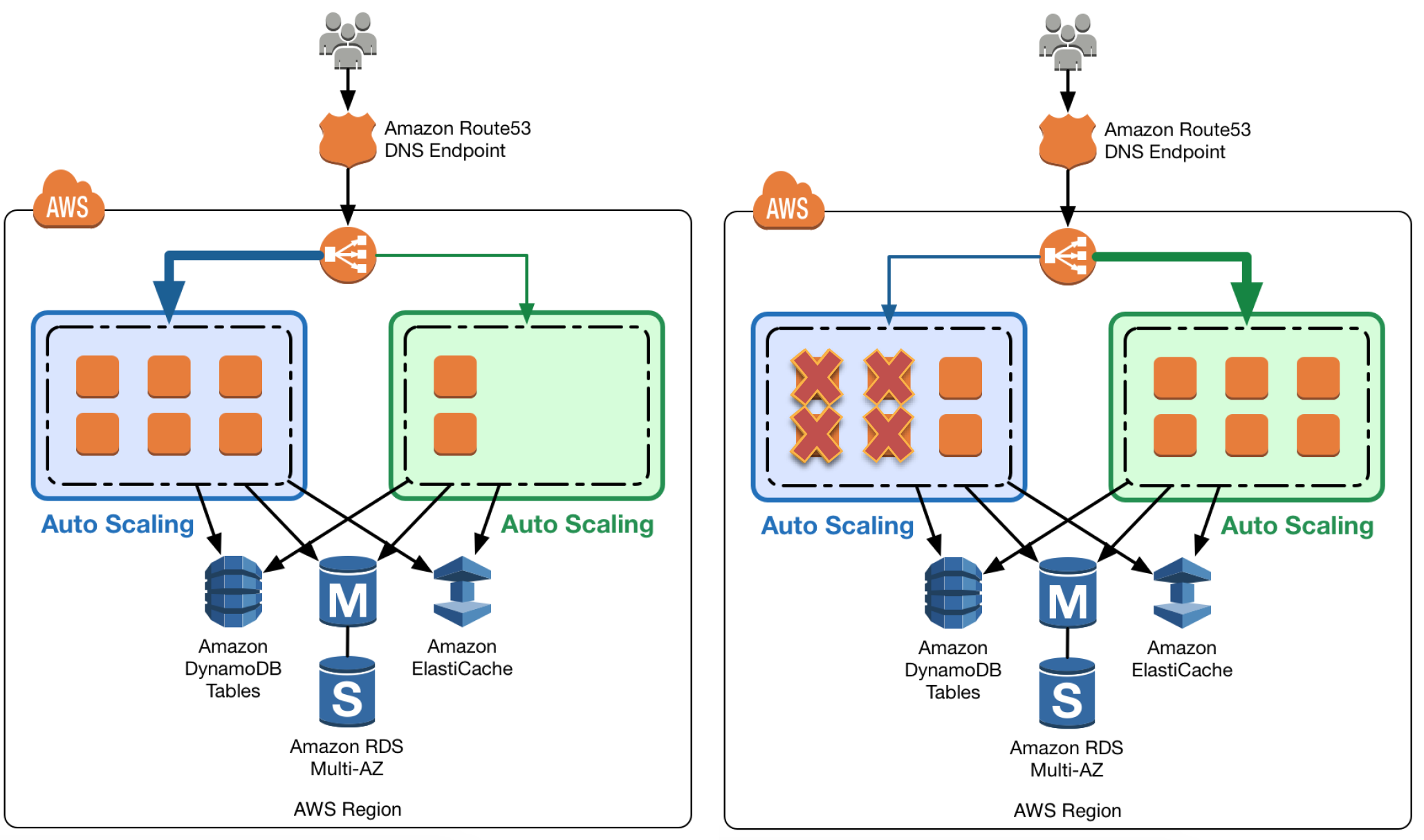
To understand the trade-offs, it's useful to compare it with other common strategies.
Building a Zero-Downtime CI/CD Pipeline: Blue-Green Deployments ...
The article "Building a Zero-Downtime CI/CD Pipeline..." provides an excellent real-world comparison of deployment strategies from a practitioner's point of view. It clearly articulates why you might choose one over the other.
Please read the section titled "Blue-Green vs Canary vs Rolling Deployments". Focus on the pros and cons outlined for each strategy. This will help you understand the specific problems that blue/green is designed to solve.
As the article highlights, the key advantages of blue/green are:
- Zero Downtime: The traffic switch is instantaneous at the load balancer level.
- Instant Rollback: If something goes wrong with the green environment, you simply switch traffic back to the still-running blue environment.
- Isolated Testing: You can run a full suite of tests on the green environment with real infrastructure before it ever receives live traffic.
The main trade-off is the cost, as you temporarily run double the infrastructure during the deployment.
2. Blue/Green Deployments on EC2 with AWS CodeDeploy
Let's start with the classic implementation for applications running on EC2 instances. The key service here is AWS CodeDeploy, which automates the entire process.
The core components you'll work with are:
- Application Load Balancer (ALB): Routes traffic to one of two Target Groups.
- Two Target Groups: One for the blue environment, one for the green.
- Auto Scaling Group (ASG): Manages the EC2 instances for your application.
- CodeDeploy: Orchestrates the deployment, including provisioning a new ASG for the green environment and managing the ALB traffic shift.
- AppSpec file (
appspec.yml): A configuration file that tells CodeDeploy how to deploy your application onto an instance and validate its health.
The following video from AWS gives a comprehensive walkthrough.
How to Create Blue/Green Deployments to Amazon Elastic Compute Cloud with AWS CodeDeploy
The video "How to Create Blue/Green Deployments to Amazon Elastic Compute Cloud..." provides a complete demonstration of the process. We'll watch it in segments to focus on the most critical concepts.
First, watch these two segments to understand the high-level concept and the key CodeDeploy configuration: What is a Blue/Green Deployment? (00:30 - 01:47): This introduces the concept within the context of CodeDeploy. Creating the Deployment Group (12:28 - 16:48): This is the most crucial part of the setup. Pay close attention to how the Blue/Green deployment type is selected and configured with the ALB target group and Auto Scaling group. It also shows the options for traffic rerouting and termination of the old instances.
The appspec.yml and Lifecycle Hooks
The magic of the deployment on the instance itself is defined in the appspec.yml file. This file uses lifecycle hooks to run scripts at various stages of the deployment. For a DevOps Engineer, understanding these hooks is vital.
How to Create Blue/Green Deployments to Amazon Elastic Compute Cloud with AWS CodeDeploy
Let's return to the same video to look at the appspec.yml file and its lifecycle hooks. This is where you define the precise steps for installing, starting, and validating your application.
Watch the segment from 16:48 - 22:18. Focus on: The structure of the appspec.yml file. The purpose of each hook: BeforeInstall, AfterInstall, ApplicationStart, and especially ValidateService. How ValidateService acts as a crucial gatekeeper. If the script in this hook fails, CodeDeploy will automatically roll back the deployment.
The ValidateService hook is your opportunity to run health checks, synthetic transactions, or any other tests to confirm the green environment is healthy before CodeDeploy shifts production traffic to it.
Finally, the deployment process itself involves CodeDeploy cloning your ASG, running through the lifecycle hooks on the new instances, and then, upon successful validation, instructing the ALB to shift traffic.
3. Blue/Green Deployments on Amazon ECS
For containerized applications, especially on AWS Fargate where you don't manage the underlying instances, the process is more streamlined. Amazon ECS has native support for blue/green deployments, also orchestrated by CodeDeploy.
The concepts are similar (ALB, two target groups), but the implementation differs. Instead of cloning an entire ASG, ECS manages two versions of your application within a single service using Task Sets.
Blue Green Deployments with the ECS External Deployment Controller
To understand the mechanism behind ECS blue/green deployments, it's important to grasp the concept of Task Sets. This AWS blog post provides a clear definition.
Please read the section titled "Solution components". Focus on the definitions of Task set and External controller. A Task Set is a grouping of tasks within an ECS service that represents a single version of your application.
With ECS, the blue/green process looks like this:
- You have a single ECS service configured for
CODE_DEPLOYdeployments. - When you deploy a new version, CodeDeploy creates a new "green" task set within the service.
- ECS launches the new tasks, which are registered with the "green" target group.
- CodeDeploy can direct test traffic to the green environment via a test listener.
- After optional tests and a "bake time" (a monitoring period), CodeDeploy swaps the production listener on the ALB to point to the green target group.
- The old "blue" task set is scaled down and terminated.

This next video demonstrates the process and highlights key features like "bake time" and lifecycle hooks using Lambda.
The Complete Guide to ECS Blue/Green Deployments on AWS
The video "The Complete Guide to ECS Blue/Green Deployments on AWS" provides a concise overview of this native capability.
Please watch from 01:00 to 04:36. This covers: The configuration of target groups, listeners, and the deployment strategy in the ECS service. The concept of bake time, which keeps both environments running for a period after the traffic shift for monitoring. Using lifecycle hooks with Lambda for automated testing and verification. A visual walkthrough of the deployment stages from scaling up the green environment to cleaning up the old blue one.
The ECS approach is powerful because it's tightly integrated and abstracts away much of the underlying infrastructure management, which fits perfectly with the operational model of Fargate.
Behavioral Interview Preparation
Understanding advanced deployment strategies is a great way to showcase your expertise in an interview.
Question: "Describe a time you were responsible for improving the reliability of the deployment process for a critical application."
How to Answer using today's concepts:
- Situation: "At a previous role, our team managed a critical API service with high traffic. Our deployment process used rolling updates, but we frequently saw a spike in errors during the rollout window as two different API versions were running simultaneously. Furthermore, a full rollback was a slow, manual process that could take over 15 minutes, which was unacceptable for this tier-1 service."
- Task: "My goal was to implement a deployment strategy that would achieve zero downtime, eliminate mid-deployment errors, and provide a near-instantaneous rollback capability."
- Action: "I chose to implement a blue/green deployment strategy. Since the application was containerized and running on ECS, I leveraged the native CodeDeploy integration.
- I configured a second target group for our Application Load Balancer.
- I updated our ECS service's Terraform configuration to use the
CODE_DEPLOYdeployment controller and specified the blue and green target groups. - I added a
ValidateServiceLambda hook that was triggered by CodeDeploy after the green environment was up. This Lambda function ran a small suite of automated API integration tests against the green target group's private endpoint. - I also configured a 10-minute 'bake time' post-traffic-shift, giving our monitoring systems time to detect any subtle performance degradations before the old environment was terminated."
- Result: "This new process completely eliminated deployment-related errors. We reduced our rollback time to under 60 seconds—it was as simple as re-running the CodeDeploy action to revert the listener swap. This dramatically reduced the risk of releases and increased our team's confidence, allowing us to deploy more frequently."
Conclusion
Great job! You've now learned how to design and implement one of the most effective deployment strategies for modern, highly-available applications on both EC2 and ECS.
Key Takeaways:
- Blue/Green is a Risk-Reduction Strategy: Its primary purpose is to enable safe, zero-downtime releases with fast, reliable rollbacks.
- The Core is Traffic Switching: The mechanism always involves redirecting traffic at a load balancer from an old environment to a new one.
- EC2 vs. ECS Implementation: On EC2, you typically manage full Auto Scaling Groups orchestrated by CodeDeploy via an
appspec.yml. On ECS, the process is more integrated, with CodeDeploy managing Task Sets within a single service. - Validation is Key: A robust
ValidateServicestep (whether a script or a Lambda function) is essential to ensure you don't switch traffic to a faulty environment. - Cost is the Main Trade-off: The reliability and safety of blue/green deployments come at the cost of temporarily running double the infrastructure.
What's Next?
This lesson concludes our module on Advanced AWS for DevOps. You've covered a wide range of topics essential for a senior DevOps role, from event-driven automation and advanced IAM to compliance-as-code and now, sophisticated deployment strategies.
In our next lesson, we will begin a new module: Kubernetes Ecosystem and Operations. Building on your CKA knowledge, we will start with the most critical aspect of running Kubernetes in production: security. The first lesson will be: "Secure a Kubernetes cluster using a combination of RBAC, Network Policies, and Pod Security Standards."