Hello! Welcome to your second lesson in the "Networking for DevOps Engineers" module.
In the previous lesson, we established a mental map of network communication using the OSI and TCP/IP models. We located the Internet Protocol (IP) at the Network/Internet layer, responsible for logical addressing and routing. Today, we're diving deep into that layer to master a skill that's fundamental for any cloud professional.
This lesson addresses the learning outcome: Perform IP subnetting and calculate CIDR ranges for a cloud network design. As a DevOps engineer with a strong AWS background, this is the practical skill that lets you design and build scalable, secure, and cost-effective VPCs. Failure to plan your IP space correctly can lead to significant architectural pain down the road.
We will cover:
- The structure of an IPv4 address and its relationship to binary.
- How CIDR (Classless Inter-Domain Routing) notation works.
- Methods for calculating the number of available hosts and subnet ranges.
- How to apply these calculations to a real-world cloud scenario, paying special attention to AWS-specific rules.
1. From IP Addresses to CIDR Notation
An IPv4 address is a 32-bit number, but we write it as four decimal numbers (octets) for readability, like 192.168.1.10. To truly understand subnetting, you need to think about the 32 bits underneath.
Since you have a background in computer science, the concept of binary representation is likely familiar. Each octet is 8 bits, and the value of the octet is the sum of the powers of 2 for each bit that is a '1'.
How IP Addressing Works in AWS | Public, Private, Elastic, CIDR Notation | AWS for Beginners
To start, let's watch a brief, practical explanation of how IP addresses relate to binary and how this leads to CIDR notation. This video from Tiny Technical Tutorials frames it perfectly for a cloud context.
Watch from 04:12 to 05:26 for a quick refresher on binary-to-decimal conversion in IP addresses. Then, watch the earlier segment from 03:36 to 03:56 which introduces CIDR itself. The key takeaway is that CIDR is simply a shorthand for defining network boundaries.
CIDR (Classless Inter-Domain Routing) notation is the modern way to define a block of IP addresses. It combines an IP address with a slash and a number, like 192.168.1.0/24.
- The number after the slash (the prefix) tells you how many of the 32 bits are part of the network portion of the address. These bits are fixed for all addresses in that block.
- The remaining bits are the host portion. These bits can change to identify individual devices within the network.

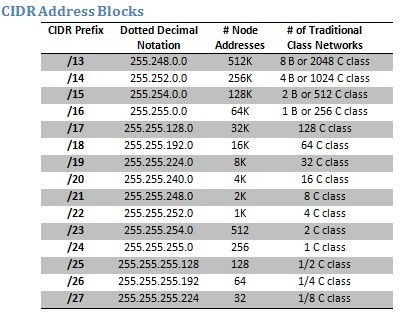
The smaller the CIDR prefix, the fewer network bits, the more host bits, and thus the larger the network. A /16 network is much larger than a /24.
How IP Addressing Works in AWS | Public, Private, Elastic, CIDR Notation | AWS for Beginners
This next clip demonstrates this inverse relationship and shows how the CIDR prefix defines the size of the IP address block.
Watch from 05:26 to 08:23. Focus on how a /24 prefix locks the first 24 bits, leaving 8 bits for hosts (256 addresses), while a /16 prefix leaves 16 bits for hosts (65,536 addresses). The reference table shown is a useful summary.
2. The Mechanics of Subnetting
Now for the core skill: calculation. Subnetting is the process of taking a large network block and dividing it into smaller, isolated networks called subnets. This is essential for security, organization, and performance.
Calculating Usable Hosts
The number of host bits determines how many devices can be in a subnet. The formula is:
Where host bits = 32 - CIDR prefix.
Why subtract 2?
- Network Address: The first address in the range (where all host bits are 0) identifies the network itself.
- Broadcast Address: The last address in the range (where all host bits are 1) is used to send messages to all devices on the subnet.
These two addresses cannot be assigned to individual devices.
Calculating Subnet Ranges: The Block Size Method
Memorizing binary charts is inefficient. A more practical approach is the "Block Size Method". This helps you quickly determine the start and end of each subnet.
Subnetting Finally Makes Sense
The article 'Subnetting Finally Makes Sense' provides an excellent walkthrough of this method. It's a powerful mental model for calculating subnets without tedious binary conversions.
Read the section 'Phase 3: Calculating Subnets'. Pay close attention to the 'Block Size Method' and the 'Walking Through a Real Calculation' example for a /26 network. The mental math trick is particularly useful for quickly identifying which subnet an IP belongs to.
Let's summarize the method for a CIDR prefix between /25 and /30:
- Find the block size:
Block Size = 256 - Subnet Mask's last octet. - List the subnets: Starting from 0, the network addresses are multiples of the block size.
- For a
/26, the mask is255.255.255.192. Block size =256 - 192 = 64. - The subnets start at
.0,.64,.128, and.192.
- For a
- Determine the range: Each subnet's broadcast address is one less than the start of the next subnet.
- The
192.168.10.64/26subnet has a broadcast address of192.168.10.127. - The first usable host is
192.168.10.65, and the last is192.168.10.126.
- The
3. Subnetting in the Cloud: The AWS VPC Case
Theory is great, but applying it in a real cloud environment is what matters. When you design an AWS VPC, you are directly applying these principles. However, there's a critical difference.
In AWS, 5 IP addresses are reserved in every subnet.
AWS VPC Subnetting Best Practices
This is a crucial detail that trips up many engineers. The article 'AWS VPC Subnetting Best Practices' explains exactly which IPs AWS reserves and why.
Read the section 'The AWS Reserved IP Pattern: What You Need to Know'. You must commit this to memory. In AWS, you have 3 fewer usable IPs per subnet than in traditional networking.
So, for AWS, the formula becomes:
A /24 subnet, which traditionally has 254 usable IPs, only has 251 in AWS.
Designing a VPC Network
Let's design a network. This involves choosing a main CIDR block for the VPC and then carving it up into subnets using Variable Length Subnet Masking (VLSM)—using different subnet sizes based on need.
Subnetting Finally Makes Sense
Let's look at a practical design scenario. This article provides a great example of designing a network for a small business before moving into cloud-specific patterns.
Read the section 'Phase 4: Designing Real Networks'. Focus on the 'Small Business Network Design' scenario to understand the logic behind choosing different subnet sizes (VLSM).
Now, let's apply that to a classic cloud architecture. Given your experience with AWS, this pattern should be familiar.
AWS VPC Subnetting Best Practices
The 'AWS VPC Subnetting Best Practices' article provides excellent, realistic examples for a three-tier web application and a microservices architecture on EKS.
First, read 'CIDR Planning for AWS VPC' to understand how to select the main VPC block and plan for multi-AZ deployments. Then, review 'Example 1: Three-Tier Web Application' in the 'Real-World AWS VPC Subnetting Examples' section. Notice how they choose a large /16 for the VPC and carve out smaller /24 and /23 subnets for each tier and availability zone.
4. Tools and Best Practices
While you need to be able to do these calculations for interviews and quick design sessions, in your day-to-day work, you'll use tools.
- Online Calculators: The video we watched mentioned
cidr.xyz. Another great one, especially for AWS, is the calculator onsubnetcalculator.dev. These are perfect for validating your plans. - Infrastructure as Code (IaC): Ultimately, you will define your VPC and subnets in code. Your experience with Terraform is directly applicable here. You'll define
aws_vpcandaws_subnetresources with their respectivecidr_blockattributes. TheAWS VPC Subnetting Best Practicesarticle includes a Terraform snippet showing exactly this.
Key Best Practices to Remember:
- Plan for Growth: A common mistake is sizing subnets too tightly. The "Rule of Thirds" (33% for now, 33% for planned growth, 33% for the unexpected) is a good guideline.
- Avoid Overlapping Subnets: When carving up a VPC block, ensure your subnet ranges are contiguous and do not overlap.
- Design for High Availability: Always plan your subnets across multiple Availability Zones (AZs). Services like Application Load Balancers require subnets in at least two AZs.
Conclusion
Excellent work. You've now covered one of the most practical and frequently tested networking skills for a DevOps role. You've moved from the abstract layers of the TCP/IP model to the concrete numbers that define cloud networks.
Key Takeaways:
- CIDR notation (
/xx) defines the boundary between the fixed network portion and the flexible host portion of an IP address range. - The number of usable hosts in a traditional subnet is .
- In AWS, this changes to due to reserved IPs. This is a critical distinction.
- The Block Size Method is a practical way to calculate subnet ranges without converting to binary.
- Effective cloud network design involves choosing a large VPC CIDR block and using VLSM to create appropriately sized subnets across multiple Availability Zones.
Preview of the Next Lesson:
We've just spent this lesson defining the addresses for our resources. But how do we find them without memorizing numbers like 10.0.1.53? In the next lesson, we will answer that by exploring the internet's phonebook. The learning outcome is: Explain the end-to-end DNS resolution process and configure common DNS record types (A, CNAME, MX, TXT).