Hello! Welcome to your third lesson in the "Networking for DevOps Engineers" module.
In our last lesson, we mastered IP subnetting, which gave us the tools to assign unique numerical addresses to every device in our cloud networks. But remembering 172.217.16.142 is hardly practical. This is where the Domain Name System (DNS) comes in, acting as the internet's phonebook.
Today's lesson directly addresses the learning outcome: Explain the end-to-end DNS resolution process and configure common DNS record types (A, CNAME, MX, TXT). As a DevOps engineer, DNS is a system you will interact with constantly—whether you're routing traffic to a new service, setting up mail servers, or verifying domain ownership for a third-party tool. Your experience with AWS Route 53 will provide a strong foundation for the concepts we'll cover.
We will explore:
- The fundamental purpose of DNS.
- The hierarchical, decentralized architecture that makes DNS so resilient.
- The step-by-step journey of a DNS query from your browser to the authoritative source.
- The roles and configuration of the most common DNS records you'll manage.
1. What is DNS? The Internet's Phonebook
At its core, DNS is a distributed database that maps human-friendly domain names (like google.com) to machine-readable IP addresses (like 172.217.16.142). Without it, we would have to navigate the internet by memorizing long strings of numbers.
To start, let's read a concise explanation from Cloudflare, a major player in the DNS space. This will formally define DNS and its primary role.
Read the first two sections of the article, 'What is DNS?' and 'How does DNS work?'. Focus on the core problem DNS solves and the analogy of a phonebook.
2. The End-to-End DNS Resolution Process
When you type a domain name into your browser, a fascinating, multi-step process unfolds in milliseconds. This process, called DNS resolution, involves a chain of specialized servers working together.
The Four Key DNS Servers
There are four types of servers involved in a typical DNS lookup:
- DNS Recursor (or Recursive Resolver): This is the server that your computer queries first. It acts like a helpful librarian, taking your request and doing all the hard work to find the answer. Your ISP provides one, or you can use public ones like Google's
8.8.8.8or Cloudflare's1.1.1.1. - Root Name Server: This is the top of the DNS hierarchy. There are only 13 logical root server addresses in the world (though they are replicated globally). They don't know the IP for
google.com, but they know who to ask next: the TLD server for.com. - Top-Level Domain (TLD) Name Server: These servers manage all the domains for a specific TLD, like
.com,.org, or.net. The.comTLD server doesn't know the IP forgoogle.com, but it knows the authoritative nameserver for thegoogle.comdomain. - Authoritative Name Server: This is the final source of truth. It holds the actual DNS records for a specific domain (e.g.,
google.com). This is the server you configure in services like AWS Route 53 or Cloudflare DNS.
Everything You Need to Know About DNS: Crash Course System Design #4
This short video from ByteByteGo provides a fantastic animated overview of these server types and the query flow. It's a great way to build a mental model of the process.
Watch from 00:30 to 04:04. Pay close attention to the role each server plays in the hierarchy and the step-by-step journey of the query.
The 8 Steps of a DNS Lookup
Now let's formalize the process you just saw. When nothing is cached, a DNS lookup follows these steps:

What are the steps in a DNS lookup?
The Cloudflare article we looked at earlier provides a clear, step-by-step text breakdown of this process. Reading through this will solidify your understanding.
Read the section 'The 8 steps in a DNS lookup'. Compare these steps to the video you just watched and the diagram above.
The Role of Caching
Making that full 8-step trip for every single request would be inefficient. To speed things up, DNS information is cached at multiple levels:
- Browser Cache: Your web browser keeps its own short-term cache.
- Operating System Cache: Your OS maintains a DNS cache.
- Recursive Resolver Cache: Your ISP's resolver caches popular lookups.
This is why the second time you visit a website, it often loads faster. The full lookup is skipped, and the answer is served from a nearby cache.
Day 30/40 - What Is DNS ( Domain Name System) With @piyushgargdev
This next video includes a great practical demonstration of DNS caching in action using browser developer tools.
Watch from 08:52 to 11:35. Notice how the DNS lookup time is present on the first visit to a new site but disappears on a refresh because the result is served from the browser's cache.
3. Common DNS Record Types
The second part of our learning outcome is to configure common DNS records. These records are the actual data stored on the authoritative nameserver. As a DevOps engineer, you'll work with these constantly.
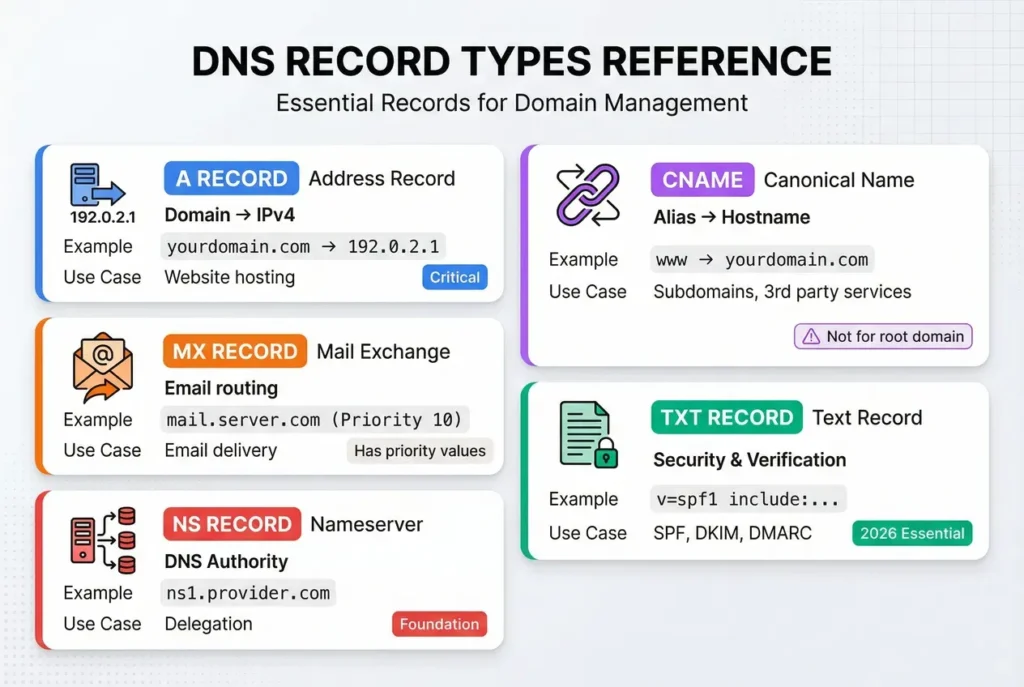
The most common record types are:
- A Record: Maps a hostname to an IPv4 address.
- AAAA Record: Maps a hostname to an IPv6 address.
- CNAME Record: Creates an alias (Canonical Name) from one hostname to another.
- MX Record: Specifies the mail exchange servers for a domain.
- TXT Record: Allows you to store arbitrary text; often used for domain verification, SPF, and DKIM.
Day 30/40 - What Is DNS ( Domain Name System) With @piyushgargdev
Now, let's see how these records are configured in a real-world DNS provider. This video provides a detailed walkthrough of creating A, CNAME, MX, and TXT records, explaining the specific use case for each.
Watch from 17:30 to 29:21. This is a very practical segment. Pay special attention to the explanation of when to use a CNAME record versus an A record—a common point of confusion. The live demonstration using the nslookup command is also highly relevant.
4. DNS Management in Practice
Time To Live (TTL)
When a DNS record is cached, how long does the cache keep it? That's determined by its Time To Live (TTL), a value in seconds you set on each record.
- A high TTL (e.g., 86400 seconds or 24 hours) reduces load on your nameservers and speeds up lookups for repeat visitors, but it means changes will take a long time to propagate across the internet.
- A low TTL (e.g., 60 seconds) allows you to make changes quickly, but increases the number of queries to your authoritative nameserver.
A common DevOps practice before a planned migration is to lower the TTL on the relevant records well in advance. This ensures that when you make the final switch, the change is reflected globally in minutes, not hours.
Everything You Need to Know About DNS: Crash Course System Design #4
This final clip explains the practical risks of slow DNS propagation and the strategy of lowering TTL before making changes.
Watch from 04:04 to 05:08. This is a critical piece of operational knowledge for managing production systems.
Local DNS Resolution on Linux
For development and testing, you sometimes need to override public DNS. Linux systems provide a simple way to do this. The resolution process is typically:
- Check the
/etc/hostsfile for a static mapping. - If not found, query the DNS servers listed in
/etc/resolv.conf.
Understanding this local resolution order is useful for debugging and for setting up local development environments that mimic production hostnames.
Read the short section 'DNS Resolution on Linux'. This explains the roles of /etc/nsswitch.conf, /etc/hosts, and /etc/resolv.conf in the lookup process on a Linux machine.
By adding an entry like 127.0.0.1 my-app.local to your /etc/hosts file, you can make your local machine resolve my-app.local to your loopback address without ever sending a query to the internet.
Conclusion
Great job! You've just walked through one of the most fundamental and critical services on the internet. You understand not just what DNS does, but how its hierarchical and distributed design allows it to function at a global scale with incredible resilience.
Key Takeaways:
- DNS translates human-readable domain names into machine-readable IP addresses.
- The resolution process is a chain of queries from a Recursive Resolver to Root, TLD, and finally Authoritative nameservers.
- Caching at every level is crucial for the performance and efficiency of DNS.
- The primary record types you will manage are A (IPv4), AAAA (IPv6), CNAME (alias), MX (mail), and TXT (verification).
- TTL (Time To Live) is a critical setting that balances performance against the speed of change propagation.
Preview of the Next Lesson:
So far, we've learned how to give our servers addresses (IP/subnetting) and how to find them by name (DNS). The next logical step is to understand how we establish a reliable connection to that server. In the next lesson, we will explore the protocol that underpins most internet communication: Describe the TCP three-way handshake and the role of TLS in securing HTTP traffic.