Hello! Welcome to the final lesson of Module 2.
In our last session, we explored endianness, mastering how to handle the byte order of multi-byte values when writing to memory or hardware registers. We ended with the challenge of writing a full uint32_t to a register correctly. Now, we zoom in further. Once we have access to a register, how do we safely and efficiently manipulate the individual bits and groups of bits (bitfields) that control hardware functionality?
This lesson directly addresses the learning outcome: Develop a set of type-safe, efficient macros for hardware register manipulation (read, write, set, clear bits/fields). This is a fundamental skill in embedded systems, especially in firmware and driver development, and a topic you can expect to be tested on in interviews for semiconductor companies.
1. The Challenge of Register Manipulation
In embedded systems, hardware peripherals are configured via Memory-Mapped I/O (MMIO) registers. Each register is a collection of bits and bitfields, each with a specific purpose, as defined in the device's datasheet.
Consider this example of a PLL (Phase-Locked Loop) Control Register:
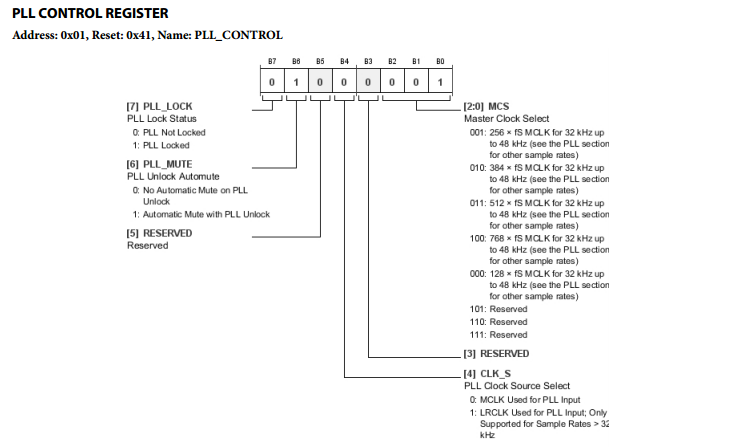
If you wanted to change the Master Clock Select (MCS) to 384 x fS (a value of 0b010 or 2), you would need to perform a read-modify-write operation:
- Read the current value of the register.
- Modify only the bits for the
MCSfield, leaving all other bits untouched. - Write the new value back to the register.
In plain C, this might look like:
#include <stdint.h>

volatile uint8_t* pll_ctrl_reg = (uint8_t*)0x01; // Example address

// Set MCS to 2 (0b010)
uint8_t current_val = *pll_ctrl_reg;
current_val &= ~0x07; // Clear bits 0, 1, and 2 (mask is 0b00000111)
current_val |= 0x02;  // Set the new value for MCS
*pll_ctrl_reg = current_val;
This approach works, but it has significant drawbacks:
- Error-Prone: It relies on "magic numbers" for masks (
0x07) and values (0x02). A typo could lead to disastrous hardware behavior. - Poor Readability: It's not immediately obvious what
current_val &= ~0x07;is trying to accomplish without consulting the datasheet. - High Maintenance: If the register layout changes, you have to find and update every instance of these magic numbers.
We can do much better by developing a generic and reusable set of macros.
2. Building a Foundation: Basic Bit Macros
Let's start with the most fundamental operations: setting, clearing, and flipping individual bits.
Working with bits and bitfields
The following article, 'Working with bits and bitfields' from Coranac, provides a great starting point. It lays out the standard bitwise logic and corresponding C macros for basic bit manipulation.
Please read Section 2, 'Basic bit operations'. Pay attention to the three fundamental operations (set, clear, flip) and the C macros provided: BIT, BIT_SET, BIT_CLEAR, and BIT_FLIP.
As the article explains, the core macros are:
// Creates a mask for a single bit at position n


#define BIT(n) (1U << (n))

// Sets the bit(s) in y specified by the mask


#define BIT_SET(y, mask)   ((y) |= (mask))

// Clears the bit(s) in y specified by the mask


#define BIT_CLEAR(y, mask) ((y) &= ~(mask))

// Flips the bit(s) in y specified by the mask


#define BIT_FLIP(y, mask)  ((y) ^= (mask))
Using these, we can rewrite part of our earlier task more clearly:
// Using our PLL example, let's say we need to mute the PLL (set bit 6)


#define PLL_MUTE_BIT 6
uint8_t reg_val = 0x41; // Initial value

BIT_SET(reg_val, BIT(PLL_MUTE_BIT)); // reg_val is now 0x01 | (1 << 6) = 0x41
This is an improvement in readability, especially when bits are given meaningful names. Note that BIT_SET and similar macros must be macros, not functions, because they modify the variable y directly using operators like |=. A function would require passing a pointer, which complicates things with different integer types (e.g., uint8_t* vs uint32_t*).
3. Manipulating Bitfields
Handling single bits is a good start, but most hardware configuration involves multi-bit fields. A bitfield is a contiguous range of bits that represents a single value. In our PLL register, MCS (bits 0-2) is a 3-bit bitfield.
Manipulating a bitfield involves two key operations:
- Extracting (Get): Reading the value from the bitfield.
- Inserting (Set): Writing a new value into the bitfield while preserving other bits.
Working with bits and bitfields
Let's return to the 'Working with bits and bitfields' article to see how to generalize our macros for bitfields.
Please read Section 3.1, 'Manual bitfield manipulation'. Focus on understanding the logic for extracting and inserting bitfield values and how the BF_GET and BF_SET macros implement this.
The logic from the article gives us these powerful general-purpose macros:
// Creates a mask for a bitfield of 'len' bits.


#define BIT_MASK(len)           (BIT(len) - 1)

// Creates a mask for a bitfield of 'len' bits at 'start' position.


#define BF_MASK(start, len)     (BIT_MASK(len) << (start))

// Prepares a value 'x' to be inserted into a bitfield.


#define BF_PREP(x, start, len)  (((x) & BIT_MASK(len)) << (start))

// Extracts a bitfield's value.


#define BF_GET(y, start, len)   (((y) >> (start)) & BIT_MASK(len))

// Inserts a value 'x' into a bitfield in 'y'.


#define BF_SET(y, x, start, len) \
    ((y) = ((y) & ~BF_MASK(start, len)) | BF_PREP(x, start, len))
Let's apply BF_SET to our original problem of setting the MCS field (start=0, length=3) to 2:
uint8_t reg_val = 0x41; // 0b01000001
BF_SET(reg_val, 2, 0, 3);
// After BF_SET, reg_val will be 0b01000010, which is 0x42.
// Let's trace it:
// 1. BF_MASK(0, 3) -> ((1<<3) - 1) << 0 -> (8-1) << 0 -> 7 (0b00000111)
// 2. ~BF_MASK -> ~7 -> 0b11111000
// 3. (y & ~BF_MASK) -> 0x41 & 0xF8 -> 0b01000001 & 0b11111000 -> 0b01000000 (0x40)
// 4. BF_PREP(2, 0, 3) -> ((2 & 7) << 0) -> 2 << 0 -> 2 (0b00000010)
// 5. (y & ~BF_MASK) | BF_PREP -> 0x40 | 0x02 -> 0x42
This is functionally correct, but we are still using magic numbers (2, 0, 3). The next step is to eliminate them.
4. Towards Type-Safe and Readable Macros
The key to maintainable code is to encode the datasheet information into your source code using named constants. A common and highly effective pattern, popular in the Linux kernel, is to define a _SHIFT and _MASK for each bitfield.
Working with bits and bitfields
The same article presents a more advanced version of these macros that leverages the C preprocessor's token-pasting operator (##) to build these constant names automatically.
Read Section 3.2, 'Named bitfields'. Understand how the BFN_GET and BFN_SET macros use the ## operator to create more readable and less error-prone code.
Let's define the constants for our PLL Control register and the "named" macros:
// In a header file, e.g., pll_reg.h

// Fields for PLL_CONTROL_REGISTER


#define PLL_CTRL_MCS_SHIFT      0
#define PLL_CTRL_MCS_LEN        3
#define PLL_CTRL_MCS_MASK       BF_MASK(PLL_CTRL_MCS_SHIFT, PLL_CTRL_MCS_LEN)


#define PLL_CTRL_CLK_S_SHIFT    4
#define PLL_CTRL_CLK_S_LEN      1
#define PLL_CTRL_CLK_S_MASK     BF_MASK(PLL_CTRL_CLK_S_SHIFT, PLL_CTRL_CLK_S_LEN)

// Named bitfield macros


#define BFN_GET(y, name)     (((y) & name##_MASK) >> name##_SHIFT)
#define BFN_PREP(x, name)    (((x) << name##_SHIFT) & name##_MASK)
#define BFN_SET(y, x, name)  ((y) = ((y) & ~name##_MASK) | BFN_PREP(x, name))

// --- Usage in a C file ---


#include "pll_reg.h"

uint8_t reg_val = 0x41;
BFN_SET(reg_val, 2, PLL_CTRL_MCS); // Set MCS field to 2
Notice how much more readable and self-documenting BFN_SET(reg_val, 2, PLL_CTRL_MCS) is. The ## operator in name##_MASK concatenates PLL_CTRL_MCS and _MASK to form the identifier PLL_CTRL_MCS_MASK. The risk of using the wrong shift or mask is now virtually zero.
5. Advanced Technique: Avoiding Side Effects
The macros we've built are good, but they have a classic preprocessor pitfall: the multiple evaluation of arguments.
How to Write Function-Like Preprocessor Macros (C example)
This is a subtle but critical issue that often distinguishes a good C programmer from a great one. The following video by Jacob Sorber explains this problem and a robust solution using GCC extensions.
Watch from 5:16 to 13:03. The video starts with a simple min macro, but the principles are universal. Pay close attention to: How passing an expression with a side effect (like a function call or i++) causes unexpected behavior. The solution using a compound statement ({ ... }) and the typeof operator to ensure each argument is evaluated only once.
As the video demonstrates, if an argument to a macro has a side effect, that side effect can occur multiple times. In our BFN_SET(y, x, name) macro, the argument y is evaluated twice. If y were something complex like *get_register_pointer(), the function would be called twice, which could be incorrect or inefficient.
To solve this, we can adopt the technique shown in the video, which is standard practice in the Linux kernel:
// A more robust, "safer" set of macros using GCC extensions


#define SAFE_BFN_GET(y, name) ({ \
    __auto_type _y = (y); \
    (_y & name##_MASK) >> name##_SHIFT; \
})


#define SAFE_BFN_SET(y, x, name) ({ \
    __auto_type _y = (y); \
    __auto_type _x = (x); \
    _y = (_y & ~name##_MASK) | ((_x << name##_SHIFT) & name##_MASK); \
    _y; /* The compound statement evaluates to the last expression */ \
})
How it works:
({ ... })is a compound statement expression, a GCC extension that allows you to have a multi-statement block that evaluates to a single value (the last statement in the block).__auto_typeis another GCC extension (similar totypeof) that deduces the type of the variable from its initializer.- By assigning
yto a local temporary variable_yat the beginning, we ensureyis evaluated only once. All subsequent operations use_y.
This pattern makes your macros as safe as inline functions while retaining the flexibility of macros to work on different data types. These are precisely the kinds of production-quality techniques interviewers at companies like AMD or Nvidia look for. In fact, the Linux kernel provides its own set of even more advanced bitfield helpers in <linux/bitfield.h>, such as FIELD_GET() and FIELD_PREP(), which have evolved over years to handle various edge cases, as discussed in kernel development mailing lists (seen in resource LINK).
6. Supercharge Your Workflow with X-Macros
We've created a great system, but defining all the _SHIFT, _LEN, and _MASK constants for dozens of registers can still be tedious and error-prone. We can automate this using an advanced preprocessor technique called X-Macros.
The idea is to define a "list" of your bitfields in one place, and then use that list to generate different code blocks.
Embedded C Programming Style: Tutorial 11 - X Macro
X-Macros are a powerful but less common technique for eliminating boilerplate code. This video from Mutex Embedded provides a clear, step-by-step guide on how they work.
Watch from 14:48 to 23:47. You don't need to absorb every detail of the database example. Focus on the core pattern: Creating a 'list macro' that takes another macro (X or data) as an argument. Defining and undefining the X macro to generate different code structures (enums, function prototypes) from the same list.
Let's apply this pattern to generate our bitfield constants.
// In pll_reg.h

// 1. Define the list of bitfields for the PLL Control Register


#define PLL_CTRL_FIELDS(X) \
    X(MCS,      0, 3)  /* Field Name, Start, Length */ \
    X(CLK_S,    4, 1)  \
    X(PLL_MUTE, 6, 1)  \
    X(PLL_LOCK, 7, 1)

// 2. Define a macro to generate the SHIFT constant


#define GEN_SHIFT(name, start, len) \
    PLL_CTRL_##name##_SHIFT = start,

// 3. Define a macro to generate the MASK constant


#define GEN_MASK(name, start, len) \
    #define PLL_CTRL_##name##_MASK  ( ((1U << (len)) - 1) << (start) )

// 4. Use the X-Macro list to generate the code
// Generate an enum for all the SHIFT values
enum {
    PLL_CTRL_FIELDS(GEN_SHIFT)
};

// Generate all the MASK #defines
PLL_CTRL_FIELDS(GEN_MASK)

// Now, you can use BFN_SET(reg, val, PLL_CTRL_MCS) as before,
// but all constants were generated automatically!
By defining the fields just once in PLL_CTRL_FIELDS, we can automatically generate enums, defines, or even initialization structs, dramatically reducing boilerplate and potential for copy-paste errors. This is an extremely powerful pattern for large-scale embedded projects.
Conclusion
In this lesson, we have built a comprehensive and robust system for hardware register manipulation, progressing from simple bitwise operations to advanced, production-quality macros.
Key Takeaways:
- Abstraction is Key: Using macros to hide the complexity of bitwise operations makes code more readable, maintainable, and less error-prone.
- Named Constants are Essential: The
_SHIFT/_MASKpattern, combined with token-pasting (##), creates a self-documenting interface between your code and the hardware datasheet. - Safety First: Simple macros can be dangerous due to multiple argument evaluation. Using GCC extensions like compound statements and
__auto_typemakes them safe from side effects. - Automate with X-Macros: For projects with many registers, X-Macros are an advanced technique to auto-generate constants, enums, and other repetitive code from a single source of truth.
You are now equipped with the low-level C programming techniques that are the bread and butter of firmware and driver development.
Preview of the Next Module:
We have now completed Module 2, covering data alignment, endianness, and low-level data manipulation. We're ready to move up one level of abstraction. Our next lesson will kick off Module 3: The Build Process and Program Execution. We will trace C source code through all the stages it takes to become an executable file: preprocessing, compilation, assembly, and linking. This will provide crucial context for understanding how the macros we wrote today are processed and how different parts of a large project come together.