Hello! Welcome to your next lesson in the "Embedded Interview Preparation Bootcamp."
In our last lesson, we focused on const and volatile, two C qualifiers that act as directives to the compiler, controlling how it treats variables. We saw how const volatile is the professional way to handle read-only hardware registers.
Today, we'll shift our focus from compiler behavior to compiler layout. We'll investigate how the compiler arranges data in memory, a topic that is fundamental to embedded systems and a frequent subject in interviews for semiconductor companies.
This lesson directly addresses the learning outcome: Calculate structure size and padding manually, and rearrange struct members to minimize memory footprint.
1. Why Data Alignment Matters
Before we talk about structures, let's establish a core architectural principle: data alignment. Modern processors (like the ARM and x86 cores you'll encounter) don't access memory one byte at a time. They fetch data in larger, fixed-size chunks, often called "words" (e.g., 4 bytes on a 32-bit system, 8 bytes on a 64-bit system). Access is fastest when the data being fetched fits neatly within one of these chunks and starts at an address that is a multiple of its own size.
Understanding Memory: How to Use Structures in Embedded C
To understand the 'why' behind alignment, this article provides an excellent first-principles explanation of how processors access memory.
Please read the sections titled "Memory Access Granularity", "Memory Access Boundary", and "Data Alignment". These will explain why hardware prefers aligned data and establish the fundamental rule: a K-byte data type should be stored at a memory address that is a multiple of K.
When data is unaligned, the CPU might have to perform two separate memory fetches and then stitch the data together, which is significantly slower.

The C standard dictates these alignment requirements:
char(1 byte): Can be at any address.short(2 bytes): Must be at an address divisible by 2.int(4 bytes): Must be at an address divisible by 4.long,double, pointers (often 8 bytes on 64-bit systems): Must be at an address divisible by 8.
2. Structure Padding: The How and Why
To enforce these alignment rules within a struct, the compiler inserts unused bytes called padding. This ensures that each member begins on its required memory boundary. This often makes the total size of the struct larger than the sum of its members.
C++ structure padding and packing | Memory alignment
Let's watch a video that introduces this concept with a simple, practical example. It clearly shows why the sizeof a struct can be surprising.
Watch the beginning of the video "C++ structure padding and packing". Introduction (0:00 - 1:46): This sets up the problem by showing a simple struct whose size is not what you'd naively expect. Alignment Rules (1:46 - 8:05): This section explains why the compiler adds padding and introduces the two most important rules for calculating struct size.
The Rules of Structure Padding
Based on the video and standard compiler behavior, we can distill the process into two key rules:
- Internal Padding: Each member of the struct must be placed at an offset from the start of the struct that is a multiple of its own alignment requirement. The compiler will insert padding bytes before a member to satisfy this.
- Trailing Padding: The total size of the entire struct must be a multiple of the alignment of its widest member. This ensures that in an array of these structs, every struct instance will start on a properly aligned boundary.
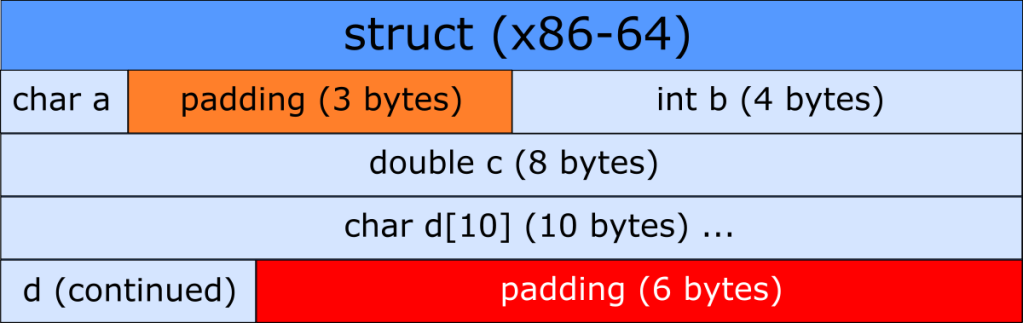
Manual Calculation Exercise
Let's apply these rules to a typical interview-style problem. Given a 64-bit system (where pointers are 8 bytes), calculate the size of the following struct:
struct device_register {
    char    status;     // 1 byte
    long    device_id;  // 8 bytes
    int     config;     // 4 bytes
    short   checksum;   // 2 bytes
};
Let's walk through it:
-
Struct Alignment: The widest member is
long device_id(8 bytes). Therefore, the entirestruct device_registermust have an 8-byte alignment, and its total size must be a multiple of 8. -
Member Layout:
char status: Size 1. Placed at offset 0.long device_id: Size 8. Needs an 8-byte aligned offset. The next available multiple of 8 is offset 8. The compiler inserts 7 padding bytes afterstatus.device_idis placed at offset 8.int config: Size 4. Placed at offset 16 (8 + 8). Its own alignment (4) is satisfied.short checksum: Size 2. Placed at offset 20 (16 + 4). Its own alignment (2) is satisfied.
-
Trailing Padding:
- The last member,
checksum, ends at offset 22 (20 + 2). - The total size must be a multiple of the struct's alignment (8).
- The next multiple of 8 after 22 is 24.
- The compiler adds 2 bytes of trailing padding.
- The last member,
Result: The sizeof(struct device_register) is 24 bytes. (1 + 7 + 8 + 4 + 2 + 2)
3. Structure Reordering: Minimizing Memory Footprint
As you saw, the order of members dramatically impacts the amount of padding. We can exploit this to save memory, which is critical in constrained embedded systems or when dealing with large datasets.
The general rule for optimization is simple: Declare structure members in order of decreasing alignment requirement.
The Lost Art of C Structure Packing
This article, "The Lost Art of C Structure Packing," is a classic resource that details the reordering technique and explains its significance.
Please read section 7, "Structure reordering". It provides a clear rule for minimizing padding and a great example using a linked-list node, showing a size reduction from 24 to 16 bytes. Pay attention to the explanation for why compilers don't do this automatically—it's a great interview talking point.
Reordering Exercise
Let's reorder our device_register struct and see the effect.
// Original struct (24 bytes)
struct device_register {
    char    status;
    long    device_id;
    int     config;
    short   checksum;
};

// Reordered struct
struct device_register_optimized {
    long    device_id;  // 8 bytes
    int     config;     // 4 bytes
    short   checksum;   // 2 bytes
    char    status;     // 1 byte
};
Let's recalculate:
- Struct Alignment: Still determined by
long device_id(8 bytes). - Member Layout:
long device_id: Size 8. Placed at offset 0.int config: Size 4. Placed at offset 8. Alignment is satisfied.short checksum: Size 2. Placed at offset 12. Alignment is satisfied.char status: Size 1. Placed at offset 14. Alignment is satisfied.- No internal padding is needed!
- Trailing Padding:
- The last member,
status, ends at offset 15. - The total size must be a multiple of 8. The next multiple is 16.
- The compiler adds 1 byte of trailing padding.
- The last member,
Result: The sizeof(struct device_register_optimized) is 16 bytes. By simply reordering the members, we achieved a 33% reduction in memory usage.
4. Advanced Case: Nested Structures
A common point of confusion, and thus a great interview question, is how padding works with nested structures. The key is that the alignment rule propagates upwards from the most-aligned member, wherever it may be.
Structural Padding In C & C++ Part 2
This next video tackles the nested structure problem directly. Understanding this is a key differentiator that demonstrates a deep grasp of memory layout.
Watch the key sections of "Structural Padding In C & C++ Part 2": Explanation (3:37 - 6:29): This part explains the core rule: the compiler "opens up" the inner struct to find the true widest member, which then determines the alignment for the outer struct. Reordering Example (7:28 - 9:55): This powerful example shows how placing an integer between a nested struct and another member can drastically increase the total size, highlighting the importance of member placement.
The takeaway is that the alignment of an outer struct is determined by the alignment of the widest scalar member anywhere inside it, including within nested structs.
Conclusion
Mastering data alignment and structure padding is non-negotiable for a senior embedded role. It demonstrates an understanding that goes beyond just writing code to understanding how that code interacts with the hardware.
Key Takeaways:
- Alignment is for Performance: Compilers add padding to ensure that each data member is naturally aligned, allowing the CPU to access it with the fewest memory operations.
- Calculate with Two Rules:
- Add internal padding so each member starts at an offset that is a multiple of its own alignment.
- Add trailing padding so the struct's total size is a multiple of its widest member's alignment.
- Optimize by Reordering: You can significantly reduce a struct's memory footprint by ordering members from largest to smallest alignment requirement.
- Nested Structures: The alignment of a nested struct is determined by the widest scalar member within it, and this influences the layout of the parent struct.
Preview of the Next Lesson:
While reordering is a powerful technique for saving memory, sometimes you need to do the opposite: force a specific, non-optimal memory layout. This is common when your struct needs to exactly match a hardware register block or a network protocol packet definition. In our next lesson, we will learn how to do this by exploring compiler-specific directives: Apply #pragma pack and __attribute__((packed)) to control data alignment and explain the performance trade-offs.