Hello! Welcome to the next lesson in our Embedded Interview Preparation Bootcamp.
In the previous lesson, we built a functional character device driver with read, write, and ioctl handlers. However, our device was purely virtual, existing only in memory. We manually created the device node and our driver had no connection to any specific hardware. In real-world systems, this is not enough. The kernel needs a standard way to associate drivers with the physical hardware components on a System-on-Chip (SoC) or board.
This lesson will bridge that gap. We will explore the modern mechanism Linux uses to describe non-discoverable hardware and automatically bind the correct drivers to it.
Your learning outcome for this lesson is to: Explain the platform driver model, including device tree probing, compatible string matching, and resource retrieval.
1. The Problem: Non-Discoverable Hardware
On a desktop PC, buses like PCI and USB have built-in enumeration mechanisms. The hardware can announce its presence and identity, allowing the OS to find and load the appropriate driver.
In embedded systems, most peripherals on an SoC (like UARTs, SPI/I2C controllers, timers, GPIO banks) are simple memory-mapped devices. They have no way to announce "I am a Synopsys DesignWare I2C controller at address 0xffc04000." For decades, this information was hardcoded into board-specific C files within the Linux kernel, leading to a maintenance nightmare and a huge amount of non-portable code.
The solution is the Device Tree.
Device Tree: hardware description for everybody !
To understand the motivation and basics of the Device Tree, the following video from Bootlin is an excellent starting point. It explains why we need a way to describe hardware and introduces the fundamental syntax.
Please watch from 00:54 to 11:39. This segment covers: The problem of describing non-discoverable hardware in embedded systems. The introduction of Device Tree as a data structure to solve this. The basic tree-like syntax of nodes and properties. A simplified example showing how an SoC's components (CPUs, memory, peripherals) are represented.
In short, a Device Tree is a data structure that describes the hardware on a given board. It is:
- Written in a human-readable text file called a Device Tree Source (
.dts). - Compiled into a compact binary format called a Device Tree Blob (
.dtb). - Loaded into memory by the bootloader (like U-Boot) and passed to the kernel at boot time.
This decouples the hardware description from the kernel driver code, allowing a single generic kernel image to run on multiple boards with different hardware configurations just by loading a different .dtb file.
2. The Link: The compatible String
So, the Device Tree describes the hardware. The kernel has a collection of drivers. How does the kernel match a device from the tree with its specific driver? The magic lies in the compatible property.
The compatible property is a string (or list of strings) within a device tree node that uniquely identifies the device's programming model. The convention is "vendor,model".
Device Tree Side (.dts):
A node describing a UART might look like this:
serial@e0001000 {
    compatible = "xlnx,xuartps";
    reg = <0xe0001000 0x1000>;
    interrupts = <0 59 4>;
    clocks = <&clkc 20>, <&clkc 30>;
    status = "okay";
};
Here, compatible = "xlnx,xuartps" tells the kernel "This is a Xilinx Zynq PS UART".
Driver Side (.c):
The corresponding driver will declare a table of compatible strings it supports.
#include <linux/of_device.h>

static const struct of_device_id my_uart_of_match[] = {
    { .compatible = "xlnx,xuartps" },
    { /* Sentinel */ }
};
MODULE_DEVICE_TABLE(of, my_uart_of_match);
The MODULE_DEVICE_TABLE macro exposes this list to the kernel's module loading system, allowing it to automatically load the driver if a matching device is found.
This matching mechanism is the foundation of the Platform Driver Model.
3. The Platform Driver Model
In Linux, most devices described in the Device Tree are treated as platform_devices. The drivers for these are called platform_drivers. The "platform bus" is a virtual bus that the kernel uses to bind these drivers to their devices.
Let's see how this works in practice.

To create a platform driver, you need to populate a struct platform_driver and register it with the kernel.
Let's code a Linux Driver - 16: How to write a Linux Device Driver for a Device Tree Devices
The video 'How to write a Linux Device Driver for a Device Tree Device' provides a clear, practical walkthrough of creating a platform driver from scratch. It perfectly demonstrates the relationship between the Device Tree and the driver C code.
Watch the following segments to see the full implementation: 02:03 - 04:53: The presenter introduces the compatible string in the device tree overlay and outlines the four essential steps for writing any platform driver. 04:53 - 06:48: Shows how to define the of_device_id array in the driver to list the compatible strings it supports. 09:31 - 10:38: Demonstrates bundling everything into the platform_driver struct, specifically connecting the probe/remove functions and the of_match_table. 10:38 - 13:24: Explains how to register and unregister the platform_driver in the module's init and exit functions using platform_driver_register() and platform_driver_unregister().
The key components in your driver code are:
-
The
of_device_idTable: Declares thecompatiblestrings your driver supports.static const struct of_device_id my_driver_ids[] = { { .compatible = "demo,driver-1.0" }, { /* end of table */ }, }; -
The
probeandremoveFunctions:int my_probe(struct platform_device *pdev): This is the most important function. It's called by the kernel after a successful match. This is where you initialize your hardware.int my_remove(struct platform_device *pdev): Called when the device is removed or the driver is unloaded. This is where you de-initialize and release resources.
-
The
platform_driverStructure: Bundles everything together.static struct platform_driver my_platform_driver = { .probe = my_probe, .remove = my_remove, .driver = { .name = "my_demo_driver", .of_match_table = my_driver_ids, // Links to the compatible strings }, }; -
Registration: In your module's
init/exitfunctions, you register/unregister this structure.platform_driver_register(&my_platform_driver);platform_driver_unregister(&my_platform_driver);
4. Resource Retrieval in probe()
Once your probe function is called, the kernel passes you a struct platform_device *pdev. This structure is your gateway to accessing all the information defined in the device tree node for your device.
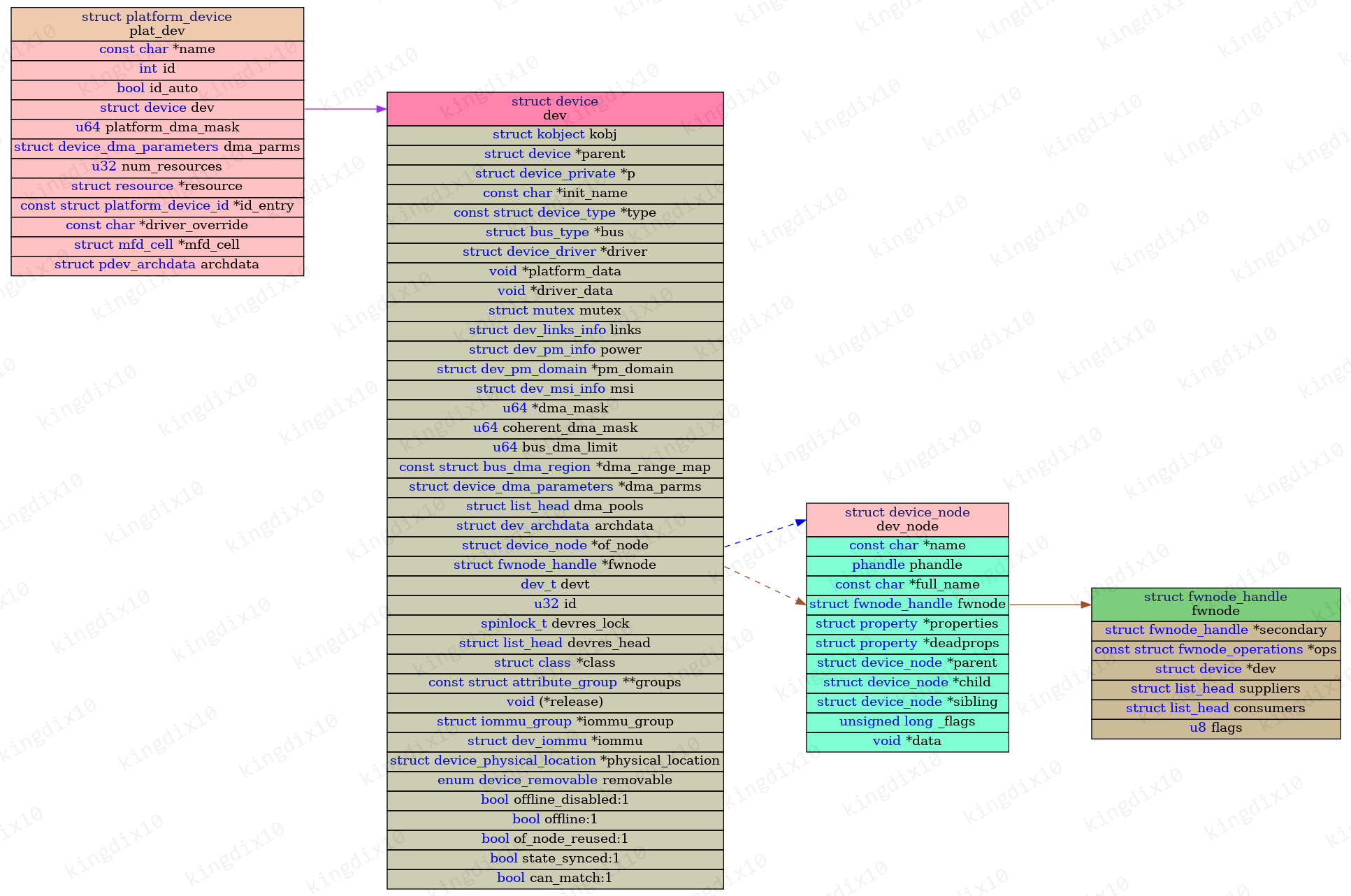
You use a standard set of API functions to extract resources from this structure.
WS3 – Developing Drivers for Altera SoC
The following slides from a driver development workshop provide exceptionally clear code snippets for retrieving the most common resources.
Review slides 100 and 101. They contain concise code examples for retrieving memory, IRQ, and clock resources inside a probe function. Focus on the API calls used.
Here are the key functions for resource retrieval:
-
Memory-Mapped Registers (
regproperty):struct resource *res; res = platform_get_resource(pdev, IORESOURCE_MEM, 0); // 0 is the resource index if (!res) { // Handle error } // res->start contains the physical base address // resource_size(res) gives the size of the regionYou would then use
ioremap()onres->startto get a virtual address you can use in the kernel. -
Interrupts (
interruptsproperty):int irq; irq = platform_get_irq(pdev, 0); // 0 is the interrupt index if (irq < 0) { // Handle error (irq is an error code) } // 'irq' now holds the Linux IRQ number, ready for request_irq() -
Clocks (
clocksproperty):struct clk *my_clk; my_clk = devm_clk_get(&pdev->dev, NULL); // NULL for the first clock if (IS_ERR(my_clk)) { // Handle error } // You can now use my_clk with clk_prepare_enable(), etc.
With these resources, your probe function has everything it needs to configure the hardware and make it operational.
Conclusion
You now understand the complete flow from hardware description to a fully probed driver. This model is fundamental to modern embedded Linux development and a very common topic in interviews for semiconductor companies, as it shows you understand how software interfaces with the hardware they design.
Key Takeaways:
- Device Tree (DT): A data structure that describes non-discoverable hardware, separating hardware configuration from kernel code.
compatibleString: The essential property in a DT node that uniquely identifies a device's programming model. It's the primary key for matching.- Platform Driver: A standard driver structure in Linux (
struct platform_driver) that binds to devices on the virtual "platform bus". - Matching/Probing: The kernel automatically matches a device's
compatiblestring against theof_match_tableof registered platform drivers. On a match, it calls the driver'sprobe()function. - Resource Retrieval: Inside
probe(), the driver uses theplatform_devicepointer and functions likeplatform_get_resource()andplatform_get_irq()to get hardware details (addresses, IRQs) from the Device Tree.
Preview of the Next Lesson:
In our resource retrieval examples, we noted the need to release resources like memory regions and IRQs in the remove function. This can be tedious and error-prone. In the next lesson, we will level up our driver's robustness by learning how to implement a platform driver that uses devm_* managed functions for automatic resource cleanup. This is a modern, preferred practice that makes drivers cleaner and safer.