Hello! Welcome to your first lesson in our Kotlin course. Since your goal is to build Android apps with Jetpack Compose, mastering Kotlin's fundamentals is the perfect place to start. This initial lesson focuses on the most basic building block of any program: variables. We will explore how to declare them, the different kinds of data they can hold, and how Kotlin's modern approach can make your code both safer and more concise.
Given your background as a Java developer, you'll find many concepts familiar, but we'll pay special attention to the key differences that make Kotlin a distinct and powerful language. By the end of this lesson, you will be able to declare variables using val and var and initialize them with Kotlin's basic data types.
1. What are Variables?
In programming, a variable is essentially a named container for a piece of data. Instead of hard-coding a value like a specific name or number everywhere in your program, you store it in a variable. This allows your program to be flexible and dynamic. For a quick conceptual introduction, please read the first part of the following Android Codelab.
Create and use variables in Kotlin
This guide from the official Android developer documentation provides a clear, foundational look at variables.
Please read the section "Variables and data types". Focus on the initial explanation of why variables are useful and then review the table of basic data types. Don't worry about memorizing everything; the goal is to get a feel for the landscape.
2. Read-only vs. Mutable Variables: val and var
One of the first and most important distinctions you'll encounter in Kotlin is the difference between read-only and mutable variables. This is a core concept that encourages writing safer code.
val(from "value") is used to declare a read-only or immutable variable. Once a value is assigned to aval, it cannot be changed. This is analogous to afinalvariable in Java.var(from "variable") is used to declare a mutable variable. Its value can be reassigned after it is initialized. This is like a standard, non-final variable in Java.
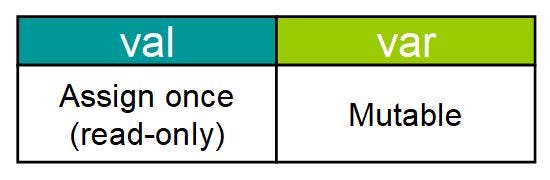
In Kotlin, it is strongly recommended to prefer val over var whenever possible. This practice, known as "immutability by default," helps prevent accidental changes to your program's state, making your code more predictable and easier to reason about.
The following article is written specifically for Java programmers transitioning to Kotlin and explains this distinction well.
How do Java programmers learn Kotlin?
This article from Educative.io directly addresses concepts you're familiar with from a new perspective.
Please read the subsection Read-only vs Mutable Variables. Pay close attention to the code examples showing how the compiler prevents reassignment to a val.
Here is a practical example you can think about:
// A user's ID probably won't change. Use val.
val userId = 1240

// The number of unread messages will change. Use var.
var unreadCount = 5

// Trying to change userId will cause a compile error:
// userId = 1241 // Error: Val cannot be reassigned

// Changing unreadCount is perfectly fine:
unreadCount = 0 // Success!
3. Basic Data Types and Type Inference
Like Java, Kotlin has a set of basic types to represent numbers, text, and true/false values. However, there's a fundamental difference: in Kotlin, all types are objects. There are no primitive types like int or double. You use capitalized types like Int and Double. For performance, the Kotlin compiler will often optimize these down to Java primitives in the compiled bytecode, but from a language perspective, you are always working with objects.
The most common basic types are:
Int: For whole numbers (e.g.,10,-500).Double: For decimal numbers (e.g.,3.14,99.99). It's the default for floating-point numbers.String: For text (e.g.,"Hello, Kotlin!").Boolean: Fortrueorfalsevalues.
Type Inference
A major feature that makes Kotlin code more concise is type inference. The compiler is smart enough to deduce the type of a variable from the value you assign to it. This means you often don't need to explicitly declare the type, unlike in traditional Java.
// Explicit type declaration (like in Java)
val message: String = "This is a message."
val year: Int = 2023

// Inferred type (more common in Kotlin)
val message = "This is a message." // Compiler infers String
val year = 2023                   // Compiler infers Int
val pi = 3.14159                  // Compiler infers Double
This feature significantly reduces boilerplate code. You only need to declare the type explicitly when the compiler cannot infer it, for example, if you declare a variable without initializing it immediately.
The following short video provides a great visual summary of val, var, and type inference.
Kotlin Crash Course for Java Developers
This video from the "Coding Master" channel is part of a crash course for Java developers, making it highly relevant for you.
Watch the segment from the introduction to variables, where the presenter explains val and var. Then, continue watching the next part on type inference and explicit type specification.
4. Declaring and Using Variables
Now let's see how these concepts come together. The following resource will walk you through the syntax of variable declaration and provide practical examples for each data type.
Create and use variables in Kotlin
We return to the Android Codelab to see these concepts in action with more detailed examples.
First, read the section "Define and use variables". Skim the conceptual parts and focus on the syntax of declaration and type inference. Next, read the section "Update variables" to see how var is used and modified, including the handy increment and decrement operators (++ and --). Finally, read the section "Explore other data types" for clear, runnable examples using Double, String (including concatenation), and Boolean.
By working through those examples, you'll gain a solid, practical understanding of how to use variables in your own Kotlin code. Try running some of the examples in the Kotlin Playground to experiment. For instance, try declaring a val with your name and a var with your age, then try to reassign both to see the compiler error for val.
Conclusion
In this lesson, we took our first crucial step into the world of Kotlin. You've learned the fundamental skill of declaring variables, which will underpin everything else we do.
Here are the key takeaways:
- Variables are declared using
valfor read-only (immutable) references andvarfor mutable ones. - It's a best practice in Kotlin to prefer
valovervarto create safer, more predictable code. - Kotlin's basic data types, such as
Int,Double,String, andBoolean, are all objects. - Type inference allows you to write more concise code by letting the compiler automatically determine a variable's type from its initial value.
You now have a solid foundation for working with data in Kotlin. In our next lesson, we will build directly on this by exploring string templates, a powerful feature that makes embedding variables and expressions inside strings much cleaner than in Java.