Hello! Welcome to your second lesson on SQL for Data Analysis.
In our last session, we mastered JOINs, which are essential for combining columns from different tables. Today, we'll build on that by learning how to perform more dynamic and multi-step analyses using subqueries. You'll learn how to write a query within another query to create sophisticated filters and temporary datasets on the fly.
This lesson directly addresses the learning outcome: Write complex subqueries in WHERE and FROM clauses for dynamic analysis. By the end of this hour, you'll be able to solve problems that a simple JOIN or WHERE clause can't handle alone, such as filtering data based on an aggregated value or performing multi-stage calculations.
What is a Subquery?
A subquery, also known as an inner or nested query, is a SELECT statement that is embedded inside another SQL statement. The database executes the subquery first, and its result is then used by the outer (or main) query.
Let's start with a quick formal introduction to the concept.
Advanced SQL Tutorial | Subqueries
This brief clip from Alex The Analyst's tutorial clearly defines what a subquery is and lists the different parts of a query where it can be used.
Watch the first 36 seconds of this video to get a concise overview of subqueries.
As the video mentions, we'll be focusing on the two most common places you'll use subqueries as a data analyst: the WHERE and FROM clauses.
Part 1: Subqueries in the WHERE Clause
Using a subquery in the WHERE clause is a powerful way to create a dynamic filter for your main query. Instead of comparing a column to a fixed value (e.g., WHERE salary > 50000), you can compare it to a value that is calculated by another query (e.g., WHERE salary > (SELECT AVG(salary) FROM employees)).
Let's walk through a classic example: finding all employees who earn more than the company-wide average salary.
Subquery in SQL | Correlated Subquery + Complete SQL Subqueries Tutorial
This video from techTFQ does an excellent job of breaking down the logic for this problem. It shows how to first think of the problem in two parts and then combine them into a single query using a subquery.
Watch from 1:32 to 7:56. Pay close attention to how the problem is deconstructed into two steps before being written as a single SQL statement. This thought process is key to writing complex queries.
Types of WHERE Subqueries
The example above uses a scalar subquery, which is a subquery that returns a single value (one row, one column). This allows you to use standard comparison operators like =, >, or <.
But what if your subquery returns multiple values, like a list of IDs? In that case, you need to use operators designed to handle lists, such as IN or NOT IN.
Advanced SQL Tutorial | Subqueries
This segment from the Alex The Analyst video demonstrates how to use the IN operator with a subquery that returns a list of employee IDs.
Watch from 5:55 to 8:10. Notice how the subquery returns a single column with multiple rows, which is then used to filter the outer query.
Nested Subqueries
You can even nest subqueries inside each other to handle multi-level logic. Think of it like a set of Russian nesting dolls; the innermost query runs first, passes its result to the one outside it, and so on.
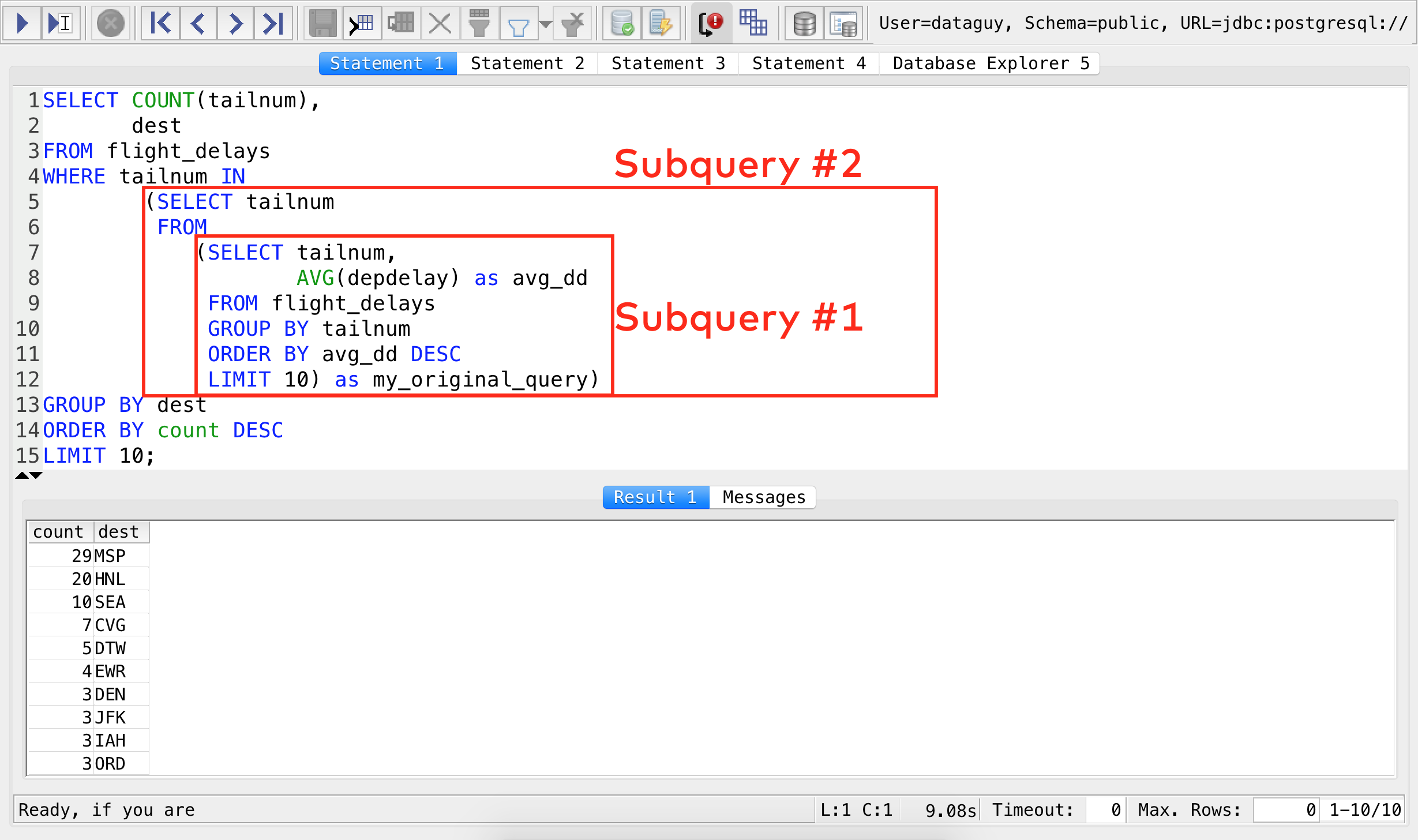
Mastering SQL Subqueries: A Comprehensive Guide
This article from Medium provides a great explanation and a case study for nested subqueries. It helps formalize the mental model of 'a query within a query'.
Read the section titled 'Nested Subqueries'. Focus on the breakdown of the logic: Inner query first, then the next outer query, and finally the outermost query.
Correlated Subqueries: The Ultimate Dynamic Filter
The subqueries we've seen so far are independent; they run once, and their result is used by the outer query. A correlated subquery, however, is different. It depends on the outer query for its values and is executed once for every row processed by the outer query.
This is a more advanced concept, but it's incredibly powerful for row-by-row comparisons. A classic example is finding employees who earn more than the average salary within their own department.
Subquery in SQL | Correlated Subquery + Complete SQL Subqueries Tutorial
This is the most important concept in this lesson. The techTFQ video provides a very clear, step-by-step explanation of how a correlated subquery works and how SQL processes it differently from a standard subquery.
Watch from 22:03 to 32:08. Focus on understanding the relationship between the inner and outer query (aliased as e1 and e2) and why the inner query runs for each row of the outer query.
While powerful, correlated subqueries can be slow on large datasets because the inner query runs repeatedly. As you advance, you'll often find that window functions (which we'll cover in the next module) can solve these types of problems more efficiently.
Part 2: Subqueries in the FROM Clause
When you place a subquery in the FROM clause, its result set is treated as a temporary table. The outer query can then select from, filter, or join this temporary table just like any other. The key rule is that a subquery in the FROM clause must be given an alias.
A primary use for this is to perform multi-stage aggregations. For example, what if you want to find the average number of crime incidents for each day of the week?
- Step 1 (Inner Query): You first need to count the incidents for each specific date.
- Step 2 (Outer Query): Then, you can calculate the average of those daily counts, grouped by the day of the week.
You can't do this in a single aggregation step. You need a subquery.
This article from ThoughtSpot provides a clear written example of a multi-stage aggregation. It demonstrates how to build the inner query first to get daily counts, and then wrap it in an outer query to find the average.
Read the section 'Using subqueries to aggregate in multiple stages'. The advice to write and test the inner query first is a crucial best practice.
Another great use of FROM subqueries is to improve query performance. By pre-aggregating data in subqueries before joining them, you can dramatically reduce the number of rows the database has to process in the join, making your query much faster. The ThoughtSpot article's section on "Joining subqueries" gives a great example of this principle.
Conclusion
Today, you've added a powerful tool to your SQL arsenal. Subqueries allow you to break down complex problems into logical steps and construct queries that are dynamic and responsive to the data itself.
Key Takeaways:
- A subquery is a
SELECTstatement nested inside another query. - Subqueries in the
WHEREclause act as dynamic filters. They can return a single value (scalar) or a list of values (used withIN). - A correlated subquery is a special type of
WHEREsubquery that depends on the outer query and runs for each of its rows, enabling row-by-row comparisons. - Subqueries in the
FROMclause create a virtual, temporary table. This is essential for performing multi-stage aggregations and can improve query performance. - Always alias your subqueries when using them in the
FROMclause.
Subqueries are fundamental, but as queries become more complex with multiple steps, they can become difficult to read. In our next lesson, we will explore Common Table Expressions (CTEs). You'll find that CTEs can perform many of the same multi-step operations as subqueries but in a much more organized and readable way.