Hello! Welcome to the first lesson in your journey to becoming a data analyst. We're kicking things off with a cornerstone of data analysis: SQL.
This lesson focuses on one of the most fundamental and powerful tools in SQL: JOINs. Your goal is to be able to combine data from different sources to answer business questions, and JOINs are precisely how you'll do that. We'll review the four main types: INNER, LEFT, RIGHT, and FULL OUTER JOIN. By the end of this hour, you'll understand not just what they do, but when and why to use each one in a practical data analysis context.
This lesson lays the groundwork for the entire "SQL for Data Analysis" module. Mastering JOINs is essential before we move on to more complex query structures in the next lesson.
Let's begin.
Why Do We Need JOINs?
In the world of data, information is rarely stored in a single, massive file. Instead, to maintain data integrity and reduce redundancy, it's organized into multiple, related tables in what's called a relational database. For example, a company might have one table for customers, another for orders, and a third for products.
As a data analyst, your job is to connect the dots. You might be asked, "Which customers in New York bought which products last month?" To answer this, you need to pull information from all three tables. This is where JOINs come in. They allow you to combine columns from two or more tables into a single result set based on a related column, known as a key.
To get a clear picture of what JOINs are and why they are so central to data analysis, please watch the first few minutes of the following video.
SQL Joins Basics (Visually Explained) | INNER, LEFT, RIGHT, FULL | #SQL Course 8
This video from Data with Baraa will introduce the core concept of joining tables and the primary reasons we use them, such as recombining scattered data, enriching it with more detail, or checking for relationships between tables.
Please watch the video from the beginning until the 7:32 mark. Focus on the distinction between joining columns vs. stacking rows, and the three main use cases for joins explained.
Visualizing JOINs with Venn Diagrams
A very effective way to understand how different JOIN types work is by using Venn diagrams. Imagine your two tables, Table A (left) and Table B (right), as two overlapping circles. The type of JOIN you use determines which part of the circles you get back in your results.
Take a look at this image. It provides a perfect visual summary of the four main JOIN types we'll be covering.
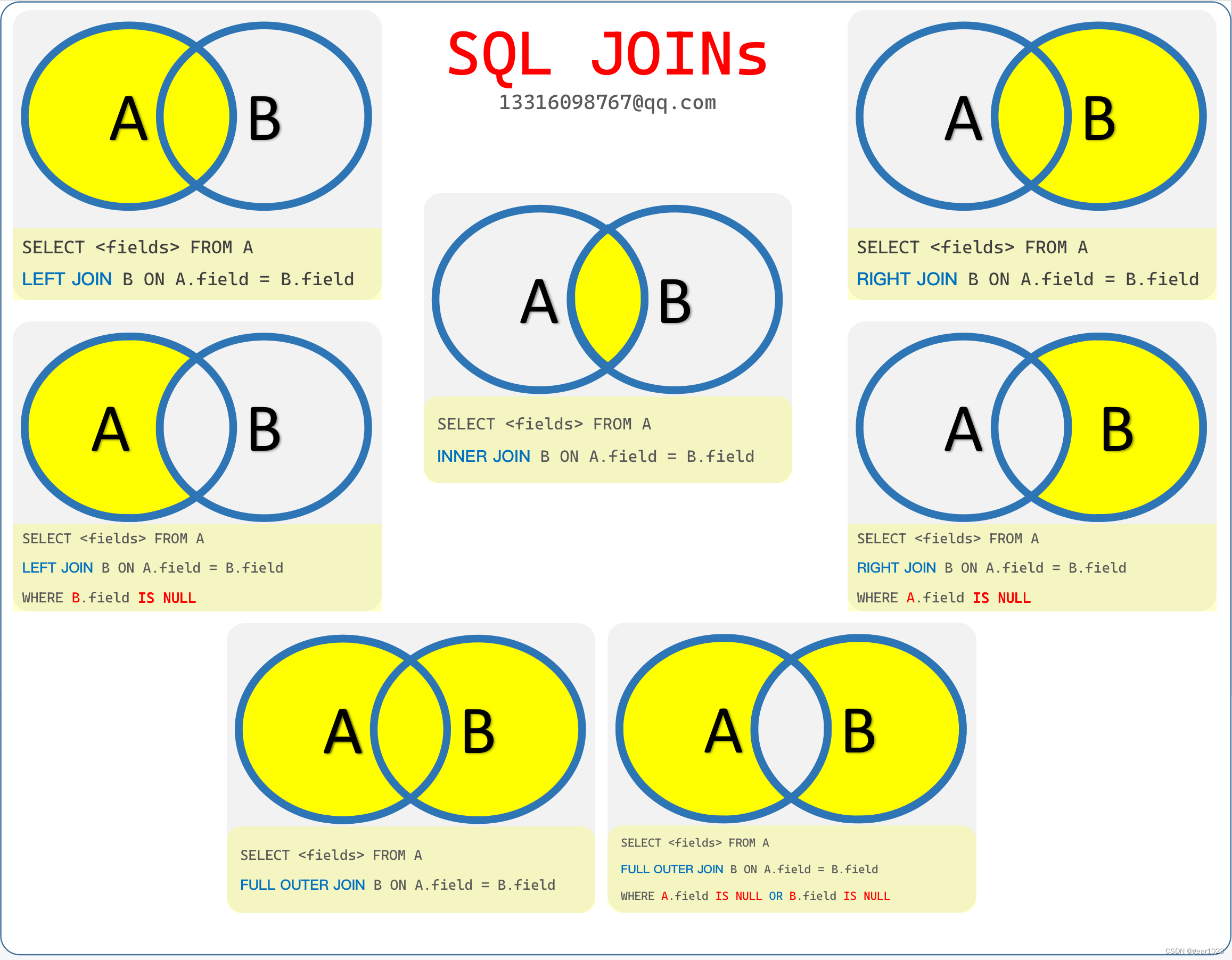
Keep this mental model in mind as we explore each JOIN type in detail.
The Four Core JOINs
Let's dive into the syntax and application of each of the four main JOINs. For each one, we'll follow a simple pattern:
- Definition: What does it do?
- Demonstration: A video segment showing it in action.
- Syntax: A clear code example.
- Use Case: When should you use it?
1. INNER JOIN
An INNER JOIN returns only the rows where the join key exists in both tables. It's like finding the intersection of two sets. If a customer has never placed an order, neither the customer nor their non-existent order will appear in the result of an INNER JOIN between customers and orders.
SQL Joins Basics (Visually Explained) | INNER, LEFT, RIGHT, FULL | #SQL Course 8
This segment provides a deep dive into INNER JOIN. Pay close attention to the query execution flow and the best practices mentioned, such as using table aliases (c for customers), which significantly improve query readability.
Watch from 10:29 to 23:01. The video will walk you through the syntax, a practical task, and a step-by-step explanation of how the database processes the join.
Syntax Example:
Let's say we have a customers table and an orders table. We want to see a list of customers who have placed orders.
SELECT
    c.customer_id,
    c.customer_name,
    o.order_id,
    o.order_date
FROM
    customers AS c -- 'c' is an alias for the customers table
INNER JOIN
    orders AS o    -- 'o' is an alias for the orders table
ON
    c.customer_id = o.customer_id; -- The join condition
- When to use it: Use
INNER JOINwhen you only care about records that have a complete relationship across tables. For example, "Show me all products that have been sold" or "List the employees assigned to a specific department."
2. LEFT JOIN
A LEFT JOIN (or LEFT OUTER JOIN) returns all rows from the left table and the matched rows from the right table. If there is no match for a row from the left table, the columns from the right table will contain NULL values. The "left" table is the one specified in the FROM clause.
SQL Joins Basics (Visually Explained) | INNER, LEFT, RIGHT, FULL | #SQL Course 8
Now, let's explore the LEFT JOIN. This part of the video explains why the order of your tables is critical and how NULL values appear when there are no matches.
Watch from 23:01 to 30:05. Focus on how the result changes from the INNER JOIN and why NULLs are generated.
Syntax Example:
We want to see all customers and any orders they might have placed.
SELECT
    c.customer_id,
    c.customer_name,
    o.order_id
FROM
    customers AS c
LEFT JOIN
    orders AS o
ON
    c.customer_id = o.customer_id;
-
When to use it: This is the most common join in data analysis. Use it when you want to keep all the records from a primary table (e.g.,
customers) and enrich it with information from a secondary table (e.g.,orders), even if that secondary information is missing. -
Pro-Tip: You can use a
LEFT JOINto find records that exist in one table but not another. For example, to find customers who have never placed an order:SELECT c.customer_name FROM customers AS c LEFT JOIN orders AS o ON c.customer_id = o.customer_id WHERE o.order_id IS NULL; -- Filter for rows where there was no match
3. RIGHT JOIN
A RIGHT JOIN (or RIGHT OUTER JOIN) is the mirror opposite of a LEFT JOIN. It returns all rows from the right table and the matched rows from the left table. If there's no match, the columns from the left table will contain NULL values.
SQL Joins Basics (Visually Explained) | INNER, LEFT, RIGHT, FULL | #SQL Course 8
This segment covers the RIGHT JOIN. The most important takeaway here is that any RIGHT JOIN can, and often should, be rewritten as a LEFT JOIN for better clarity.
Watch from 30:05 to 35:14. Notice how switching the table order and using a LEFT JOIN achieves the same result.
A Word of Advice on RIGHT JOIN:
In practice, RIGHT JOIN is rarely used. Most analysts find it more intuitive to think from left to right. To avoid confusion and maintain a consistent style, it's a common best practice to always use LEFT JOIN by simply arranging your tables in the desired order.
For instance, this RIGHT JOIN:
-- Get all orders and any matching customer info
SELECT c.customer_name, o.order_id
FROM customers AS c
RIGHT JOIN orders AS o ON c.customer_id = o.customer_id;
is functionally identical to this more conventional LEFT JOIN:
-- Get all orders and any matching customer info
SELECT c.customer_name, o.order_id
FROM orders AS o
LEFT JOIN customers AS c ON o.customer_id = c.customer_id;
- When to use it: Know that it exists, but try to favor
LEFT JOINin your work.
4. FULL OUTER JOIN
A FULL OUTER JOIN combines the results of both LEFT and RIGHT JOINs. It returns all rows from both tables. Where there is a match, the data is combined. Where there isn't a match from one side or the other, the missing columns are filled with NULL.
SQL Joins Basics (Visually Explained) | INNER, LEFT, RIGHT, FULL | #SQL Course 8
Finally, let's look at the FULL OUTER JOIN, which gives you the complete picture of two tables, including all matching and non-matching rows.
Watch from 35:14 to 39:33 to see how this join works and produces NULLs on both sides of the result set.
Syntax Example:
We want to see every customer and every order, regardless of whether they are matched.
SELECT
    c.customer_id,
    c.customer_name,
    o.order_id
FROM
    customers AS c
FULL OUTER JOIN
    orders AS o
ON
    c.customer_id = o.customer_id;
- When to use it: Use
FULL OUTER JOINwhen you need to perform data reconciliation. For example, if you have two separate lists of users (e.g., from marketing and sales) and you want to see who is on both lists, who is only on the marketing list, and who is only on the sales list.
Choosing the Right JOIN
You've now seen the four main types. The next logical question is, "Which one should I use?" This summary from the "SQL Join Types Explained" article provides an excellent guide.
SQL Join Types Explained: All 6 Types With Visual Examples (2026)
This article from SQLNoir offers a fantastic, practical guide on when to use each JOIN. It also includes the '80/20 Rule,' a handy heuristic for data analysis work.
Please read the sections titled 'Which Join Should You Use? (Decision Guide)' and 'Frequently Asked Questions'. Focus on the decision table and the '80/20 Rule.' The FAQ section will reinforce the key differences between the joins.
Conclusion
In this lesson, we've laid the essential foundation for combining data in SQL. You now have a solid framework for approaching any task that requires merging information from multiple tables.
Key Takeaways:
JOINs are used to combine columns from different tables based on a related key.INNER JOINis for retrieving only the records that have matches in both tables.LEFT JOINis your most common tool. It keeps all records from the primary (left) table while adding matching data from the right.RIGHT JOINis functionally the reverse of aLEFT JOINand is best rewritten as one for clarity.FULL OUTER JOINgives you a complete view of all records from both tables, highlighting matches and mismatches.- Using Venn diagrams as a mental model and table aliases in your code are excellent practices.
In our next lesson, we will build upon this foundation by exploring complex subqueries. You'll learn how to write queries within other queries to perform more dynamic and layered analysis, a technique that often works hand-in-hand with the JOINs you've learned today.