Hello! Welcome to your second lesson on modern JavaScript.
In our last lesson, we established the foundation for writing clean, predictable code by learning to use let and const for variable declarations and understanding block scope. Now, we'll build on that by introducing another essential ES6 feature: arrow functions.
Today, you will learn to write and use arrow functions, focusing on their concise syntax and their most common application: as callbacks for array methods. This is a fundamental pattern in modern JavaScript. As someone aiming to build web applications, you'll find yourself using arrow functions constantly to handle data and user events.
1. From Traditional Functions to Arrow Functions
The primary motivation for arrow functions is to provide a shorter, more readable syntax for writing function expressions. Let's see how they work.
A traditional function expression is assigned to a variable, like this:
// Traditional function expression
const add = function(a, b) {
  return a + b;
};
An arrow function allows you to write this same logic more compactly. To get a quick, dynamic overview of this transformation, let's watch the beginning of the following video.
Learn JavaScript ARROW FUNCTIONS in 8 minutes! 🎯
The video 'Learn JavaScript ARROW FUNCTIONS in 8 minutes!' from Bro Code provides a fast-paced introduction to arrow function syntax.
Watch from the beginning to 03:00. Focus on how a traditional function expression is converted into an arrow function and how parameters are handled.
As you saw, the transformation involves a few key changes:
- Remove the
functionkeyword. - Add a "fat arrow"
=>after the parameters.
This gives us:
const add = (a, b) => {
  return a + b;
};
Implicit Return and Other Syntax Rules
Arrow functions can become even more concise. If the function body contains only a single return statement, you can remove the curly braces {} and the return keyword. This is called an implicit return.
// The same 'add' function with an implicit return
const add = (a, b) => a + b;
This conciseness is a major reason for their popularity. Here's a summary of the syntax rules:
- Multiple parameters: Require parentheses.
const sum = (a, b) => a + b; - One parameter: Parentheses are optional.
const square = x => x * x; - No parameters: Require empty parentheses.
const getRandom = () => Math.random(); - Multi-line body (Block Body): Requires curly braces
{}and an explicitreturnstatement if you need to return a value.const checkAge = (age) => { if (age > 18) { return "Adult"; } return "Minor"; };
For a clear, text-based summary of these rules, especially the concept of implicit return, the following article is an excellent resource.
Getting Started with ES6 Arrow Functions in JavaScript
The article 'Getting Started with ES6 Arrow Functions in JavaScript' from DigitalOcean breaks down the syntax variations cleanly.
Read the sections titled 'Your First ES6 Arrow Function', 'Removing Unnecessary Parenthesis', and 'Implicit Return'. These short sections clearly explain the core syntax rules we just discussed.
Test your understanding!
Convert the following traditional function expression into the most concise arrow function possible.
const getInitials = function(firstName, lastName) {
  return firstName[0] + lastName[0];
};
Show answer
const getInitials = (firstName, lastName) => firstName[0] + lastName[0];
Explanation: We remove the function keyword, add the =>, and since it's a single return statement, we use an implicit return.
2. The Power of Callbacks: Array Methods
Arrow functions truly shine when used as callbacks. A callback is simply a function passed as an argument to another function, to be executed later. This is a core concept in JavaScript for handling asynchronous operations, events, and data processing.
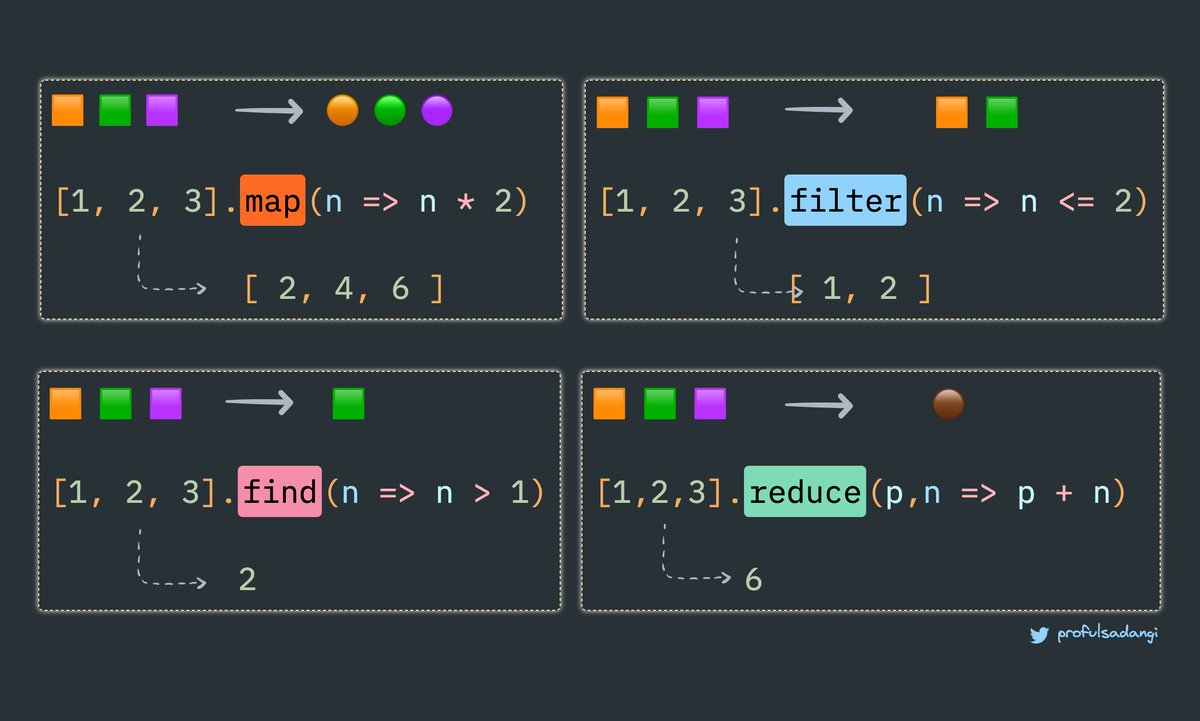
Their most frequent use case is with array methods like .map(), .filter(), and .reduce(). These methods let you transform arrays without writing manual loops.
Let's watch the rest of the Bro Code video, where this is demonstrated.
Learn JavaScript ARROW FUNCTIONS in 8 minutes! 🎯
This part of the video demonstrates the power of combining arrow functions with array methods, which is a crucial pattern in modern JavaScript.
Watch from 04:20 to the end. Pay attention to how a single line of code with an arrow function can replace a multi-line loop to transform or filter an array.
To summarize the video's examples:
map(): Creates a new array by applying a function to every element of the original array.const numbers = [1, 2, 3, 4]; const doubled = numbers.map(num => num * 2); // Result: [2, 4, 6, 8]filter(): Creates a new array with all elements that pass the test implemented by the provided function.const numbers = [1, 2, 3, 4]; const evens = numbers.filter(num => num % 2 === 0); // Result: [2, 4]
This combination makes data manipulation incredibly declarative and readable.
3. A Crucial Difference: The this Keyword
Beyond syntax, arrow functions have one major behavioral difference from traditional functions: they do not have their own this context.
In traditional functions, the value of this is determined by how the function is called. This can lead to confusing bugs, especially inside callbacks. For example, a method on an object that uses setTimeout with a traditional function callback will "lose" its this context.
Arrow functions solve this. They inherit this from their parent scope (this is called lexical scoping). This means this inside an arrow function is the same as this outside of it.
This concept can be tricky, but the following video explains it perfectly with a practical example. Understanding this is key to avoiding a whole class of common JavaScript bugs.
JavaScript ES6 Arrow Functions Tutorial
The video 'JavaScript ES6 Arrow Functions Tutorial' by Web Dev Simplified provides an excellent, detailed explanation of how this works differently in arrow functions versus traditional functions.
Watch from 05:28 to the end. The video first shows the problem with a traditional function inside an object method and then shows how an arrow function elegantly solves it because it doesn't rebind this.
In summary:
- Traditional Function: Creates its own
thisbinding. Confusing in callbacks. - Arrow Function: Inherits
thisfrom its surroundings. Predictable and safe for callbacks.
This is a huge advantage and a primary reason why arrow functions are preferred for callbacks, especially when you start working with object-oriented patterns or frameworks like React.
4. Practice: Refactoring to Arrow Functions
Let's apply what you've learned. Below is a block of code that processes a list of users. Your task is to refactor the traditional function callbacks into arrow functions to make the code more modern and concise.
const users = [
  { id: 1, name: "Alice", isActive: true },
  { id: 2, name: "Bob", isActive: false },
  { id: 3, name: "Charlie", isActive: true },
];

// Goal 1: Use .filter() to get only active users.
const activeUsers = users.filter(function(user) {
  return user.isActive === true;
});

// Goal 2: Use .map() to get the names of the active users.
const activeUserNames = activeUsers.map(function(user) {
  return user.name;
});

console.log(activeUserNames); // Should output: ["Alice", "Charlie"]
Show Refactored Solution
Here is the refactored code using arrow functions. Notice how much cleaner the callbacks are.
const users = [
  { id: 1, name: "Alice", isActive: true },
  { id: 2, name: "Bob", isActive: false },
  { id: 3, name: "Charlie", isActive: true },
];

// Refactored with an arrow function
const activeUsers = users.filter(user => user.isActive === true);

// Refactored with an arrow function
const activeUserNames = activeUsers.map(user => user.name);

console.log(activeUserNames); // ["Alice", "Charlie"]
As a bonus, in the next lesson we'll see how to chain these methods together into a single, elegant statement!
Conclusion
Excellent work! You've now mastered another essential piece of modern JavaScript. Arrow functions not only make your code shorter but also improve its readability and help you avoid tricky issues with the this keyword.
Key Takeaways:
- Concise Syntax: Arrow functions (
=>) provide a shorter way to write function expressions. - Implicit Return: For single-expression functions, you can omit the
returnkeyword and curly braces, making your code very compact. - Ideal for Callbacks: They are perfectly suited for array methods (
.map,.filter, etc.) and event handlers, making your code's intent clear at a glance. - Lexical
this: Arrow functions inheritthisfrom their parent scope, which solves a common source of bugs found with traditional functions.
In our next lesson, we will dive deeper into transforming arrays using map(), filter(), and reduce(). You've had a solid preview today, and next, you'll master these methods to perform the kind of powerful data manipulation that is at the heart of any dynamic web application.