Hello! In our last lesson, we introduced the useEffect hook for managing side effects, focusing on how to use it with an empty dependency array [] to fetch data when a component first mounts. This is a crucial pattern, but it's only half the story.
Today, we'll master the other half: controlling useEffect execution with the dependency array. You'll learn how to make your effects re-run in response to changes in props or state. This is essential for building dynamic applications that react to user input, like updating a data display when a search term changes. Mastering this will help you prevent performance issues and write more efficient, predictable React components.
Let's get started.
The Problem: Unnecessary Reruns
In the last lesson, you learned that if you omit the dependency array entirely, the effect runs after every single render. Let's see why this can be a problem.
Imagine a component with two separate state variables: one to track a resource id (e.g., from a URL or dropdown) and another to toggle a dark mode theme.
import { useState, useEffect } from 'react';

function ResourceViewer() {
  const [resourceId, setResourceId] = useState(1);
  const [isDarkMode, setIsDarkMode] = useState(false);

  useEffect(() => {
    // This effect fetches data based on resourceId
    console.log(`Fetching data for resource ${resourceId}...`);
    // fetch(`https://api.example.com/items/${resourceId}`);
  }); // <-- No dependency array!

  return (
    <div style={{ background: isDarkMode ? '#333' : '#FFF', color: isDarkMode ? '#FFF' : '#333' }}>
      <button onClick={() => setResourceId(id => id + 1)}>
        Next Resource
      </button>
      <button onClick={() => setIsDarkMode(dark => !dark)}>
        Toggle Theme
      </button>
      <p>Viewing resource: {resourceId}</p>
    </div>
  );
}
If you run this code, you'll see "Fetching data..." in the console not only when you click "Next Resource," but also when you click "Toggle Theme." The data fetching effect is running even when the resourceId hasn't changed. This is inefficient and can lead to unnecessary API calls, wasting both client resources and server bandwidth.
UseEffect React Hook the complete guide: Fetch data + Dependency Array + convert class to function
This video provides a perfect demonstration of this exact problem. It shows a component where an effect runs unnecessarily when an unrelated piece of state changes.
Watch from 01:42 to 03:11 to understand that useEffect runs after every render by default, and then from 09:58 to 12:43 to see a practical example of why this is a problem.
The Solution: The Dependency Array Watchlist
To fix this, we provide a "watchlist" of dependencies as the second argument to useEffect. This array tells React: "Only re-run this effect if one of these values has changed since the last render."
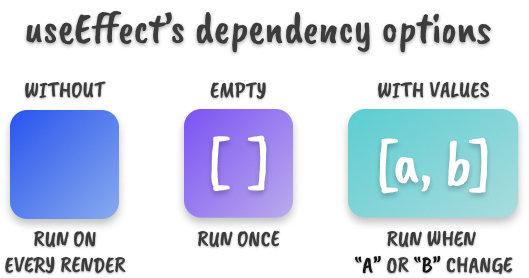
By adding resourceId to our watchlist, we tell React to ignore changes to any other state or prop, like isDarkMode.
useEffect(() => {
  console.log(`Fetching data for resource ${resourceId}...`);
  // fetch(`https://api.example.com/items/${resourceId}`);
}, [resourceId]); // <-- Now it only watches resourceId
With this change, toggling the theme will no longer trigger the console log. The effect is now correctly synchronized only with the data it depends on.
UseEffect React Hook the complete guide: Fetch data + Dependency Array + convert class to function
The same video continues to show exactly how to apply this fix and how it resolves the issue of unnecessary reruns.
Watch from 12:43 to 14:22. The presenter explains how passing a value into the dependency array makes the effect 'listen' for changes to only that value.
This is the core principle for building interactive components. For example, if you have a search input, you can make an effect that re-fetches data every time the search query changes.
The Rules of Hooks: Dependencies are Not Optional
You might be tempted to think you can choose what to put in the dependency array. However, the React team is very clear: Every reactive value from the component scope (props, state, functions) that is used inside your effect must be included in the dependency array.
This isn't just a style guide; it's a rule to prevent bugs. Your code editor's linter (if configured correctly) will warn you about this with the react-hooks/exhaustive-deps rule. Do not ignore this warning!
The official React documentation explains this rule clearly. Let's read the key section.
In this resource, read the section titled 'Specifying reactive dependencies'. It explains that you can't 'choose' dependencies and shows how the linter will flag missing ones. This is the foundational rule for using useEffect correctly.
So, why is this rule so strict? Let's explore the two major bugs it helps you avoid.
Pitfall 1: Stale Data (Missing Dependencies)
When an effect runs, it creates a "closure" over the variables it uses. If you don't include a variable in the dependency array, the effect will "remember" the value of that variable from the first time it ran and will not see its updated value on subsequent re-renders. This is called a stale closure.
You Are Using useEffect Wrong (and how to fix it)
The concept of 'stale closures' can be tricky, but this video explains it with a fantastic example that makes the problem crystal clear. It's one of the most common and confusing bugs for developers new to React hooks.
Watch from 02:20 to 07:26 and then from 09:19 to 17:32. The speaker demonstrates how an effect with a missing dependency uses a 'stale' activityCount value. He passionately argues why the ESLint rule is not optional and exists to prevent these exact bugs. This is a critical segment for understanding the 'why' behind the rule.
As you saw, failing to list dependencies can lead to your effect working with outdated information, causing subtle and hard-to-debug issues. Always trust the linter.
Pitfall 2: Infinite Loops
The second common pitfall occurs when an effect's logic causes a dependency to change, which then re-runs the effect, creating an infinite loop.
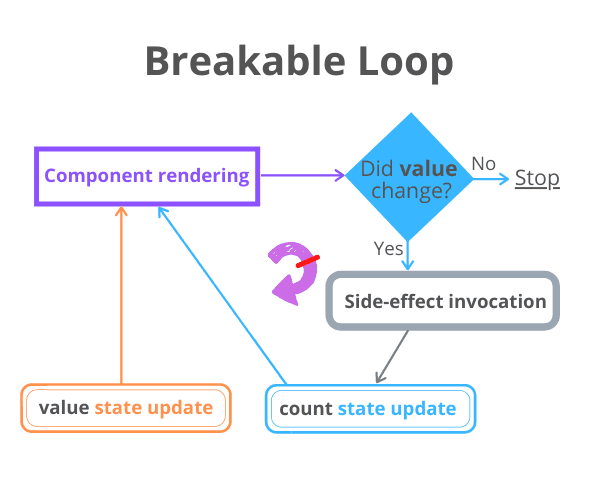
Here's a classic example:
function Counter() {
  const [count, setCount] = useState(0);

  useEffect(() => {
    const intervalId = setInterval(() => {
      // This effect sets state, causing a re-render.
      setCount(count + 1);
    }, 1000);

    return () => clearInterval(intervalId);
  }, [count]); // 🚩 ...but it also depends on the state it sets!

  return <h1>{count}</h1>;
}
The Loop:
- Component renders,
countis0. useEffectruns, readscountas0, sets up an interval.- After 1 second,
setCount(0 + 1)is called. countis now1, triggering a re-render.- Since
countchanged,useEffectruns again. The old interval is cleared, and a new interval is created. - This cycle repeats forever, resetting the interval every second.
The Fix: Functional State Updates
To break this loop, you can use the functional update form of a state setter. Instead of passing the new value directly, you pass a function that receives the previous state and returns the new one.
useEffect(() => {
  const intervalId = setInterval(() => {
    // This updater function gets the latest count from React
    setCount(c => c + 1);
  }, 1000);

  return () => clearInterval(intervalId);
}, []); // ✅ Now the effect no longer depends on `count`
Since we no longer need to read the count variable inside the effect, we can safely remove it from the dependency array. The effect now runs only once, but the setCount updater always has access to the most recent state.
React `useEffect` Reference and Dependency Arrays Article
Both the React docs and the Medium article provide great explanations for this pattern. Let's review them.
First, read the section 'Updating state based on previous state from an Effect' in the official React docs (resource LINK). It shows this exact setInterval fix. Focus on how passing an updater function setCount(c => c + 1) removes the dependency.
React useEffect Dependency Arrays: Preventing Infinite ...
Now, let's look at a similar explanation from a different perspective.
Read the sections 'Infinite Loops: How They Happen (and Why)' and 'Fix #2: Use functional setState' in this article. It provides a concise summary of the problem and the functional update solution.
Pitfall 3: Unstable Dependencies (Objects & Functions)
A dependency array works by comparing values using Object.is (similar to ===). For primitive values like numbers and strings, this works as expected. But for objects and functions, it compares their references in memory.
Since objects and functions defined inside a component are recreated on every render, their references change every time, even if their contents are identical.
function MyComponent({ userId }) {
  // 🚩 This options object is a new object on every render
  const options = {
    id: userId,
    active: true
  };

  useEffect(() => {
    fetchData(options);
  }, [options]); // 🚩 This will run on EVERY render, because options is always "new"

  // ...
}
This will cause your effect to run on every render, defeating the purpose of the dependency array.
Common Fixes:
- Move them inside: If an object or function is only used by the effect, define it inside the effect.
- Destructure primitives: Instead of depending on an entire object, depend on the primitive values within it.
// Fix 1: Move inside
useEffect(() => {
  const options = { id: userId, active: true }; // Now created inside
  fetchData(options);
}, [userId]); // Now only depends on the primitive `userId`

// Fix 2: Destructure (if options were a prop)
// useEffect(() => { ... }, [options.id, options.active]);
For more complex cases involving functions, you might eventually use hooks like useCallback and useMemo, but the two fixes above solve the vast majority of cases.
Test your understanding!
You have a component that fetches details for a specific user. Currently, it's hardcoded to fetch user 1. Your task is to refactor it so it can fetch details for any user ID passed in as a prop.
Starting Code:
import { useState, useEffect } from 'react';

// Assume this component is used like <UserDetails userId={2} />
function UserDetails({ userId }) {
  const [user, setUser] = useState(null);
  const [loading, setLoading] = useState(true);

  useEffect(() => {
    setLoading(true);
    fetch(`https://jsonplaceholder.typicode.com/users/1`) // <-- Hardcoded!
      .then(res => res.json())
      .then(data => {
        setUser(data);
        setLoading(false);
      });
  }, []); // <-- This dependency array is also incorrect for a dynamic ID

  if (loading) return <p>Loading...</p>;

  return (
    <div>
      <h1>{user?.name}</h1>
      <p>Email: {user?.email}</p>
      <p>Phone: {user?.phone}</p>
    </div>
  );
}
Your Task:
- Modify the
fetchURL to use theuserIdprop. - Update the
useEffectdependency array so that the component automatically re-fetches the data whenever theuserIdprop changes.
Show answer
Here's the corrected code.
The key changes are:
- The
fetchcall now uses a template literal`...`to include theuserIdprop in the URL. - The
userIdprop is added to the dependency array. Now, if a parent component renders<UserDetails>with a differentuserId, this effect will automatically re-run to fetch the new user's data.
import { useState, useEffect } from 'react';

function UserDetails({ userId }) {
  const [user, setUser] = useState(null);
  const [loading, setLoading] = useState(true);

  useEffect(() => {
    setLoading(true);
    // 1. Use the userId prop in the fetch URL
    fetch(`https://jsonplaceholder.typicode.com/users/${userId}`)
      .then(res => res.json())
      .then(data => {
        setUser(data);
        setLoading(false);
      });
  // 2. Add userId to the dependency array
  }, [userId]);

  if (loading) return <p>Loading...</p>;

  return (
    <div>
      <h1>{user?.name}</h1>
      <p>Email: {user?.email}</p>
      <p>Phone: {user?.phone}</p>
    </div>
  );
}
Conclusion
You've now unlocked the full power of useEffect! By carefully managing the dependency array, you can create efficient and bug-free components that synchronize with external systems in response to state and prop changes.
Key Takeaways:
- The dependency array is a "watchlist" that tells
useEffectwhen to re-run. - The Rule: Every reactive value (props, state) used inside an effect must be in the dependency array. Trust your linter!
- Stale Data: Forgetting a dependency causes the effect to use old values.
- Infinite Loops: Occur when an effect updates a state variable that it depends on. Fix this with the functional update form of
setState(e.g.,setCount(c => c + 1)). - Unstable Dependencies: Objects and functions created during render will have new references every time, causing effects to run too often. Move them inside the effect or depend on their primitive values instead.
In our next lesson, we'll put this knowledge to use as we learn to render dynamic lists of data and apply conditional rendering—skills you'll need for the upcoming mid-course project